How to Scale Your Marketing Without Hiring a Full Team for Agencies

Averi Academy
Averi Team
8 minutes

In This Article
Audit workflows, build an AI-first workspace, automate repeatable tasks, and use templates to scale agency marketing without hiring full-time staff.
Updated:
Trusted by 1,000+ teams
Startups use Averi to build
content engines that rank.
You're managing more clients than ever, but your team is stretched thin. Hiring full-time staff isn't always an option, and overloading your current team leads to burnout. Here's how you can scale your marketing operations efficiently without adding headcount:
Audit Workflows: Map out your current processes to identify time-consuming, repetitive tasks.
Leverage AI tools for marketing teams: Use AI platforms to handle routine tasks like content drafts, reporting, and scheduling.
Automate Processes: Integrate tools like HubSpot, WordPress, or Asana to reduce manual work.
Standardize Templates: Create reusable templates for campaigns, content calendars, and reports.
Compare Costs: AI workspaces can cost as little as $45/month per user compared to $10,000+ for a full-time hire.
Step 1: Map Your Current Workflows and Find Bottlenecks
Audit Your Current Client Workflows
Start by documenting a complete campaign cycle for 2–3 typical clients. Pick examples like a small business retainer, an enterprise account, or a project engagement, and break down the process step by step - from the initial brief to the final reporting. Highlight essential workflows such as onboarding, strategy, content creation, paid media, email campaigns, and reporting. For each step, note the roles involved, the tools used (e.g., HubSpot, WordPress, Google Ads), and the time required (use decimal hours for precision). Stick to the MM/DD/YYYY format for dates to easily align this data with cost models later.
To ensure accuracy, hold 60–90 minute workshops with account managers and specialists to dig into the actual processes. Supplement these sessions by reviewing recent project boards or email threads to fill in any gaps. Many teams find that 30–50% of their time is spent on coordination, manual formatting, and data collection instead of strategic work. By mapping this out, you’ll uncover how long tasks take and where coordination issues arise, providing a solid foundation for identifying opportunities for automation.
Find Time-Consuming and Repeatable Tasks
Once workflows are documented, focus on identifying tasks that are both time-intensive and recurring. These might include activities like brief creation, keyword research, using an AI content creation framework, resizing assets, CMS scheduling, social media posting, quality assurance, and reporting. Track how often these tasks occur, their average duration, total monthly hours, and any delays (e.g., a draft submitted on 01/10/2026 with feedback provided on 01/17/2026). Visualize this data using a simple bar chart to show "hours per task type per month." This makes it easy to spot tasks ripe for automation, with reporting, formatting, and publishing often standing out as top candidates.
Separate Tasks That Need Human Expertise from AI Tasks
Not every task is suited for automation or AI. To decide, evaluate tasks based on four key criteria:
Context depth: Keep humans involved in tasks requiring nuanced understanding.
Risk: Ensure human oversight for anything involving legal, compliance, or reputational risks.
Repeatability: Automate tasks that follow predictable, rules-based patterns.
Data availability: Automate tasks driven by structured and accessible data.
For example, humans should handle brand voice, messaging frameworks, strategy, and final reviews. On the other hand, AI can assist with keyword clustering, drafting initial content, repurposing material, and generating subject line ideas. Automation tools can handle moving briefs through stages, sending reminders, uploading content to CMS platforms, and generating reports. Use a simple decision matrix - Human-only / Human + AI / AI + Automation - to categorize each step in your workflow for consistency and clarity. This structured approach ensures the right balance between human creativity and machine efficiency.
How I Run A 0-Employee Marketing Agency With AI Tools
This approach focuses on maximizing AI productivity for marketers to maintain high output without a large headcount.
Step 2: Build an AI-First Marketing Workspace
Once you've mapped out your workflows and pinpointed bottlenecks, it's time to create a centralized hub for all your marketing operations. Instead of juggling 5–10 different tools, consolidate everything into one connected workspace that brings together AI, human expertise, and execution. This streamlined approach reduces the inefficiency of constantly switching between tools, which can cost teams up to 95 minutes of deep focus every day [1]. To make this happen, structure your workspace using Averi as the foundation for centralizing your efforts.
Setting Up an AI Marketing Workspace with Averi
Start by designing the structure of your workspace in Averi. Set up dedicated spaces for each client or vertical, and organize standard folders for campaigns, briefs, assets, and reports. Assign specific roles - such as strategists, copywriters, media buyers, and account managers - with tailored access permissions. To save time, leverage AI-powered templates for recurring tasks like email sequences, social media calendars, ad sets, and blog briefs.
Next, connect Averi to your essential data sources, such as your CRM, analytics platforms, and advertising accounts. This integration allows the AI to generate recommendations and content based on your actual performance history, rather than relying on generic advice. Establish approval workflows where AI-generated drafts are automatically routed to the appropriate reviewer and then seamlessly passed on to your publishing tools. This setup allows you to scale operations efficiently without increasing headcount.
Linking Tools for Smooth Execution
Integrate your workspace with execution platforms like HubSpot, WordPress, Google Ads, and Asana. For example:
Use HubSpot or Salesforce for email automation and CRM.
Connect WordPress or Webflow for content management.
Sync with Google Ads and Meta Ads Manager for paid campaigns.
Link Asana or ClickUp for task management.
Whenever possible, use native integrations to simplify the process. If native options aren't available, middleware like Zapier or Make can bridge the gap.
Here’s how it works in practice: when an email draft is approved in Averi, it should automatically transfer to HubSpot as a campaign, while a finalized landing page syncs to WordPress as a draft ready for publication. Meanwhile, performance metrics like open rates, clicks, conversions, and ad spend should flow back into Averi, creating a centralized, real-time view of each campaign.
Automating Repetitive Tasks with Workflow Automation
Once your tools are integrated, take the next step by automating repetitive tasks. Focus on high-volume, low-complexity processes that often eat up hours of your week. For instance, when Averi generates a draft, use Zapier to automatically create a review task in Asana, assign it to the right person, and attach the draft link. Similarly, once a draft is approved, have it automatically marked as "Ready to publish" in your CMS or email platform.
Daily syncs can also be automated to pull performance data from platforms like Google Analytics and HubSpot into Averi, keeping your dashboards updated without the need for manual exports. Prioritize automations based on how frequently tasks occur and their likelihood of error. Start with processes that happen multiple times a week, such as status updates, data syncing, lead routing, and report preparation.
Marketing teams that embrace AI-driven automation save an average of 2.5 hours per day [1]. Over time, these savings add up, especially for teams managing multiple clients with limited resources. By automating routine steps, your team can focus on what truly matters - strategic planning, nurturing client relationships, and solving creative challenges.
Step 3: Create Repeatable and Scalable Campaign Workflows
Tap into your connected workspace and automation tools to establish workflows that can be reused across multiple clients. By creating systems that work across the board, agencies can expand their operations without the need to hire additional staff.
Build Templates for Strategy and Execution
Once routine tasks are automated, take it a step further by standardizing your processes with reusable content creation templates. These templates can streamline your core deliverables, such as:
A campaign plan template that outlines goals, KPIs, audience segments, messaging, channels, budgets, and timelines.
A content calendar template to track details like dates, channels, asset types, draft links, statuses, owners, and approvals.
A blog or content outline template featuring SEO targets, header structures (H1–H3), key talking points, internal links, and calls-to-action.
An ad set template that includes offers, hook angles, primary text variations, headlines, creative notes, audience targeting, placements, and testing strategies.
These templates should include predefined sections like "Campaign Objective", "Target Persona", and "Tone/Voice." For instance, in AI-driven platforms like Averi, strategists can select a template, input a brief (covering industry, audience, objectives, and key offers), and let the AI generate draft plans, calendars, or outlines. This process leaves room for human review and fine-tuning.
According to a 2023 Content Marketing Institute study, 59% of B2B marketers with documented content processes and templates reported being "very" or "extremely" successful, compared to just 32% of those without such processes.
Templates don't just save time - they unlock scalability for smaller teams. Take the example of a 5-person B2B agency that used AI-driven templates to create blogs, emails, and LinkedIn posts. By automating the initial drafts and focusing their time on refining and approving content, the agency doubled its client retainers in six months, cut production time per asset by 40–50%, and delivered projects more consistently and on schedule.
Combine AI and Human Expertise for Content Production
The key to efficient content production lies in balancing AI capabilities with human creativity. Humans guide the strategy by setting brand guidelines, defining messaging pillars, and approving final content, while AI takes care of generating first drafts, creating variations, and adapting materials to different formats.
For example, a strategist using Averi's Brand Core can input a brief along with the brand’s guidelines, prompting the AI to draft blogs, emails, ads, and social media posts. This approach speeds up production while ensuring the content remains aligned with the brand. These collaborative workflows lay the groundwork for smooth and efficient campaign launches in future phases.
Step 4: Calculate Costs, TCO, and Profitability
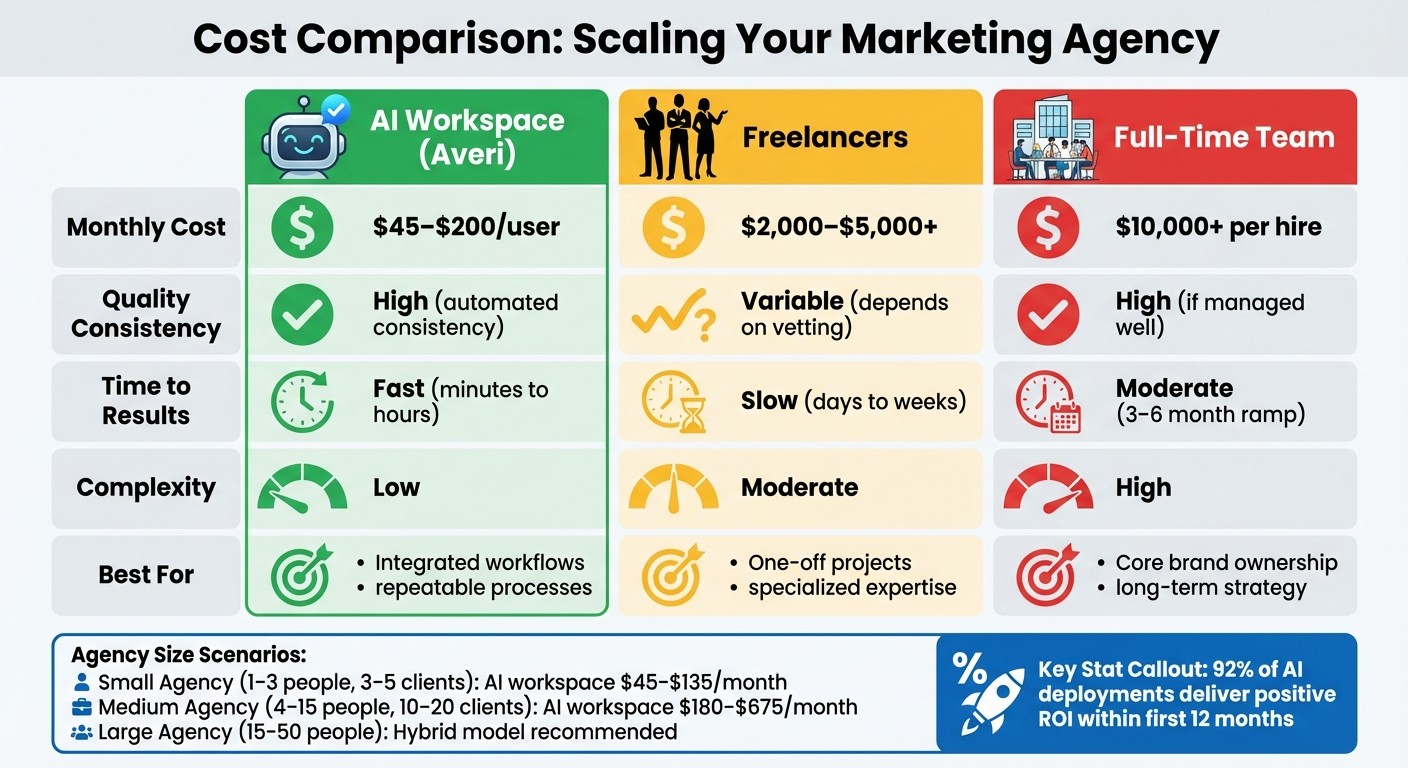
Cost Comparison: AI Workspace vs Freelancers vs Full-Time Hires for Marketing Agencies
Before diving into any scaling strategy, it’s crucial to get a clear picture of the actual costs involved. Total Cost of Ownership (TCO) isn’t just about upfront expenses - it also includes implementation, training, and ongoing operational costs.
comparing AI vs. agency vs. Averi models
Start by breaking down the costs of each option. For instance, an AI workspace like Averi costs $45 per month on the Plus plan. This includes unlimited AI usage, a /create mode for content production, and access to vetted experts when necessary. In contrast, hiring a full-time content strategist can exceed $10,000 per month when you factor in salary, benefits, and recruitment costs. Freelancers, on the other hand, typically charge between $50 and $150 per hour, which can quickly escalate for larger projects.
But it doesn’t stop with subscription fees or salaries. For full-time hires, you also need to consider recruitment costs (15–20% of total compensation), onboarding, and the expense of turnover. Freelancers, while flexible, often require juggling multiple individuals, which can lead to coordination headaches.
"The total cost of ownership is the sum of the acquisition cost plus the maintenance cost of a product or a service." – Nick Harrahill, Director of Support, Spin.AI [3]
Interestingly, 85% of organizations underestimate AI project costs by over 10% [4], often overlooking operational expenses that can consume 10–15% of total budgets. However, careful planning pays off - 92% of AI deployments deliver a positive ROI within the first 12 months [5]. This makes the upfront investment worthwhile when approached strategically.
With these cost considerations in mind, it’s important to evaluate how agency size affects the cost-benefit equation.
Cost Scenarios for Agencies of Different Sizes
The financial dynamics shift significantly depending on the size of your agency and the number of clients you manage.
For a small agency (1–3 people) handling 3–5 clients, monthly costs for AI workspace seats range from $45 to $135. By comparison, hiring a part-time freelancer could cost $2,000 to $5,000 per month, while a full-time hire might exceed $10,000 per month. At this scale, an AI workspace offers consistent quality, fast turnaround times, and the ability to activate experts as needed.
A medium-sized agency (4–15 people) managing 10–20 clients might spend $180 to $675 per month on AI workspace seats, with occasional use of specialized experts. Building a three-person internal team for the same workload could cost over $30,000 per month, while coordinating freelancers might run between $8,000 and $15,000 per month. Here, the scalability of an AI workspace becomes a key advantage, eliminating delays and fixed costs tied to traditional hiring.
For larger agencies (15–50 people), a hybrid model often works best. This involves keeping core in-house strategists while leveraging an AI workspace for execution and bringing in external experts for specialized tasks. At this scale, AI-powered workflows can significantly improve efficiency, allowing agencies to handle more work or boost margins without proportionally increasing payroll expenses.
Cost Comparison Table
Option | Monthly Cost (USD) | Quality Consistency | Time to Results | Complexity | Best For |
|---|---|---|---|---|---|
AI Workspace (Averi) | $45–$200/user | High (automated consistency) | Fast (minutes to hours) | Low | Integrated workflows and repeatable processes |
Point Tools | $20–$100/tool | Medium (manual setup) | Moderate (requires integration) | Moderate | Isolated tasks with existing infrastructure |
Freelancers | $2,000–$5,000+ | Variable (depends on vetting) | Slow (days to weeks) | Moderate | One-off projects or specialized expertise |
Full-Time Team | $10,000+ per hire | High (if managed well) | Moderate (3–6 month ramp) | High | Core brand ownership and long-term strategy |
This table highlights the trade-offs between different options. AI workspaces provide speed and consistency at a lower cost, but they may not fully replace the strategic depth or specialized creativity that human resources can bring. Freelancers offer flexibility but often come with additional management overhead, while full-time teams provide control at the expense of higher fixed costs and longer hiring cycles.
For many agencies, the best approach is a mix - using an AI workspace for scalable, efficient execution while selectively tapping into expert human resources when needed. This combination ensures consistent results while maintaining the flexibility to adapt to evolving demands. By understanding these trade-offs, you can craft a scaling strategy that aligns with your specific needs and goals.
Step 5: Implementation Roadmap for Scaling Marketing
Taking the leap from planning to execution requires a structured, step-by-step approach. By starting small and building on proven results, you can scale marketing operations effectively while taking advantage of AI-driven efficiencies - without the need for a full-time team.
Phase 1: Pilot with 1 to 2 Clients
Kick things off by focusing on predictable, measurable client engagements. Ideal candidates are those with consistent monthly retainers ranging from $5,000 to $20,000 and clear KPIs like traffic growth, lead generation, or return on ad spend (ROAS). Choose workflows that are easy to replicate, such as weekly content calendars, ad copy variations, social media posts, or email newsletters. These areas provide the clearest opportunities to save time with AI.
Run a 60–90-day pilot. Start by recording baseline metrics like task hours, deliverable costs, and key KPIs. Introduce your AI tools - such as Averi for strategy and workflows, along with one or two tools for ad or content creation - and run them alongside your existing processes for at least two full cycles (e.g., two monthly campaigns). Allocate around $100–$1,000 per month for AI subscriptions and dedicate 10–20 hours to setup. Consider increasing your paid media budget by 10–20% for testing purposes.
Avoid pilots that rely heavily on subjective brand elements, like complex rebranding projects, until your prompts, guardrails, and review processes are fully developed. Use the results from these pilots to refine your processes before transitioning to standardized workflows.
Phase 2: Document and Standardize Playbooks
Once the pilot phase demonstrates success, turn those workflows into clear and actionable Standard Operating Procedures (SOPs). A well-structured AI-powered playbook should include:
The purpose and scope of the workflow
Required inputs, such as client data, briefs, and brand guidelines
Step-by-step instructions with visuals or screenshots
Quality standards, including tone of voice guidelines and compliance checks
Approval processes, SLAs (e.g., "draft delivered within 24 hours"), and measurement rules
Make sure to document edge cases and compliance considerations, especially for regulated industries in the U.S. Use Averi to version these workflows so updates and changes are easy to track. Assign an owner for each playbook and plan quarterly reviews to keep them relevant and effective.
High-priority workflows to document include:
Content operations: Averi generates outlines and drafts, editors refine and fact-check, and final assets are stored in a DAM or CMS.
Paid media: An AI platform creates and tests ad copy, dynamically allocates budgets, and feeds performance data back into Averi for strategic adjustments.
Reporting: AI tools summarize data from platforms like HubSpot or GA4 into client-ready presentations on a regular schedule.
Phase 3: Scale Across Clients and Services
With your playbooks finalized, you’re ready to scale. Expand AI-powered processes across various client industries while maintaining a consistent workflow structure. Adjust for industry-specific needs such as buyer personas, compliance requirements, and preferred channels. For example:
SaaS workflows might emphasize lead scoring, nurturing free trials, and LinkedIn Ads.
Local services might focus on Google Ads, local SEO, and call tracking.
eCommerce strategies could prioritize product feeds, dynamic retargeting, and metrics like AOV and ROAS.
Create "industry packs" within Averi - prebuilt prompts, sample briefs, and reporting templates tailored to specific verticals. This makes onboarding new clients as simple as selecting the right pack and customizing it with the client’s details, such as budget, target regions, and seasonal considerations. As AI takes over more execution tasks, your team’s role shifts to orchestration and oversight. Assign a "workflow owner" or RevOps-style role to oversee automations and integrations, while training account managers to manage AI-driven campaigns instead of building them from scratch.
A practical timeline for scaling might look like this:
Months 1–2: Conduct pilots with 1–2 clients, tracking hours, costs, and KPI improvements.
Month 3: Evaluate pilot results, formalize 2–3 core workflows, and create initial playbooks.
Months 4–6: Onboard 3–5 additional clients per workflow and introduce basic industry-specific templates.
Months 7–9: Expand into new services like lifecycle email campaigns or social media, while streamlining your tool stack.
Months 10–12: Roll out standardized AI playbooks across most accounts and adjust pricing to reflect increased efficiency and improved margins.
Regular reviews every 4–6 weeks ensure you’re making data-driven adjustments rather than relying on assumptions.
Building Trust and Transparency
Position AI as a tool for efficiency, not a replacement for strategy. Be upfront in contracts and proposals about where AI is used - such as content drafting, optimization, or reporting - and highlight what remains under human review. Include safeguards like brand and compliance checklists, human approvals for client-facing assets, and automated alerts for performance deviations. Schedule regular "AI performance reviews" with clients, either quarterly or monthly, to showcase time savings, performance improvements, and any process updates. This transparency builds trust as you scale AI usage.
Conclusion: Achieving Scalable Marketing Without the Overhead
Building agile marketing teams that scale doesn’t have to mean increasing payroll or enduring long hiring processes. By auditing workflows, creating an AI-driven workspace, standardizing templates, comparing the costs of AI tools versus hiring, and rolling out changes gradually with a pilot program, you can address the hurdles outlined earlier.
As highlighted in the cost breakdown above, hiring an AI marketing manager is far more cost-effective than U.S. marketing specialists who can run $60,000–hiring U.S. marketing specialists can run $60,000–$100,000+ annually00,000+ annually when factoring in benefits and overhead. In contrast, AI platforms typically cost just a few hundred to a few thousand dollars per month. For example, agencies using Averi can move from strategy to execution in mere days, avoiding delays caused by switching between tools [2]. A small agency with three team members that once struggled to handle six retainer clients could scale to managing 10–12 clients without adding staff. By automating tasks like reporting, content drafts, and scheduling, production work time can be reduced by 30–40%.
AI doesn’t replace strategic thinking - it enhances it. By automating repetitive, data-heavy tasks like first drafts, resizing creative assets, or compiling reports, your team can focus on strategic initiatives and building stronger client relationships. Start small: conduct a 60–90 minute workflow audit for one client, identify three to five tasks that can be automated, and track the results, such as time saved or additional campaigns launched. Use a simple KPI, like hours saved per month or campaigns launched per quarter, to measure success. Once you see the benefits, document your processes and expand these efficiencies across your entire client base. Agencies adopting AI-first operations today will outpace competitors in speed, efficiency, and profitability.
Sign up for the AI Marketing Workspace to transform your lean team into a scalable, profit-driven growth engine - without the extra overhead.
FAQs
How can agencies use AI tools to scale marketing while keeping creativity intact?
AI tools are transforming how agencies manage marketing, taking over repetitive, data-intensive tasks like setting up workflows, analyzing real-time metrics, and drafting initial content. This streamlined approach means campaigns can go live in a matter of hours rather than days, cutting down on both manual labor and expenses.
By automating production and optimization processes, AI gives marketers the freedom to zero in on what they do best - crafting creative strategies and telling compelling brand stories. Even small teams can achieve more with AI, using it to run experiments, fine-tune budgets, and spot emerging trends with greater ease. With built-in review systems and oversight, these tools ensure that the heart of a brand's identity remains intact, even as execution becomes more efficient.
How can AI workspaces help agencies save costs compared to hiring full-time staff?
AI workspaces present a practical way for agencies to save on costs by offering a flexible, pay-as-you-go alternative to hiring multiple full-time employees. For instance, choosing a fractional CMO over a full-time hire can cut staffing expenses by 40–60%. Beyond staffing, these tools significantly speed up tasks - like shrinking blog production time from 3.8 hours to just 9.5 minutes - driving down operational costs and boosting productivity.
By simplifying workflows and making better use of resources, AI workspaces empower smaller teams to grow efficiently without the financial burden of building a large in-house staff.
How can agencies maintain quality and consistency when using AI in their marketing processes?
Agencies can achieve consistent and high-quality marketing results by blending the efficiency of AI tools with the insight of human oversight. Start by establishing clear guidelines for your brand's voice, style, and compliance, and ensure these are integrated into your AI systems. This foundation helps maintain consistency and alignment across all marketing efforts.
Leverage automated quality assurance tools to review content thoroughly - whether it's copy, visuals, or performance metrics. These tools provide comprehensive checks, going beyond the limitations of manual reviews.
To streamline workflows, implement an AI-powered process that incorporates approval steps. For instance, AI can manage initial drafts and perform quality checks, while human reviewers step in for final approvals. Keep your system sharp by regularly updating prompts, retraining AI models with current data, and assigning a dedicated QA lead to oversee performance. This approach ensures your AI tools adapt and remain aligned with your brand's evolving needs.
Related Blog Posts

Zach Chmael
CMO, Averi
"We built Averi around the exact workflow we've used to scale our web traffic over 6000% in the last 6 months."
Your content should be working harder.
Averi's content engine builds Google entity authority, drives AI citations, and scales your visibility so you can get more customers.