
In This Article
Step-by-step guide to low-cost content marketing: set goals, build a lean weekly workflow, use affordable tools, and track results.
Updated:
Trusted by 1,000+ teams
Startups use Averi to build
content engines that rank.
Content marketing is a powerful way for small teams to attract customers and generate leads without spending on ads. By creating content that answers your audience's questions, you can build trust and drive traffic over time. However, bootstrapped teams often struggle with limited time, tight budgets, and a lack of expertise. This guide offers a simple, step-by-step approach to help you:
Set clear goals and allocate resources wisely.
Build a lean weekly workflow to stay consistent.
Use affordable tools to save time and improve results.
Focus on high-impact content formats like comparison posts, case studies, and how-to guides.
Track performance with free or low-cost tools like Google Analytics and Search Console.
Step 1: Set Goals and Define Your Budget
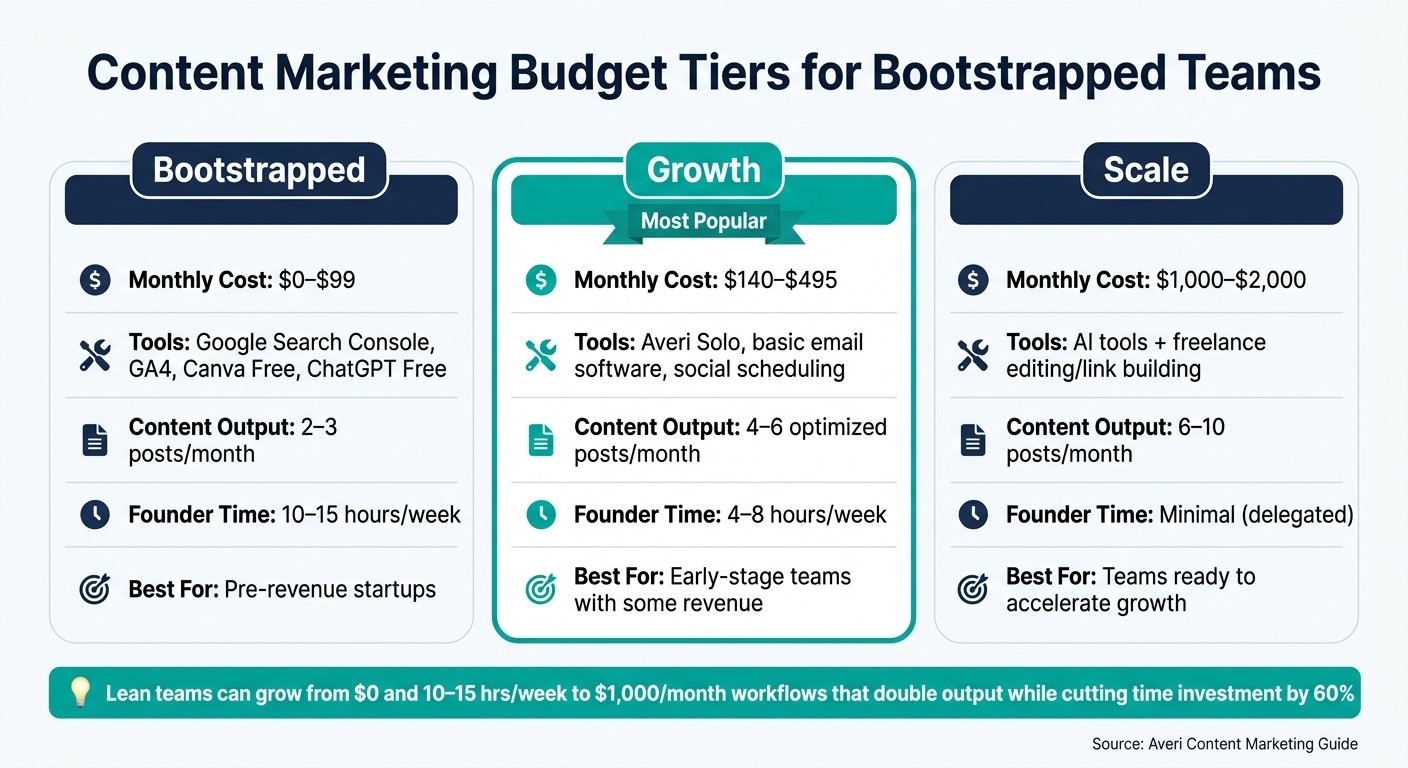
Content Marketing Budget Tiers: Cost, Output & Time Investment
Before diving into content creation, it's essential to have two things nailed down: a clear goal and a realistic budget. Without these, you'll risk wasting time and money on content that doesn't deliver results.
Choose 1–2 Core Marketing Goals
Trying to tackle everything at once is a recipe for burnout and inefficiency. Instead, focus on one or two key goals and shape your content around them. For smaller teams, common priorities include generating leads (with content like comparison pages or case studies), growing an email list, or building brand awareness through founder-led social media content.
Once you've identified your goals, set a timeline that aligns with your expectations. For example:
SEO content usually takes 3–12 months to show results.
LinkedIn growth often happens within 3–6 months.
Email newsletters can take 6–18 months to convert effectively [1].
If you're looking for quicker wins, focus on content that drives conversions - comparison pages and case studies tend to close deals faster than educational blog posts [3].
From day one, track your progress using free tools. Google Search Console helps you monitor keyword rankings and identify areas for improvement, while Google Analytics 4 provides insights into traffic, signups, and conversions. These tools offer all the metrics you need without any added costs [1][2].
With your goals in place, allocate your resources wisely.
Create a Budget That Matches Your Capabilities
Budgeting isn’t just about money - it’s also about time. Be realistic about the trade-offs. For instance, if you’re spending five hours a week writing content yourself, that time has value, even if you’re not spending cash [2].
Budget Tier | Monthly Cost | Typical Allocation | Output Expectation |
|---|---|---|---|
Under $100 | $0–$99 | Free tools (GSC, GA4, Canva Free, ChatGPT Free) + founder time | 2–3 posts per month; 10–15 hours of founder time [4] |
$100–$500 | $140–$495 | AI content tools (e.g., Averi Solo), basic email software, social scheduling tools | 4–6 optimized posts per month; 4–8 hours of founder time [4][5] |
$500–$2,000 | $1,000–$2,000 | AI tools + selective freelance support (e.g., editing or link building) | 6–10 posts per month; improved domain authority [4] |
For pre-revenue startups, starting with the $0 tier makes the most sense. Focus on building credibility through LinkedIn posts, one-on-one conversations with early adopters, and a few targeted blog posts. Investing in long-term SEO tools can wait until you see consistent organic traffic growth or find that your time is becoming a bottleneck [1][2].
Step 2: Build a Lean Content Workflow
Once your goals and budget are set, the next step is to create an AI-powered content system that transforms your strategy into consistent weekly results. Many small teams struggle with content not because of a lack of ideas, but because they don’t have a reliable process to produce and deliver content without exhausting their resources.
Plan a Weekly Content Routine
Establish a fixed weekly schedule to maintain consistency without overloading your team. For example:
Monday: Focus on strategy - use tools like Google Search Console to identify quick-win keywords.
Tuesday and Wednesday: Dedicate time to drafting - record a short voice memo and transcribe it into a rough draft for faster writing.
Thursday: Work on repurposing and distributing your content.
Friday: Review performance data to refine your approach.
To stay efficient, block out a 4-hour window each week for content creation, reducing distractions and context switching. This streamlined routine ensures that every effort aligns with your core objectives [1][3][6].
Leverage Averi and Budget-Friendly Tools
Combine affordable tools to manage the entire content process for under $200 per month. Averi ($100/month) simplifies strategy execution by handling keyword research, AI-assisted drafting, SEO/GEO optimization, and even direct publishing to platforms like WordPress, Webflow, or Framer. This can cut a founder’s weekly content workload from five hours to about two [1][2].
Fill in the remaining gaps with free or low-cost tools:
Google Docs or Notion: Ideal for drafting and managing editorial calendars.
Canva (free tier): Create social graphics and thumbnails with ease.
Mailchimp or MailerLite: Handle email distribution efficiently.
Workflow Stage | Recommended Tool(s) | Purpose |
|---|---|---|
Strategy & Research | Google Search Console, Averi | Track keywords and select topics |
Drafting & Optimization | Averi, ChatGPT, Claude | AI-assisted drafting and SEO/GEO scoring |
Visual Design | Canva | Design carousels, thumbnails, and graphics |
Email Distribution | Mailchimp, MailerLite | Automate newsletters and sequences |
Social Scheduling | Schedule posts and track basic analytics | |
Collaboration | Google Docs, Notion | Manage editorial calendars and topic banks |
Automate Repetitive Work
Repetitive tasks, especially in distribution, often eat up valuable time. Tools like Buffer or Hootsuite (starting at $15–$18/month) allow you to schedule a week’s worth of social posts in one sitting [1]. For email, set up an automated welcome sequence in Mailchimp or MailerLite, so new subscribers are nurtured without requiring extra effort.
Take automation further with tools like Zapier or Make. These can generate draft social posts automatically when a new blog is published and apply consistent UTM tags to links. By automating these smaller tasks, you free up time to focus on decisions that genuinely require your attention [7].
Step 3: Create and Repurpose High-ROI Content
Start with the Right Content Formats
Prioritize content that directly addresses buyers actively searching for solutions. Formats like comparison posts (e.g., "Product A vs. Product B"), use-case pages, and FAQ-style guides deliver results far beyond general educational material. In fact, these types of content convert at about 10 times the rate of broader, informational topics.
Once you've covered these high-intent areas, expand your efforts with how-to guides and case studies. These formats not only boost your SEO over time but also act as consistent traffic generators. Studies show that roughly 10% of posts drive 38% of total visits, making early identification of high-performing content a smart move for teams with limited resources.
Content Format | ROI Potential | Primary Benefit |
|---|---|---|
Comparison Posts | Very High | 10x higher conversion than informational keywords |
How-To Guides | High | Builds long-term SEO and authority |
Case Studies | High | Top performer for 53% of B2B marketers |
Founder LinkedIn Posts | High | 3x more engagement than company posts |
ROI Calculators | Medium/High | Justifies purchases and shortens sales cycles |
To maximize reach, adapt these formats for use across multiple channels.
Repurpose Content Across Channels
Efficient content teams focus on getting more mileage out of what they’ve already created. A single blog post can be transformed into at least 10 additional assets, such as LinkedIn updates, email newsletters, short video scripts, or infographics. Tools like Averi streamline this process by organizing your entire content library in one place, making it easy to repurpose material in minutes rather than hours.
Outsource Selectively to Keep Costs Down
Once you’ve optimized your in-house content production, consider outsourcing specific tasks to save time and reduce costs. The idea isn’t to outsource everything - it’s about delegating tasks that don’t require your direct input, such as video editing, social media graphics, or post formatting. Meanwhile, strategic decisions like defining your brand's voice and setting content direction should stay in-house.
When outsourcing, platforms like Fiverr and Upwork provide access to skilled freelancers at manageable rates. For instance, social media graphic designers typically charge $10–$50 per set, while SEO writers range from $100–$250 per post [4]. If you’re looking to refine your content quality, hiring a freelance editor - who can enhance consistency and sharpen your tone - can be a smarter first step than bringing on a full-time writer. Editors generally cost $300–$800 per month [4].
"The mistake most founders make: hiring a content manager before they've built the systems, processes, and strategy that make a content team effective." - Averi [8]
Step 4: Track Results and Improve Over Time
Build a Simple Tracking System
You don’t need pricey analytics tools to figure out what’s working. A straightforward setup with three free tools can handle most of the job: Google Search Console (GSC) to monitor keyword rankings and impressions, Google Analytics 4 (GA4) to track user behavior and conversions, and Ahrefs Webmaster Tools (free for verified domains) to keep tabs on backlinks. Break your metrics into three categories: leading indicators (like traffic and time on page), middle indicators (such as email signups), and lagging indicators (revenue and customer acquisition cost). Focus on one key metric from each category every week.
For added efficiency, Averi’s analytics layer integrates GSC and GA4 data, offering features like decay detection. This alerts you when an article that once performed well starts losing traffic, saving you hours of manual checks. Use these weekly reviews to pinpoint areas for improvement.
Refresh Content Using Performance Insights
Giving underperforming content a boost doesn’t have to be time-consuming. In GSC, filter your pages by positions 11–30. These are posts that Google already considers relevant but need a little extra effort to move up in rankings. Adding 300–500 words, updating outdated stats, or improving internal links can push these pages onto the first results page.
Averi simplifies this process by identifying opportunities automatically, offering recommendations like, "This piece is ranking #8 - here’s how to move it to page 1." If you don’t have access to such tools, a quick weekly check in GSC can reveal easy wins. Look for queries with high impressions but low click-through rates, then refine meta titles or descriptions to grab attention. Once your content is updated, analyze how each channel is performing to maximize your return on investment.
Focus Resources on High-Impact Channels
With streamlined workflows and performance data in hand, you can allocate resources to the strategies that deliver the best results. Calculate cost per lead for each channel by dividing your investment (time and money) by the number of leads it generates. This will help you identify where to double down. Shift resources to the tactics that work, while keeping a mix of strategies to maintain balance.
Channel | ROI Potential | Timeline | Action Plan |
|---|---|---|---|
SEO / Blog | High (compounding) | 3–6 months | Focus on improving near-ranking keywords |
Founder LinkedIn | High | Immediate | Post more frequently on topics that perform |
Email Newsletter | High (compounding) | 1–3 months | Grow your list before trying new formats |
Paid Social | Low (non-compounding) | Immediate | Pause until organic channels show conversions |
The takeaway is simple: paid channels stop delivering the moment you stop spending, but organic and email strategies build momentum over time. For tight budgets, this difference should guide nearly every decision about where to invest your time and money.
Conclusion: Start Small, Build Over Time
Success in content marketing, especially on a limited budget, thrives on a streamlined approach and clear priorities. By narrowing your focus to one specific business objective, choosing two key channels, and establishing a simple weekly routine, you can create meaningful momentum. Begin with bottom-of-funnel content designed to close deals, monitor what drives results, and reinvest resources into strategies that prove effective.
Research reveals that lean teams can grow from a $0 setup producing 2–3 posts per month with 10–15 hours of founder time, to a $1,000/month workflow that doubles output while reducing time investment by 60% [4]. Achieving this kind of progress becomes far more attainable with the right tools - and that’s where Averi steps in. The Solo plan streamlines strategy, drafting, SEO and GEO optimization, and even direct CMS publishing, addressing the often-overlooked cost of founder time spent on writing rather than scaling the business [4].
Each piece of content you publish strengthens your domain authority and provides insights to refine future efforts. Winning isn’t about having the largest budget - it’s about starting, staying consistent, and improving with every iteration.
FAQs
What’s the fastest content type to generate leads on a tight budget?
The most effective content types for generating leads on a limited budget include problem-solving guides, tutorials, and comparison posts. These formats are quick to create and resonate well with audiences looking for actionable solutions. AI tools such as ChatGPT or Claude can simplify the process by speeding up research and drafting. Concentrate on evergreen content that tackles common pain points, ensuring long-term relevance. Additionally, free or affordable platforms like Canva for visuals and Mailchimp for email campaigns can help establish credibility and attract qualified leads efficiently - perfect for startups or lean teams working with tight resources.
How many hours per week do I need to publish consistently?
To maintain a steady publishing schedule on a tight budget, set aside 6–8 hours each week. This time frame allows for creating and scheduling approximately four posts, along with social media content or newsletters each month. Prioritize a consistent workflow by focusing on evergreen content, repurposing existing materials, and leveraging free or low-cost tools to streamline your efforts and boost productivity.
Which free metrics should I track to know content is working?
To measure how your content is performing without spending a dime, focus on these key metrics:
Google Search Console: Keep an eye on rankings, clicks, and impressions to understand how your content is doing in search results.
Website Analytics: Dive into visitor behavior and track conversions to see how users interact with your site.
Social Engagement: Monitor shares, likes, and comments to gauge how your content resonates on social platforms.
Email Metrics: Pay attention to open rates and click-through rates to assess the success of your email campaigns.
Qualitative Feedback: Look at comments, direct messages, or other feedback to understand your audience’s thoughts and reactions.
These tools and insights give you a clear picture of organic traffic, engagement, and audience response - all without spending a penny.
Related Blog Posts

Zach Chmael
CMO, Averi
"We built Averi around the exact workflow we've used to scale our web traffic over 6000% in the last 6 months."
Your content should be working harder.
Averi's content engine builds Google entity authority, drives AI citations, and scales your visibility so you can get more customers.