How to Build a No-Code Marketing Stack for Media & Entertainment

Averi Academy
Averi Team
8 minutes

In This Article
Centralize campaign data, automate workflows, generate brand-aligned content, and track performance for media marketing—no coding required.
Updated:
Trusted by 1,000+ teams
Startups use Averi to build
content engines that rank.
Media and entertainment companies need to manage large-scale campaigns across multiple platforms while staying efficient and consistent. A no-code marketing stack simplifies this process by using tools that automate tasks without requiring programming skills. Here's how you can build one:
Centralize Data: Use Airtable to organize campaign details, media assets, and schedules in one place.
Automate Workflows: Connect tools with Zapier to eliminate manual tasks like data transfers and scheduling.
Generate Content: Leverage Averi AI for creating brand-aligned content, from emails to social media posts.
Track Performance: Integrate analytics into Airtable to monitor campaign success and refine strategies.
This approach saves time, reduces costs, and ensures campaigns are consistent and scalable. Start small by implementing one tool or workflow, then expand as you see results.
No-code automation for Marketing & Growth - 9x Webinar
Step 1: Set Up Your Core Workflow with Airtable and Zapier
Creating a no-code marketing stack begins with establishing a centralized system to connect your tools seamlessly. For media and entertainment companies juggling multiple campaigns, Airtable acts as your command center, while Zapier serves as the bridge linking all your systems together.
Organize Campaign Data in Airtable
Airtable simplifies campaign management by consolidating everything your team needs - campaign briefs, media assets, audience details, launch schedules, and performance metrics - all in one accessible place. No more digging through Slack messages or email threads to find the latest trailer link or revised copy. Instead, your team has instant access to unified data that keeps workflows running smoothly.
Start by setting up a base with tables tailored to your campaigns. For example:
A "Campaigns" table can track streaming series launches or album releases, with fields for campaign name, target audience, launch date, budget, and status.
An "Assets" table can house video files, promotional images, and copy variations, tagged by platform (e.g., Instagram, TikTok, or YouTube) and format.
You can also create custom views for specific teams, like social media managers or analytics specialists. This structure transforms your team's processes into a scalable, repeatable system.
Once your data is centralized, Zapier steps in to connect everything.
Connect Your Tools with Zapier
Zapier turns your Airtable base into more than just a static database - it becomes an automation powerhouse. By linking Airtable to your CRM, email marketing platform, social media tools, and analytics systems, Zapier eliminates the need for manual data transfers. With over 2,000 integrations, you can connect nearly any tool in your stack without writing a single line of code.
Here’s how it works: Define a trigger in Airtable, such as moving a campaign to "Ready for Launch", and link it to an action in another tool, like scheduling an email in Mailchimp. When the campaign status updates, Zapier handles the rest - segmenting audiences, scheduling posts, and notifying team members automatically. This reduces repetitive tasks, minimizes errors, and keeps everything on track.
Example: Automating a Streaming Platform Campaign
Let’s break this down with an example. Imagine a streaming service preparing for a new series launch. Your content team creates a campaign record in Airtable, entering details like the series name, premiere date, target audience, and uploading promotional assets. When the campaign status changes to "Approved", Zapier springs into action:
It segments your email list in HubSpot based on audience preferences stored in Airtable.
Personalized email drafts are generated, referencing the series’ genre and similar shows the audience has enjoyed.
A three-email sequence is scheduled to build anticipation leading up to the premiere.
At the same time, another Zap posts teaser clips to your social media channels and updates your project management tool to notify the PR team. Tasks that used to take hours are now automated, ensuring campaigns are launched on time with consistent messaging.
Step 2: Create and Personalize Content with Averi AI
Now it’s time to craft content that truly reflects your brand’s identity. Averi AI simplifies this process by combining the speed of AI with a centralized system to maintain brand consistency. This step integrates seamlessly into your existing workflow, ensuring your creative output aligns with your broader marketing automation efforts.
Setting Up Averi AI for Your Brand
Before diving into content creation, it’s essential to configure your Brand Core. This is where you define your brand’s personality, tone, target audience, and key details about your company. By training Averi AI with this information just once, you ensure that every piece of content it generates stays aligned with your brand’s voice across all channels.
For instance, you can specify details like your streaming service’s tone - whether it’s bold and edgy or warm and approachable - along with your target audience, such as Gen Z streamers or millennial parents. You can also include specific guidelines, like consistently capitalizing “Original Series” or avoiding exclamation marks in email subject lines. All of this is stored in your Infobase, so you won’t need to repeat the same instructions for every project.
Streamlining Content Creation
Once your Brand Core is set up, Averi AI takes over to simplify content production. Unlike other tools that require constant prompting, Averi AI’s Synapse orchestration automatically adjusts its approach based on the nature of your request. Whether you need social media posts for an album release or a comprehensive launch strategy for a new series, the platform adapts to meet your needs.
The /create mode guides you through three clear stages: a discussion to outline your goals, draft creation, and final edits. From Instagram captions to email campaigns and landing page copy, Averi AI uses proven workflows to produce content that matches your brand’s voice, saving time without sacrificing quality.
Bringing in Experts for Complex Campaigns
While Averi AI is excellent for routine content tasks, some projects require a human touch. For more intricate campaigns that demand deeper insight, you can activate Averi AI’s Human Cortex feature. This connects you with pre-vetted marketing professionals who seamlessly integrate into your workflow. These experts have immediate access to your Brand Core and past campaigns, eliminating the need for lengthy onboarding. This hybrid approach combines AI efficiency for everyday tasks with human expertise for projects that require extra nuance.
Step 3: Track Performance and Improve Campaigns
With the automated data flow set up through Airtable and Zapier, tracking performance becomes a seamless part of your workflow. Once your content is published, it’s time to monitor how it performs and adjust your strategy accordingly. Analytics integrations make it easy to figure out what’s working and what’s falling flat - no need to call in a data analyst.
Link Your Analytics Tools
Effective tracking starts with bringing all your data together in one place. Instead of hopping between platforms to check metrics, use Zapier to funnel everything into Airtable. Set up a centralized table to collect engagement rates, click-throughs, conversions, and audience demographics from all your channels. This gives you a clear, consolidated view of your campaign data, making it easier to make decisions quickly.
For a deeper dive, Averi AI can track content performance across platforms and highlight trends. It can pinpoint which messages resonate with specific audience segments and which content formats generate the most engagement. With more than 2,000 integrations available, you can connect tools like your CRM and ad platforms without needing to write any code.
Use Data to Adjust Your Campaigns
Once your data is centralized, the next step is using it to refine your campaigns. Data only becomes useful when you act on it. If you notice something underperforming - say, your Instagram posts aren’t hitting the mark - you can make changes right away. Update messaging in Averi AI, tweak targeting settings in Airtable, or reallocate budget to better-performing channels through your ad platforms.
Pay attention to what your audience engages with, and focus your efforts on what works while cutting out the rest. This streamlined approach to analytics not only improves individual campaigns but also enhances your overall marketing workflow, ensuring every adjustment brings you closer to your goals.
Step 4: Build and Scale Media Campaigns
Once your data flows smoothly and performance tracking is in place, the next step is to turn your campaigns into efficient, repeatable systems. Media companies face constant demands, and relying on manual processes can quickly slow down progress.
Create Campaign Workflows
Start by outlining your most frequent campaign types in Airtable. For a streaming platform, this might include launching new shows, sending subscriber retention emails, or managing social media calendars. Each campaign type can be transformed into a reusable template with clearly defined stages: from creating the brief to generating content, reviewing it, and finally distributing it. Tools like Zapier can automate these stages, ensuring that when one task is completed, the next one starts automatically.
Averi AI can act as a powerful content creation tool within this workflow. It can generate campaign copy, social posts, and email sequences in just minutes. Its Brand Core feature ensures all content aligns with your brand identity, while the /create mode guides you step-by-step from the initial brief to the final draft. If you need specialized input - like crafting a complex video script or tailoring content for specific international markets - you can instantly invite an expert, maintaining all the necessary context within your workflow.
This setup not only streamlines processes but also sets the stage for efficient testing and multi-channel expansion.
Test and Refine Your Campaigns
Testing doesn’t have to be a long, drawn-out process. With your no-code tools in place, you can quickly test variations in messaging, audience targeting, and content formats. Use Airtable to track performance data, and feed those insights back into Averi AI to fine-tune your future campaigns. For example, if personalized playlist recommendations outperform generic promotional emails, you can shift your strategy immediately instead of waiting for a quarterly review.
Make testing an integral part of your workflow. Automate A/B testing through your email or ad management platforms, log the results in Airtable, and use those insights to optimize your next campaign. This approach has proven effective - Juniper Networks, under the leadership of former CMO Jean English, used AI to personalize outreach at scale, achieving five times more meetings compared to their previous manual efforts [1].
With these insights in hand, scaling your campaigns across multiple channels becomes a natural next step.
Expand Campaigns Across Channels
Once you’ve validated a campaign, scaling it across various platforms becomes much easier. Your centralized Airtable workflow serves as the single source of truth, while Zapier automates content distribution to social media schedulers, email platforms, and content management systems. Averi AI can adapt your core messaging for different platforms, transforming a blog post into engaging social media snippets, email copy, or ad text - all while maintaining brand consistency through its Brand Voice settings.
For global media companies, AI-powered translation and localization tools remove the delays often associated with traditional agencies. These tools enable you to create native-quality content for international audiences in real time and at a fraction of the cost. With access to over 2,000 integrations across modern no-code platforms [1], you can connect almost any tool or channel your campaigns require - without needing to write a single line of code.
Tool Comparison: Choosing the Right No-Code Stack for Media Marketing
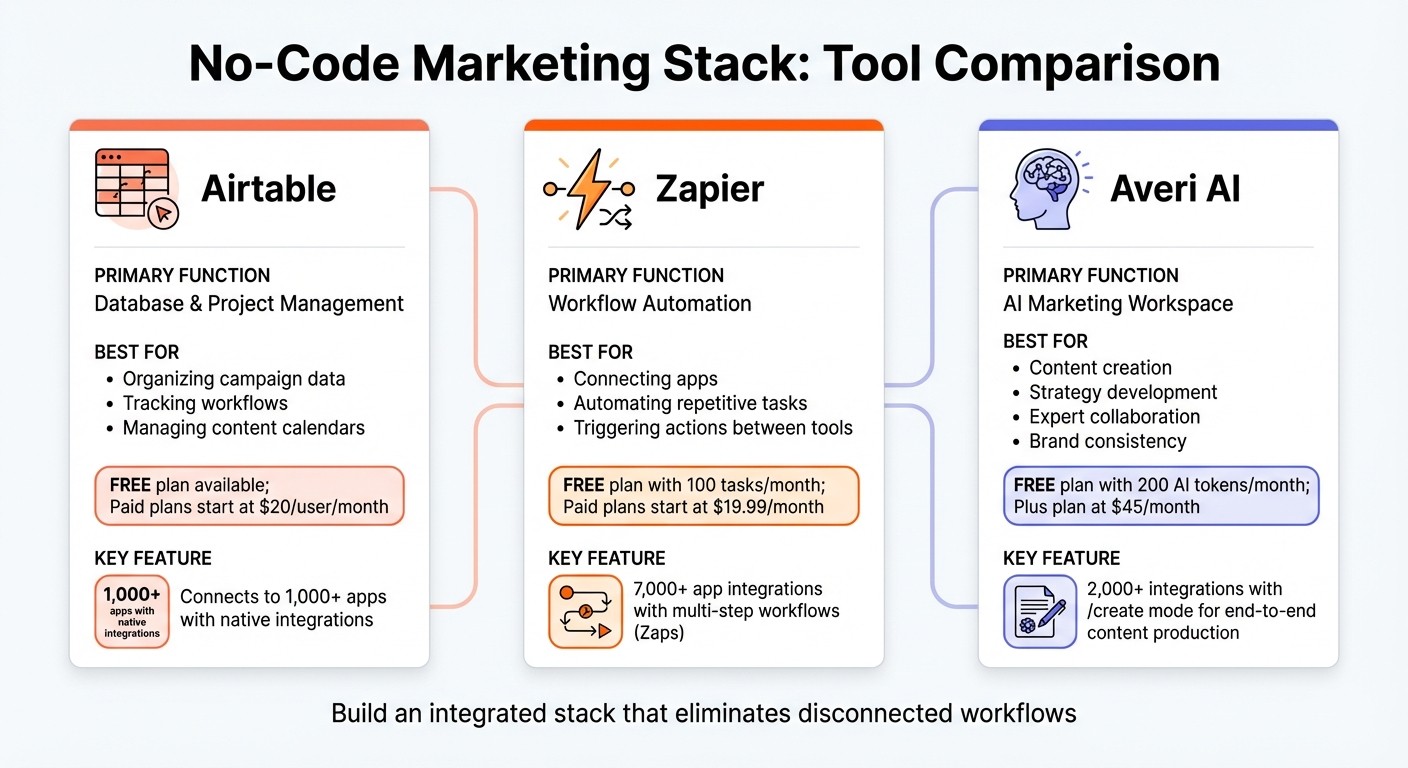
No-Code Marketing Stack Tool Comparison for Media Companies
To build a seamless no-code marketing stack, start with tools that work well together: Airtable for organizing data, Zapier to automate app connections, and Averi AI for creating AI-assisted, human-refined content.
Side-by-Side Tool Comparison
Tool | Primary Function | Best For | Pricing Range | Key Integration Features |
|---|---|---|---|---|
Airtable | Database & project management | Organizing campaign data, tracking workflows, managing content calendars | Free plan available; paid plans start at $20/user/month | Connects to 1,000+ apps; native integrations with major marketing tools |
Zapier | Workflow automation | Connecting apps, automating repetitive tasks, triggering actions between tools | Free plan with 100 tasks/month; paid plans start at $19.99/month | 7,000+ app integrations; multi-step workflows (Zaps) |
Averi AI | AI marketing workspace | Content creation, strategy development, expert collaboration, brand consistency | Free plan with 200 AI tokens/month; Plus plan at $45/month | 2,000+ integrations; /create mode for end-to-end content production |
Each of these tools plays a unique role in crafting an efficient marketing workflow. Airtable excels at organizing everything from campaign data to content calendars, giving you a clear overview of your projects. Zapier handles the heavy lifting of automating repetitive tasks, ensuring your tools communicate seamlessly. Meanwhile, Averi AI brings AI-powered content creation into the mix, combining automation with expert input to maintain your brand's voice and strategy.
For media companies juggling multiple campaigns, Averi AI's Brand Core feature is a standout. It ensures every piece of content - whether generated by AI or refined by experts - aligns perfectly with your brand’s tone and messaging. Together, these tools form a powerful, integrated stack that simplifies media marketing while delivering consistent results.
Conclusion: Building Your No-Code Marketing Stack
Key Takeaways
Creating a no-code marketing stack for the media and entertainment industry revolves around four essential steps: centralizing data with tools like Airtable, automating connections through Zapier, producing consistent content with Averi AI, and tracking performance effectively. These steps eliminate the inefficiencies caused by juggling disconnected tools, streamlining your entire workflow.
This method isn't just about convenience - it reduces costs and accelerates processes. Automation alone has saved companies millions and increased meeting rates by up to five times [1]. Together, these tools create a cohesive system designed to deliver reliable and consistent outcomes.
Starting Small, Scaling Smart
Now that the advantages are clear, the next step is to move from concept to action. Begin by tackling specific challenges, such as inconsistent messaging or delays in campaign rollouts, with a focused, small-scale implementation. For instance, try using Airtable to organize your content calendar or Averi AI to generate social media posts for a single campaign. This approach allows you to see results quickly without overhauling your entire system.
Once you've successfully streamlined one workflow, expand your efforts to other channels and campaigns. Over time, this method builds institutional expertise, making each new project faster and more efficient than the last.
The secret to long-term success lies in avoiding an over-reliance on scattered point solutions. Instead, opt for tools that integrate smoothly with your existing systems, creating a unified workspace where strategy, content creation, and execution come together seamlessly. This shift transforms marketing from a collection of isolated tasks into a scalable, efficient process.
FAQs
How does Averi AI help maintain a consistent brand voice?
Averi AI keeps your brand's voice steady and recognizable by leveraging advanced tools designed to match your unique tone and style. It integrates your brand guidelines, applies multiple review layers, and follows a detailed vetting process to ensure every piece of content aligns perfectly with your expectations.
By automating routine tasks while maintaining human oversight, Averi AI achieves a seamless blend of speed and precision, allowing you to deliver consistent, high-quality messaging across all your campaigns.
How do I set up automation between Zapier and Airtable?
To connect Zapier with Airtable and automate your workflow, start by creating a new Zap in Zapier. Choose Airtable as either the trigger app (to start the automation) or the action app (to respond to a trigger), depending on your needs. Log in to your Airtable account through Zapier and select the base and table you want to use.
Set up the trigger event, such as adding a new record, and then define the action event, like creating or updating a record. Carefully map the fields between Zapier and Airtable to ensure the data syncs properly. Once configured, test the Zap to ensure everything runs smoothly. If the test is successful, activate the Zap to start the automation.
How can I effectively track and analyze campaign performance with a no-code marketing stack?
To keep a close eye on campaign performance, consider using AI-powered tools that offer real-time analytics, automated reporting, and practical insights. Tools like GTM AI are designed to consolidate data from various sources, track essential metrics, and present the information through user-friendly dashboards, making it easier to make informed decisions.
By automating the process of performance tracking, you can quickly spot trends, fine-tune campaigns on the fly, and ensure your marketing strategies yield tangible results - all without needing advanced technical skills.
Related Blog Posts

Zach Chmael
CMO, Averi
"We built Averi around the exact workflow we've used to scale our web traffic over 6000% in the last 6 months."
Your content should be working harder.
Averi's content engine builds Google entity authority, drives AI citations, and scales your visibility so you can get more customers.