How to Create AI-Assisted Content Workflows for Education Platforms

Averi Academy
Averi Team
8 minutes

In This Article
A practical 5-step guide to audit, plan, pilot, and scale AI-assisted content workflows for education platforms while ensuring quality, compliance, and personalization.
Updated:
Trusted by 1,000+ teams
Startups use Averi to build
content engines that rank.
AI-assisted workflows are transforming how education platforms handle content creation. By combining automation with human oversight, these systems streamline tasks like drafting, editing, and scheduling while ensuring accuracy and quality.
Key takeaways:
Efficiency Boost: AI can reduce repetitive tasks, speeding up content production timelines.
Human-AI Collaboration: As of April 2025, 71.7% of web content is created with AI and human input, ensuring rigor and relevance.
Error Mitigation: AI-generated outputs, like math feedback, can have a 30% error rate, highlighting the need for human review.
Personalization Potential: AI enables tailored lesson plans and real-time feedback, improving learner outcomes by up to 20%.
To succeed, platforms must:
Audit current workflows to identify bottlenecks.
Set measurable goals, such as faster content creation or higher output volume.
Select appropriate AI tools tailored to specific tasks (e.g., planning, creation, or distribution).
Launch workflows in phases, starting with small pilots.
Continuously refine processes based on performance metrics and feedback.
AI doesn’t replace educators - it empowers them to focus on delivering impactful learning experiences while AI handles repetitive, time-consuming tasks.
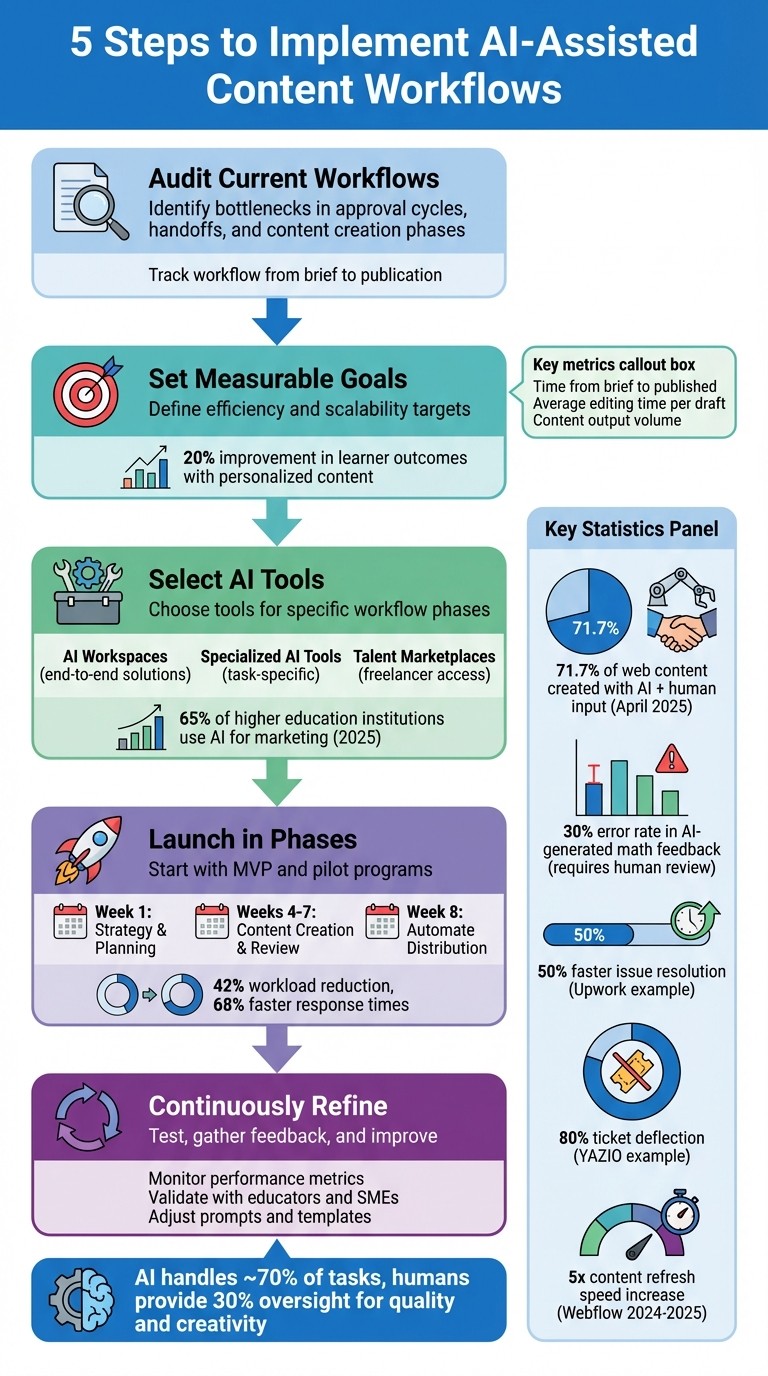
5-Step Process for Implementing AI-Assisted Content Workflows in Education
Exploring AI Workflows: First Session of GW's AI Academy
Review Your Current Content Workflow
Take a close look at your existing process to identify where things might be slowing down. Many education platforms struggle with lengthy approval cycles, where content moves between teams without clear ownership, creating unnecessary delays during reviews and sign-offs [1]. These disorganized handoffs and lack of accountability can bring projects to a standstill.
Track your workflow from the initial brief to publication, paying attention to how inconsistencies in briefs might be impacting the quality and timeliness of your content [1][3]. Focus on pinpointing the specific stages where delays most often occur.
Find Bottlenecks in Content Creation
Look for holdups in the ideation, approval, and distribution phases [1]. Are your team members spending too much time manually formatting documents? Are critical pieces of content stuck in review for too long? If multiple projects with different timelines are all being published at once, it could point to an issue with your production velocity.
To dig deeper, segment your audit by content type. Create separate workflow templates for blogs, videos, assessments, and social media posts. These tailored templates can help uncover bottlenecks unique to each format. Jumping into AI tools without first identifying these pain points often results in rushed, lower-quality content [1].
Once you’ve identified the trouble spots, map out your workflow to address these inefficiencies.
Map Your Workflow
Outline every step of your process, from ideation to publication, specifying who is responsible for each stage and where handoffs happen. Use simple tools to visualize the workflow. For example, between 2024 and 2025, Webflow managed to increase its content refresh speed by five times and grew AI-attributed signups from 2% to over 10% by streamlining its workflows [4].
Clearly defining roles and responsibilities at each stage will help you identify where delays are happening due to unclear ownership. Whether you structure your workflow as task-based (detailing every step from brainstorming to post-publication analysis) or status-based (tracking progress through an editorial calendar), the goal is to spot where content gets stuck. This process also reveals opportunities for AI to step in and automate repetitive tasks like formatting, scheduling initial reviews, or flagging outdated content for updates [1]. A well-documented workflow not only clarifies responsibilities but also highlights where automation can save time and improve efficiency.
Set Goals for AI-Assisted Workflows
Before diving into AI integration, it's crucial to define clear and measurable objectives that align with your educational goals. Are you aiming to produce more content with your current team, speed up lesson plan creation, or offer personalized learning materials? Each of these requires different AI tools and metrics, so clarifying your goals upfront will help shape your strategy and ensure the right outcomes.
Define Efficiency and Scalability Targets
To evaluate AI's impact on your workflows, focus on metrics that reflect efficiency and scalability. For instance, track how long it takes to go from a concept to a published piece ("Time from Brief to Published") or the average time spent editing drafts ("Average Editing Time per Draft") [3]. For scalability, measure how many substantial posts or modules you can publish each month to see if AI enables you to expand output without increasing team size [3][1].
Start by benchmarking your current performance and set improvement targets. Companies like Upwork and YAZIO have already shown what's possible, with Upwork resolving issues 50% faster and YAZIO achieving 80% ticket deflection [5].
"We'd have to hire three full-time agents focused on customer support to maintain our team's current workload if we were to try to replace it [AI] with human support."
Michael Trojan, User Success Specialist (AI), YAZIO [5]
To maintain quality while increasing efficiency, set guardrails specific to AI. Track metrics like "Fact-Check Pass Rates" and "Brand Voice Alignment" to ensure AI-generated content meets your standards [3]. Establish clear policies to prevent misuse, such as prohibiting AI from fabricating quotes or research data, which helps maintain academic integrity [3]. Additionally, require team members to flag AI-generated sections and verify AI-suggested URLs or citations [3].
Plan for Content Personalization and Engagement
While speed and efficiency are important, don't overlook AI's potential to enhance learner engagement and customize content.
Set goals for using AI to analyze learner data and create personalized lesson sequences [6][7]. Studies have shown that tailored content can lead to a 20% improvement in test scores across various e-learning platforms [7]. You can also implement AI-driven real-time feedback systems, where AI acts as a virtual tutor, dynamically adjusting the difficulty of content based on each student's progress [6].
Incorporate accessibility into your plans by leveraging AI to generate captions, transcripts, and translations, ensuring compliance with legal standards like Section 504 of the Rehabilitation Act [6]. Transparency is equally important - 86% of consumers value brand honesty, so disclosing when content is AI-assisted can help build trust with students [8].
"AI is not an endpoint - it's a starting point. Teaching them to shape, supervise, and improve AI-generated content is just as critical as teaching them to write it from scratch."
Let AI handle the heavy lifting - drafting, formatting, data analysis, and content variations - so your instructional designers can focus on strategy, fact-checking, and ensuring the content aligns with your learners' needs [3]. This balance between human oversight and AI efficiency is key to achieving your educational objectives.
Choose AI Tools for Your Education Platform
After setting clear goals and assessing your current performance, the next step is selecting the right AI tools. The trick is aligning these tools with specific stages of your workflow. A tool that excels at crafting lesson plans might not perform as well when it comes to distribution or quality checks. By carefully matching tools to tasks, you can save time and avoid unnecessary frustration. This approach builds on the workflows discussed earlier, ensuring every phase benefits from precise AI integration.
AI Tools for Education: An Overview
With your goals and workflows in mind, picking the right AI tools becomes critical for streamlining the creation of educational content. Broadly, the education AI landscape can be divided into three categories: AI workspaces, specialized AI tools, and talent marketplaces.
AI workspaces such as Averi offer end-to-end solutions by combining AI generation and human expertise on a single platform. They allow you to plan content strategies, draft lesson materials, and collaborate with specialists - all within one ecosystem. This is ideal for managing the entire process, from concept to final distribution, without juggling multiple tools.
Specialized AI tools like ChatGPT, Copy.ai, or Jasper focus on specific tasks, such as generating text quickly. These tools are great for brainstorming or drafting, but tasks like editing, ensuring brand alignment, and distribution will require additional effort. For education-specific needs, platforms like Eduaide.Ai specialize in creating lesson plans and developing syllabi [9].
Talent marketplaces such as Upwork or Fiverr connect you with freelancers for one-off projects. While these platforms give you access to a range of expertise, you’ll need to handle project management, revisions, and quality control yourself. This approach works well for sporadic needs but isn’t scalable for ongoing content production.
In 2025, 65% of higher education institutions reported using AI for marketing and enrollment, a jump from 40% in 2024, with 69% noting improved workflow efficiency [10]. For example, Yale University’s "It's Your Yale" chatbot reached a 90% accuracy rate after being tested against 500 frequently asked questions [10]. Similarly, the University of Michigan deployed over 3,500 instances of their "Maizey" AI platform, integrating it with Canvas LMS to provide course-specific tutoring [10].
Compare AI Tools by Workflow Phase
Each stage of the workflow benefits from different tools. For planning and research, tools that integrate with SEO platforms like Ahrefs or Semrush can help analyze learner data and identify content gaps [3]. For content creation, prioritize features such as brand voice training, automated research, and the ability to repurpose lessons into multiple formats like blog posts, social media snippets, or video scripts [9].
During the review phase, tools with built-in quality control features are essential. Averi offers expert review layers and brand voice alignment checks, whereas specialized AI tools often require manual oversight [4]. For distribution, tools that integrate seamlessly with CMS platforms like Webflow, WordPress, or Canvas can eliminate time-consuming copy-paste workflows [1].
Workflow Phase | Key Features to Look For | Example Tools |
|---|---|---|
Planning | Audience research, keyword analysis, SEO integration | Averi AI, Ahrefs, Semrush |
Content Creation | Brand voice training, multi-format adaptation, lesson plan generation | Averi AI, Eduaide.Ai |
Review & Quality Control | Expert collaboration, fact-checking, brand alignment | Averi AI (with Human Cortex), manual intervention required |
Distribution | CMS integration, multi-platform publishing, automated metadata | Averi AI, direct CMS connectors |
When selecting tools, focus on interoperability. Opt for platforms that support open standards like 1EdTech’s QTI and LTI, which ensure metadata and labels are compatible across educational systems [2]. Additionally, prioritize data privacy by choosing tools that comply with FERPA, COPPA, and GDPR to protect student data from being used to train external models [2][11].
"A chatbot is only as good as the content it's trained on. Make sure your content is accurate, up-to-date, and easy to understand."
Todd Ross Nienkerk, Owner and Co-Founder, Four Kitchens[10]
Lastly, adopt a risk-based approach. High-stakes tasks like grading or assessments require tools with rigorous human oversight, while low-stakes activities like drafting content can rely more on automation [2][12]. By tailoring your tools to the task at hand, you can strike the right balance between efficiency and reliability.
Build and Launch AI-Assisted Workflows
To create a streamlined system, it's crucial to build workflows that bring together planning, creation, and distribution into one cohesive process. The aim is to replace disconnected tasks with a well-coordinated pipeline where AI handles repetitive activities, freeing up humans to focus on quality and creativity. Start small by rolling out a Minimum Viable Product (MVP) with essential features like basic drafting, and gradually add more advanced tools such as sentiment analysis or custom model tuning [13]. This phased approach not only reduces risks but also allows for real-time feedback, making it easier to refine and improve your workflows.
Phase 1: Strategy and Planning
With your tools in place, the first step is to establish a clear strategic foundation. Use AI to assess your existing data and pinpoint content gaps. For instance, platforms like Averi Synapse can analyze your website to identify missing topics, suggest ideal customer profiles, and evaluate competitors to shape a comprehensive content strategy. This phase, which typically lasts about one week, focuses on defining goals, mapping workflows, and setting the tone for your brand [13].
For example, if you're building lesson plans for high school science, AI can highlight which topics lack adequate resources or need updates to align with current standards. This ensures your strategy is both scalable and aligned with educational needs.
It's also essential to define forbidden use cases during this stage. Prohibit AI from fabricating quotes, testimonials, or research data to maintain credibility. As Montana Thomas aptly puts it:
"AI supports your strategy, it does not set it"
[3]
By keeping human judgment at the core of decision-making, AI becomes a tool to enhance, not replace, strategic planning.
Phase 2: Content Creation and Review
Once the strategy is in place, move to content creation and review. This phase involves leveraging AI to generate drafts, which are then polished through human oversight. Spend 4–7 weeks testing your MVP to fine-tune tone, quality, and adherence to standards. During this period, AI can handle tasks like drafting lesson plans, researching topics, and structuring content for better search visibility, while humans ensure accuracy and compliance with educational benchmarks.
To manage quality effectively, adopt a risk-based review model. High-stakes materials, such as summative assessments or adaptive scoring, must undergo validation by subject matter experts (SMEs). On the other hand, lower-stakes tasks, like brainstorming or administrative drafts, may only need minimal review [2]. For example, in math education, AI-generated feedback has shown error rates exceeding 30% in certain areas, making SME involvement indispensable [2]. Additionally, require writers to verify any URLs or citations suggested by AI to avoid spreading misinformation [3].
Phase 3: Automate Content Distribution
Once content has been reviewed and approved, the next step is automating its distribution. Use tools that integrate directly with platforms like Canvas or D2L Brightspace to streamline publishing. Typically, integration and quality assurance take about one week, followed by another week for launch and feedback analysis [13]. These tools ensure metadata is preserved across systems using standards like 1EdTech's QTI and LTI [2].
To maintain transparency, document key details about AI involvement - such as the model used, prompts, and the level of human review. Store this metadata alongside the content for accountability [2]. AI-driven workflows have demonstrated their value, reducing workloads by 42% and speeding up response times by 68% within just four months [13]. While the initial setup requires effort, the long-term efficiency gains make automation a worthwhile investment.
Test and Improve AI-Assisted Workflows
Once your AI-enhanced workflow is launched, it’s crucial to test its performance and fine-tune it based on real-world data. Start small with a single-type pilot - for instance, apply the AI workflow to just one content type, like lesson plans or quiz questions, to see how it performs in practice before rolling it out on a larger scale [1]. This cautious approach minimizes risk and helps you catch potential issues early. Track metrics like the time it takes to move from the initial brief to publication and the average editing time. These benchmarks will give you a solid baseline for measuring efficiency. From there, focus on integrating your AI tools into your existing platforms for a smoother workflow.
Connect Tools with Existing Systems
Integration is where things can either run like clockwork or grind to a halt. To avoid bottlenecks, connect your AI tools with platforms like Canvas, D2L Brightspace, or Google Workspace. This eliminates the need for tedious manual copy-pasting and ensures metadata stays intact across systems. Assign clear ownership for each AI-assisted step to maintain accountability for quality and consistency with your brand’s voice [3]. If your content management system (CMS) integration isn’t seamless, you risk wasting time on manual reformatting - something you’ll want to avoid.
Track Workflow Performance
Once your tools are integrated, keep a close eye on key performance metrics. Measure the time it takes to move from brief to publication, how long editing takes, and the total volume of content produced [3]. These numbers will help you determine whether your workflow is genuinely saving time or simply shifting tasks around. Quality matters just as much as speed, so implement human-in-the-loop validation to check for accuracy, alignment with your brand voice, and adherence to academic integrity. The Averi team notes that AI typically handles about 70% of a task, leaving the final 30% to human expertise for oversight and creativity [3]. If your editing time consistently exceeds this ratio, it might indicate that your prompts need tweaking or that the AI tool isn’t the right fit for your needs.
Refine Based on Feedback and Data
Use the data you’ve gathered and feedback from educators and subject matter experts (SMEs) to refine your workflow. Regularly test the AI-generated content with educators and students to ensure it meets quality and relevance standards [7]. Collaborate closely with SMEs to review outputs, making sure they align with teaching frameworks like Bloom’s Taxonomy and the three learning domains [15]. If feedback highlights problems - such as content being too generic or not matching your brand’s tone - adjust your prompts and templates accordingly [7]. Tools like Fireflies or Otter.ai can help by transcribing and summarizing feedback sessions with staff and students. Use these transcriptions to turn insights into actionable improvements [14]. Over time, this iterative process pays off: each adjustment makes future content creation faster and more effective.
Conclusion
Incorporating AI-assisted workflows into education platforms isn't about replacing educators - it’s about empowering them to focus on what they do best: teaching and fostering connections with students. Thoughtful integration of AI tools can significantly streamline operations, allowing content that once took days to create to be completed in just hours. This efficiency not only saves time but also enables teams to concentrate on elevating quality and addressing strategic priorities. The result? A scalable system that’s ready to meet the demands of the future.
The real advantage lies in scalability and continuous refinement. As your content library expands, AI tools become more adept, producing materials that align seamlessly with your platform's voice. This evolution directly supports improved student outcomes, offering tangible proof of the value AI can bring. By 2025, 92% of executives anticipate their workflows will be digitized and powered by AI-enabled automation [17], highlighting the importance of adopting these systems now to stay ahead in the education space.
"The potential of AI in education lies in its ability to enhance both teaching and learning while maintaining the human connection that is essential for student growth." - SPH-Super-Admin, Sekolah Pelita Harapan [16]
Starting small is key. Consider piloting AI with a specific content type - like lesson plans or quiz questions - to fine-tune your workflow before rolling it out on a larger scale. Monitor your results, gather feedback from educators and students, and adjust your templates and prompts based on those insights. The sooner you begin, the faster your workflows evolve into a system that continually improves with each new piece of content.
Take the first step toward transforming your educational content strategy. Streamline your processes and explore the possibilities: sign up for Averi and receive a personalized marketing plan designed for your platform.
FAQs
How can I integrate AI tools into educational platforms like Canvas?
Integrating AI tools with Canvas can be approached through built-in features, third-party integrations, or direct collaborations. One option is IgniteAI, a native feature within Canvas that simplifies the use of AI. It offers tools like automated grading, content creation, and language support. These features operate seamlessly within Canvas's existing framework, maintaining FERPA compliance and leveraging permissions and single sign-on for smooth functionality.
For those exploring third-party solutions, LTI (Learning Tools Interoperability) integrations provide a straightforward way to embed AI tools like LearnWise AI or ibl.ai into Canvas. These tools enhance the platform with capabilities such as quiz generation, lesson planning, and real-time tutoring, all while prioritizing data privacy. Administrators can enable these tools and sync them with Canvas rosters, making them easily accessible for educators and students.
For more advanced needs, direct collaborations - such as partnerships with OpenAI - embed AI features directly into Canvas. This allows educators to draft lesson plans, design assessments, and provide real-time student support without leaving the platform. Implementing these options typically involves administrators enabling the AI tools, setting permissions, and rolling them out for educators to use within the Canvas interface.
What metrics should I use to evaluate the success of AI-assisted content workflows?
To gauge the success of AI-assisted content workflows, it’s essential to evaluate three main areas: efficiency, engagement, and business impact.
When it comes to efficiency, consider metrics like the time saved compared to traditional content creation methods, the reduction in team hours, and the overall volume of content produced. For engagement, focus on audience-related indicators such as time spent on a page, bounce rates, scroll depth, and conversion rates - these reveal how well the content connects with its intended audience. Finally, measure business impact by examining cost savings, revenue growth linked to AI-driven workflows, and the speed at which educational materials are brought to market.
In addition to these quantitative measures, incorporate qualitative evaluations. Check for content quality, consistency in brand voice, and factual accuracy. It’s also important to track AI performance metrics like accuracy and reliability and monitor user adoption rates to ensure the workflow is seamlessly integrated into your team’s operations.
How do AI-assisted workflows maintain accuracy and quality in educational content?
AI-assisted workflows bring together the speed of AI-generated drafts and the precision of human oversight to ensure both accuracy and quality. While AI can swiftly produce outlines, research summaries, or quiz questions, subject-matter experts step in to review and refine the material. This collaboration ensures that the content aligns with institutional standards and remains factually sound, with AI playing a supporting role rather than making final decisions.
These workflows also benefit from data-driven quality assurance (QA) tools, which continuously monitor and enhance content. By analyzing metrics such as student performance, feedback, and completion rates, AI systems can flag outdated or less effective materials. This process prompts timely updates, keeping content relevant and aligned with learning goals.
Research supports the effectiveness of this combined approach. When AI-generated content undergoes expert review, it consistently meets rigorous educational standards. This synergy between human expertise and AI-driven efficiency ensures that educational materials stay accurate, engaging, and impactful for learners.
Related Blog Posts

Zach Chmael
CMO, Averi
"We built Averi around the exact workflow we've used to scale our web traffic over 6000% in the last 6 months."
Your content should be working harder.
Averi's content engine builds Google entity authority, drives AI citations, and scales your visibility so you can get more customers.