How to Create AI-Assisted Content Workflows for Media & Entertainment

Averi Academy
Averi Team
8 minutes

In This Article
Map workflows, automate repetitive tasks, pick the right AI tools, and measure results to speed media content production while keeping brand consistency.
Updated:
Trusted by 1,000+ teams
Startups use Averi to build
content engines that rank.
Media and entertainment teams are under pressure to produce more content, faster, and across multiple platforms - all while staying on budget and maintaining brand consistency. AI-assisted workflows can help by automating repetitive tasks and streamlining processes.
Here’s how AI can transform your content production:
Cut Costs: Automate routine tasks like transcription, translation, and SEO optimization to let your team focus on creative direction.
Faster Turnaround: Respond to trends quickly with AI tools that adapt content for various platforms in minutes.
Efficient Distribution: Tailor content for YouTube, TikTok, Instagram, and more without manual effort.
Personalization at Scale: Create targeted content variations for different audiences effortlessly.
The key to success lies in integrating AI with human expertise. Tools like Averi AI combine planning, creation, and distribution into one workspace, ensuring efficiency without sacrificing quality. Start by identifying bottlenecks in your current workflow, automate repetitive tasks, and track performance metrics to refine the process over time.
AI won’t replace your team - but it will empower those who know how to use it effectively.
Ultimate AI For Content Creation Workflow [TUTORIAL]
Evaluate Your Current Workflow and Find the Gaps
Take a close look at how your current workflow operates to uncover where things break down. For many media and entertainment teams, 30% of their creative time is spent searching for assets, coordinating revisions, and juggling tasks across disconnected tools[5]. The first step toward improvement is mapping out what’s actually happening - using real workflow data as your guide. This insight serves as the backbone for integrating AI effectively.
Common Problems in Media & Entertainment Workflows
Content production often gets bogged down by a few recurring issues. For instance, manual asset repurposing eats up hours as teams resize graphics, adjust backgrounds, and create platform-specific versions of the same promotional video. Then there are localization delays, where traditional translation and dubbing processes can’t keep pace with global release schedules. This often leads to local teams creating unofficial content that may stray from brand guidelines.
Another pain point is metadata and tagging gaps, which slow down content discoverability. Manually entering SEO tags and asset descriptions can delay both publishing and archiving. Approval and review loops are another culprit, with feedback scattered across emails, Slack messages, and Google Docs. This disorganization can cause time-sensitive content to miss its release window. Finally, disconnected tool stacks force teams to jump between 8–12 different platforms for planning, design, writing, and analytics. These constant handoffs disrupt creative flow and drain momentum[4].
"True transformation comes from orchestration: intelligent systems that operate across the full pipeline." [4]
How to Map Your Current Process
Once you’ve pinpointed these common challenges, the next step is creating a detailed map of your workflow. Document every stage, from the initial brief to final distribution. Include tasks like research, drafting, SEO optimization, graphics creation, localization, approvals, and performance tracking. Then, categorize each activity into one of three types: creative judgment (tasks requiring human expertise and strategy), repetitive transformation (like resizing, formatting, or basic editing), or compliance checks (legal reviews and brand guideline adherence)[4].
Start your AI efforts with tasks that are routine and repetitive - they deliver the quickest returns. For example, automating metadata entry can immediately save time on tedious chores. Identify which steps are the biggest time sinks or most prone to errors, and note the data sources AI will need, such as style guides, brand assets, and analytics dashboards. This ensures AI produces consistent results without making errors like "hallucinations"[4].
Choose the Right AI Tools for Your Workflow
When it comes to AI tools, the distinction between a point tool (like ChatGPT or Jasper) and a workspace (like Averi AI) boils down to orchestration. Point tools are great for single tasks, but workspaces take it further by integrating planning, creation, review, and distribution into one cohesive system. For teams managing multi-platform campaigns, this means you can handle video, audio, social media posts, and localized content all in one place - no need to juggle countless browser tabs. As of April 2025, 74.2% of newly created web pages included AI-generated elements, yet 71.7% of that content still required human-AI collaboration to meet quality standards [4]. The right tool should make this collaboration effortless. Understanding this distinction is crucial when evaluating the features that matter most for media and entertainment workflows.
Required Features for Media & Entertainment AI Tools
To meet the demands of media and entertainment teams, an AI platform needs to excel in several key areas:
Multimodal content creation: The platform should seamlessly handle everything from video scripts and social graphics to blog posts and email campaigns, eliminating the need to export files or switch tools constantly.
CMS integrations: Look for tools that can directly publish content to platforms like WordPress or Webflow, streamlining the distribution process.
Brand consistency controls: The AI must adapt to your tone, style guides, and visual identity to ensure every piece of content aligns with your brand.
Real-time collaboration: Features that allow teams to review drafts, leave feedback, and approve edits in a shared workspace save time and reduce version control headaches.
Automated compliance checking: Tools should support regional formatting (like MM/DD/YYYY dates and imperial measurements for the U.S.) and adhere to data privacy regulations such as GDPR and CCPA [4].
These features are non-negotiable for teams looking to maintain efficiency and quality in their workflows. With these criteria in mind, let’s take a closer look at how Averi AI addresses these needs.
"True transformation comes from orchestration: intelligent systems that operate across the full pipeline." [4]
TVTechnology
How Averi AI Works for Media & Entertainment Teams
Averi AI isn’t just another content generator - it’s a workspace designed to streamline every part of the creative process. Its Synapse feature intelligently assigns routine tasks to AI while reserving more complex projects for human experts, balancing efficiency with strategic oversight. The /create mode simplifies workflows into three clear phases: Brief, Draft, and Edit. Everything happens in one unified space, eliminating the need to jump between Google Docs, Slack, and other tools.
Averi AI’s Library is another standout feature, storing your brand guidelines, past campaigns, and audience personas. This ensures every new project starts with the right context, making it easier to maintain brand alignment. For more specialized needs, the Human Cortex connects you with vetted professionals who understand your brand and can dive in without requiring extensive briefings.
For media teams launching multi-platform campaigns, this means everything - planning a video series, drafting social media captions, and coordinating with a motion designer - happens in one streamlined flow. And throughout it all, the platform keeps your context intact, ensuring consistency and efficiency at every step.
Build Your AI-Assisted Workflow in 3 Steps
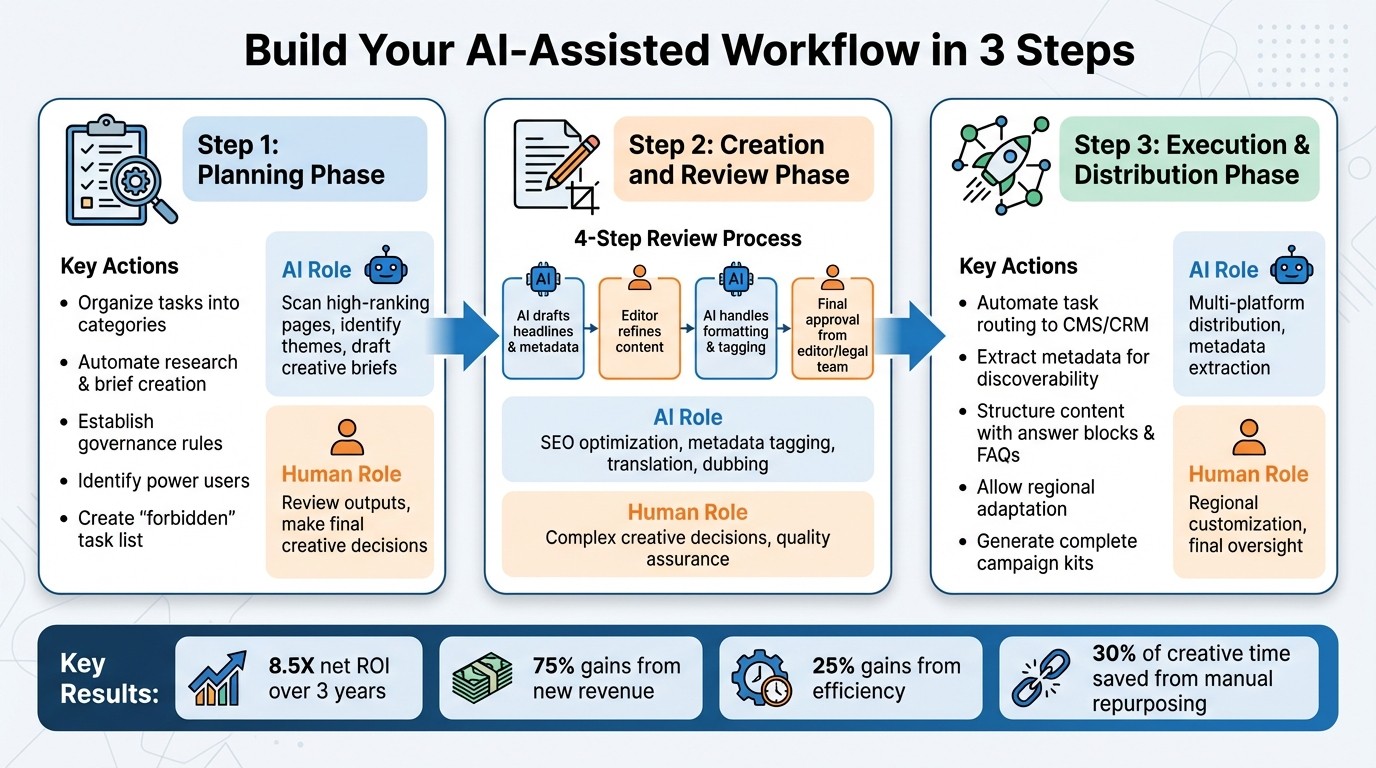
3-Step AI-Assisted Content Workflow for Media Teams
To create a streamlined AI-assisted workflow, break the process into three clear stages: planning, creation and review, and execution. Each stage should include defined handoffs between AI and human oversight to avoid the chaos of unstructured content production. This approach keeps your team focused on impactful tasks. Here's how to set it up effectively.
Step 1: Planning Phase
Begin by organizing tasks into categories to pinpoint where automation can have the greatest impact. This step often highlights areas like research, brief creation, and competitive analysis as prime candidates for automation, offering quick returns on investment [4]. Use AI tools to scan high-ranking pages, identify recurring themes, and draft creative briefs that align with your brand's voice and guidelines.
Establish governance rules early. Decide who will review AI outputs and who has the final say on creative decisions. Without clear accountability, you risk misaligned branding and unnecessary revisions [2][4]. Identify "power users" within your team - individuals with domain expertise who can test AI tools and promote best practices [5]. Additionally, create a "forbidden" list to document tasks AI should never handle, such as generating testimonials or producing regulated content without expert oversight [2]. With this groundwork in place, you're ready to move on to content creation and quality checks.
Step 2: Creation and Review Phase
This stage focuses on producing and refining content. Set up a structured review process: let AI draft initial elements like headlines and metadata, have an editor refine the content, use AI for tasks like formatting and tagging, and secure final approval from an editor or legal team [4]. This four-step process ensures a balance between efficiency and oversight. AI is particularly useful for repetitive tasks such as SEO optimization and metadata tagging, allowing your team to focus on more strategic, creative work [4].
"Adobe's tools help us move faster and stay aligned - delivering high-quality creative that always feels unmistakably Paramount."
Matt Hernandez, SVP of Design, Paramount Streaming[1]
For teams managing global campaigns, AI now offers advanced tools for tasks like automated translation, dubbing, and lip-syncing, making it easier to scale video content for international audiences [1]. Reserve complex creative decisions for human reviewers, while leveraging AI to handle time-consuming tasks. The aim is collaboration - AI handles the groundwork, and humans ensure the final product is polished and aligned with goals [4].
Step 3: Execution and Distribution Phase
This final stage is where your content reaches its audience. Use an orchestration layer to automate tasks, route outputs to platforms like CMS or CRM, and manage exceptions across the production pipeline [4]. AI can also extract metadata - identifying entities, sentiment, and tags - to enhance discoverability and make assets easier to repurpose internally [4]. Structuring content with "answer blocks", question-based headings, and FAQs boosts its chances of being featured in AI-driven search results [2].
For global campaigns, allow regional teams to adapt AI-localized content to ensure it reflects local nuances and sensitivities without delaying production [5]. AI can also generate complete campaign kits - landing pages, social posts, and email sequences - from a single brief, maintaining consistency across channels [3]. This final phase ties the workflow together, delivering both efficiency and coordinated execution.
Organizations adopting AI-driven content workflows can see up to an 8.5X net ROI over three years, with about 75% of the gains stemming from new revenue opportunities and 25% from efficiency improvements [5]. Moreover, creative teams often spend 30% of their time repurposing assets manually [5]. Automating these processes frees up that time for more strategic, value-driven work.
Measure Results and Improve Your Workflow
Once your AI workflow is up and running, measuring its performance becomes critical for ongoing improvement. Start by tracking key metrics like production speed, output volume, and editing time. For instance, measure how long it takes to go from a project brief to publication [2][4], count the number of deliverables produced each month (videos, social teasers, or episodic rollouts) [2][1], and monitor the average editing time per draft to ensure AI-generated content isn't creating more work for editors [2][4]. These numbers provide a solid foundation for evaluating your workflow effectiveness.
Speed isn’t the only thing that matters - quality is equally important. Keep an eye on error rates and factual accuracy to catch problems before they reach your audience [2][4]. If editors are spending more time revising AI drafts, it could signal a decline in quality, where subpar outputs are creating additional work [2]. For industries with strict regulations, tracking compliance errors or regulatory issues is another crucial aspect [4].
Key Metrics for AI Workflow Performance
Create a dashboard to track essential metrics like production speed, output volume, cost per piece, engagement rates, and team hours saved. Comparing these figures to your pre-AI baseline can highlight the impact of automation. For example, increasing your monthly output from 12 to 28 video assets demonstrates a clear efficiency boost. To calculate cost per piece, divide the total production costs (including AI tools and labor) by the number of assets delivered, giving you a tangible measure of your workflow’s efficiency.
Consistency also plays a big role. Watch for shifts in tone or sudden increases in factual errors, which may indicate a need to fine-tune your prompts or add more human oversight [4]. Categorize tasks in your workflow as "creative judgment", "repetitive transformation", or "compliance check" [4]. This classification helps pinpoint where automation delivers the most value.
Use Data to Refine Your Process
The data you gather should guide ongoing refinements to your workflow. Conduct monthly audits to identify bottlenecks or recurring quality issues [4][3]. Evaluate each phase - planning, creation, and execution - to ensure it aligns with your performance goals. Use AI tools to summarize performance data and compare your content to competitors, identifying areas where you might be falling behind [2]. If approval cycles are slowing down production, consider revising your review process. Similarly, if certain types of content have higher error rates, introduce mandatory human review for those formats [2][4].
Adopt an iterative approach: analyze, adjust, implement, and repeat. Let performance data drive changes to your workflow. For instance, if AI-generated social posts aren’t performing as well as those written by humans, tweak your prompts or assign those tasks back to your team. Use AI to scan your content library for outdated pieces or those with declining traffic, and prioritize them for updates [2][3]. This ensures your content remains dynamic and relevant, turning it into an evolving asset rather than a one-time output.
Conclusion
Create an AI-supported content workflow by identifying bottlenecks, integrating planning and distribution tools, and striking a balance between AI efficiency and human oversight. Teams utilizing AI-driven workflows often experience faster production cycles, lower asset costs, and consistent brand quality. For example, Paramount Streaming successfully sped up localized content production without compromising brand integrity[1]. Use AI as a collaborative tool to handle repetitive tasks like transcription, drafting, and adapting content for multiple platforms, while your team focuses on creative and strategic decision-making.
"True transformation comes from orchestration: intelligent systems that operate across the full pipeline." - TVTechnology[4]
Start with high-volume tasks such as social media posts or email campaigns to see quick returns, and gradually expand to more complex workflows as your team becomes proficient. Document every step - from initial brief to final publication - and use data insights to refine your process over time. The best workflows seamlessly integrate AI capabilities with human expertise.
Take these steps to revolutionize your content production. Begin building your AI-assisted workflow today. Sign up for Averi AI's workspace to access tools for planning, creation, and execution, along with a network of over 2,500 marketing experts - all in one platform. Map out your current process, identify where automation can help, and start delivering results faster.
FAQs
How can AI tools ensure brand consistency across different platforms?
AI-powered tools play a key role in ensuring your brand stays consistent across all channels. By incorporating your style guides, tone-of-voice guidelines, and visual standards directly into the content creation workflow, these tools help maintain a unified brand identity. They can automatically spot language that doesn’t align with your brand, recommend better word choices, and apply pre-set design elements like color schemes, fonts, and logo placements. This means every piece of content is polished and aligned with your brand before it’s finalized.
In addition to quality control, AI simplifies repetitive tasks. By centralizing assets such as templates, taglines, and imagery, it streamlines formatting, SEO tagging, and metadata management. When connected to systems like CMS platforms, ad tools, and CRMs, these tools ensure consistent, on-brand content is distributed seamlessly across websites, social media, email campaigns, and other channels. The result? A more efficient process that saves time and delivers a cohesive experience for your audience.
What should I look for in an AI tool to optimize media and entertainment workflows?
When selecting an AI tool for media and entertainment workflows, prioritize solutions designed to handle time-consuming, repetitive tasks such as editing, SEO tagging, formatting, and versioning. These capabilities can dramatically streamline production, often reducing timelines by 30–50%, enabling teams to shift from drawn-out processes to faster, more efficient operations.
Opt for tools that incorporate a collaborative framework, where AI assists with tasks like research, drafting, and quality assurance, while humans maintain control over critical elements like strategy, tone, and final approvals. Features such as customizable style guides and brand-voice reviews are crucial for preserving both quality and consistency across projects.
Finally, ensure the tool provides smooth integrations with platforms like CMS, CRM, and advertising systems. It should support enterprise-level data ownership and scale personalized content across multiple channels. This transforms the AI from a simple tool into an all-encompassing workspace, enhancing productivity for large-scale campaigns.
How can media teams evaluate the success of AI-assisted content workflows?
Media teams can gauge the impact of AI-assisted workflows by examining two main aspects: operational efficiency and audience performance.
To evaluate operational efficiency, focus on metrics like shorter production timelines, reduced total cost of ownership (TCO), and lower cost per asset. AI-powered workflows often streamline content creation, helping teams produce assets more quickly and affordably, countering the trend of rising production costs. Additionally, quality controls - such as adherence to brand voice and review pass rates - can ensure that these workflows maintain the expected level of excellence.
When it comes to audience performance, engagement metrics like click-through rates, watch time, and conversions are key indicators. AI tools also enable a deeper dive into factors such as audience sentiment and the success of personalized content. By comparing these metrics before and after implementing AI-driven processes and aligning them with business priorities like increasing subscriber numbers or boosting ad revenue, media teams can clearly demonstrate the value of these advanced workflows.
Related Blog Posts

Zach Chmael
CMO, Averi
"We built Averi around the exact workflow we've used to scale our web traffic over 6000% in the last 6 months."
Your content should be working harder.
Averi's content engine builds Google entity authority, drives AI citations, and scales your visibility so you can get more customers.