
In This Article
Templates and timelines for onboarding, lead nurturing, and re-engagement plus AI-backed tips to boost activation and deliverability.
Updated:
Trusted by 1,000+ teams
Startups use Averi to build
content engines that rank.
Email sequences are essential for startups to automate communication, save time, and drive growth. They help with onboarding, lead nurturing, and recovering lost revenue while delivering an average ROI of $36 for every $1 spent. However, creating effective sequences can be time-consuming and technically challenging for small teams using AI marketing automation. AI tools like Averi AI simplify the process by drafting tailored sequences, managing triggers, and analyzing performance.
Key Points:
Onboarding Emails: Focus on guiding users to quick wins within their first week to boost retention.
Lead Nurturing: Build trust with helpful content before introducing your product.
Re-engagement: Use targeted campaigns to recover inactive users and reduce churn.
AI Assistance: Tools like Averi AI streamline sequence creation, saving time while maintaining quality.
Start small with a basic 3-email onboarding sequence and expand as you grow. Focus on activation metrics, not just open rates, to measure success.
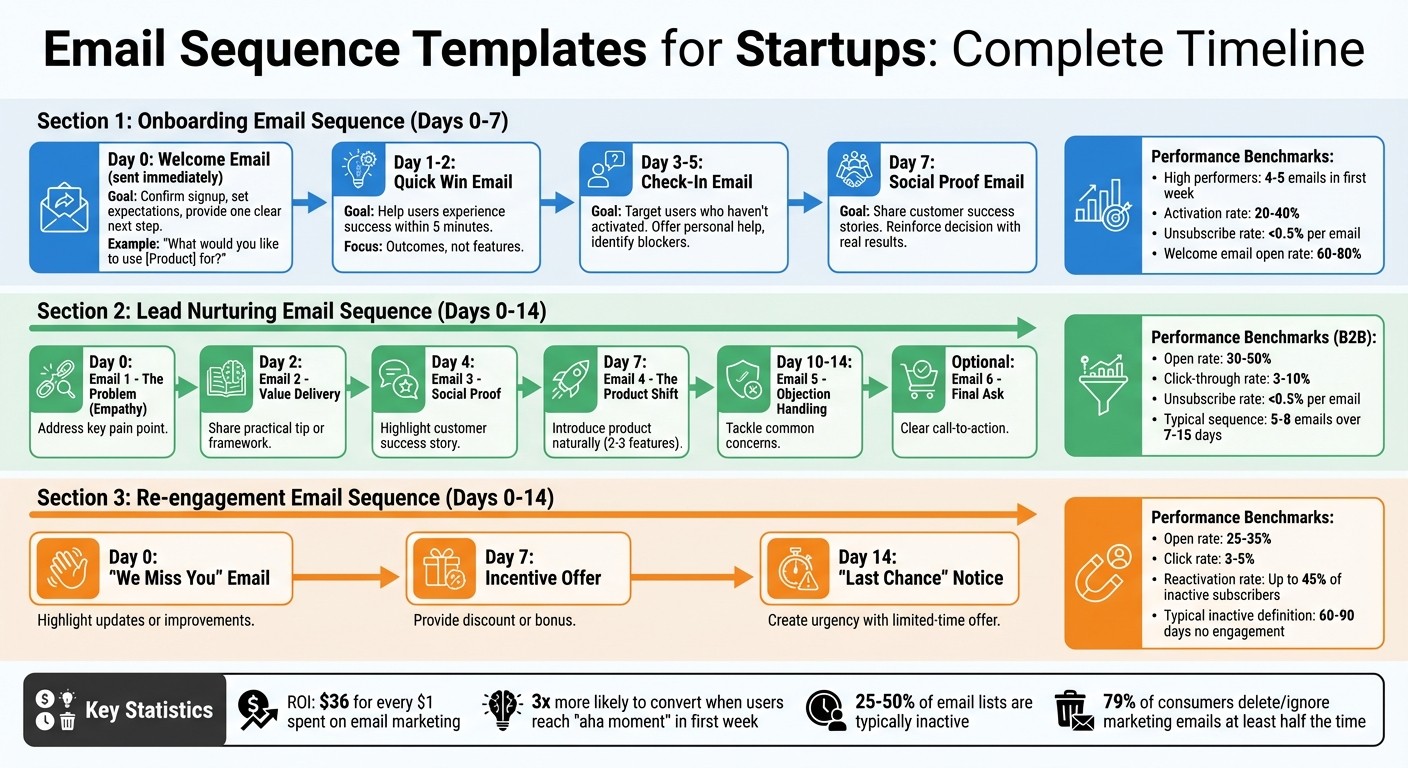
Email Sequence Timeline: Onboarding, Lead Nurturing & Re-engagement Schedule
3 Best Email Automation Flows in 2025 (try these now)
Onboarding Email Sequence Templates
The goal of onboarding is to help new users achieve a quick win. When users reach their "aha moment" within the first week, they are three times more likely to convert[9]. The most effective email sequences don’t bombard users with feature tutorials - they guide them toward success with one clear action at a time.
Core Onboarding Email Templates
A basic onboarding sequence typically includes three emails: a Welcome email (Day 0), a Quick Win email (Day 1–2), and a Check-In email (Day 3–5)[2]. High-performing companies often send 4–5 emails during the first week, while average sequences send only 2–3[8]. Here's a breakdown of how to structure your sequence:
Day 0: Welcome (Send Immediately)
This email should go out as soon as someone signs up. Its purpose is to confirm their signup, set expectations, and provide one clear next step. For example, Notion asks users, "What would you like to use Notion for?" and offers buttons for specific use cases like Team wiki or Project management, helping users find relevant content right away[7]. Drift keeps it simple by focusing on one activation step - installing their widget - to deliver immediate value[7].
Day 1–2: Quick Win
Encourage users to experience success within five minutes[9]. The best-performing sequences guide users to value within 24 hours[8]. Instead of highlighting features, focus on outcomes. For instance, if your product is designed for team collaboration, suggest that users invite their first teammate and complete a task together.
Day 3–5: Check-In
This email targets users who haven’t activated yet. Offer personal help and try to identify any blockers[9][2]. Early-stage startups often see better results with emails sent from a real person, like "Nik, Founder at [Product]", rather than generic addresses[2]. Intercom, for example, includes a CEO video explaining the product’s vision to build trust and engagement[7].
Day 7: Social Proof
By this point, users have had time to explore your product. A follow-up email sharing customer success stories can reinforce their decision by showing how others are achieving results[9][6].
Each email should have one clear objective and a single call-to-action to avoid overwhelming users with choices[9][1]. A strong onboarding sequence typically achieves activation rates between 20% and 40%, while keeping unsubscribe rates below 0.5% per email[9][1].
Adapting Onboarding Emails to Your Brand
Generic templates won’t resonate - your onboarding emails should reflect your brand’s personality. AI tools can analyze your website and brand positioning to draft emails in your voice[5]. However, human-created content often outperforms AI-generated material, driving 5.44x more traffic[5]. Use AI to create a starting point, then refine it with your unique touch. Tools like Averi AI can streamline the process, especially during early stages.
Personalization starts with segmentation. In your first email, ask a simple question about the user’s intent[7]. Whether they signed up for a free trial or downloaded a lead magnet, tailoring the journey boosts relevance[1]. For founder-led startups, authenticity is a major advantage[2]. Plain text or minimally designed HTML emails tend to perform better than flashy templates because they feel more personal[3][7]. Encourage engagement by including prompts like, "Reply to this email with your biggest challenge", which can improve deliverability and offer valuable feedback[1][2].
When to Send and What to Measure
Once your emails are tailored, focus on timing and tracking performance to maximize their impact.
Timing is everything. Send emails daily or every other day during the first week, as this is when users are most engaged[1]. The first seven days after signup are critical in determining whether a user sticks around or churns[9].
"The best onboarding sequences don't teach the product. They guide users to their first success as quickly as possible." - Sequenzy[8]
Track key metrics like open rates (aim for over 35%, with welcome emails reaching 60–80%), click-through rates (target above 8%), and activation milestones such as completing setup or inviting a teammate[3][9]. Also, monitor unsubscribe rates - anything higher than 0.5% per email could signal a problem[1].
Lastly, ensure your emails are properly authenticated to avoid spam filters[3]. Even the best-crafted sequence won’t make an impact if it never reaches the user’s inbox.
Lead Nurturing Email Sequence Templates
Lead nurturing is all about earning trust before making a sales pitch. The most effective email sequences focus on delivering helpful insights, practical advice, or actionable frameworks first. Only after establishing value does your product naturally enter the conversation as the solution. This approach respects the buyer's journey and drives higher conversions. While email marketing consistently offers strong returns [3], those results depend on crafting a logical, well-structured sequence. Below are templates designed to educate, build trust, and convert leads step by step.
Templates for Educating and Converting Leads
An effective lead nurturing sequence typically includes 5–8 targeted emails sent over 7–15 days [1]. Each email should have a single goal and a clear call-to-action to keep things focused and avoid overwhelming recipients [1]. Here’s how to structure your sequence:
Email 1: The Problem (Empathy)
Start by addressing a key pain point your audience faces. For instance, if you're speaking to startup founders struggling with content marketing, you might say: "You know content drives growth, but between building your product, talking to customers, and raising funding, writing blog posts gets pushed to the bottom of your list." This builds empathy and shows you understand their struggles
[6].
Email 2: Value Delivery
Share a practical tip, framework, or guide with actionable advice. Include a "Try this today" suggestion to make it immediately useful
[6].
Email 3: Social Proof
Highlight a customer success story. Be specific about the challenges they faced, how your solution helped, and the measurable results they achieved
[3].
Email 4: The Product Shift
Introduce your product naturally, focusing on 2–3 standout features that directly address the pain points discussed earlier
Email 5: Objection Handling
Tackle common concerns head-on. For example, if potential customers often worry about the time it takes to learn a new tool, offer a quick-start guide or pre-built templates to lower the barrier to entry
[6].
Email 6 (Optional): Final Ask
Wrap up with a straightforward call-to-action. Whether it’s booking a demo, starting a free trial, or replying with questions, keep the focus on one clear next step.
For B2B audiences, aim for email open rates between 30–50% and click-through rates of 3–10% [1]. If your unsubscribe rate exceeds 0.5% per email, it’s worth revisiting your messaging to ensure it aligns with your audience’s needs [1].
Personalizing Lead Emails with AI
To stand out, personalization is key. Generic emails rarely convert. Go beyond addressing recipients by name - reference their industry, the resource they downloaded, or a specific challenge they face. This level of relevance can significantly boost engagement and response rates [1].
AI tools like Averi AI make personalization easier by tailoring email content to each lead’s actions and interests. For instance, if someone downloads a guide on onboarding, follow-up emails can focus on activation strategies instead of general product features. This ensures every message feels timely and relevant.
Behavior-triggered sequences also outperform static campaigns. Instead of sending the same emails to everyone, trigger sequences based on specific actions - like attending a webinar, downloading a resource, or visiting your pricing page. This approach ensures you’re delivering the right message at the right time, increasing conversion rates [7].
Averi AI’s Brand Core feature takes this further by learning your product, positioning, and tone of voice. It ensures every email in your sequence stays consistent while still allowing for dynamic personalization.
Sequence Timing and Testing Strategies
Timing is everything when it comes to keeping leads engaged. During the first week, send emails daily or every other day. As engagement tapers off, shift to weekly emails [1]. A sample schedule might look like this:
Testing is equally important. Start by A/B testing subject lines, then experiment with the tone of your messaging - comparing problem-focused versus insight-driven approaches. Finally, test when you introduce your product in the sequence [6]. Wait until at least 200 people have opened each version before drawing conclusions, as smaller sample sizes can lead to inaccurate results [6].
To optimize performance, review your sequence monthly. Identify the email with the lowest open-to-click rate and focus on improving it first [1]. Keep your emails concise - 150–300 words is ideal for B2B audiences [1]. Additionally, maintain a clean email list by running re-engagement campaigns every 90 days to target inactive subscribers [3].
Re-engagement and Churn Prevention Email Templates
Re-engagement emails play a critical role in recovering lost opportunities and maintaining your sender reputation. They ensure that every stage of your customer journey is optimized for growth, especially when dealing with disengaged users.
Inactive users not only impact your revenue but can also harm your email deliverability. Studies show that 25–50% of email lists are typically inactive [10], and 79% of consumers delete or ignore marketing emails from brands they’ve subscribed to at least half the time [11]. However, targeted re-engagement strategies can reactivate up to 45% of inactive subscribers [14].
Re-engagement Email Templates
A well-structured re-engagement campaign typically spans 2–3 weeks and includes three key touchpoints:
"We miss you" email: This initial message highlights updates or improvements, reminding users of your value.
Incentive offer: Sent seven days later, this email provides a tangible reason - like a discount or bonus - to return.
"Last chance" notice: A final email after 14 days creates urgency by emphasizing limited-time opportunities [10].
For example, RB2B's founder Adam implemented such a campaign in April 2025 after reaching $5M ARR. Using the subject line "we miss you at rb2b", the email offered a 15% discount valid for 48 hours and highlighted a new partnership with Demandbase, which increased person-level ID coverage from 35% to 65% [13].
Clay takes a different approach at trial expiration. Instead of cutting off access, they transition users to a free account and offer 100 bonus credits to encourage further exploration of their AI features [13]. Similarly, Grammarly sends a "Zero Activity Nudge" after just one week of inactivity, using personalized metrics (e.g., "0 words analyzed" or "0 alerts") to remind users of the product's value [13].
Intercom employs an empathy-driven win-back sequence, starting with a message like, "we get it – sometimes trying new tools falls down the priority list." Users can extend their trial simply by replying, "Extend my trial" [13].
To succeed, clearly define "inactive" for your business - typically users who haven’t opened or clicked in 60–90 days [10]. Each email should focus on a single call to action, whether it’s logging back in, extending a trial, or redeeming a discount. For high-value customers, a plain-text email directly from the founder often outperforms traditional marketing emails [10][13].
Automated vs. Manual Re-engagement
Feature | Automated Re-engagement | Manual/Personal Re-engagement |
|---|---|---|
Best For | Large user bases and trial users [13] | High-value accounts or stalled enterprise deals [10] |
Triggers | Time-based (e.g., 30 days inactive) or event-based [13] | Specific milestones or high-intent behavior [12] |
Format | HTML templates with personalized data [10] | |
Goal | Broad reactivation and efficiency [10] | Building relationships and addressing friction [10] |
Automated campaigns are ideal for scaling outreach, relying on behavioral triggers like inactivity or trial expiration. These often use branded HTML templates with dynamic personalization [13]. On the other hand, manual re-engagement works best for smaller lists or high-value accounts, where a personal email from the founder can uncover specific challenges that automated campaigns might overlook [10].
To reduce email fatigue, offer users options to adjust their email frequency, such as switching to a weekly digest or monthly roundup [10].
Measuring and Improving Re-engagement Results
For B2B re-engagement campaigns, aim for open rates between 25–35% and click rates of 3–5% [10]. If your unsubscribe rate exceeds 0.5% per email, pause the campaign immediately to protect your sender reputation [15]. Removing 20% of inactive subscribers can significantly improve email deliverability for the rest of your list [10].
AI tools like Averi AI can help identify weak points in your sequence by analyzing open-to-click rates, enabling you to focus optimization efforts where they’re needed most [1]. Review and refine your re-engagement campaigns monthly, testing variables like subject lines, tone, and timing of incentives to improve performance [14].
"A smaller, engaged list is always better than a large, unengaged one - for deliverability and for the relationship." - Averi [3]
After completing a three-email re-engagement sequence, remove non-responders from your list. This step safeguards your domain’s deliverability and ensures your messages reach users who genuinely want to hear from you [10][11].
Setting Up Email Sequences with AI Tools
Creating email sequences no longer needs to be a drawn-out process. With tools like Averi AI, startups can roll out fully functional workflows in just days, leaving more time to focus on growth. The trick lies in following a clear plan that balances automation with human input - a method that mirrors earlier discussions on how AI tools help startups close execution gaps.
5 Steps to Launch Your Email Sequences
Start by defining your sequence type and goal. Are you aiming to convert trial users into paying customers, nurture cold leads, or reconnect with inactive accounts? For example, a trial conversion sequence might include 6–10 emails designed to move users from free to paid, whereas a lead nurture sequence typically runs 5–8 emails to warm up potential prospects [1].
Next, map out your sequence structure before drafting any emails. An effective sequence often follows a predictable pattern: start with a fulfillment email to deliver on your initial promise, follow up with a few value-driven messages to build credibility, naturally introduce your product around the fourth email, and close with social proof or a direct conversion ask.
Set up behavioral triggers to ensure emails are sent at just the right time, as previously discussed in sections on timing and triggers. Segment your audience based on their source and actions, tailoring your messages accordingly. For instance, someone who downloaded a pricing guide will need different information than someone who signed up for a product demo. Keep your emails concise - around 150–300 words for most nurture messages - and include one clear call-to-action in each email to avoid overwhelming your audience.
Finally, track key metrics to measure success. For B2B warm lists, aim for open rates between 30% and 50% and click-through rates of 3–10%. Focus on improving the weakest point in your sequence, such as the email with the lowest open-to-click rate. To ensure your data is reliable, wait until at least 100 people have completed the sequence before making significant changes.
Once you’ve outlined your sequence, use the checklist below to fine-tune every detail for maximum impact.
Email Automation Setup Checklist
Before hitting "send", double-check these essentials:
Segment your audience by source and behavior to keep your messages relevant.
Include clear calls-to-action that specify the next step, such as starting a free trial, replying with a challenge, or booking a demo.
Schedule follow-ups for non-openers with updated subject lines to boost engagement.
Personalize messages beyond just using first names - reference specific actions like a download or a product milestone.
Use reply prompts (e.g., "Hit reply and share your biggest challenge") to encourage engagement and build relationships.
Regularly clean your email list by removing bounces and running re-engagement campaigns every 90 days to maintain strong deliverability.
Aim for solid B2B performance benchmarks: open rates over 35%, click-through rates above 8%, and unsubscribe rates below 0.1%.
With these steps in place, you’ll be ready to explore how Averi AI simplifies this entire process by automating critical tasks.
How Averi AI Handles Email Sequence Work
Averi AI significantly reduces the time it takes to go from strategy to launch by automating tasks like research, drafting, and optimization - all while keeping human oversight at the forefront. The platform begins by analyzing your website to understand your business, products, and voice. This context shapes every email it generates.
Instead of starting from scratch, Averi continuously monitors your industry, identifying trends and high-potential topics aligned with your ideal customer profiles. It organizes content ideas by type, complete with suggested titles and target keywords, so you can simply approve what gets created.
When you select a topic or sequence, Averi dives into detailed research using hyperlinked sources you can verify. It applies your brand’s context and structures the content to perform well on platforms like Google and be recognized by tools like ChatGPT and Perplexity. The first draft arrives in a collaborative editing workspace, where you can leave comments, tag teammates, and request adjustments.
This process cuts the time needed to build email sequences from a week to just one day. All content is saved in your Library, creating a knowledge base that makes future drafts even more refined. With each piece of published content, Averi sharpens its understanding of what resonates with your audience.
"We built Averi around the exact workflow we've used to scale our web traffic over 6000% in the last 6 months." - Zach Chmael, CMO, Averi [5]
For startups just getting started, consider beginning with a simple "Minimum Viable Onboarding" sequence - three emails that cover Welcome, Value Reminder, and Check-in. This allows you to start small and expand as you gain insights into what works best for your audience [2].
Conclusion
Email sequences are a powerful tool, delivering an average return of $36 for every $1 spent. The real challenge, however, is juggling their execution alongside product development, customer engagement, and the daily demands of running a startup [3].
The good news? You don’t need a massive marketing team or a hefty budget to make email automation work. Start small. A simple three-email onboarding sequence - Welcome, Value Reminder, and Founder Check-in - is enough to get the ball rolling. As your product evolves, you can expand into trial conversion and dunning flows. These onboarding sequences alone can double or even triple retention rates, making them a smart early investment [2][4].
AI tools like Averi AI have simplified the process dramatically, cutting what used to take a week down to just a day. From research to drafting and optimization, these tools enable you to implement the actionable templates and workflows outlined in this guide [5]. With the right setup, email marketing can become a scalable, self-sustaining engine for your startup.
"If you take one thing from this guide, let it be this: start with three emails, not thirty." - Sequenzy [2]
This advice underscores the importance of keeping your strategy focused. Forget vanity metrics like open rates and instead concentrate on activation metrics - the percentage of users who complete a key action after receiving your emails. Build trust by delivering value in the first few emails, and hold off on pitching your product until you've established credibility [6][1]. By prioritizing user activation and leveraging the right tools, your email sequences can drive sustainable growth and deliver results that compound over time.
FAQs
What’s the fastest way to find my product’s ‘quick win’ for onboarding?
When onboarding new users, the key is to focus on delivering immediate value rather than overwhelming them with every feature your product offers. A well-crafted onboarding email or sequence should guide users toward completing a simple, impactful action - something that highlights your product’s core benefit.
For example, encourage users to perform a key task or achieve a quick result that demonstrates how your product can make their lives easier or better. This early success creates an “aha moment,” where users clearly see the value you provide.
By helping users experience this initial win within 24 hours, you increase their likelihood of staying engaged and eventually converting into long-term users. It’s all about showing, not telling, why your product matters.
How can I set up behavior-based triggers without complex engineering?
You can use automation tools with visual workflow builders or pre-made templates to set up behavior-based triggers effortlessly. These platforms allow you to design campaigns for actions such as sign-ups, cart abandonment, or re-engagement - all without needing to write a single line of code. Just link your data sources, define triggers based on user behaviors, and tailor workflows using ready-to-use templates. This simplifies the process and eliminates the need for advanced technical skills.
Which metrics matter most for sequences beyond opens and clicks?
When evaluating email campaign success, it's essential to look beyond just open and click rates. Metrics like conversion rates - whether that's purchases, demo sign-ups, or other desired actions - offer a clearer picture of impact. Similarly, tracking revenue generated and overall ROI ties your efforts directly to business outcomes.
Other important indicators include reply rates, which reflect how well your messaging resonates, and unsubscribe rates, which can signal potential issues with relevance or frequency. Keep an eye on engagement trends, such as repeat interactions, to gauge how well your content maintains interest over time.
For campaigns focused on nurturing or re-engagement, monitor how effectively recipients move through the funnel. Metrics like the number of recipients scheduling calls or requesting demos can provide valuable insights into the sequence's performance.
Related Blog Posts

Zach Chmael
CMO, Averi
"We built Averi around the exact workflow we've used to scale our web traffic over 6000% in the last 6 months."
Your content should be working harder.
Averi's content engine builds Google entity authority, drives AI citations, and scales your visibility so you can get more customers.