How to Create AI-Assisted Content Workflows for Nonprofits

Averi Academy
Averi Team
8 minutes

In This Article
Build AI-assisted content workflows that save staff time and boost donor engagement by pairing affordable AI tools with clear policies and human review.
Updated:
Trusted by 1,000+ teams
Startups use Averi to build
content engines that rank.
Nonprofits often struggle to balance engaging donors, promoting events, and sharing their mission with limited resources. AI-assisted workflows can help by automating repetitive tasks, saving time, and improving efficiency. For instance, nonprofits using AI report saving 15–25 hours weekly, equivalent to $20,000 annually, while boosting donor retention by 35%. Despite this, only 26% of nonprofits use AI effectively, leaving significant opportunities for improvement.
Key Takeaways:
AI Benefits: Automates tasks like drafting emails, creating social posts, and managing schedules.
Success Stories: Organizations like charity: water saw a 32% increase in Facebook conversions.
Affordable Tools: Options like ChatGPT Plus ($20/month) and Canva Pro ($12.95/month, often free for nonprofits) make AI accessible.
Getting Started: Focus on pairing content types (donor engagement, event promotion, storytelling) with the right AI tools. Let AI handle repetitive tasks while humans oversee creativity and personalization.
Start small with a pilot project, like creating social media captions, and measure results. With clear policies and human oversight, AI can help nonprofits save time, improve engagement, and amplify their impact.
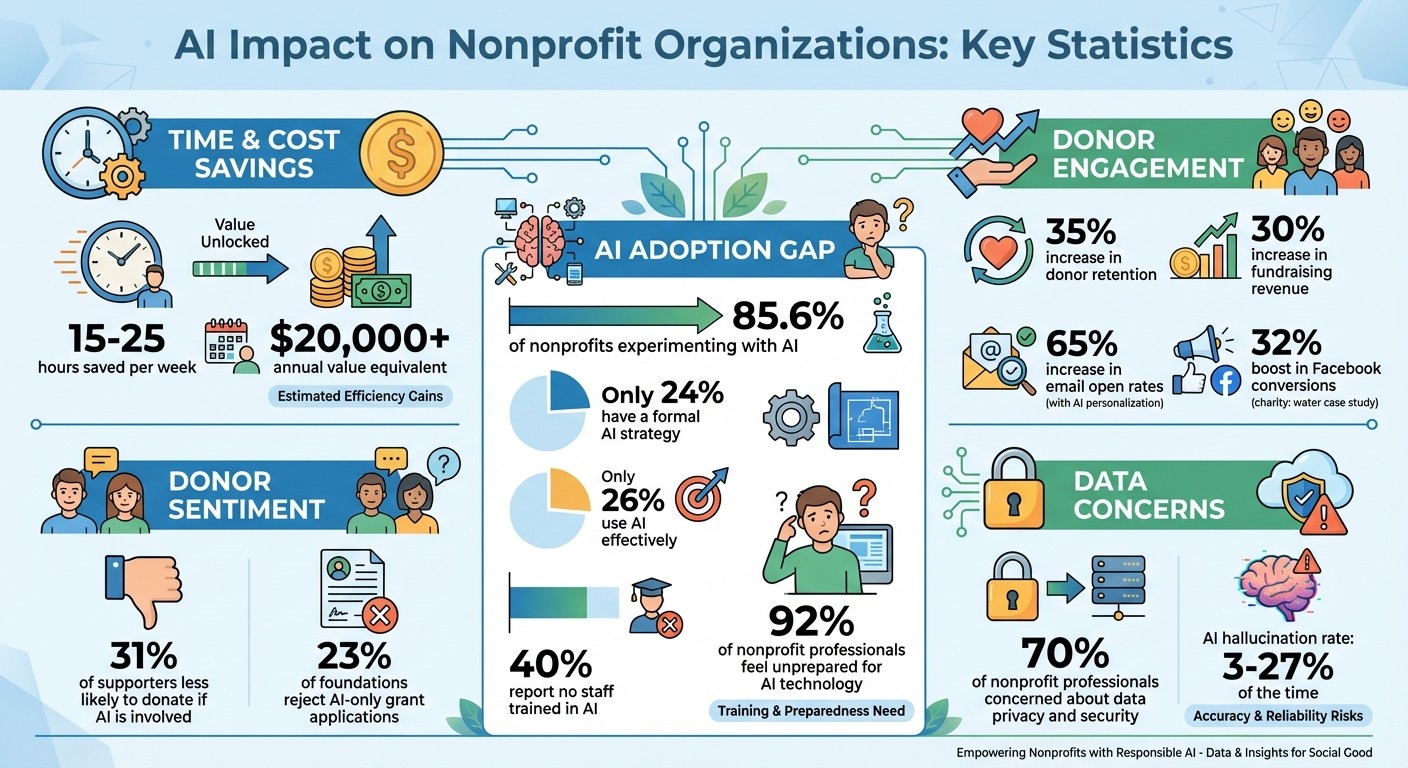
AI Impact Statistics for Nonprofits: Time Savings, Donor Retention, and Adoption Rates
5 Ways Nonprofits Can Use AI to Get More Done (Without Losing Your Voice)
Matching Nonprofit Content Needs to AI Workflows
To make the most of AI tools, it’s important to align your nonprofit’s content needs with what AI can do best. Nonprofits typically create three main types of content: donor engagement materials (like thank-you emails, appeals, and updates), event promotion (social media campaigns, registration pages, volunteer recruitment), and mission storytelling (impact stories, testimonials, and educational posts). Each type requires its own level of personalization and review.
Main Nonprofit Content Types
Donor engagement content includes materials like email newsletters, personalized appeals, welcome series, and donation landing pages. AI can handle the initial drafts and help with audience segmentation, but the final touches - tone, personalization, and emotional connection - are best refined by human hands.
Event promotion involves creating social media campaigns, event registration pages, and recruiting volunteers. AI shines here by repurposing a single event announcement into multiple formats, such as social posts, email reminders, and promotional snippets. For example, in June 2025, Angela Gillisse, Chief of Data and Technology at Community Rebuilders in Michigan, shared that using Microsoft 365 Copilot saved her at least 15 hours per week on drafting and preparing materials. This freed up time for strategic event planning [7].
Mission storytelling includes crafting impact stories, behind-the-scenes content, educational blogs, and testimonials. AI can transform one volunteer’s story into a blog post, pull quotes for social media, and even create an email feature. This method amplifies the story’s reach without adding extra workload for your team [2].
Once you’ve categorized your content, the next step is to decide which tasks AI should handle and which need a human touch for the best results.
Dividing Work Between AI and Staff
Nonprofit Technology Strategist Ron Wille describes an effective division of labor as the "busywork versus heart work" model: AI takes care of the busywork, while humans focus on the heart work [8]. AI can draft content, format documents, optimize for SEO, and manage scheduling - essentially about 70% of the repetitive tasks. Humans, on the other hand, should lead creative direction, build relationships, and make final decisions - tasks that require empathy, strategy, and judgment.
Task Category | AI Tasks | Human Tasks |
|---|---|---|
Strategy | Data-driven trend analysis | Goal setting and audience definition |
Creation | Initial drafting and formatting | Creative storytelling and voice refinement |
Management | Scheduling and distribution | Final approval and relationship building |
Optimization | SEO and multi-platform adaptation | Quality control and fact-checking |
This structure ensures AI handles routine tasks while your team focuses on what truly matters - building connections and driving your mission forward. Once this balance is in place, you’ll be ready to tackle more complex projects, such as grant proposals or major donor campaigns.
Workflow Management and Documentation
With roles and responsibilities clearly defined, it’s time to organize workflows for consistency and quality. Assign clear ownership for each step in the process. A typical setup might include an Editor-in-Chief (to set strategy and oversee brand voice), a Managing Editor (to create content briefs and manage the calendar), and Writers or Subject Matter Experts (to use AI for drafting and ensure accuracy) [6].
Keep all workflow documents in a centralized location, such as a shared drive, Notion workspace, or a platform like Averi AI’s Library feature. These documents should include your brand voice guidelines, audience personas, content categories (like Impact Stories, Behind-the-Scenes, and Calls to Action), and examples of past successful campaigns. This "Brand Core" ensures AI outputs remain consistent and helps new team members get up to speed quickly [6].
Set up human review checkpoints at critical moments: before donor communications are sent, before publishing content with statistics or impact claims, and before launching any public-facing campaigns. These checkpoints are essential to catch AI errors, avoid misleading information, and maintain the personal touch that resonates with donors and supporters.
How to Build AI-Assisted Content Workflows
Creating an AI-assisted content workflow involves three key steps: selecting the right tools, setting up a strong foundation, and building a complete workflow tailored to your needs.
Selecting Your Tools
Nonprofits typically choose between three types of technology: AI Workspaces, Point Tools, and CRM Automation Platforms. Each serves a unique purpose:
AI Workspaces (e.g., Averi AI) centralize content strategy and execution, making them ideal for managing multiple content types across various channels.
Point Tools (e.g., ChatGPT, Jasper) focus on specific tasks, complementing nonprofits that already have a robust tech stack.
CRM Automation Platforms (e.g., Givebutter Plus, Salesforce Nonprofit Cloud) specialize in donor-triggered workflows, such as sending automated thank-you emails or re-engaging lapsed donors.
The choice depends on your nonprofit’s priorities and how you balance AI with human involvement. For example, AI Workspaces might suit organizations juggling diverse content needs, while CRM Automation Platforms excel at automating donor interactions.
Interestingly, while 85.6% of nonprofits are experimenting with AI, only 24% have a formal strategy for integrating these tools [5]. Start by auditing your current systems - your CRM, email platform, social media scheduler, and content storage. Then, select one central system for content planning and creation to avoid the inefficiencies of juggling disjointed tools.
Cost is another consideration. For example, ChatGPT Plus costs $20/month (with nonprofit discounts often available), Canva Pro runs about $12.95/month (eligible nonprofits may access premium features for free), Notion AI is roughly $10/month per user, and Givebutter Plus starts at $29/month for automation features [3][5]. Many platforms offer nonprofit-specific pricing, so it’s worth checking before committing.
Choose tools that align with your organization’s specific goals and resources.
Setting Up Your Foundation
To make the most of AI tools, start by establishing a solid foundation. This includes creating a Brand and Mission Core, organizing donor segments, and defining compliance guidelines.
Brand and Mission Core: Develop a document that includes your mission statement, brand voice, and audience personas (e.g., first-time donors, recurring supporters, volunteers). Store this in your central content system so your AI tools can reference it easily.
Donor Segmentation: Use your CRM to group donors based on behavior and relationship stage. For instance, first-time donors might benefit from a welcome sequence, while recurring donors could receive exclusive updates. Volunteers, on the other hand, may require a different engagement strategy. Remember, AI can’t fix poor-quality data [5].
Compliance and Privacy Guidelines: Draft a clear, one-page policy outlining approved AI tools, permissible data types (avoiding sensitive details like credit card information), and content requiring human review. This step is critical, as 23% of foundations won’t accept grant applications containing content created solely by generative AI [5].
Once your foundation is in place, you’re ready to apply these principles to specific campaigns.
Creating a Complete Workflow Example
Let’s take a new donor welcome journey as an example of how to combine AI, automation, and human oversight:
Trigger Event: A first-time donor makes a contribution through your website. Your CRM (e.g., Givebutter Plus or Salesforce) tags them as a "New Donor" and enrolls them in a welcome sequence.
AI-Assisted Content Creation: Using your Brand and Mission Core, your AI tool (e.g., ChatGPT, Averi AI, or your CRM’s AI feature) drafts a personalized thank-you email. The email includes the donor’s name, donation amount, a specific impact statement, and an invitation to learn more about your programs.
Human Review: A team member reviews the draft for accuracy, personalizes it further, and ensures all impact claims are correct - saving time compared to writing from scratch.
Automated Delivery: Once approved, the email is sent, typically within 48 hours of the donation. Follow-up emails are scheduled, such as an impact story after 30 days and an event invitation after 90 days.
Ongoing Optimization: After several months, review metrics like open rates and repeat donations. Use these insights to refine AI prompts and adjust workflow timing for future campaigns.
Real-world examples highlight the potential of AI-assisted workflows. In 2024, charity: water used AI to optimize Facebook campaigns for monthly giving, boosting conversions by 32% [3]. Similarly, in 2025, Climate Ride leveraged Google's Gemini for Workspace to rebrand its website and enhance campaign emails [9]. These cases illustrate how blending AI efficiency with human oversight can create scalable workflows that strengthen donor engagement and storytelling.
Applying AI Workflows to Nonprofit Use Cases
Effectively integrating AI automation into nonprofit workflows can streamline operations while maintaining the personal connection that makes your mission resonate.
Donor Engagement Workflows
AI can design personalized donor journeys that go beyond acknowledging financial contributions. These journeys typically include three key sequences: a welcome series for new donors, stewardship sequences to share updates on impact, and reactivation campaigns to reconnect with lapsed supporters [2].
For example, a youth-focused nonprofit experienced a 65% increase in email open rates by leveraging AI-powered personalization. They segmented donors based on giving history, engagement patterns, and demographics [1]. The AI workflow also analyzed signals like event attendance and volunteer involvement - beyond just financial data - to identify potential major gift contributors [1]. Nonprofits adopting AI report 35% higher donor retention compared to those using traditional approaches [1].
Here’s how a reactivation workflow might look: Your CRM flags donors who haven’t contributed in 12 months. An AI tool, like ChatGPT Plus ($20/month) or Averi AI, drafts tailored emails referencing past contributions and recent organizational milestones. A team member reviews and adds a personal touch to each email before it’s sent. Follow-up reminders are then scheduled based on how donors engage with the initial message.
Building on these personalized donor workflows, similar AI techniques can enhance event promotion strategies.
Event Promotion Workflows
Promoting events involves managing multiple communication channels and audience groups. AI tools can streamline this process, automating tasks like sending personalized invitations, registration confirmations, reminders, and post-event follow-ups [1][2].
Start by segmenting your audience into groups such as major donors, volunteers, community partners, and general supporters. AI can craft customized invitations for each group, emphasizing their unique connection to your mission. For instance, volunteers might receive messages highlighting their hands-on contributions, while major donors could get updates on how their funding has driven program success.
Set up automated reminders at strategic intervals - 7 days, 3 days, and on the event day. AI can also create social media content tailored to platforms like Instagram, LinkedIn, and Facebook, ensuring your messaging fits each format. After the event, send thank-you emails within 48 hours and follow up with a survey a week later to collect feedback and identify future volunteers or donors.
Beyond event promotion, AI can also support long-term engagement through mission-driven storytelling and content planning.
Mission Storytelling and Content Planning
While donor and event workflows focus on immediate actions, storytelling builds deeper connections over time. AI can help nonprofits maintain consistent messaging without overwhelming small teams, yet only 25% of nonprofits currently have a documented content strategy [2]. AI simplifies this by organizing content into categories like Impact Stories, Behind-the-Scenes, Education, and Calls to Action [2].
Take a single volunteer success story, for instance, and repurpose it across various formats: a feature in your newsletter, multiple social media posts, and a detailed blog interview [2]. This approach ensures your message reaches diverse audiences without requiring entirely new content each time.
To stay organized, create an editorial calendar assigning each content category to a specific week. For example:
Week 1: Share an impact story, such as a beneficiary testimonial.
Week 2: Highlight behind-the-scenes content, like a volunteer preparation video.
Week 3: Publish educational material, such as an infographic on your cause.
Week 4: Promote a call to action, like a matching gift campaign.
AI tools like Notion AI ($10/month per user) or Canva Pro ($12.95/month, often free for eligible nonprofits) can draft initial content for each category, which your team can then refine and personalize [3]. Nonprofits using this structured approach report saving 15–25 hours per week, which can translate to more than $20,000 in annual value [1].
Managing AI Use and Measuring Results
85.6% of nonprofits are already experimenting with or using AI in some way, yet only 24% have a formal strategy in place [5]. Without a clear plan, organizations risk facing issues like data breaches or losing donor trust, which could outweigh the potential benefits of AI. Before expanding its use, nonprofits should implement strict quality measures and robust data safeguards. These steps create a solid foundation for consistent AI integration, as outlined in the workflow examples provided.
Creating AI Policies and Guidelines
Developing a written AI policy is a crucial first step. This policy should focus on three key areas: data protection, transparency, and accountability. For instance, it’s essential to prohibit staff from entering personally identifiable information - such as donor addresses, employer details, or credit card data - into third-party AI tools [5,16,17]. Concerns about data privacy and security are top of mind for 70% of nonprofit professionals [5].
Transparency is equally important. While AI can improve efficiency, 31% of supporters say they would be less likely to donate if they knew AI was involved [5]. To address this, be upfront about how AI is used. For example, you might share that "AI assists in drafting initial content, which is then reviewed and personalized by our team." Additionally, keep in mind that 23% of foundations reject AI-generated grant applications [5], so it’s vital to document which tools are approved for specific tasks.
Protect sensitive data by implementing role-based access controls. Use platforms with built-in permission systems that restrict donor data processing and adhere to high encryption and data retention standards [16,17].
Maintaining Quality Control
AI tools, including chatbots, can "hallucinate" or generate inaccurate information 3% to 27% of the time [4]. This makes human oversight essential. Develop a fact-checking checklist requiring staff to verify statistics, quotes, and URLs before publishing any content. Additionally, ensure that tone and accuracy align with your organization’s standards.
Your policy should clearly define prohibited uses for AI. For example, AI should not fabricate donor testimonials, generate quotes from beneficiaries, or provide regulated advice (such as legal or medical guidance) without expert review [6]. Require staff to document which parts of content were AI-generated and which were manually created. Maintaining a style guide that outlines your organization’s voice, tone, and messaging priorities can help ensure consistency.
Insurance coverage is another consideration. Traditional Directors and Officers (D&O) insurance may not cover risks related to AI-generated inaccuracies or biases [10]. Before expanding AI use into higher-risk areas, consult with your insurer and legal counsel to address potential liabilities.
Scaling AI Workflows Across Your Organization
Start small by piloting low-risk tasks, such as summarizing meeting notes, before moving on to donor communications [5,17]. This phased approach allows staff to build confidence with AI while minimizing potential risks. Notably, 40% of nonprofits report that no one on their staff is currently trained in AI [5], so providing adequate training is essential before scaling up.
The American Cancer Society offers a compelling example of scaling AI successfully. In 2022, Ben Devore, Director of Media Strategy, led a machine learning initiative to enhance digital advertising campaigns. By using AI to identify likely donors and engage them with interactive banners, the organization achieved a nearly 70% donor engagement rate and exceeded its initial revenue benchmark by 117% [10].
Once strong policies and quality controls are in place, nonprofits can cautiously expand AI’s role across their operations. Documenting successful practices in a shared library or knowledge base ensures that lessons learned are accessible for future projects. Tools like Averi AI can help by automatically capturing workflows, brand guidelines, and past campaigns, enabling teams to build on institutional knowledge rather than starting from scratch. This methodical approach allows nonprofits to move from trial phases to producing consistent, measurable outcomes across their organization.
Next Steps
Now that you've explored how AI can reshape nonprofit content workflows - from crafting donor thank-you emails to promoting events and sharing your mission - it's time to take the next step. Start with a single pilot project. Focus on one high-volume task, such as writing social media captions or managing volunteer schedules, where you can test efficiency without jeopardizing donor relationships [1][5]. This targeted approach helps your team gain confidence while delivering measurable results.
Before diving in, create a clear AI policy. Outline approved tools, data protection measures, and transparency protocols. With 92% of nonprofit professionals feeling unprepared for AI technology [5], having well-defined guidelines ensures your team is protected and your organization's reputation remains intact. Be sure to document which tools are authorized for specific tasks.
Nonprofits already using AI report saving 15–25 hours per week - equivalent to over $20,000 annually - while also seeing a 35% boost in donor retention and a 30% increase in fundraising revenue [1][5].
As you expand your AI efforts, consider a platform like Averi AI. This tool integrates AI speed with human expertise, offering a centralized workspace where strategy, drafting, and execution come together seamlessly. By leveraging your Brand Core, content library, and previous campaigns, the AI becomes smarter with each project. And when needed, vetted experts are available to step in. This streamlined system eliminates the need for juggling multiple tools, making implementation faster and more efficient.
Take the first step today. Sign up for the AI Marketing Workspace, launch your first AI-assisted campaign, and watch as your team gains capacity without adding extra staff. Start small, track your progress, and see how AI can transform your nonprofit's impact.
FAQs
How can nonprofits protect sensitive data when using AI tools?
Nonprofits can protect sensitive donor and beneficiary information while embracing AI by embedding data privacy into every step of their processes. Start by selecting AI platforms that clearly define data ownership, retention, and usage policies. Opt for tools that encrypt data during both transmission and storage, limit retention to the duration of the task, and offer advanced options such as private or on-premise servers. Contracts should include safeguards like access controls, audit logs, and data deletion rights to ensure sensitive information remains secure.
To further reduce risks, focus on minimizing the use of personally identifiable information (PII). Techniques like anonymization, tokenization, or data aggregation can help limit exposure. Share only what’s absolutely necessary - such as donor segment sizes instead of full names. Training staff to carefully review AI-generated content for any accidental disclosures can provide an additional layer of protection.
It’s also crucial to comply with U.S. privacy laws like the CCPA and adhere to specific regulations, such as HIPAA for health-related programs. Regular audits of AI vendors, updates to privacy notices, and maintaining a transparent data privacy policy not only ensure compliance but also foster trust with donors. By thoughtfully selecting vendors, minimizing data use, and staying up-to-date with legal requirements, nonprofits can harness the power of AI responsibly without compromising privacy.
How can nonprofits start using AI to improve their content workflows?
To begin incorporating AI into your nonprofit’s content workflows, start by evaluating your current process and establishing clear objectives. Look for repetitive, time-consuming tasks such as brainstorming ideas, conducting research, or drafting initial content. Identifying these areas will help you determine where AI can save time while still ensuring critical tasks retain human oversight.
The next step is to experiment with a simple AI-assisted workflow through a pilot project. For instance, you could use AI to draft a series of fundraising emails. Provide the AI with a detailed brief, allow it to generate initial drafts, and then refine those drafts to align with your organization’s unique voice and messaging. As you work through this, track both the time saved and the quality of the output to measure its effectiveness.
Lastly, integrate AI tools into your existing platforms, such as your CMS or email marketing software, to make the process more efficient. Begin with small-scale implementations, adjust as needed, and expand once you’ve demonstrated clear benefits. By following these steps, your nonprofit can leverage AI to produce meaningful content while conserving valuable time and resources.
How can AI-assisted workflows help nonprofits engage with donors more effectively?
AI-powered workflows are transforming how nonprofits connect with their supporters, making communication faster, more precise, and deeply personal. By analyzing donor data, these tools can automatically group supporters, predict who is most likely to give, and create customized messages - whether it’s an email, a social media update, or a heartfelt thank-you note - all while maintaining the organization’s unique voice. This automation significantly reduces manual work, freeing up staff to focus on nurturing genuine relationships.
These workflows integrate effortlessly with tools nonprofits already use, such as CRMs, email platforms, and content calendars. This ensures that all communications remain consistent and aligned with the organization’s brand. Nonprofits can launch campaigns quickly, follow up with donors at the right moments, and tailor outreach for various donor segments - all without adding extra strain to their teams. By taking repetitive tasks off their plates, teams can spend more energy on activities that truly make an impact, strengthening donor relationships, encouraging repeat contributions, and making the most of their resources.
Related Blog Posts

Zach Chmael
CMO, Averi
"We built Averi around the exact workflow we've used to scale our web traffic over 6000% in the last 6 months."
Your content should be working harder.
Averi's content engine builds Google entity authority, drives AI citations, and scales your visibility so you can get more customers.