
In This Article
Practical ASO tactics for consumer apps: optimize titles, keywords, visuals, ratings, content, and mobile speed—use AI and A/B tests to boost visibility and downloads.
Updated:
Trusted by 1,000+ teams
Startups use Averi to build
content engines that rank.
SEO for consumer apps revolves around App Store Optimization (ASO), which focuses on improving app visibility and driving organic downloads through Apple App Store and Google Play Store search algorithms. With 65–70% of app downloads originating from organic searches, ASO is essential for growth. Unlike traditional SEO, ASO emphasizes concise keywords, conversion rates, and user behavior within app stores. Here's a quick breakdown:
Keyword Optimization: Prioritize keywords in app titles, subtitles, and metadata. Use tools like Sensor Tower or App Annie for keyword research.
Visuals: High-quality icons and screenshots significantly impact user decisions - 60% of installs depend on them.
User Feedback: Ratings and reviews directly affect rankings. Apps with a rating above 4.0 stars see higher conversions.
Content Strategy: Leverage blog content to capture users outside app stores, focusing on tutorials, comparisons, and FAQs.
AI Tools: Use AI for keyword research, content creation, and performance tracking to save time and improve efficiency.
Success requires constant monitoring of metrics like conversion rate, visibility, and download velocity, along with regular updates to metadata and visuals. Apps that refresh their listings every 4–6 weeks maintain a 30% higher visibility score. By combining ASO with a strong content strategy and AI-driven tools, you can drive consistent downloads and engagement without relying heavily on paid ads.
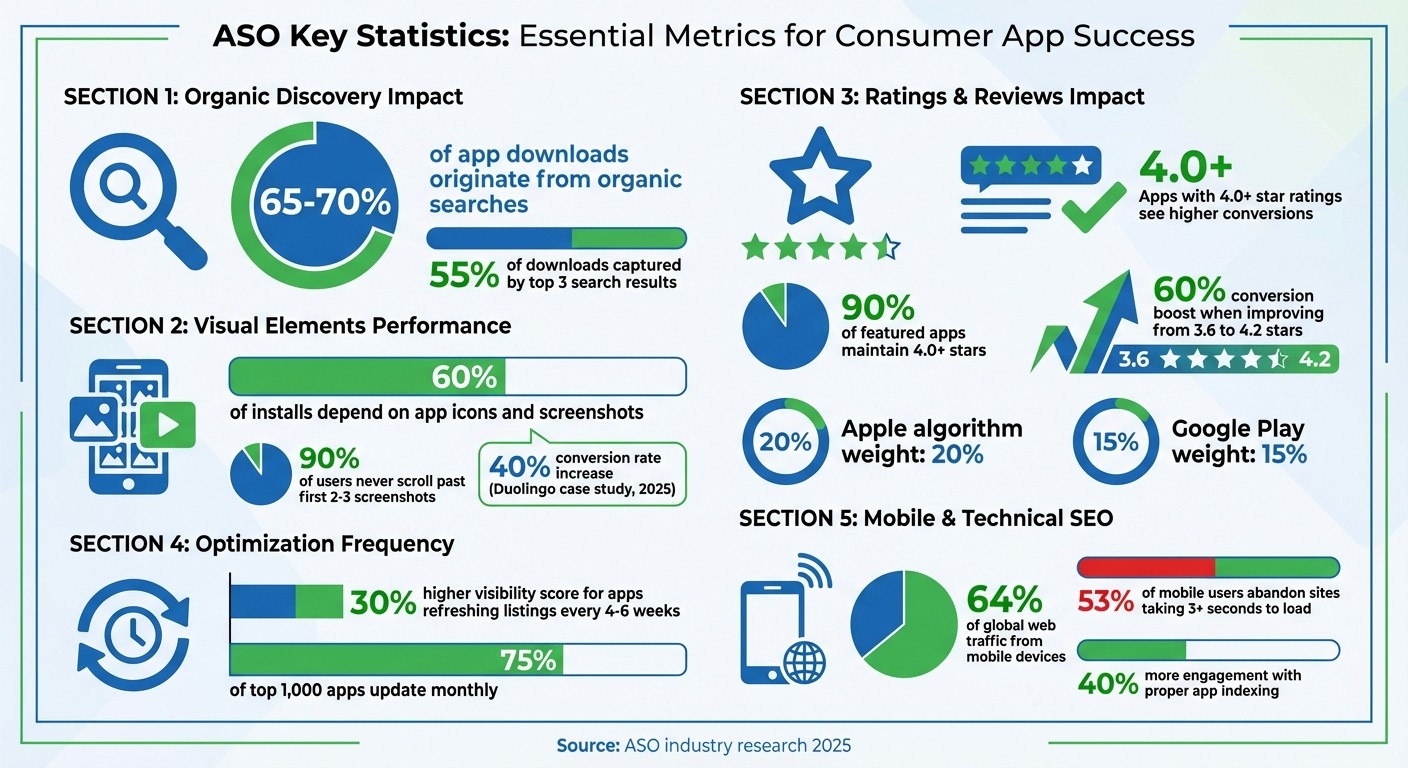
ASO Key Statistics and Performance Metrics for Consumer Apps
App Store Optimization: The Proven ASO Framework for 2026
App Store Optimization (ASO) Basics
ASO is what helps your app stand out in crowded marketplaces. From your app's title to its visuals, every element influences whether users can find your app and decide to hit "Install." Since Apple and Google handle these factors differently, tailoring your approach to each platform is essential for boosting visibility and downloads. Let's break down the essentials of optimizing keywords and visuals to grow your app's organic reach.
Keyword Research for App Stores
Your app title carries the most weight in search rankings across both Apple and Google app stores [5][9]. Place your most important keyword at the very beginning. For example, "Habit Tracker - HabitKit" performs better than "HabitKit - Habit Tracker." This strategy, dubbed "Title-First", was key to HabitKit's success in 2025, when Sebastian Roe secured a top-five rank for "habit tracker", driving $15,000 in monthly recurring revenue through organic growth [1].
On iOS, the 100-character keyword field is a hidden but crucial tool. Use commas without spaces (e.g., "sleep,meditation,relax") to maximize space, avoid repeating words from your title or subtitle, and stick to singular terms since Apple's algorithm handles plurals automatically [2][3][6]. Note that Apple does not index the app description for keywords, so this field is your only chance to add extra search terms [3][6].
Google Play’s approach is more like traditional web SEO. The platform indexes the entire 4,000-character description, so aim for a 1–2% keyword density by naturally repeating your core terms 3–5 times throughout the text [2][3]. Google Play also indexes user reviews, so pay close attention to the language your users use in their feedback [2].
For keyword research, tools like Sensor Tower ($99+/month), App Annie ($100+/month), and Mobile Action ($50+/month) can help you identify high-traffic terms and assess their difficulty [9]. Targeting the right keywords is critical - since the top three search results capture 55% of downloads - focusing on quality over sheer volume makes a big difference [9].
Optimizing Visuals and Metadata
Your app's icon and first screenshot are make-or-break elements. 60% of users decide to install an app based on these two visuals alone [3]. High-contrast icons with bold, distinctive shapes tend to perform better, especially in competitive categories like health or finance, where minimalist designs can get lost [10].
For screenshots, start with a "Hero Shot" that highlights your app's main value proposition, then showcase key features, and finish with social proof like awards or testimonials [7][9]. Since 90% of users never scroll past the first 2–3 screenshots, put your strongest visuals upfront. Add captions that focus on outcomes, not just features - for example, "Achieve Your Fitness Goals" instead of "Track Your Steps." Apple even uses Optical Character Recognition (OCR) to index text in screenshots, so including keywords in captions can improve search visibility [2].
App preview videos also play a role. Keep them under 30 seconds, with the first 3–5 seconds designed to grab attention. Since many users watch without sound, captions are a must [5][9]. Duolingo saw its conversion rate jump by 40% in 2025 after refining its ASO strategy, leading to an estimated 2.3 million additional downloads per month without increasing ad spend [7].
Regular updates to your metadata are crucial. Refresh your listings every 4–6 weeks - apps that do so maintain a 30% higher visibility score than those with static content [2]. Google Play Console's built-in A/B testing tools allow you to experiment with different icons and screenshots. Test one element at a time to accurately measure the impact [7][8].
Managing Reviews and Ratings
Reviews and ratings are more than just social proof - they directly influence rankings and conversions. Apple’s algorithm assigns about 20% weight to ratings, while Google Play gives them 15% [7]. Improving your app's rating from 3.6 to 4.2 stars can boost conversion rates by 60%, and 90% of featured apps maintain a rating of 4.0 stars or higher [5][3][6].
Timing matters when asking for reviews. Prompt users at meaningful milestones, like completing a task or achieving a goal [11][13]. This increases the chances of positive feedback. However, avoid only asking after positive actions - prompting after milestones like a week of active use can help build a more balanced and authentic rating profile [10].
Responding to negative reviews is equally important, especially when they mention issues like "bugs" or "crashes" [7]. Use your response to show you’re addressing the problem, such as, "We fixed this in v2.3!" This approach often turns dissatisfied users into advocates [10][13]. Both Apple and Google penalize fake or incentivized reviews, so focus on earning genuine feedback from your users [11][12].
Creating Content That Drives Organic Traffic
ASO brings users to your app page, but a well-crafted website content strategy turns that interest into action. Did you know that one in four app users finds an app through search engines? About 40% of global users rely on platforms like Google and Bing to discover new apps [18]. By building a strong content strategy, your blog can become a powerful discovery tool, complementing ASO by capturing high-intent users directly from search engines.
Content Types That Work for Apps
Certain content formats are especially effective for apps. For example:
How-to guides: These address specific user challenges while naturally showcasing your app's features. A photo editing app could publish a guide like "How to Edit Photos Like a Pro on Android", highlighting its capabilities [18].
Comparison articles: Pieces such as "Top 5 Meditation Apps Compared" engage users who are weighing options and position your app against competitors [18][19].
Feature breakdowns and tutorials: Articles like "Using Our App to Improve Your Daily Routine" spotlight specific functionalities and benefits [18].
The trick is aligning content with search intent. For instance, someone searching for "how to track habits" wants actionable solutions, not a sales pitch. This approach helps extend your app’s reach beyond app store listings, capturing users earlier in their discovery process. Once you’ve got their attention, the next step is building credibility through EEAT.
Building Credibility with EEAT and AI Search
Google’s EEAT principles - Expertise, Authoritativeness, and Trustworthiness - are essential for ranking, especially as AI-generated content now dominates 86.5% of the top 20 search results on Google [15]. To set your content apart from generic AI material, include detailed author bios with verifiable credentials and practical experience, such as phrases like "In our testing of 15 tools..." [15]. Linking to professional profiles on platforms like LinkedIn or established industry publications further boosts your authority [19].
The rise of AI search engines like ChatGPT, Perplexity, and Google’s AI Overviews introduces a new challenge: Generative Engine Optimization (GEO). With 91.4% of content cited in AI Overviews including AI-generated elements, it’s critical to adapt [15]. To increase your chances of being cited:
Provide a direct, 40–60 word answer to your target question within the first 200–300 words of your content.
Use clear H2 and H3 headings for better organization.
As Ramona Sukhraj from HubSpot puts it:
"If you're doing SEO well, you're already the majority of the way to effective GEO. The foundations are the same: quality content, credible information, and technical soundness" [16].
Here’s how traditional SEO compares to the AI-driven era:
Traditional SEO | AI-Era SEO |
|---|---|
Focus on keywords | Focus on intent and entities |
Aim for page 1 rankings | Aim for AI citations and snippets |
Drive clicks to your site | Become a trusted source for AI systems |
Publish high volume | Publish in-depth, authoritative content |
Compete for position | Compete for recommendations |
Using structured data, such as SoftwareApplication and HowTo schema, can help AI tools and search engines better understand your app and display rich snippets [18][19]. Additionally, since 72% of users rely on voice search to find businesses, structuring content to answer "who, what, when, where, why, and how" in a conversational tone is increasingly important [16].
Using AI Tools to Automate Content Production
Maintaining a steady content schedule is vital, and AI tools can make this easier. Businesses that combine AI with human oversight report a 67% improvement in content quality [15]. Tools like Averi AI handle keyword discovery, drafting, SEO optimization, and even publishing to platforms like Webflow, Framer, or WordPress [14][15].
Averi’s process starts by analyzing your website to understand your business, identifying ideal customer profiles, and creating a comprehensive content plan. It continuously researches high-intent keywords and organizes content ideas into formats like how-to guides, comparisons, and listicles [14]. Once a topic is approved, Averi conducts detailed research using hyperlinked, credible sources, builds an SEO and GEO-friendly structure, and generates a draft complete with FAQs and summaries. You can then refine this draft collaboratively before publishing [14].
Zach Chmael, CMO of Averi, explains:
"AI-generated content isn't good or bad for SEO. Your process for creating AI-assisted content determines whether it helps or hurts your rankings" [15].
Other tools, like Scalenut, use Natural Language Processing (NLP) to enhance semantic relevance and identify “People Also Ask” (PAA) questions for content outlines [17][4]. AI should complement human expertise, acting as a multiplier rather than a replacement [15]. In fact, AI referral traffic to small and medium-sized business websites grew by 123% in just a few months, proving that the right strategy can scale visibility without sacrificing quality [16].
Technical SEO and Mobile Optimization
Technical SEO lays the groundwork to ensure your content is accessible, loads quickly, and provides a smooth mobile experience. This is especially crucial for consumer apps, as 64% of global web traffic now comes from mobile devices, and 53% of mobile users abandon sites that take longer than three seconds to load [23][24].
Mobile-First Design Requirements
Google prioritizes your mobile site for indexing and ranking. If your mobile experience falters, your rankings take a hit. For instance, in 2023, a UK-based travel agency saw a 55.5% drop in mobile rankings and lost $133,200 in monthly revenue after neglecting content parity between their desktop and mobile sites during an update [23].
Speed is the cornerstone of mobile optimization. Core Web Vitals - which include loading performance (LCP), interactivity (TBT), and visual stability (CLS) - are now direct ranking factors. Aim for an LCP under 2.5 seconds and a CLS below 0.10 [23]. Walmart demonstrated the importance of speed when cutting their page load time by one second led to a 2% increase in conversion rates [23]. A fast, optimized mobile site not only improves user experience but also enhances app store and search rankings [2][3].
Beyond speed, focus on usability. Touch targets should be at least 44×44 pixels, and essential information must appear above the fold. As SEO consultant Andrew Charlton emphasizes:
"The web is mobile, so use mobile-first principles. Design, develop, and review for mobile > desktop" [23].
Once your mobile experience is streamlined, the next step is optimizing your visual assets.
Optimizing Images and Videos for Search
Visuals play a pivotal role in driving app conversions. Consider this: the first three screenshots influence 90% of install decisions, and preview videos can triple install rates [5]. But poorly optimized visuals can slow down your site, undermining both rankings and user experience.
Start with modern file formats. Replace JPEGs and PNGs with WebP or AVIF to reduce file sizes [20][23]. Use <img> or <picture> tags for images, as search engines do not index CSS background images. Add the srcset attribute to serve appropriately sized images based on screen resolution [20][23]. For videos, implement the loading="lazy" attribute to defer loading until the user scrolls near them [21][23].
Metadata is equally important. Use descriptive filenames (e.g., meditation-app-dashboard.webp instead of IMG_1234.webp) and craft alt text with relevant keywords to help search engines understand your visuals [20][22]. Add structured data like ImageObject or VideoObject schema to enable rich search results [20][25]. For videos, include transcripts, captions, and subtitles to improve accessibility [22].
Finally, submit dedicated image and video XML sitemaps to ensure search engines can discover all your media assets [20][22]. These steps not only enhance load times but also turn your visuals into assets that boost your app's visibility in search results.
Navigation and Internal Linking Structure
A well-organized site structure is essential for helping search engines understand and prioritize your content. Internal linking plays a key role, guiding crawlers to your most important pages and improving indexation [4].
Connect your homepage to core pages like features, pricing, and use cases, and ensure your URLs align with your app's deep linking structure. Use descriptive anchor text that incorporates keywords - "learn how to track habits with our app" is far more effective than "click here" [4]. This approach signals relevance to search engines and enhances user engagement.
If you've implemented app indexing and deep linking, make sure your web URLs mirror your app content exactly (e.g., yoursite.com/content matches yourapp://content). This alignment allows Google to display "Install" or "Open in App" buttons in mobile search results, driving higher engagement. Apps with proper indexing see 40% more engagement from search traffic compared to web-only experiences [3].
Use Google Search Console's App Indexing report to confirm your implementation and monitor which app pages appear in search results [3]. By linking your website and app seamlessly, technical SEO becomes a direct driver of downloads and user engagement.
Tracking Performance and Using AI for Optimization
Improving app visibility and downloads isn't a one-and-done task - it’s an ongoing process. By combining solid SEO practices with continuous tracking and AI-driven insights, app performance can be fine-tuned over time. Success hinges on monitoring key metrics and leveraging AI tools to uncover new opportunities.
Key Metrics to Monitor
Start with visibility metrics to gauge how well your app is being discovered. This includes tracking impressions, keyword rankings (especially in the top 10), and Search Ads Popularity (SAP) scores. Since organic app store searches make up 65–70% of downloads, these metrics are critical to your growth strategy [5].
Next, focus on conversion metrics. Your Conversion Rate (CVR) - the percentage of store page visitors who install your app - is a key indicator of success. With the average CVR on the App Store hovering around 33.7% [5], anything below 20% signals the need for immediate attention [7]. Also, keep an eye on Download Velocity, which measures the number of installs over a short period (24–72 hours). Spikes here can significantly boost your rankings [2].
User quality and retention metrics are equally important. Monitor retention rates on Day 1, Day 7, and Day 30, along with Daily and Monthly Active Users (DAU/MAU) and uninstall rates [5][14]. App stores increasingly prioritize post-install behavior over sheer download numbers [6].
Finally, don’t overlook social proof metrics. Aim for an average star rating of 4.0 or higher - 90% of featured apps meet this benchmark - and respond to user reviews within 24–48 hours. A boost in ratings from 3.6 to 4.2 stars can improve conversion rates by as much as 60% [5].
These metrics form a foundation, but AI-powered tools take analysis further by identifying trends and competitor strategies.
AI-Powered Competitive Analysis
AI tools like Averi, AppTweak, and Sensor Tower are game-changers for competitive analysis. They use natural language processing (NLP) to identify content gaps, high-intent long-tail keywords, and actionable recommendations from user-generated content [1].
A great example is Duolingo, which improved its App Store conversion rate by 40% in 2025 through AI-driven ASO optimization. This led to an estimated 2.3 million additional organic downloads per month - without increasing marketing spend [7].
AI also monitors ranking shifts in real time, allowing for quick responses to changes. As Stormy AI explains:
"The algorithm now understands 'context' rather than just matching character strings, making traditional keyword stuffing a relic of the past." [2]
Manual vs. AI-Driven Workflows
When comparing manual SEO efforts to AI-driven workflows, the advantages of automation become clear. Here's a breakdown:
Factor | Manual SEO Process | AI-Driven Workflow (e.g., Averi/Stormy) |
|---|---|---|
Time to Completion | Days to weeks for research and content | Minutes to hours via automation |
Repeatability | Low; relies on specialist expertise | High; consistent and autonomous cycles |
Total Cost | High (specialist salaries or agency fees) | Lower (SaaS subscriptions, scalable output) |
Data Depth | Limited to manual exports | In-depth competitor and semantic analysis |
Scalability | Linear (requires more team members) | Exponential (scales without extra staff) |
A hybrid approach works best. Use AI for tasks like data analysis, keyword discovery, and content drafting, while reserving human input for strategic decisions, refining your brand voice, and responding to customer feedback [6][7][14]. A structured 6-week optimization cycle can help: dedicate Weeks 1–2 to research, Week 3 to implementation, Weeks 4–5 to monitoring, and Week 6 to analysis [2]. Regularly updating metadata every 4–6 weeks can maintain a 30% higher visibility score compared to static apps [2].
As Sebastian Roe, creator of HabitKit, advises:
"If you manage to secure a good ranking on the App Store, you don't need a big marketing budget and you can compete with bigger brands." [1]
AI tools make this level of success achievable without the need for a full-time ASO team.
Conclusion
Building an effective SEO strategy for consumer apps requires a blend of ASO, high-quality content, technical precision, and AI-powered tools. When these elements come together, they create a framework that drives consistent app growth.
ASO remains the cornerstone, accounting for 65–70% of organic app discoveries. Supporting this, well-crafted content and technical optimization improve relevance and safeguard against penalties [1][5]. AI tools further enhance this process by automating tasks like keyword research, A/B testing, and content creation. This frees up your team to focus on strategic priorities and refining your brand [15][4]. Together, these components work in harmony to achieve growth that's both cost-effective and sustainable.
Technical improvements not only elevate rankings but also boost conversion rates and fuel organic growth, all while reducing acquisition costs [1][8]. Apps that update their listings monthly see a 30% increase in visibility compared to those that remain static, a practice followed by 75% of the top 1,000 apps [2][8].
Sebastian Roe of HabitKit highlights the power of strong App Store rankings in helping smaller brands compete with industry giants [1]. This underscores the potential of a well-executed SEO approach: achieving growth without relying heavily on paid advertising.
Today’s success depends on optimizing for user intent and semantic relevance rather than just focusing on keywords [2][15]. With 86.5% of top-ranking content already using AI tools [15], the challenge isn’t whether to integrate AI - it’s about using it effectively while maintaining the human touch that builds trust and authority.
A six-week cycle - researching, implementing, monitoring, and analyzing - can help streamline your efforts [2]. Focus on the metrics that matter most, such as conversion rates, download velocity, retention, and user ratings. Let AI handle repetitive tasks while you concentrate on the strategic elements that only human expertise can deliver: shaping your brand voice and strengthening customer relationships.
FAQs
How do I pick ASO keywords that can actually rank?
To select ASO keywords that perform well, start with detailed research, emphasizing search volume, relevance, and competition. Understand app store algorithms, such as semantic clustering and text indexing, to uncover keywords with strong ranking potential. Place these keywords strategically in your app's metadata - like the app name, subtitle, and keyword field - and ensure regular updates. Focus on matching keywords to user intent and current search trends to improve both visibility and conversions.
What should I A/B test first on my app store page?
When it comes to A/B testing your app store page, start with your visual assets, focusing on the first three screenshots. These play a crucial role, impacting nearly 90% of install decisions. Experimenting with different visuals, layouts, or messaging in these key screenshots can make your app more appealing, boosting both click-through and conversion rates.
How can I measure whether ASO or my website content is driving installs?
To figure out whether ASO or website content is leading to more app installs, focus on tracking organic traffic and conversion metrics for each channel. For ASO, keep an eye on app store rankings, search visibility, and how often views turn into downloads. For website content, use analytics tools to track referral traffic, click-through rates, and app store conversions. By comparing the traffic volume and quality from both sources, you can pinpoint which approach is driving better results.
Related Blog Posts

Zach Chmael
CMO, Averi
"We built Averi around the exact workflow we've used to scale our web traffic over 6000% in the last 6 months."
Your content should be working harder.
Averi's content engine builds Google entity authority, drives AI citations, and scales your visibility so you can get more customers.