
In This Article
SEO tactics nonprofits can use: set goals, run audits, target local keywords, optimize content, fix technical issues, and leverage AI.
Updated:
Trusted by 1,000+ teams
Startups use Averi to build
content engines that rank.
Nonprofits often struggle with SEO due to limited resources, yet organic search drives 38% of website traffic for many organizations. With only 37% of nonprofits having a strategy in place, there’s a clear opportunity to improve visibility and reach. This guide simplifies the process by focusing on:
Setting clear goals: Align SEO metrics (e.g., donations, volunteer sign-ups) with your mission.
Running a baseline audit: Use tools like Google Search Console to identify issues (e.g., page speed, mobile usability).
Understanding your audience: Tailor content for beneficiaries, donors, and volunteers by analyzing search intent.
Keyword strategy: Focus on long-tail, local, and branded keywords to connect with your community.
Content optimization: Use structured data (e.g., schema markup), E-E-A-T principles, and storytelling to build trust.
Technical SEO: Ensure crawlability, fix errors, and improve site speed for better rankings.
Tracking performance: Monitor metrics like organic traffic, keyword rankings, and conversions using GA4 and GSC.
With AI tools like Averi AI, nonprofits can simplify SEO tasks like keyword research and content creation, allowing small teams to focus on their mission. The goal isn’t just traffic - it’s connecting with those who need your services, want to donate, or wish to volunteer.
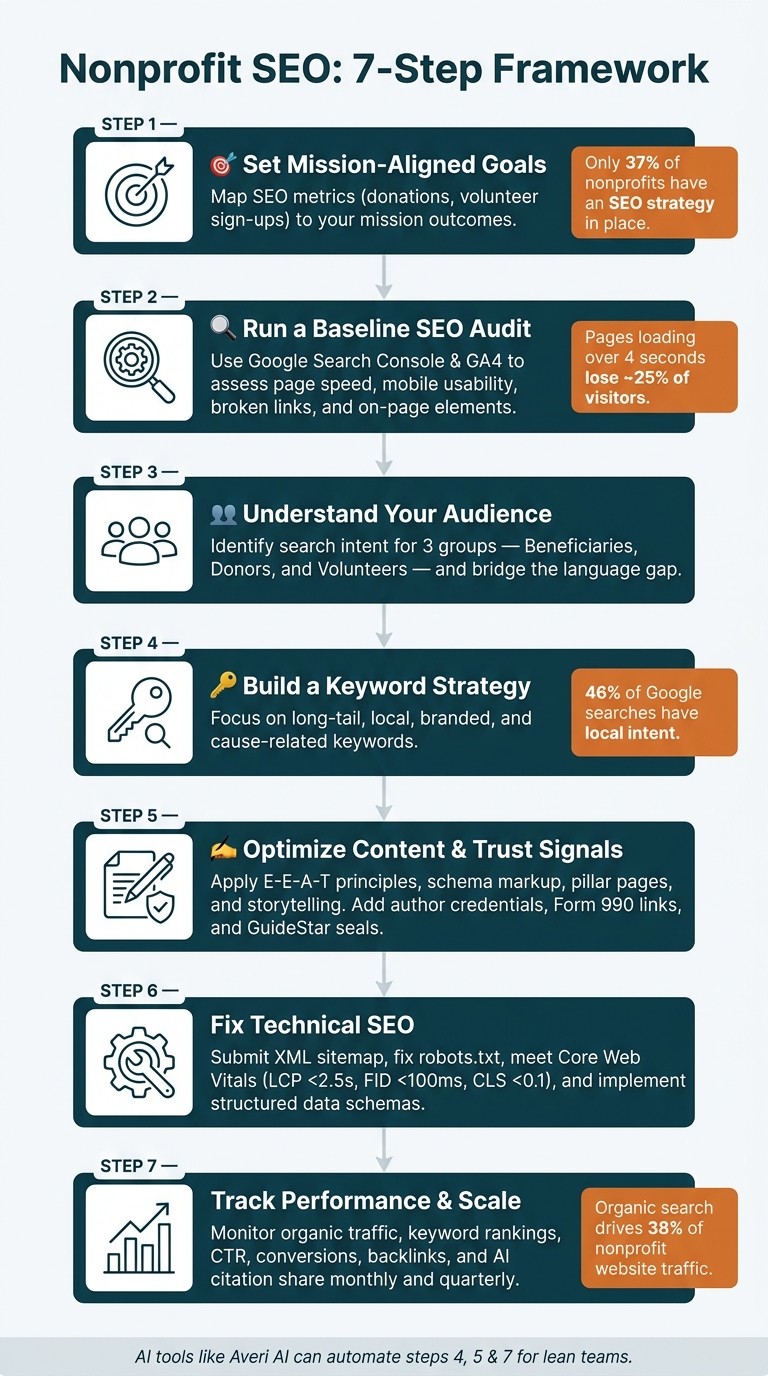
Nonprofit SEO Strategy: 7-Step Framework to Boost Visibility
Nonprofit SEO Strategy 101 [Nonprofit Marketing with Jake Bohall, Part 6]
Setting Goals and Establishing a Baseline
Before diving into SEO improvements, it’s crucial to assess where you currently stand and outline clear objectives. Without this foundation, any SEO efforts risk being inefficient - something nonprofits with limited resources can’t afford.
Define SEO Goals That Align With Your Mission
The best way to create an SEO strategy is by starting with your mission. Think about this: What do you want visitors to do on your website? Common goals include securing donations, attracting volunteers, providing services, or educating people about your cause. Each of these actions can be tied to a specific, measurable SEO goal.
Mission Outcome | Measurable SEO Metric | Key Page |
|---|---|---|
Increase funding | Conversion rate on donation pages; organic traffic to "Ways to Give" | Donation landing page |
Recruit volunteers | Application submissions; traffic to volunteer FAQ | Volunteer sign-up page |
Support beneficiaries | Rankings for "how to get help" terms; resource downloads | Program/services pages |
Build credibility | Branded search volume; backlinks from .gov/.edu sites | About page, Annual Report |
Once you know which goals connect to which pages, set up GA4 conversion tracking for actions like donations, newsletter sign-ups, or volunteer applications. Simply tracking visits won’t give you the full picture - understanding what visitors actually do is key. [1][9]
Run a Baseline SEO Audit
A baseline audit doesn’t have to be overwhelming. Start with Google Search Console to see which queries are already driving traffic to your site. Pair this with Google Analytics 4 to understand how visitors behave once they arrive.
From there, focus on four essential checks:
Page speed: Use PageSpeed Insights to ensure your homepage loads quickly. If it takes longer than four seconds, about 25% of visitors will leave before even engaging with your site. [6]
Mobile usability: Since Google prioritizes mobile-first indexing, make sure your site works smoothly on mobile devices.
Broken links and "noindex" tags: Scan for any broken links or accidental "noindex" tags that could block pages from being seen.
On-page elements: Review your top 10 pages for SEO basics like unique title tags (50–60 characters), meta descriptions (150–160 characters), and proper heading structures.
Additionally, test whether your organization is mentioned in AI-powered tools like ChatGPT, Gemini, or Perplexity. By early 2026, AI Overviews appear in over 13% of searches [2], making citations in these summaries just as important as traditional search rankings.
Use the insights from your audit to better understand how your audience searches and interacts with your content.
Identify Your Audience and Their Search Intent
Nonprofits typically serve three main groups, each with distinct search behaviors:
Beneficiaries seek direct assistance (e.g., "free legal aid for renters in Chicago").
Donors are ready to give (e.g., "tax-deductible donation for food banks").
Volunteers look for specific opportunities (e.g., "animal shelter volunteer requirements near me").
Avoid treating these groups as a single audience. Instead, analyze your Google Search Console Queries report to see the exact phrases people use to find your site. Often, there’s a gap between how your team describes your work and how your audience searches for it. Bridging this gap - by using the language your audience actually types into search engines - is where meaningful SEO progress begins. [1]
"Traditional 'page one ranking' is no longer sufficient as a goal if the person reading page one never clicks." - Melinda Bartley, Charitable [2]
This insight is especially relevant today. In 2025, a study of 17 nonprofits revealed a 13% drop in organic traffic year-over-year after Google expanded AI Overviews. However, during the same period, branded searches rose by nearly 19% [6]. The lesson? Your goals should focus on both visibility in AI summaries and growing direct brand recognition - not just raw traffic numbers.
Building a Keyword Strategy for Nonprofits
Find Keywords for Programs, Donations, and Education
Once you've identified your key audiences - beneficiaries, donors, and volunteers - the next step is understanding the exact search terms they use. This ensures your messaging aligns with their needs. Start by checking Google Search Console to uncover the real queries driving traffic to your site. Then, expand your list using tools like Google Keyword Planner or Semrush, which can help you gauge search volumes and discover related terms.
Focus on long-tail keywords, as they often have less competition and reflect specific user intent. For instance, a phrase like "STEM education programs for underserved youth" is more targeted and actionable than a broad term such as "education nonprofit" [6][3]. Always prioritize using the language your audience uses, rather than relying on internal jargon.
Keyword Category | Example Search Term | Target Audience |
|---|---|---|
Mission-Based | "free groceries near me" | Beneficiaries |
Donor-Intent | "tax-deductible donation animal rescue" | Donors |
Local | "literacy volunteer opportunities in Boston" | Volunteers |
Information-Seeking | "long-term effects of climate change" | Advocates/Students |
Service-Seeking | "domestic violence shelter near me" | Beneficiaries |
This foundation helps you prioritize keywords that connect locally, build your brand, and highlight your cause. The next step is homing in on local and branded terms to strengthen community ties and engage loyal supporters.
Prioritize Local, Branded, and Cause-Related Keywords
With 46% of Google searches having local intent [2], location-based keywords should be a top focus. Phrases like "food pantry Chicago" or "animal shelter volunteer [city name]" are powerful for reaching community members ready to take action.
Your Google Business Profile (GBP) plays a crucial role in capturing this local traffic. Make sure to claim and fully complete your profile, including accurate hours, services, and photos. Consistency in your Name, Address, and Phone number (NAP) across your website and directories is essential, as discrepancies can hurt your local rankings [7][2]. Tools like Moz Local or BrightLocal can help identify and fix any inconsistencies.
Branded searches are another important signal. Someone searching for your organization's name directly is likely a motivated donor or a returning advocate. Monitoring the volume of branded searches can provide insights into your growing visibility and reach.
"A page that ranks well on Google doesn't need to be 'boosted' every week. It doesn't need a media budget. It shows up, it earns trust, and it works while you sleep." - Melinda Bartley, Charitable [2]
To make your keyword research even more efficient, consider integrating AI tools into your strategy.
Use AI to Speed Up Keyword Research
Traditional keyword research can be time-consuming, but AI tools like Averi AI can simplify the process. Averi AI analyzes your website to identify high-intent keywords, spot content gaps, and create a prioritized content plan tailored to your goals.
One standout feature of Averi is AI competitor analysis. By searching for mission-related topics, you can see which nonprofits are mentioned in AI-generated responses from tools like ChatGPT or Perplexity. If your organization isn’t appearing in these summaries, it may indicate areas where your keyword and content strategy need improvement. As search trends shift toward conversational queries - such as "How can I help foster children in my area?" instead of "foster care volunteer" - AI tools can uncover these natural-language opportunities, giving lean teams a way to stay competitive [4].
"SEO gets you on the list, while GEO makes you the answer." - Elevation Web [6]
Creating and Optimizing Nonprofit Content
To make your nonprofit's digital presence more effective, it's crucial to refine your keyword strategy and optimize your core pages. Combining technical SEO with mission-driven content ensures your website is both visible and accessible.
Optimize Core Pages for Search and Accessibility
Your homepage, donation page, and program pages play a central role in search performance. These pages should have unique title tags (50–60 characters) and concise meta descriptions (150–160 characters) to encourage user engagement [1][2].
Use a single H1 tag for each page and organize content with H2s and H3s to improve readability for both screen readers and search engines. Optimize images by compressing them into WebP format and adding descriptive alt text - this not only meets accessibility standards but also helps search engines understand your visuals [1].
Incorporate schema markup to clarify the purpose of your pages to search engines. For instance, use DonateAction schema for your donation page and FAQPage schema for program pages. This structured data can help your content appear in Google AI Overviews, which are featured in over 13% of searches as of early 2026 [2].
Once your core pages are optimized, focus on creating a content plan that revolves around education and storytelling to highlight your nonprofit's mission.
Build a Content Plan Around Education and Storytelling
Start by crafting a clear mission statement, such as "We empower community access to mental health resources." This ensures your content remains focused and intentional [5].
Organize your content using pillar pages and topic clusters. For example, a pillar page about "food insecurity in Chicago" can serve as the foundation for related blog posts, FAQs, and program details. Interlinking this content demonstrates depth and authority to search engines [5].
Nonprofits have a unique advantage in producing primary-source content that others can't replicate. This includes program outcome data, beneficiary stories, and policy insights [8]. Tools like Averi AI can streamline this process by analyzing your existing content to generate ideas such as how-to guides, impact stories, and FAQs. These drafts come preloaded with keywords and an SEO-friendly structure, allowing your team to focus on refining the content while Averi handles the heavy lifting.
Add E-E-A-T and Trust Signals to Your Site
Google's E-E-A-T framework - Experience, Expertise, Authoritativeness, and Trustworthiness - is especially critical for nonprofits. Demonstrating credibility not only builds trust with your audience but also improves engagement and conversions. Here's how to strengthen these signals:
Highlight testimonials from beneficiaries, share volunteer stories, and showcase impact case studies.
Replace generic "Staff" bylines with named authors, ideally with credentials like LCSW or PhD, and link to detailed bios. For example, a blog post on trauma recovery carries more weight when written by a licensed clinical social worker [8].
Use Person schema to verify authorship by linking to professional profiles, such as LinkedIn or licensing boards.
Provide direct links to your IRS Form 990 and aim to earn a GuideStar Gold or Platinum Seal of Transparency to validate your nonprofit's credibility for both users and search engines [8][4].
E-E-A-T Component | Nonprofit Implementation |
|---|---|
Experience | Beneficiary testimonials, impact stories, and volunteer narratives |
Expertise | Authored content by credentialed staff with detailed bios |
Authoritativeness | Backlinks from .gov/.edu sites, original research, and coalition reports |
Trustworthiness | HTTPS, Form 990 links, and third-party seals like GuideStar |
Technical SEO and Local Search for Nonprofits
Once you've optimized your content and established trust signals, it's time to refine the technical foundation of your website. A solid technical setup ensures search engines and local supporters can easily access your mission-driven content.
Improve Page Speed and Mobile Usability
With mobile searches leading the way, your website must load quickly and function seamlessly on smaller screens. Google's mobile-first indexing highlights the importance of making your site mobile-friendly and fast.
Start by analyzing your site's performance using tools like Google PageSpeed Insights or GTmetrix. These tools can identify issues such as oversized images or render-blocking scripts. To address these, compress images using services like Squoosh or TinyPNG and convert them to WebP format, which reduces file sizes without compromising quality [1][2]. Strive to meet Google's Core Web Vitals benchmarks:
Largest Contentful Paint (LCP): Under 2.5 seconds
First Input Delay (FID): Under 100 milliseconds
Cumulative Layout Shift (CLS): Under 0.1 [2]
"A nonprofit website that ranks well for the right search terms reaches the people it exists to serve. That's not marketing. That's infrastructure." - Eric Phung, Website Consultant [1]
By improving speed and usability, you'll not only enhance user experience but also ensure search engines can efficiently access your content.
Set Up Crawlability and Structured Data
Even the best content is useless if search engines can't find it. Start by creating an XML sitemap and submitting it through Google Search Console (GSC) [1][2]. Review your robots.txt file to ensure critical pages, such as donation or program pages, aren't accidentally blocked [1]. Additionally, allow key bots like GPTBot, ClaudeBot, and PerplexityBot in your robots.txt file to improve visibility in AI-driven search tools.
For structured data, implement schema markup to help search engines understand your content. Focus on these schema types:
Schema Type | Best Used On |
|---|---|
| Homepage – showcases mission, location, and social links |
| Fundraising events or volunteer opportunities |
| Donation pages to signal giving intent |
| Program or resource pages with frequently asked questions |
Improve Local Search Visibility
For nonprofits rooted in their communities, local search optimization can deliver significant results. Around 46% of all Google searches include local intent [2], making tools like Google Business Profile (GBP) essential for appearing in local search results and on Google Maps.
Claim and fully optimize your GBP, ensuring your Name, Address, and Phone (NAP) information is accurate and consistent across directories. Tools like Moz Local can help you maintain this consistency [2]. Encourage volunteers and donors to leave positive reviews, as these can significantly boost your local rankings [2][3].
A practical example of success comes from Kitchens for Good, a nonprofit in San Diego. In early 2026, they partnered with Cornershop Creative to revamp their technical SEO and site structure. Within six months, they saw a 20% increase in organic traffic and a 50% rise in keyword-optimized pages ranking in the top 10 search results [3].
Tracking and Scaling Nonprofit SEO
Once you've fine-tuned your technical setup and content strategy, keeping an eye on performance is essential for sustaining and expanding your nonprofit's organic reach.
Track the Right SEO Metrics
After laying the groundwork, tools like Google Search Console (GSC) and GA4 can help you monitor key SEO metrics without breaking the bank. These platforms provide all the essentials most nonprofits need.
"If you only set up one tool, make it [Google Search Console]. It shows what searches bring people to your site, which pages rank, which have errors, and where problems exist." - Silvia Li Sam, Founder & CEO, Slam Media Lab [10]
Keep tabs on these metrics monthly: organic traffic, keyword rankings (via the GSC "Queries" tab), click-through rate (CTR) by page, and conversions tied to your mission. In GA4, set up events like "Donation Completed", "Volunteer Registered," and "Newsletter Signup" to connect SEO efforts to real-world outcomes. Every quarter, expand your analysis to include domain authority, backlink growth, and how well your content performs within specific topic clusters.
Don't overlook AI citation share, an increasingly relevant metric in 2026. With Google AI Overviews now appearing in over 13% of searches [2], check platforms like ChatGPT, Perplexity, and Gemini periodically to see if your nonprofit is being referenced [8].
Metric Category | Key Metric | Tool | Frequency |
|---|---|---|---|
Visibility | Organic Traffic & Keyword Rankings | GA4 / GSC | Monthly |
Engagement | CTR & Time on Page | GSC / GA4 | Monthly |
Impact | Donations & Volunteer Sign-ups | GA4 | Monthly |
Authority | Backlink Growth & Domain Authority | Ahrefs / Semrush | Quarterly |
Technical | Core Web Vitals & Crawl Errors | GSC | Quarterly |
AI Presence | Citation Share in LLMs | Perplexity / ChatGPT | Quarterly |
Automate Reporting and Content Reviews
Use the metrics you track to guide your actions. Review your top-performing pages every quarter, updating outdated stats and fixing broken links. This approach - refreshing existing content rather than churning out new pages - helps maintain rankings efficiently, especially for nonprofits with smaller teams [6].
When presenting results to your board or leadership, focus on mission impact. For instance, connect SEO improvements to the number of beneficiaries who visited your programs page or donors who completed a gift via organic search.
One example of this strategy in action: Slam Media Lab helped AmeriCamp increase organic clicks by 331% over 20 months, jumping from 44,700 to 153,500 clicks. They also boosted top-3 keyword rankings from 21 to 358 and expanded indexed keywords from 1,445 to 5,441 - all without relying on paid advertising [10].
Use AI Workflows to Scale SEO Without Adding Staff
AI tools can help nonprofits stretch their resources further. For organizations without a dedicated SEO manager, automation tools like Averi can handle tasks such as pulling data, generating content ideas, and monitoring rankings. This allows your team to focus on delivering services while staying on top of SEO.
The benefits are clear: AI can save hours by analyzing data from GSC, suggesting updates to meta descriptions, or flagging opportunities like a post stuck at #8 in rankings. It can even identify low-competition keywords or highlight competitor content that needs attention. These insights help you prioritize actions that make the biggest impact without adding extra workload.
Conclusion: Building a Long-Term SEO Plan for Your Nonprofit
SEO isn't just a short-term tactic; it's a continuous commitment to strengthening your nonprofit's digital foundation. Every strategy outlined here ties directly to your organization's mission, ensuring that your efforts are not just about generating traffic but about connecting with beneficiaries, inspiring donors, and establishing credibility. As Eric Phung, Website Consultant at Socialectric, aptly explains:
"SEO, in this context, is about ensuring that credibility is findable. It's not about chasing traffic for its own sake." [1]
Getting started means conducting a technical audit to set a baseline, crafting a keyword strategy that aligns with your programs and community, and producing content that demonstrates genuine expertise. The success of Kitchens for Good is a testament to what’s achievable - they saw a 20% rise in organic traffic and a 50% increase in pages ranking in the top 10 within just six months [3]. Their experience highlights how technical improvements can lead to tangible results.
The search environment is evolving rapidly. With 58.5% of U.S. Google searches now ending without a click [2], being featured in AI-driven summaries has become just as critical as ranking on the first page. Structuring your content with clear headings, concise answers, and schema markup helps AI tools like ChatGPT and Perplexity not only recognize but also recommend your organization - making you the trusted source, not just another link.
For small teams with limited resources, automation tools can bridge the gap. Instead of relying on an external SEO agency or juggling multiple disconnected platforms, tools like Averi streamline the process by handling keyword research, creating optimized content, identifying ranking opportunities, and publishing directly to your CMS. This approach complements the strategies discussed throughout this guide, enabling your team to focus on their mission while automation extends your digital reach.
Ultimately, nonprofits that succeed in SEO over the long haul aren't necessarily the ones with the deepest pockets. They treat organic visibility as a long-term investment, built through consistent publishing, regular updates, and the power of compounding growth.
FAQs
What SEO goals should a nonprofit track?
Nonprofits should tie their SEO efforts directly to their mission, whether it’s driving more website traffic, increasing donations, attracting volunteers, or building awareness. The priority should be making sure beneficiaries, funders, and journalists can easily access accurate and credible information. Rather than focusing solely on generating clicks, align your goals with what users are searching for. This way, your content can lead visitors toward impactful actions, like using your services or contributing to your cause.
How do we choose keywords for donors, volunteers, and beneficiaries?
To select the right keywords, think about what your audience is searching for and match their specific intent. For example:
Beneficiaries often look for immediate services or local resources, using phrases like "rent assistance near me."
Volunteers tend to search for ways to get involved, such as "weekend volunteer opportunities" or queries about time commitments.
Donors prioritize impact and transparency, searching for terms like "donate to food bank."
Make use of tools like Google Search Console, analyze competitors' strategies, and prioritize long-tail, conversational phrases that align with how people naturally search.
How can a small team use AI to scale nonprofit SEO?
Small teams in the nonprofit sector can make a big impact with SEO by zeroing in on expertise-driven content that showcases tangible outcomes. Align your efforts with Google’s E-E-A-T framework by creating content that directly addresses user intent - whether it’s providing educational resources or crafting optimized donation pages.
To help AI better understand and feature your content, use structured data such as Article or FAQPage schema. Additionally, conduct regular audits to see how AI tools present your organization. Update your pages with concise, authoritative answers to industry-specific questions to maintain visibility and trustworthiness.
Related Blog Posts

Zach Chmael
CMO, Averi
"We built Averi around the exact workflow we've used to scale our web traffic over 6000% in the last 6 months."
Your content should be working harder.
Averi's content engine builds Google entity authority, drives AI citations, and scales your visibility so you can get more customers.