
In This Article
Practical tactics to boost B2B SaaS landing page conversions: clear goals, simpler forms, AI personalization, and faster testing.
Updated:
Trusted by 1,000+ teams
Startups use Averi to build
content engines that rank.
Want to boost conversions for your B2B SaaS landing pages? Start here.
Most B2B SaaS landing pages convert at a median rate of 3.8%, but the best ones hit 11.6% or more. The difference? A focused, data-driven approach to optimization. Here’s how to make your landing pages work harder:
Set one clear goal per page. Avoid clutter and focus on a single action, like booking a demo or starting a free trial.
Tailor content to your audience. Align messaging with buyer personas and funnel stages. For decision-makers, highlight ROI; for technical users, showcase features.
Use AI for personalization. Tools like Unbounce and Instapage can adjust headlines, CTAs, and even page layouts based on visitor data, boosting conversions by up to 38%.
Simplify your forms. Reducing fields to 3–5 can increase form completions by 156%. For more complex needs, try multi-step forms or progressive profiling.
Prioritize mobile design. With 68% of B2B buyers researching on mobile, fast-loading, user-friendly pages are essential.
Landing pages are more than just marketing tools - they’re revenue drivers. By refining your approach with these strategies, you’ll lower customer acquisition costs and improve lead quality. Start small: test headlines, simplify forms, and measure results weekly. Every improvement compounds over time.
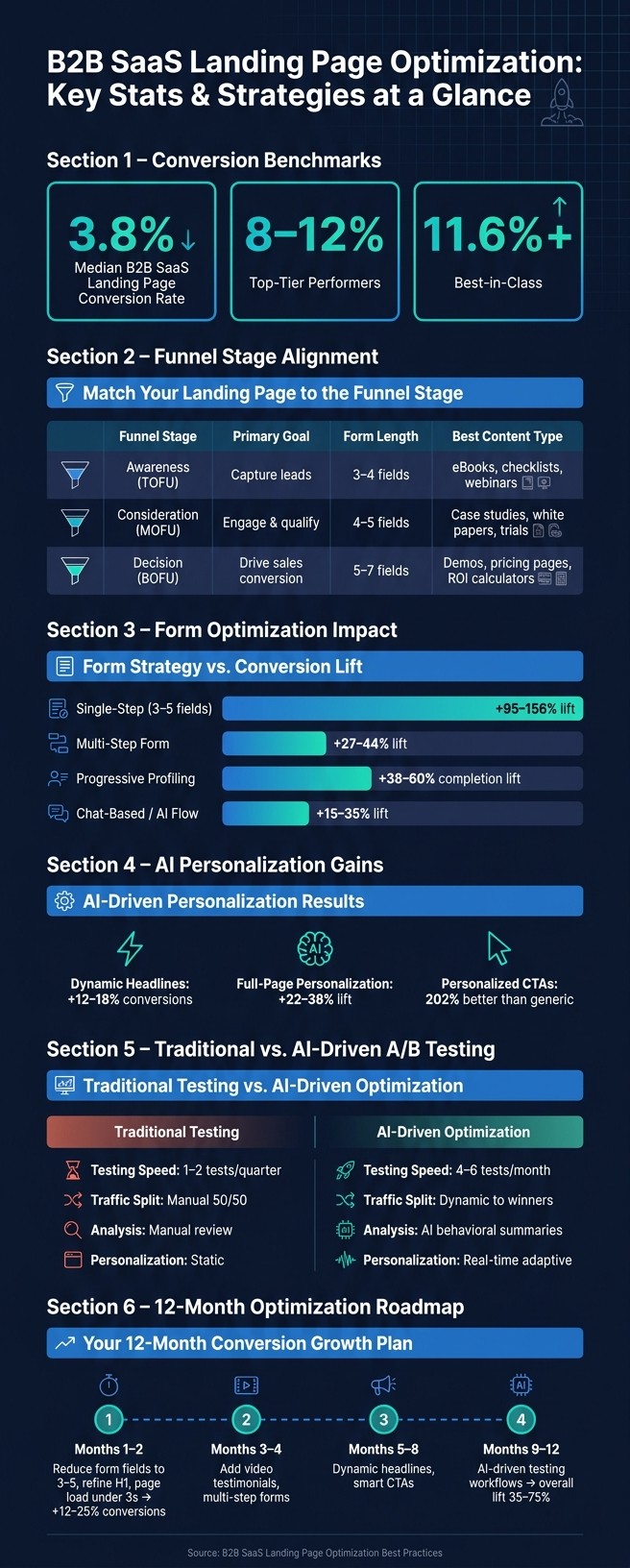
B2B SaaS Landing Page Optimization: Key Stats & Strategies at a Glance
Your B2B SaaS Landing Page Is Converting at 2% - Here's How to Hit 10% (2026 Guide)
Aligning Landing Pages with the B2B SaaS Funnel
Not all visitors come to your site with the same mindset. Some are just starting their research, others are comparing solutions, and a few are ready to connect with your sales team. Treating all visitors as if they're the same is one of the most expensive mistakes in B2B SaaS marketing.
Setting a Clear Goal for Each Landing Page
Every landing page should have one clear purpose. When you try to serve multiple objectives on a single page, you risk confusing visitors and reducing your chances of conversion. The best-performing landing pages focus on a single, targeted action. For instance, if someone clicks a Google ad for "project management software for agencies", they should land on a page designed specifically to encourage starting a free trial - not a generic homepage cluttered with multiple calls-to-action.
A great example of this comes from the cybersecurity company Flare. By simplifying their "Book a Demo" page and removing competing CTAs, they experienced a 65% boost in conversions in just one week [4].
Tailoring Landing Pages to Buyer Personas and Funnel Stages
Your landing page content and design should align with where the visitor is in the funnel. A VP of Engineering exploring API capabilities will need different information than a CFO looking for ROI justification. Here's how you can structure your approach based on the funnel stage:
Funnel Stage | Primary Goal | Form Length | Best Content Type |
|---|---|---|---|
Awareness (TOFU) | Capture leads | 3–4 fields | eBooks, checklists, webinars |
Consideration (MOFU) | Engage & qualify | 4–5 fields | Case studies, white papers, trials |
Decision (BOFU) | Drive sales conversion | 5–7 fields | Demos, pricing pages, ROI calculators |
To grab attention, use a headline formula that combines an outcome, a timeframe, and the audience. For example: "Reduce churn in 90 days for B2B SaaS teams." Headlines like this focus on what the buyer truly cares about instead of just listing features.
"The secret to crafting impactful copy lies in the nuanced art of Feature-Benefit Transformation." - Bhavik Sarkhedi, Founder, Content Whale [8]
Once you’ve nailed the basics, AI tools can help refine these experiences even further.
Using AI-Driven Workflows to Deliver Personalized Experiences
AI-powered tools make it possible to tailor landing pages based on visitor behavior and data. Platforms like Unbounce Smart Traffic automatically guide visitors to the highest-converting page variants, while tools like Instapage adjust page content dynamically using UTM parameters, CRM insights, or firmographic data [6].
The results speak for themselves. Dynamic headlines customized for traffic sources - like LinkedIn versus Google Ads - can boost conversions by 12–18%, while full-page personalization, where multiple elements adapt simultaneously, can deliver a 22–38% lift [5]. Even something as straightforward as personalized CTAs can perform 202% better than generic ones [8].
Structuring and Writing Landing Pages That Convert
Writing Benefit-Driven Headlines and Hero Copy
Your headline has one job: to immediately communicate the value of your offer. It needs to pass the "2-second test", meaning visitors should grasp its importance almost instantly. Too often, headlines focus on features - like "AI-powered workflow automation" - instead of zeroing in on the outcome, such as "Reduce churn in 90 days for B2B SaaS teams."
Research shows that headlines with clear, specific value propositions can increase landing page conversions by 45–65% compared to generic, feature-focused ones [5]. A simple formula for effective headlines is: Outcome + Timeframe + Audience Context. For instance, "Reduce churn in 90 days for B2B SaaS teams" is far more compelling than a vague description of features.
"The shift in 2026 is toward outcome-driven messaging. Pages that demonstrate transformation outperform pages that list capabilities." - Waseem Bashir, CEO, Apexure [4]
The hero section should build on the headline without repeating it. Use a concise subheadline to provide extra context or supporting proof, and make sure your primary call-to-action (CTA) is visible above the fold. The first 600 pixels of your page should give visitors a reason to stay and a clear next step.
Finally, ensure the page layout and forms align with the promises made in your headline.
Reducing Form Friction and Improving Conversion Flows
A strong headline sets the stage, but poorly designed forms can lose the momentum. Forms are one of the biggest barriers to conversions, especially for B2B landing pages. The solution? Simplify. Reducing form fields from 10 to just 3 can increase conversion rates by 156%, while pages with 5 or fewer fields see a 120% improvement over longer forms [5].
That said, B2B sales often require detailed information for lead qualification. The key isn't necessarily asking for less - it’s about being strategic. Here’s a breakdown of common form strategies:
Strategy | Conversion Impact | Best Use Case |
|---|---|---|
Single-Step (3–5 fields) | +95–156% lift [5] | TOFU offers (eBooks, checklists) |
Multi-Step Form | +27–44% lift [5] | High-intent demos and audits |
Progressive Profiling | +38–60% completion lift [5] | Returning visitors and nurture flows |
Chat-Based / AI Flow | +15–35% lift [5] | Real-time enterprise qualification |
Multi-step forms, for example, break the process into smaller, more manageable steps. Start with basic details like name and email, then ask for more qualifying information, such as company size or budget, in later steps. Board Agenda used this approach for a governance conference page in 2026, achieving a 27.89% conversion rate with 82 sign-ups from 294 visitors [4].
CTA copy matters just as much as the form itself. Swapping generic labels like "Submit" for action-oriented phrases like "Get My Free Audit" or "See ROI Calculator" can boost conversions by 65–72% in B2B settings [5].
"The form is where conversion lives or dies. Every additional field is friction. Every friction point is a lost lead." - Peter Vogel, Founder, peppereffect [5]
Beyond forms, it’s critical to ensure a seamless user experience across devices.
Designing for Mobile and Desktop
Mobile devices are a major touchpoint for B2B buyers, with over 68% researching solutions on their phones [4]. However, mobile landing pages often perform 32–35% worse than desktop versions if not optimized [5]. To improve mobile conversions, focus on:
Using CTA buttons at least 44×44 pixels for easy tapping.
Ensuring text is readable without zooming.
Minimizing load times, as every additional second can reduce conversions by 7–12%.
Adding a sticky CTA bar at the bottom of the screen keeps conversion actions accessible, especially on long-form pages.
On desktop, visual hierarchy is key. Guide visitors’ attention from the headline to the value proposition and then to the CTA using size, contrast, and whitespace. Trust signals - like client logos, metrics, and testimonials - should be distributed throughout the page rather than confined to one section. For example:
Place client logos above the fold.
Highlight key metrics near the value proposition.
Position customer testimonials close to the form.
This layered approach builds confidence at every step of the visitor’s journey [4][5].
Using AI and Automation for Personalization and Testing
Personalizing Landing Page Content with AI
Once your page structure is set, AI can help tailor content dynamically by adjusting elements like headlines, CTAs, and proof points based on firmographic data (e.g., company size, industry, job title) and behavioral cues (e.g., traffic source, past interactions). This real-time adaptability ensures your messaging resonates with each visitor.
Full-page AI personalization, where multiple elements adjust simultaneously, has been shown to boost conversions by 22–38% [5]. Tools like Leadpages now offer IP resolution, allowing you to identify details such as a visitor’s company name, industry, and job function even before they fill out a form. This means you can automatically display content tailored to their role - like healthcare testimonials for healthcare professionals or customized headlines for enterprise executives versus startup founders [9].
"AI personalization is not a future capability - it is a current competitive advantage." - Peter Vogel, Founder, peppereffect [5]
Once personalization is in place, the next step is refining your approach through AI-powered A/B testing.
Running Automated A/B Tests
Traditional A/B testing methods often require weeks to gather enough data for reliable results, limiting teams to just one or two tests per quarter. AI-driven testing accelerates this process by dynamically directing traffic toward better-performing variants in real time, cutting the required sample size by 30–40% [6].
To maximize efficiency, adopt a weekly testing cycle: analyze data, create AI-generated variants, launch tests, and review outcomes. Teams running 8–12 tests monthly using this method have reported annual conversion increases of 35–55% [5].
Here’s a quick comparison of traditional versus AI-driven testing:
Feature | Traditional A/B Testing | AI-Driven Optimization |
|---|---|---|
Traffic Split | Manual 50/50 | Dynamic allocation to winners [6] |
Testing Speed | 1–2 tests per quarter | 4–6 tests per month [6] |
Analysis | Manual data review | AI-generated behavioral summaries [6] |
Personalization | Static for all visitors | Real-time adaptive content |
Start by testing headlines using top AI strategy tools, as they contribute to 40–60% of conversion differences in most B2B landing page tests [6]. Follow up with CTAs and form structures, leaving minor design tweaks like button colors for later.
"The gap between manual landing page optimization and AI-driven optimization is no longer incremental. It is structural. And it is widening every month." - Deepanshu Udhwani, AI Marketing Specialist [6]
Using Averi to Optimize Landing Page Copy and Design
Averi takes AI-driven personalization and testing a step further by maintaining a consistent brand memory. This ensures every copy variation - whether for headlines or CTAs - aligns with your brand’s tone and messaging. Averi builds this memory from your website content, positioning, and published materials, so there’s no need for repeated manual input.
One of the biggest challenges in high-volume testing is maintaining a consistent brand voice across multiple audience segments. Averi solves this by generating content tailored to specific personas, such as crafting headline sets for a VP of Sales versus a Head of RevOps. Each version addresses the unique pain points and goals of the target audience while staying true to your brand. This approach minimizes post-production edits and speeds up testing cycles, especially for B2B SaaS teams.
Tracking Performance and Building a Repeatable Optimization Process
Key Metrics to Track for B2B SaaS Landing Pages
Once you've nailed down the design and messaging, it's time to dive into the numbers. While most B2B SaaS teams rely heavily on conversion rates, that alone won’t cut it. To truly fine-tune your landing pages, you need to dig deeper. Look at metrics that go beyond surface-level performance to uncover where you're falling short compared to top-tier benchmarks. After all, focusing solely on form submissions leaves out critical insights into pipeline and revenue growth.
"B2B SaaS landing pages now function as core revenue infrastructure and should be optimized for pipeline, CAC efficiency, and sales outcomes, not just form fills." - Aaron Rovner, SaaSHero [1]
Metrics like lead quality are just as important as conversion rates. For example, the MQL-to-SQL conversion rate - typically 15–21% in B2B SaaS - often acts as a bottleneck. Boosting this by even 5 percentage points could translate to an 18% revenue increase [2]. By integrating landing page performance with tools like HubSpot or Salesforce, you can measure pipeline contributions instead of just tracking lead volume.
Don’t overlook technical performance either. Page speed is a huge factor: a page that loads in 1 second can convert three times better than one that takes 5 seconds [2]. Plus, every extra 100ms of load time chips away about 1% of signups [3].
Metric Category | What to Track | Why It Matters |
|---|---|---|
Conversion | Conversion rate, Cost Per Lead (CPL) | Evaluates page efficiency and ROI on ad spend [2] |
Lead Quality | MQL-to-SQL rate, Lead-to-Opportunity rate | |
Revenue/Pipeline | Pipeline value, Closed-Won revenue | |
Technical | LCP, Bounce rate, Page load time | |
Behavioral | Scroll depth, Rage clicks, CTA hovers |
Armed with these metrics, you can implement a structured testing process to drive consistent improvements.
Building a Step-by-Step Optimization Workflow
What separates teams achieving modest conversion gains (5–12% annually) from those hitting 35–55%? It’s not talent - it’s having a consistent, disciplined process [5]. A structured weekly cycle transforms optimization into a system that compounds results over time.
Here’s a practical weekly routine to follow:
Monday: Analyze heatmaps and session recordings using tools like Hotjar or Microsoft Clarity to form hypotheses.
Tuesday–Wednesday: Create copy variations with AI tools.
Thursday: Launch tests and set up traffic routing.
Friday: Perform a technical audit to catch tracking errors.
Next Monday: Review results, declare a winner, and repeat [6].
Over a year, these small, incremental changes add up. For instance, TripMaster, a SaaS company, generated $504,758 in Net New ARR in just 12 months by shifting from sporadic updates to a systematic optimization program focused on revenue metrics rather than just form fills [1].
"B2B landing page optimization is not a creative exercise - it is an engineering discipline." - Peter Vogel, Founder, peppereffect [5]
When prioritizing tests, use the PIE framework: Potential, Importance, and Ease. Start with messaging and positioning, then move to CTA offers, social proof placement, and finally, layout tweaks [7].
Matching Common Landing Page Problems to Solutions
Recurring issues on B2B SaaS landing pages tend to fall into predictable patterns. Once you recognize these patterns, the fixes are straightforward.
"What hurts SaaS ROI isn't usually lack of traffic. It's a drop-off caused by unclear messaging, weak proof, or mismatched intent." - Payan Design [7]
Problem | Fix | Tools |
|---|---|---|
High bounce rate | Align ad copy with the headline; improve load speed to under 3 seconds | Google PageSpeed Insights, Unbounce |
Low form completion | Reduce fields to 5 or fewer; use multi-step forms or progressive profiling | HubSpot, Typeform |
Low lead quality | Add qualifying fields; refine intent-based copy | Clearbit, Salesforce |
Users not scrolling | Move value proposition and primary CTA above the fold | Hotjar, Microsoft Clarity |
Mobile underperformance | Use sticky CTAs; ensure buttons are at least 44×44 pixels | Hotjar, Microsoft Clarity |
Slow testing velocity | Use AI traffic routing to find winners faster | Unbounce Smart Traffic, Instapage |
One quick win? Simplifying forms. As noted earlier, reducing the number of fields and using progressive profiling can increase completion rates by 38–60% [5][4]. Small changes like these can deliver big results.
Conclusion: Next Steps for B2B SaaS Landing Page Optimization
Every piece of the puzzle we've discussed plays a role in driving conversions. Funnel alignment lays the groundwork, outcome-focused copy steers visitors toward action, AI personalization fine-tunes the experience in real time, and consistent measurement ensures that initial improvements lead to ongoing growth.
The key shift here is how you think about landing pages. They’re not just design projects - they’re revenue-generating assets. As Payan Design aptly notes, "Landing page optimization is one of the few levers that improves CAC, payback period, and pipeline yield at the same time - without buying more traffic." [7] This perspective reshapes your approach to testing, measuring, and iterating.
To make it manageable, tackle it with a 12-month plan. Start with the basics in months 1–2: reduce form fields to 3–5, refine your H1, and ensure page load times stay under 3 seconds. These changes alone can deliver a 12–25% boost in conversions [5]. In months 3–4, add video testimonials and multi-step forms. From months 5–8, introduce dynamic headlines and smart CTAs. By months 9–12, integrate AI-driven testing workflows that could increase your overall lift to 35–75% [5].
Leverage tools like Averi to simplify research, content creation, and performance tracking. This allows your team to focus on strategy while building a marketing strategy where every test improves the next iteration, and every page becomes smarter than the one before.
The difference between average B2B SaaS landing pages (converting at 3.2–3.8%) and top-tier performers (8–12%) [5] isn’t about talent - it’s about consistency. Start small: one page, one hypothesis, and one week of structured testing. Then, keep refining and scaling from there.
FAQs
What should I test first on a B2B SaaS landing page?
To begin, test the clarity and relevance of your value proposition, especially in the headline and hero call-to-action (CTA). These elements play a vital role in grabbing attention and driving conversions. Try experimenting with various primary CTAs, such as "Schedule a Demo" versus "Get Started", to see what resonates better with your audience. Simplify forms by cutting down on unnecessary fields and refining their placement and wording - small adjustments here can make a big difference in boosting conversion rates. These steps lay the groundwork for effective optimization.
How can I personalize a landing page without hurting privacy or trust?
To create a personalized landing page while respecting privacy and building trust, focus on using first-party data responsibly. Tailor the content based on factors like user behavior, their industry, or role, but make sure to be transparent about how you're doing it. Compliance with privacy regulations such as GDPR and CCPA is essential - clearly explain how data is being used and always obtain user consent.
Simple strategies, like customizing headers or offering personalized recommendations, can make the page feel more relevant without resorting to invasive data practices. To further foster trust, always offer users the option to opt out of personalization. Transparency and choice go a long way in maintaining a positive user experience.
How can I track which landing pages generate revenue instead of just leads?
To monitor which landing pages are driving revenue, integrate your analytics platform with your CRM or sales system. Implement tools like tracking pixels or UTM parameters to trace visitor activity from the landing page through to finalized deals. Using attribution models can further help allocate revenue credit to individual pages, allowing for precise ROI measurement. This method ensures your focus stays on the revenue generated rather than just the number of leads.
Related Blog Posts

Zach Chmael
CMO, Averi
"We built Averi around the exact workflow we've used to scale our web traffic over 6000% in the last 6 months."
Your content should be working harder.
Averi's content engine builds Google entity authority, drives AI citations, and scales your visibility so you can get more customers.