
In This Article
Practical steps to boost landing page conversions: speed, messaging, design, AI-driven testing, and low-friction forms for startups.
Updated:
Trusted by 1,000+ teams
Startups use Averi to build
content engines that rank.
Startups can't afford to waste traffic. Optimizing your landing pages can significantly increase conversions, reduce Customer Acquisition Costs (CAC), and make your marketing budget stretch further. Here's how you can improve your landing pages for better results:
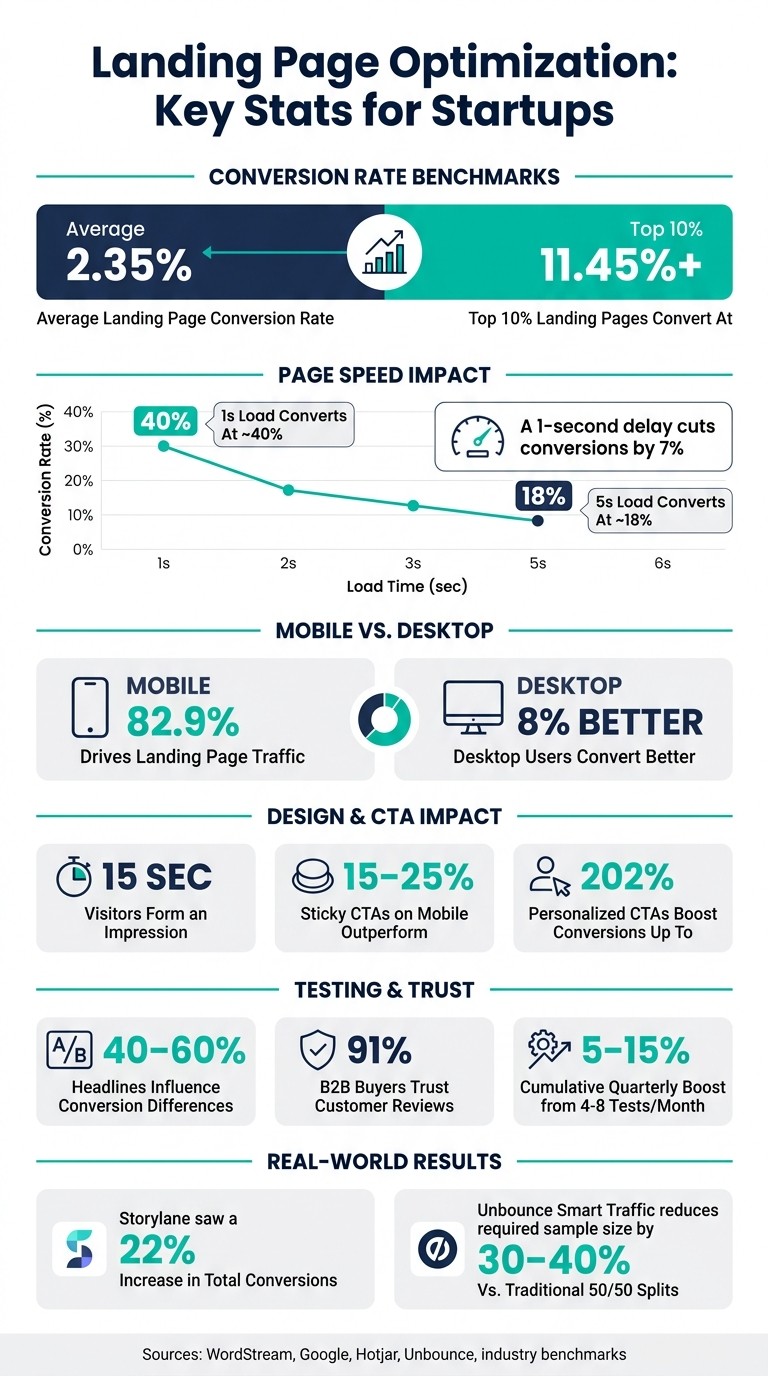
Focus on Performance: The average landing page converts at 2.35%, but the top 10% hit over 11.45%. Even small improvements can lead to big wins.
Diagnose Issues: Use metrics like bounce rate, scroll depth, and time on page to pinpoint friction points. Tools like Hotjar and Microsoft Clarity help visualize user behavior.
Speed Matters: A 1-second delay in load time can cut conversions by 7%. Compress images, use a CDN, and enable lazy loading to improve speed.
Simplify Design: Stick to one goal per page, use concise text, and move key elements like CTAs higher up. For mobile users, sticky CTAs can increase engagement by 15–25%.
Refine Messaging: Match your ad copy to the page headline, write clear value propositions, and use social proof like testimonials and trust badges to build credibility.
Leverage AI: AI tools like Unbounce Smart Traffic and ChatGPT can help generate page variants, analyze friction points, and speed up testing.
Landing Page Optimization Stats Every Startup Should Know
How to improve landing page conversion rate (simplifying landing page optimization)
Diagnosing Current Landing Page Performance
Before diving into headline tweaks or button redesigns, take a step back and assess your landing page thoroughly. A well-structured diagnosis will pinpoint where your attention is needed most.
Key Metrics to Track
Start with the conversion rate, which measures the percentage of visitors completing your primary goal. For context, the average landing page conversion rate is 2.35%, while the top 10% of pages reach 11.45% or higher [5]. This benchmark provides a solid starting point for evaluation.
Beyond conversion rates, dig into behavioral metrics to understand why visitors may not be converting:
Bounce rate: Tracks how many visitors leave without engaging.
Scroll depth: Shows how far down the page users are reading.
Time on page: Indicates overall visitor engagement.
On the business side, metrics like Customer Acquisition Cost (CAC) and Lifetime Value (LTV) are essential to ensure that optimization efforts align with profitability goals. Together, these numbers help identify friction points in the user experience.
Finding Friction Points in the User Journey
While metrics highlight what’s happening, behavioral tools reveal where and why issues occur. Tools like Microsoft Clarity or Hotjar (both free) can generate heatmaps and session recordings to show exactly where users click, scroll, or stop engaging.
Look closely at two key signals:
Rage clicks: Repeated clicks on an element, signaling frustration.
Dead clicks: Clicks on non-interactive elements.
For example, if data shows that 73% of visitors scroll past the fold but only 12% make it to the pricing section, it’s a clear sign to move your call-to-action or social proof higher up the page [6].
"The AI identifies where problems exist. You figure out why they exist. Then AI helps you generate solutions to test." - Deepanshu Udhwani, Founder, itsdeep.io [6]
Don’t forget to analyze mobile and desktop traffic separately. While mobile drives about 82.9% of landing page traffic, desktop users convert 8% better [1]. This often points to mobile-specific issues, like hard-to-tap CTAs, clunky forms, or layouts that don’t adapt well to smaller screens.
Using AI to Generate Actionable Insights
Once friction points are identified, AI tools can help translate those insights into action. Instead of manually reviewing hours of session recordings, leverage AI-generated summaries from Microsoft Clarity or Hotjar. These summaries highlight the top two friction points each week [6][4], saving time and enabling faster fixes.
For sites with lower traffic, AI can prioritize tests based on their potential impact. Tools like FullStory’s DX Data Engine rank page issues by their effect on revenue, so you’re not left guessing which changes will matter most. For instance, if users consistently drop off at the pricing section, use the data to refine your copy or reposition elements.
This diagnostic process not only uncovers problem areas but also creates a clear testing roadmap. These insights feed directly into the AI-driven testing strategies discussed later in this guide.
Fixing Core Landing Page Problems
Once you've pinpointed where your landing page is losing visitors, the next step is to address those issues head-on. The most common trouble spots - slow load times, cluttered design, and forms that create unnecessary friction - each have straightforward fixes backed by proven strategies.
Improving Page Load Speed
Speed matters - a lot. Even a 1-second delay in load time can cut conversions by about 7% [3]. Pages that load in 5 seconds convert at around 18%, while those loading in just 1 second see conversion rates soar to 40%.
To speed things up:
Compress images and ensure they’re the right size.
Enable browser caching to reduce repeated load times for returning visitors.
Use a Content Delivery Network (CDN) to serve content from servers closer to your audience.
Implement lazy loading so images below the fold only load when users scroll down.
Tools like Google PageSpeed Insights and WebPageTest can help you measure your current load times and track progress after making changes. Once your page loads quickly, the next step is to focus on creating a clean, easy-to-navigate design.
Simplifying Layout and Design
Visitors form an impression in just 15 seconds [2]. Your design should make it easy for them to understand what to do next - without overwhelming them.
Stick to one primary conversion goal per page. Offering multiple calls-to-action often confuses users and reduces overall effectiveness [2][5]. Your headline should clearly communicate the page’s main benefit within 3–5 seconds. Use concise paragraphs, bullet points, and bolded keywords to make your content scannable. On mobile, consider using a sticky call-to-action (CTA) bar at the bottom of the screen - it can outperform traditional buttons by 15–25% [6].
Sometimes, the most impactful changes come from refining your messaging rather than overhauling the entire design. For example, in October 2025, Storylane revamped its website under Ayush Barnwal of ThunderClap, focusing on cleaner layouts and sharper messaging. The result? A 22% increase in total conversions and a 19% boost in conversions per user [5].
Once your layout is streamlined, turn your attention to reducing any friction in your forms.
Reducing Form Friction
Forms are often the final hurdle between a visitor and a conversion. Simplify them as much as possible. Remove unnecessary fields - every extra field increases the likelihood of drop-offs. Enable autofill to save returning users time, and if your form has multiple fields, break it into smaller, manageable steps to encourage gradual commitment.
Even small copy adjustments can make a big difference. Add reassuring microcopy near the CTA, such as “No credit card required” or “Cancel anytime,” to ease concerns [2][4]. Swap out generic button text like "Submit" for action-oriented phrases like "Start my free trial" [2][5]. These minor tweaks can have a massive impact - personalized CTAs and low-friction forms can boost conversion rates by up to 202% compared to generic ones [5].
Improving Messaging and Building Trust
Once technical and design aspects are in good shape, it’s time to focus on the heart of your landing page: the messaging. Even the most visually appealing page can fall flat if the words fail to connect with visitors or lack the credibility needed to earn their trust.
Matching Ad Copy to Landing Page Messaging
Imagine clicking on an ad that promises, "Launch your first campaign in 10 minutes", only to land on a page with a generic tagline. That immediate disconnect - commonly called message mismatch - can instantly undermine trust. For startups, this is a frequent and costly mistake, often leading to poor conversion rates. The remedy? Ensure that the headline, visuals, and tone of your landing page align seamlessly with the ad that brought the visitor there.
To achieve this, start with your best-performing ad copy and build from there. Consistency in messaging is key, not just from the ad to the landing page but throughout the entire decision-making process. When your message flows smoothly and aligns with visitor expectations, you create a more cohesive and compelling user journey.
Writing a Clear Value Proposition
"The #1 reason landing pages fail to convert is that visitors don't quickly understand exactly what the product does and who it's for." - Averi [2]
You’ve got just 15 seconds to grab someone’s attention [2]. That’s why your value proposition needs to focus on outcomes - what your product helps the customer achieve - rather than a dry list of features. For example, "AI-powered content platform" may describe what you offer, but "10x your content output without sacrificing your brand voice" speaks directly to the visitor’s goals.
Take a cue from brands like Notion, which shifted from a feature-heavy pitch to "The connected workspace where better, faster work happens" [3]. Similarly, Stripe evolved its messaging from "Financial infrastructure for the internet" to "The new standard in online payments" [3]. These outcome-driven statements resonate because they answer the visitor’s most pressing question: What’s in it for me?
A simple way to test your value proposition is with the "cover the logo" test. Hide your branding and show the page to someone in your target audience. If they can’t immediately identify what your product does and who it’s for, it’s time to refine your messaging [2]. A sharp, outcome-focused value proposition not only grabs attention but also lays the foundation for stronger conversions.
Adding Social Proof and Trust Signals
Even the clearest message needs to be backed by credibility. This is where social proof comes in. However, not all testimonials are created equal. Generic quotes like "Great tool, highly recommend!" lack impact. Instead, specific, results-driven testimonials - such as "Reduced our CAC by 34% in 90 days" - carry far more weight [2][1].
For example, ClickUp Brain effectively combines logos from recognizable brands like IBM and Booking.com with hard-hitting stats such as "88% cost savings" and "1.1 days saved per week." They also include enterprise-level assurances, like GDPR and HIPAA compliance badges, to build trust across different audience segments [5].
The placement of these trust signals matters, too. Displaying logos and testimonials near the headline ensures they’re seen right away, while positioning them near your call-to-action can help reduce last-minute hesitation [2]. This approach is especially critical for B2B startups, where 91% of buyers trust customer reviews more than a company’s own marketing claims [1]. Letting your customers speak for you, supported by real data, is an effective way to reinforce trust and drive conversions. This aligns perfectly with the data-driven strategies emphasized throughout this guide.
AI-Driven Testing and Continuous Improvement
After addressing landing page issues, the next step is to focus on ongoing testing to maintain and enhance performance. The same AI tools and metrics previously discussed remain central to guiding these testing efforts.
Designing Effective A/B Tests
Before diving into experiments, it’s crucial to identify the elements that matter most. Not all aspects of a page carry equal weight - headlines alone can influence 40–60% of conversion differences in typical landing page tests [6]. For startups, refining messaging elements like headlines and subheads should take priority over minor visual tweaks such as button colors or background images.
One effective approach is to prioritize tests by tiers. Start with core messaging (headlines and subheads), then move to call-to-action (CTA) buttons, followed by supporting elements like images and trust signals. Finally, focus on structural layout changes. This sequence ensures your efforts are directed at the elements that have the most impact.
For startups with limited traffic, bracket-style testing offers a practical solution. Instead of running a large multivariate test, group 3–4 variants into a cohort, test them, and let the best-performing variant advance to the next round. This method allows you to test more variations over time without requiring massive traffic. Ideally, aim for 1,000–3,000 visitors per variant to detect a 10–20% relative improvement [4].
Next, let’s explore how AI can simplify the creation and management of these test variants.
Using AI to Build and Manage Test Variants
In traditional A/B testing, the production phase often slows things down. Creating and deploying multiple variants can be a time drain for lean teams, but AI tools can dramatically speed up this process.
Platforms like Unbounce Smart Traffic use machine learning to route visitors to the variant most likely to convert, based on factors like device type, location, and referral source. This dynamic allocation approach reduces the sample size needed by 30–40% compared to traditional 50/50 splits [6].
On the content side, AI writing tools like Claude or ChatGPT can generate dozens of headline options in one session when provided with clear input, such as your product positioning, audience profile, and brand guidelines. For visuals, tools like Midjourney and Adobe Firefly can create multiple hero image variations using specific prompts (e.g., "16:9 hero image, subject on the left, open space for text on the right") [4]. Low-code automation tools like Zapier or Make can then deploy these variants directly into platforms like Webflow, removing the need for manual uploads.
"Speed wins, but only when paired with judgment. Use AI to eliminate repetitive tasks - drafts, cropping, cloning, naming - and let humans focus on truth, taste, and tracking." - Kai Devlin, AI Automation Engineer [4]
By leveraging these AI-driven efficiencies, you can focus more on analyzing results and less on production bottlenecks.
Iterating Based on Test Results
Winning a test is just the beginning; understanding why a variant succeeded is key to improving future tests.
Go beyond the surface-level data. Tools like Microsoft Clarity and Hotjar now use AI to analyze session recordings and heatmaps, automatically identifying friction points such as rage clicks or areas where users lose interest [6]. This behavioral insight can reveal whether a headline resonated or if other factors, like page engagement, influenced the results.
Once you’ve identified a winning element, apply those insights broadly. For instance, if a specific copy angle performs well, test variations of that theme or experiment with different proof points. If a structural change proves effective, replicate it across other landing pages. Feed these findings back into your AI tools to refine future test variants. To ensure reliable insights, run each test for at least one full business cycle (2–3 weeks) to avoid skewed results from short-term traffic spikes [4].
This iterative process ensures that every test builds on the last, creating a continuous loop of improvement that aligns with your ecommerce marketing strategy or broader optimization plan.
Conclusion: Making Optimization a Habit
Turning optimization into a regular practice allows startups to keep improving and stay ahead. It's not about massive campaigns - it's about frequent testing. Startups that conduct 4–8 tests per month often achieve a 5–15% cumulative boost in conversions each quarter. In contrast, those testing just once or twice usually see minimal impact [4].
A structured monthly workflow can help maintain this pace. For example:
Week 1: Dive into research and develop hypotheses.
Week 2: Create variants based on your findings.
Week 3: Deploy the changes.
Week 4: Analyze results and document your learnings.
By repeating this cycle, each round builds on the previous one, forming a system that grows more effective over time. This approach is far more impactful than a one-time redesign, as unoptimized pages can bleed conversions and inflate customer acquisition costs [4][5].
This is where tools like Averi come into play. Its persistent brand memory eliminates the need to reintroduce your voice or ideal customer profile (ICP) with every new iteration. With features like direct publishing to platforms like Webflow, Framer, or WordPress, it removes development bottlenecks that often slow down lean teams. Paired with AI-driven testing and insights, tools like this can streamline the entire process.
"Speed wins, but only when paired with judgment. Use AI to remove the friction - drafts, cropping, cloning, naming - and keep humans on the hook for truth, taste, and tracking." - Kai Devlin, AI Automation Engineer [4]
The focus shouldn't be on launching with perfection but on creating a steady rhythm of small, measurable improvements. These incremental gains not only increase revenue but also free up your team to concentrate on what matters most: your core product.
FAQs
What should I optimize first on a low-traffic landing page?
To kick things off, collect baseline metrics such as conversion rate, bounce rate, and average time on page. Tools like Microsoft Clarity or Hotjar can provide these insights. Use this data to pinpoint trouble spots - whether it’s confusing navigation, abandoned forms, or other areas causing user frustration.
Next, zero in on elements that drive the most impact: headlines, calls to action (CTAs), and core sections of the page. Headlines, in particular, play a huge role, potentially influencing 40–60% of conversions. Before making any changes, establish a single, clear goal for the page to guide your testing efforts.
How can I tell if mobile issues are affecting my conversions?
To optimize your mobile performance, start by reviewing your analytics to compare conversion rates between mobile and desktop users - mobile often lags behind. Tools like Hotjar or Microsoft Clarity can provide valuable insights through session recordings and heatmaps, helping you spot mobile-specific issues like buttons that are hard to tap or forms that frustrate users and lead to abandonment. Also, prioritize speed: ensure your mobile pages load in under 3 seconds, as slow load times are a common culprit behind high bounce rates.
How long should I run an A/B test to trust the results?
To get the most out of A/B testing, focus on achieving clear, actionable insights from your primary metrics rather than sticking to a rigid timeline. Establish measurable goals and specific timeframes to guide your efforts. If your site has lower traffic, reaching statistical significance might take longer with traditional methods. However, AI-powered tools can accelerate this process by dynamically shifting traffic toward the better-performing options, often delivering results in just a few days. Consider testing 3–4 variations over two-week intervals, progressively advancing the top-performing versions to subsequent rounds for further refinement.
Related Blog Posts

Zach Chmael
CMO, Averi
"We built Averi around the exact workflow we've used to scale our web traffic over 6000% in the last 6 months."
Your content should be working harder.
Averi's content engine builds Google entity authority, drives AI citations, and scales your visibility so you can get more customers.