How to Use Marketing Analytics for Creators & Influencers

Averi Academy
Averi Team
8 minutes

In This Article
Analytics-driven creators grow faster and earn more by tracking engagement, demographics, and ROI.
Updated:
Trusted by 1,000+ teams
Startups use Averi to build
content engines that rank.
Marketing analytics helps creators and influencers grow their audiences and income by focusing on actionable data like engagement rates, watch time, and audience demographics. With platforms constantly changing algorithms and brands prioritizing ROI over follower counts, understanding analytics is now a necessity. Key metrics to track include engagement (e.g., shares, saves, completion rates), audience growth, and sponsored content performance. Tools like platform-native analytics (YouTube Studio, Instagram Insights) and third-party platforms (Buffer, Metricool) simplify data tracking. AI-powered tools can automate reporting, analyze trends, and predict performance, saving time and improving strategies. Creators who use analytics effectively grow faster and earn more from sponsorships.
Digital Marketing Analytics Full Course 2026 [FREE] | Marketing Analytics Tutorial 2026 |Simplilearn

Which Metrics to Track
Not all metrics carry the same weight. While a large follower count might look impressive, it doesn’t necessarily reflect the true effectiveness of your content. To gauge real growth and revenue potential, focus on three key areas: engagement, audience growth, and the performance of sponsored content.
Engagement Metrics
Engagement rate stands out as one of the most critical metrics. It’s calculated as follows: (total likes + comments + shares + saves) / total followers (or reach) × 100 [1][4]. However, not all forms of engagement are equal. Shares and saves often signal a deeper level of interest, showing that your audience values your content enough to revisit or share it with others [3][4].
Different platforms prioritize different types of engagement. For example:
TikTok: Completion rate (how much of a video is watched) and shares are key indicators [3][4]. A 97% completion rate on a 60-second video can significantly boost algorithmic promotion [4].
Instagram: Save rates and direct message interactions carry the most weight [3].
YouTube: Watch time and average view duration are critical [3].
Healthy engagement benchmarks vary by platform: TikTok (5–10%), Instagram (1–3%), YouTube (0.5–1%), and Twitter/X (0.2–0.5%). Beyond raw numbers, consider using AI tools to analyze sentiment - whether interactions are positive, negative, or neutral. For instance, a drop of more than 15% in positive sentiment over a month might indicate the need for a content review [3].
While engagement is essential, tracking how your audience grows over time is equally important.
Audience Growth Metrics
When evaluating audience growth, focus on growth rate percentages rather than absolute numbers. A strong weekly growth rate is around 5%, while 1% is more typical [1]. Monitoring this growth velocity can help identify shifts in content quality, posting habits, or even changes in platform algorithms [1].
It’s also crucial to understand the difference between reach and impressions. Reach reflects the number of unique viewers, while impressions represent the total number of views. Reach is a better indicator of audience expansion, with a healthy organic growth rate typically maintaining a steady 2–3% monthly increase [2]. Be cautious of sudden spikes - such as a 20% or higher jump in monthly growth - as this might signal the use of purchased followers rather than genuine engagement [2][4].
Another overlooked but telling metric is engagement per new follower. If engagement rates drop as your audience grows, it could mean you’re attracting followers who are less engaged. Conducting a cohort analysis to assess whether new followers remain active over time can provide insights into retention and loyalty [5].
Once organic performance is clear, it’s time to evaluate how sponsored content measures up.
Sponsored Content Performance Metrics
For brands, the return on investment (ROI) of sponsored content is far more important than superficial metrics. One useful calculation is Cost-Per-Engaged-Audience (CPEA), which divides the cost of a partnership by the total engaged audience (likes, comments, shares, and saves) [2].
Additionally, track click-through rates (CTR) and conversion rates using tools like UTM parameters or unique discount codes [2]. Another key metric is Revenue Per Mille (RPM), which shows earnings per 1,000 views after platform deductions. This differs from CPM, which reflects what advertisers pay the platform [3].
Comparing the engagement rates of sponsored posts with those of organic content can also be revealing. If sponsored posts see significantly lower engagement, it could indicate audience fatigue or a mismatch between the brand and your content [8]. Interestingly, micro-influencers (10,000–100,000 followers) often deliver 2.3 times better ROI than mega-influencers, emphasizing the value of tracking these metrics carefully [2].
How to Analyze Your Audience Demographics
Knowing who your followers are matters just as much as how many people interact with your content. Demographic insights help you determine if your audience aligns with the brands you want to collaborate with and guide you in creating content that connects with the right people. Creators who consistently analyze their audience demographics and engagement trends earn 2.4x more from sponsorships compared to those who don’t [5]. These insights go beyond content planning - they directly tie your analytics to measurable brand partnerships.
Which Demographics to Track
Start by focusing on the basics: age, gender, location, and language. From there, dive deeper into interests, spending habits, and psychographics like values and purchasing behaviors [1][2][4][8]. For instance, if you’re a beauty creator aiming to partner with luxury skincare brands, you’ll need to demonstrate that your followers aren’t primarily gamers or fitness enthusiasts - even if your overall follower count is impressive [2].
Another key metric is your authenticity score, which measures the percentage of real users in your audience. Analytics platforms calculate this score using factors like account creation dates and engagement patterns; a score above 85% is considered strong, while anything below 70% could indicate risks [6]. Keeping an eye on this score ensures your engagement quality remains credible.
Geographic data is also crucial, especially the concentration of followers in high-CPM regions like the US, UK, and Canada. This information can justify higher sponsorship rates [8]. Additionally, consider gathering zero-party data - details users willingly share through tools like Instagram Stories polls or surveys on platforms like Typeform. This information can reveal specific interests and purchasing intentions [5].
How to Access Demographic Data
Most social platforms provide free analytics tools. Here’s a quick breakdown:
Instagram Insights: Offers data on age, gender, top locations, and active times, ideal for creators focused on visual content [1].
TikTok Creator Center: Tracks gender, top territories, and follower activity, perfect for creators riding trends [1].
YouTube Studio: Provides age, gender, geography, and subtitle/CC language data, great for analyzing engagement and retention [1].
For a broader view, consider consolidating your data with third-party tools. Platforms like Buffer and Metricool are excellent for Instagram and TikTok creators [1]. Later and Influee go further by offering audience quality checks and fraud detection [4][8]. If you need advanced features like AI-driven audience segmentation, enterprise tools like Sprout Social are worth exploring [4][8].
Set a regular schedule to review your data: spend 5 minutes daily, 30 minutes weekly, and 90 minutes monthly tracking shifts in your audience [1]. For example, if your female audience grows from 30% to 50%, adjust your content to better engage that group [1][8]. When using third-party tools, always opt for secure login methods like OAuth instead of sharing passwords to keep your accounts safe [1][6].
Aligning Your Audience with Brand Requirements
Once you’ve gathered your data, focus on aligning your audience demographics with the brands you want to work with. Build a media kit that highlights verified metrics [5][8]. Include UTM parameters (unique tracking links) in your partnerships to provide brands with clear data showing how your audience drives conversions [4].
Cross-check platform-reported demographics with your engagement data regularly to maintain credibility [2]. Break your audience into micro-segments based on behaviors or interests, such as identifying your "super-fans" - the 8% who consistently comment on your posts [8]. These segments are valuable for loyalty programs and can give you an edge in brand pitches. Creators who use advanced analytics tools earn 2.8x higher sponsorship rates than those relying solely on platform estimates [8], as they can back up their audience quality with hard data.
"A creator with 100,000 highly engaged, relevant followers commands better rates than one with 500,000 uninterested followers. Analytics make that distinction clear." - InfluenceFlow [5]
How to Measure and Improve Content Performance
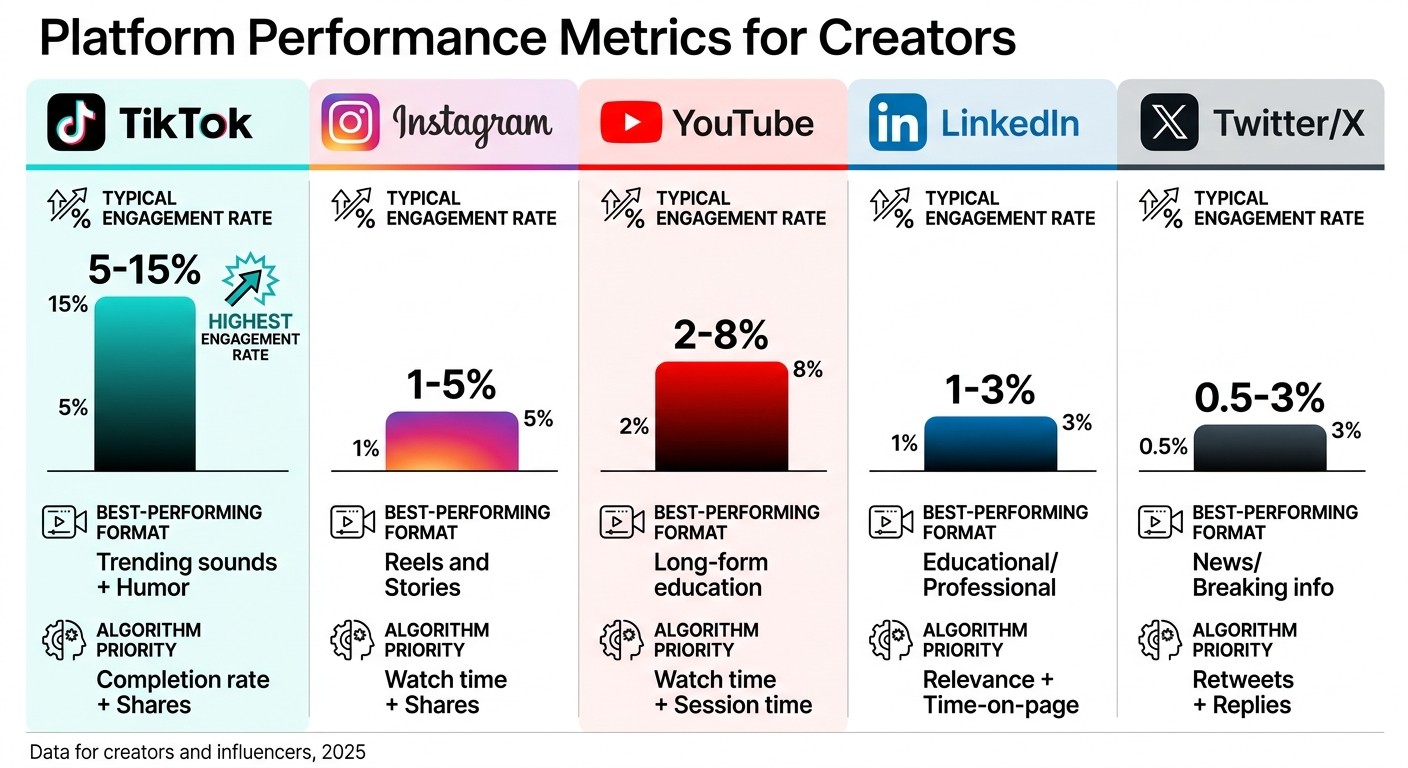
Social Media Platform Analytics Comparison: Engagement Rates and Algorithm Priorities for Creators 2025
Knowing which content truly delivers results is a cornerstone of expanding your audience and landing better brand deals. To get there, it's crucial to align each content format with its specific goals. For example, videos are best evaluated through completion rates and watch time, while blog posts should focus on metrics like organic traffic and backlinks [9]. But don’t stop at surface-level statistics - consumption metrics like scroll depth and video completion reveal how engaged viewers are, while engagement metrics such as shares and saves indicate whether your content resonates [10][11].
Comparing Content Format Performance
Each content format serves a unique role in your strategy. Blog posts are great for generating leads, while case studies and webinars are better suited for converting audiences further down the funnel [10]. To pinpoint your most effective formats, prioritize save and share rates. A high save rate suggests your content is valuable enough for future reference, while shares show it’s worth recommending [11][4].
Experimentation, like A/B testing, can help determine the best format for a specific topic - whether an infographic, video, or long-form blog post drives more engagement [12]. AI tools can also highlight areas of high engagement, identifying formats that exceed expectations [11]. For video content, analyzing heatmaps is particularly useful to see where viewers drop off or rewatch, giving insight into pacing and length effectiveness [11]. Additionally, tracking impression decay - how quickly impressions decline after 24 hours - can reveal which formats sustain attention over time [11].
Platform | Typical Engagement Rate | Best-Performing Format | Algorithm Priority |
|---|---|---|---|
TikTok | 5-15% | Trending sounds + Humor | Completion rate + Shares |
1-5% | Reels and Stories | Watch time + Shares | |
YouTube | 2-8% | Long-form education | Watch time + Session time |
1-3% | Educational/Professional | Relevance + Time-on-page | |
Twitter/X | 0.5-3% | News/Breaking info | Retweets + Replies |
Next, consider how posting schedules can further influence these performance trends.
When and How Often to Post
Timing and posting frequency play a major role in engagement. Posting at 7:00 AM instead of 3:00 PM can lead to a 50% to 200% increase in views [3]. Use tools like platform-native heatmaps or third-party dashboards to determine when your audience is most active [1]. On TikTok, for instance, tracking engagement velocity - likes and comments within the first 2-4 hours - is critical as this window heavily influences the platform's viral potential [1].
When testing new posting times, stick to the schedule for at least two weeks before making adjustments. It usually takes about four weeks of data to evaluate whether a timing change is effective [1]. To stay on top of performance, review your analytics daily for 5 minutes, weekly for 30 minutes, and monthly for 90 minutes [1][3]. Additionally, keep an eye on competitors - monitor the posting frequency of 5-10 creators in your niche over 90 days to uncover trends and gaps [3]. If your competitors post daily and you only post weekly, this data can guide adjustments to your schedule.
Seasonality also matters. Fitness content tends to peak in January, while gift guides perform better in November [2]. Keep in mind that algorithm changes may take 6-8 weeks to fully affect your channel, so allow time to see the results of major strategy shifts [1].
This foundation of organic timing helps set the stage for understanding how sponsored content compares.
Measuring Sponsored vs. Organic Content
Tagging your sponsored posts in analytics tools is essential for comparing their performance to your organic content [8]. The primary goal is to determine whether these partnerships enhance engagement or hurt your algorithm visibility [1][8]. A useful metric here is Revenue Per View (RPV), which can help you measure monetization across platforms [1].
To accurately track website traffic and conversions from sponsored posts, use UTM parameters - unique tracking links - in Google Analytics [6][1]. This is especially important because only 30% of purchases influenced by content use promo codes, making multi-touch attribution critical for understanding the customer journey [2][6]. Compare these results against your organic performance baseline to fairly evaluate the impact of sponsored content [1].
Another key metric is Cost-Per-Engaged-Audience (CPEA), calculated by dividing the cost of a partnership by your total engaged audience. This allows you to weigh the value of influencer partnerships against more traditional advertising methods [2]. Quarterly audits can help you identify your top-performing content types based on engagement rates. Focus on these successful formats while phasing out underperformers [8]. Creators who consistently monitor audience retention curves tend to maintain engagement rates that are 47% higher than those who don’t [8].
"Views are vanity. Engagement is currency - it drives algorithm ranking and sponsorship value." - InfluenceFlow [8]
Choosing the Right Analytics Tools
Your choice of analytics tools largely depends on your stage in the creator journey. As of 2025, 73% of creators rely on analytics dashboards to guide their growth strategies - so starting simple and scaling up as your presence expands is a smart move [1].
Begin by exploring the built-in tools offered by your primary platforms before venturing into third-party solutions.
Platform-Native Analytics Tools
Platforms like YouTube Studio, Instagram Insights, and TikTok Creator Center offer free analytics tools tailored to their respective ecosystems. These tools provide real-time metrics such as watch time and click-through rates on YouTube, reach and profile visits on Instagram, and engagement velocity on TikTok [1][3]. While these are accurate and cost nothing, they require you to log into each platform individually, and the metrics may use different terminology [1][6]. For creators managing one or two platforms, these tools are sufficient and easy to navigate.
Using these native tools to track basic metrics - like engagement rates and top-performing content - lays the groundwork for deciding if and when you need to invest in more advanced solutions.
Third-Party Analytics Platforms
When managing multiple platforms or growing your audience past 5,000 followers, third-party tools become essential. Platforms like Buffer ($5–$99/month), Metricool ($25–$79/month), or Later ($25–$125/month) consolidate data from various channels into a single dashboard, saving you the hassle of logging into multiple apps and manually compiling reports. On average, creators using these tools save 8–10 hours of manual data entry per week [1][2].
These platforms also offer advanced features that native tools lack. For example:
AI-powered fraud detection: Identifies fake followers and bots with 92% accuracy, ensuring reliable metrics for partnerships [6].
Sentiment analysis: Uses natural language processing to gauge whether comments are positive, neutral, or negative [3][6].
Multi-channel attribution: Tracks content performance across platforms using promo codes and pixel-based conversion tracking [2][6].
Consider this case: In 2025, a direct-to-consumer skincare brand used an $800/month analytics platform to track the performance of 40 influencers. By integrating Shopify and UTM parameters, they found that 35% of their partnerships underperformed compared to their paid ad baseline. By pausing the 14 lowest-performing creators, they achieved a 45% improvement in ROI for the remaining partnerships and saw a 38% year-over-year boost in influencer ROI [2].
For more tech-savvy creators, Google Looker Studio is a free option to create custom dashboards, though it requires more setup compared to plug-and-play alternatives [6][4].
Evaluating Cost and Features
Before committing to a paid tool, identify your top 5–7 metrics - such as engagement rate, revenue per view, or audience demographics - based on your goals [1][2]. This helps avoid "analysis paralysis" from tracking unnecessary data points. Ensure the tool integrates well with your key platforms, as some excel in Instagram analytics but may lack robust TikTok or LinkedIn support [1][2].
Also, confirm compliance with data privacy laws like GDPR (EU) and CCPA (California) by checking where your data is stored. Features like white-label reporting and customizable widgets can help you create professional performance reports [1][2][6]. Tools with CRM integration (e.g., HubSpot) or e-commerce compatibility (e.g., Shopify) can automate tracking, connecting your content directly to revenue [2][6].
With 82% of brands prioritizing ROI tracking over follower counts by 2026, having clear data on conversions gives you a stronger position in partnership negotiations [2].
Using the right analytics tools doesn’t just streamline data management - it equips you with actionable insights to fuel your growth strategy.
Using AI to Automate Analytics
Manual data tracking can drain time and resources. By 2025, 72% of content creators are expected to integrate at least one AI-powered tool into their workflow [7]. These platforms go beyond simple number crunching - they uncover patterns, highlight anomalies, and suggest actionable steps, freeing creators to concentrate on strategy and creativity.
How AI Identifies Trends and Opportunities
AI tools dig deep into your content library and audience behavior, pinpointing areas where your audience is craving more. Using Natural Language Processing (NLP), these tools analyze comment sentiment, categorizing thousands of responses as positive, negative, or neutral. This goes far beyond likes, giving creators a clearer picture of audience sentiment [3][6].
On platforms like TikTok and YouTube, AI monitors engagement velocity during the critical first 2–4 hours, predicting which content has the potential to go viral [1]. Tools like VidIQ and TubeBuddy evaluate thumbnails, titles, and topics on a 0–100 scale, helping creators refine their approach. Those who follow these AI recommendations have seen average view increases of 30–40% [3]. AI also identifies trending sounds, hashtags, and topics within your niche, often advising adoption within 48 hours for maximum impact [3]. Additionally, AI-powered fraud detection systems achieve 92% accuracy in flagging fake accounts, addressing the issue of bot followers, which make up an estimated 15–20% of followers on major platforms [2][4][6].
Automating Data Collection and Reporting
AI tools streamline data collection by pulling metrics through APIs into a unified dashboard, eliminating the need for manual input. These platforms can be set to automatically generate and email performance reports on a daily, weekly, or monthly basis, cutting reporting time by up to 90% [2][4].
In real time, AI monitors your metrics and sends alerts for unexpected changes, such as a sudden drop in engagement or a spike in profile visits. For creators managing sponsorships, integrations with platforms like Shopify or Salesforce automate promo code tracking, directly linking content performance to revenue [2][5]. Some tools even use generative AI to simplify complex data, offering plain-English summaries like, "Your engagement dropped 12% last week after a new feature launch" [5].
AI’s real-time tracking doesn’t just stop at monitoring - it also predicts future trends and outcomes.
Predicting Future Content Performance
AI takes historical data and transforms it into predictive insights, estimating post-launch metrics like engagement, views, and even Creator Fund earnings [4][1]. This analysis allows creators to test multiple thumbnail and title variations, choosing the ones with the highest performance potential [3].
Conclusion
This guide has shown how detailed analytics can reshape strategies for creators. The numbers tell a clear story: creators who embrace analytics grow their audiences much faster. By 2025, 73% of creators utilized analytics dashboards to guide their growth strategies, a significant jump from 52% in 2023 [1].
The focus has shifted from superficial metrics to insights that drive decisions. Brands now prioritize return on investment (ROI) over follower counts, meaning creators need to understand metrics like engagement rate, watch time, completion rate, and audience demographics. These insights aren't just nice to have - they're crucial for landing sponsorships and commanding higher rates. In fact, creators who consistently analyze these data points earn 2.4 times more from partnerships [5].
AI has also stepped in to simplify time-consuming data tasks, helping creators predict successful strategies and identify fake engagement. For instance, applying AI recommendations for thumbnails and titles can boost average views by 30–40% [3].
A well-structured workflow makes analytics manageable: spend 5 minutes daily reviewing key metrics, 30 minutes weekly identifying trends, and 90 minutes monthly refining your content strategy [1]. Adjust one variable - like posting time or video format - and monitor the results over 2–4 weeks before making further changes [1]. This methodical approach turns guesswork into informed growth.
Analytics provide the clarity to see what works, understand your audience, and focus your efforts where they matter most. Creators who use these tools grow smarter and faster.
FAQs
What are the first 5 metrics I should track?
To kick off your journey as a creator, focus on tracking these essential metrics:
Reach: This tells you how many people see your content, giving insight into its visibility.
Engagement: Keep an eye on likes, comments, shares, and saves to gauge how your audience interacts with your posts.
Audience Demographics: Understanding details like age, location, and interests helps you tailor content to your followers.
Content Performance: Identify which posts resonate most with your audience by analyzing their performance.
Audience Growth Rate: Monitor how your followers or subscribers grow over time to measure your reach expansion.
These metrics form the backbone of understanding your audience and refining your content strategy.
How do I know if my followers are real?
To determine if your followers are genuine, shift your focus from follower counts to engagement and audience quality. Pay attention to indicators like a healthy ratio of followers to engagement, the level of interaction (likes, comments, shares), and whether the demographics align with your target audience. AI-powered tools can be particularly useful in spotting unusual patterns or flagging potentially fake accounts. By prioritizing real engagement metrics and studying audience behavior, you'll gain a better understanding of who your true followers are.
How can I prove ROI to brands?
To demonstrate ROI effectively to brands, mix hard numbers with meaningful insights. Track quantitative metrics such as sales, leads, reach, clicks, and branded search volume. Pair these with qualitative insights like audience engagement levels and sentiment analysis to give a fuller picture of campaign success.
Leverage tools like UTMs, promo codes, and influencer analytics platforms to monitor performance and attribution accurately. Don't overlook the value of qualitative wins - use surveys or direct feedback to highlight increases in brand awareness and the broader impact of your campaigns.
Related Blog Posts

Zach Chmael
CMO, Averi
"We built Averi around the exact workflow we've used to scale our web traffic over 6000% in the last 6 months."
Your content should be working harder.
Averi's content engine builds Google entity authority, drives AI citations, and scales your visibility so you can get more customers.