
In This Article
Templates that turn founder updates into high-impact LinkedIn posts.
Updated:
Trusted by 1,000+ teams
Startups use Averi to build
content engines that rank.
LinkedIn can be a powerful tool for founders to grow their B2B reach, but creating posts often feels daunting. This guide simplifies the process with five clear templates tailored for key scenarios: milestone announcements, thought leadership, hiring posts, product launches, and build updates. Each template provides a structure to save time, increase engagement, and effectively communicate your message.
Key Takeaways:
Milestone Posts: Share achievements with context, lessons, and gratitude to inspire your audience.
Thought Leadership: Challenge industry norms with bold insights and encourage discussion.
Hiring Posts: Attract talent by emphasizing impact and ownership over generic job descriptions.
Product Launches: Focus on the problem your product solves and back it with metrics or user feedback.
Build Updates: Offer transparency by sharing challenges, decisions, and lessons learned.
By using these templates, founders can maintain consistency, engage effectively, and maximize their LinkedIn presence without starting from scratch every time. Start small - pick one template, personalize it, and post confidently.
1. Milestone Announcement Template
When it comes to LinkedIn, milestone announcements are a powerful way for founders to connect with their audience. These posts work because they blend proof of success with a compelling story. The real trick lies in making your achievement relatable. A strong start is essential - open with a striking metric that immediately grabs attention. For instance, saying, "We grew from $2,400 to $7,800 MRR in just 90 days", is far more engaging than a vague statement.
A well-structured milestone post typically follows this flow:
Milestone → Context/Struggle → 3–5 Key Lessons → Gratitude/Next Goal [5].
This format highlights that growth isn’t always a straight line. By sharing the challenges behind the success, you build credibility and offer practical takeaways for your audience [5].
To maximize engagement, end your post with a question. Posts that conclude with a question see up to 2.4x more comments [5]. Comments are especially valuable because LinkedIn’s algorithm prioritizes them over likes when gauging engagement [1]. To further boost visibility, reply to every comment within 60–90 minutes of posting [1].
Keep mobile readers in mind by using short paragraphs (1–3 sentences), adding frequent line breaks, and avoiding external links within the post itself - place those links in the comments instead [1].
Template:
[Specific metric or achievement]
[One-line context: where you were before]
Here’s what actually made the difference:
• [Lesson 1 with specific detail]
• [Lesson 2 with specific detail]
• [Lesson 3 with specific detail]
[A quick note of gratitude or acknowledgment of your team]
[Question to encourage comments]
2. Thought Leadership Template
Thought leadership posts work best when they challenge mainstream perspectives. Instead of recycling familiar ideas, they introduce fresh, often contrarian viewpoints that invite discussion and debate [9][10]. Interestingly, posts from individual professionals generate twice as much engagement as those from companies - making this format particularly effective for founders [9]. It’s a chance to inform, provoke thought, and stand out.
A great way to structure these posts is by using the Hook-Story-Payoff framework [10]. The hook should grab attention within the first three lines (about 200 characters) so it’s visible before the "see more" cutoff [1][4]. Techniques like "flipping beliefs" or "busting myths" are excellent for stopping the scroll [8]. Once you’ve captured attention, back it up with original insights, specific data, or lessons learned from personal experience. Wrap it up with a compelling call-to-action or a question that encourages readers to share their opinions.
For the best results, keep your posts between 150–300 words [1]. Use short paragraphs and frequent line breaks to make them easy to read on mobile devices. If you’re including links, place them in the comments for better reach [1][4][10].
Template:
[Share your bold or contrarian statement]
Everyone in [industry] says [common belief].
Here’s why that’s not true:
[Explain your experience or data that disproves it]
[Reveal your approach, framework, or insight]
[Provide a concrete example with measurable results]
The takeaway: [Summarize the key lesson in one sentence]
[End with a question to encourage discussion]
3. Hiring Post Template
Posting job openings from your personal profile can significantly extend your reach. Founders often see their network's visibility grow from 2,000 to as many as 20,000 people [1].
Ditch the dull, generic job descriptions. Instead, focus on impact and ownership. Use action-packed phrases like "Ship code on Day 1" or "Own the entire backend" to grab attention [6].
Start your post with a compelling hook - keep it under 200 characters and clearly state the role and mission [8]. Highlight how this opportunity stands apart from typical Big Tech jobs, and wrap it up with a direct call to action like, "DM me if you want impact" [6].
Aim for brevity. Posts should be 150–300 words, broken into short paragraphs with frequent line breaks to improve readability on mobile devices. Include the application link in the first comment, and engage with comments within 60–90 minutes to boost visibility.
Template:
We're hiring a [Role] to [specific mission or problem].
If you want safety, go to Big Tech.
If you want impact, keep reading.
Here's what you'll own:
• [Specific responsibility #1]
• [Specific responsibility #2]
• [Specific responsibility #3]
Why join us:
[Share your North Star mission in one sentence]
[Include one concrete example of your team living a company value this week]
Ready to make an impact? DM me or drop a comment below.
[Link to application in first comment]
Up next, learn how to craft product launch posts that truly engage your audience.
4. Product Launch Template
When launching a product, grabbing attention within the first 200 characters is crucial - this is all users see before the "see more" prompt. Start with a problem-focused hook that highlights the pain point your product addresses, rather than just listing features [11][12].
Use the "Before/After" framework to structure your post. Begin by describing the challenge your audience faces, then illustrate the improved outcome your product delivers, and finally explain what drives that change [1][5]. For instance, instead of saying, "We launched AI-powered automation", write something like, "Cut your team's Slack messages by 60%" [4]. Keep your post concise - 150 to 300 words, broken into short, easy-to-read paragraphs [1].
Social proof is key for building trust and driving adoption. Share beta results, such as "reduced onboarding time from 45 to 7 minutes", or include testimonials from early users [11][13]. Posts with visuals, like a 30–90 second demo video or screenshots, tend to get 2–3x more engagement [11][13]. If you're linking externally, place the link in the comments to avoid disrupting the flow of your post [1].
Close with a conversation starter rather than a sales pitch. Questions like "Where would this break in your workflow?" encourage comments, which algorithms prioritize over likes [1]. To maximize reach, respond to every comment within the first two hours - this initial engagement period is critical for boosting visibility [1][11].
Template:
We shipped [Product/Feature] to solve [specific problem].
Before: [Describe the painful situation in one sentence]
After: [Show the improved state with a specific metric]
Here's what changed:
[Explain the mechanism or approach that makes this different]
Early results from beta:
[Specific metric or user quote]
[Another concrete outcome]
[Include one sentence about your mission or "why now"]
Where would this break in your workflow? Drop a comment below.
[Link to sign up in first comment]
Up next: Build Update Template.
5. Build Update Template
Build updates offer a glimpse into the inner workings of your journey - whether it’s product development, team milestones, or lessons learned. They’re an opportunity to create real connections through honesty and openness, rather than just spotlighting successes.
Keep these updates concise, ideally between 150–300 words, with short paragraphs and clear breaks for readability on mobile devices [1]. The opening lines (under 200 characters) should grab attention with a compelling stat, intriguing insight, or a moment of tension.
Don’t shy away from vulnerability. Sharing a misstep, a close call, or even a decision you had to reverse can build trust [3]. This kind of transparency not only makes your updates relatable but also reinforces the credibility established in earlier posts. Use specific details - like revenue growth (e.g., "$2,400 to $7,800 MRR"), product dashboard screenshots, or customer feedback - to make the update feel personal and authentic.
Wrap things up with a thought-provoking question, such as "What would you have done differently?" or "How would this apply in your world?" - questions like these encourage engagement, which algorithms reward [1]. Be sure to respond to comments quickly, ideally within 60–90 minutes, to maximize visibility [1].
This template helps transform your experiences into compelling stories that strengthen your narrative as a founder. Here’s a simple structure to follow:
Template:
We just hit [specific milestone or shipped feature].
What nearly went wrong:
[Briefly describe the challenge, mistake, or tension]
The turning point:
[Share the decision or insight that shifted the outcome]
What we learned:
[Key takeaway or framework]
[Metric-based result (e.g., "reduced onboarding time from 45 to 7 minutes")]
[Conclude with a sentence about what’s next or how this aligns with your mission]
What would you have done differently?
To determine which LinkedIn post format aligns with your objectives, refer to the comparison below.
Template Comparison Table
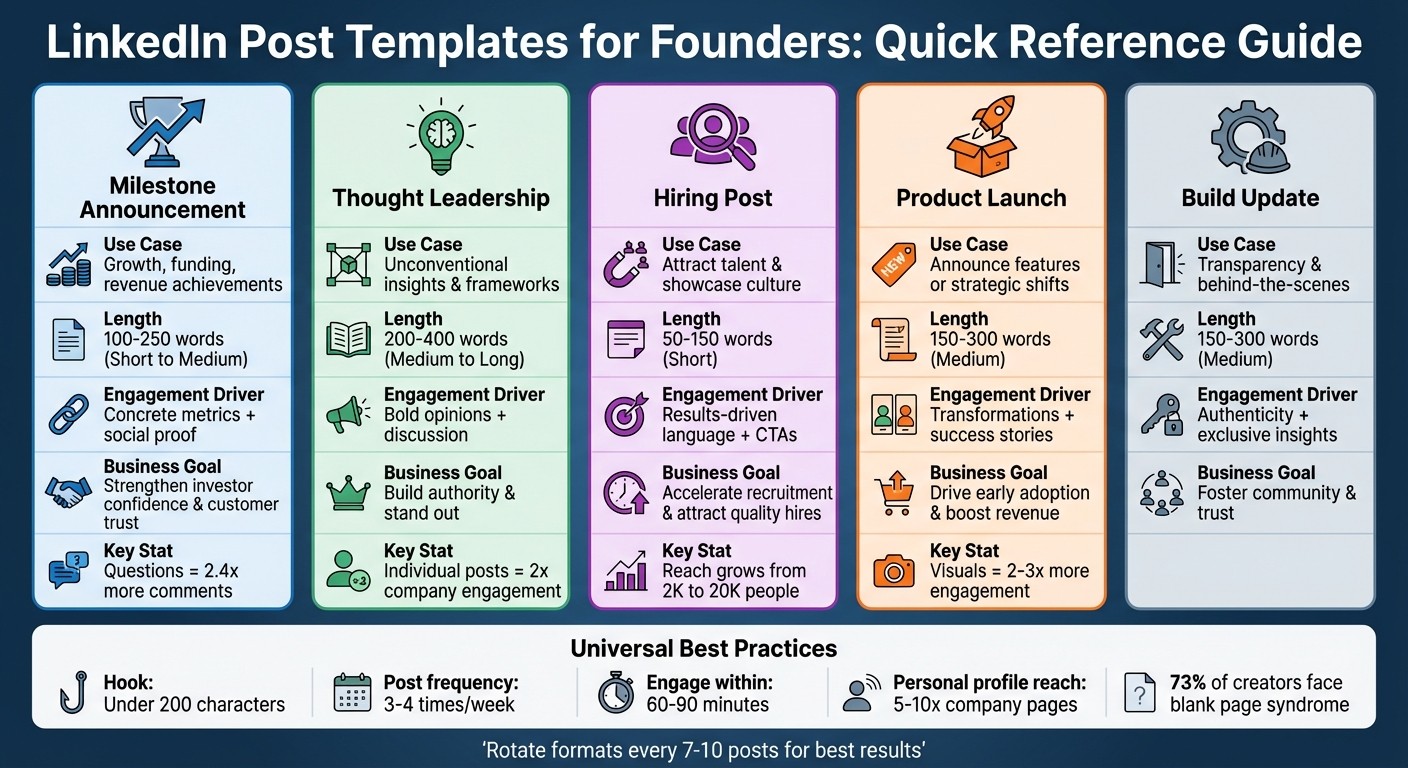
LinkedIn Post Templates Comparison: Types, Length, and Business Goals for Founders
LinkedIn post templates are tailored for specific purposes. The table outlines five templates, detailing their use cases, ideal length, primary engagement triggers, and intended business outcomes.
Template Type | Use Case | Recommended Length | Engagement Driver | Business Goal |
|---|---|---|---|---|
Milestone Announcement | Highlighting growth, funding, or revenue achievements | Short to Medium (100–250 words) | Concrete metrics and social proof | Strengthen investor confidence and customer trust |
Thought Leadership | Presenting unconventional insights or frameworks | Medium to Long (200–400 words) | Bold opinions and sparking discussion | Build authority and stand out |
Hiring Post | Attracting talent and showcasing company culture | Short (50–150 words) | Concise, results-driven language with CTAs | Accelerate recruitment and attract quality hires |
Product Launch | Announcing features or strategic shifts | Medium (150–300 words) | Highlighting transformations and success stories | Drive early adoption and boost revenue |
Build Update | Offering transparency and behind-the-scenes updates | Medium (150–300 words) | Authenticity and exclusive insights | Foster community involvement and trust |
This breakdown helps you align your business objectives with the most effective format for your message.
Pro Tip: Founders posting from personal profiles often see greater reach. To maximize visibility, engage with your post actively within the first 60–90 minutes.
"Templates reduce decision fatigue and let you focus on the one thing that actually matters - the message itself."
Whether you're announcing funding with a Milestone post or driving discussion with Thought Leadership, these templates simplify the process, helping you craft impactful messages that resonate with your audience.
Conclusion
These five templates are designed to tackle decision fatigue and conquer the blank page syndrome that affects 73% of content creators[2]. They allow you to focus on crafting your message and publishing more efficiently, all while staying true to your voice.
To make each post resonate, include at least one proof line - this could be a specific statistic, a customer testimonial, or a key takeaway. This small but powerful addition keeps your content grounded and personal[8]. As LinkedIn Buddy wisely notes:
"Templates shouldn't make your posts generic; they should make shipping easier."[8]
By tailoring your posts in this way, you can establish a rhythm that keeps your LinkedIn presence consistent. Remember, on LinkedIn, consistency outshines perfection. Posting 3–4 times a week aligns with the platform's algorithm preferences[1]. Rotate through different post formats every 7–10 posts to keep your content engaging and dynamic[5].
Your personal profile holds immense potential, often achieving 5–10 times the reach of company pages[1][4]. To maximize this, engage with your audience in the first 60–90 minutes after posting. This signals to the algorithm that your content deserves wider visibility[1].
With a mix of authenticity, regular posting, and smart engagement, you're setting the foundation for LinkedIn success. Start small - pick one template this week, adapt it to your voice, add a proof line, and hit publish. Consistent publishing builds not just an audience but also trust and credibility over time.
FAQs
How do I choose the right template for my goal?
To select the best LinkedIn post template, start by identifying your goal and choosing a format that aligns with it. For instance, if you're aiming to establish credibility, templates focused on storytelling or sharing lessons learned are effective. On the other hand, if your priority is attracting new talent, templates designed for team updates or sharing behind-the-scenes insights are more suitable. Leveraging tried-and-true structures, such as fill-in-the-blank formats, can help you craft engaging posts efficiently. Always ensure the template type - whether it's storytelling, insights, or quick prompts - matches the purpose of your post.
What should I include in a 'proof line' if I’m early-stage?
For early-stage startups, a proof line serves as a way to demonstrate progress or validation, helping to establish credibility. Examples might include statements like "Gathered early user feedback to validate the initial concept" or "Landed our first paying customers." The key is to emphasize milestones that reflect traction, valuable insights, or clear market interest.
How can I get more comments without sounding salesy?
To spark more comments and keep things engaging, try using conversational formats like storytelling, sharing lessons learned, or posing thought-provoking questions. Kick things off with a strong hook - maybe a relatable challenge or an unexpected insight - to grab attention right away. Wrap things up with an open-ended question that encourages readers to share their thoughts or experiences.
By offering real insights and incorporating formats like personal perspectives or case studies, you create a sense of trust and connection. This approach makes your posts feel more genuine and invites natural interaction.
Related Blog Posts

Zach Chmael
CMO, Averi
"We built Averi around the exact workflow we've used to scale our web traffic over 6000% in the last 6 months."
Your content should be working harder.
Averi's content engine builds Google entity authority, drives AI citations, and scales your visibility so you can get more customers.