

Framer + Averi: How to Automate Blog SEO on Framer

Zach Chmael

Head of Marketing

5 minutes

In This Article

Step-by-step: connect Averi to your Framer CMS, publish SEO + GEO scored blog posts directly, skip the copy-paste. Setup to first published post in under 90 minutes.

Updated

Trusted by 1,000+ teams

★★★★★ 4.9/5

Startups use Averi to build
content engines that rank.

TL;DR

🔗 Connect in 10 minutes: Averi connects to your Framer CMS. Authorize, map fields, choose publish mode (auto, draft, or scheduled).

✍️ Full workflow automated: Strategy → AI draft → your edit → content scoring (55% SEO + 45% GEO) → direct publish to Framer CMS with formatting, meta, images, and slug intact.

⏱️ Time per post: 38–53 minutes (vs. 4–5 hours manual). 75–85% savings. 2 tools instead of 5+.

🎨 Design stays intact. Creates CMS items using your existing blog template. No design changes.

💰 Total stack cost: Framer Pro ($30/mo) + Averi Solo ($99/mo) = $129/month for automated Framer blog SEO.

📋 Framer SEO checklist included: sitemap verification, robots.txt for AI crawlers, redirects, Open Graph, authors collection, image optimization, schema within 5,000-char embed limits.

Start free with Averi. 14-day trial. First Framer post publishes in under 90 minutes from signup.

Zach Chmael

CMO, Averi

"We built Averi around the exact workflow we've used to scale our web traffic over 6000% in the last 6 months."

Your content should be working harder.

Averi's content engine builds Google entity authority, drives AI citations, and scales your visibility so you can get more customers.

Framer + Averi: How to Automate Blog SEO on Framer

Framer is fast, beautiful, and increasingly the platform of choice for design-forward startups.

Over 500,000 monthly active users and a $2 billion valuation tell you the platform has earned its place.

The design is unmatched. The CMS is clean. The hosting is global and fast.

But when a founder decides to start blogging for organic growth, the same friction appears that hits every CMS: Framer is a publishing platform, not a content production system. You still need to research keywords, plan topics, write drafts, optimize for SEO and GEO, format for the CMS, and track performance across separate tools.

Most Framer users solve this with a patchwork: Google Keyword Planner, ChatGPT, a separate SEO tool, and manual copy-paste into Framer's CMS editor.

The patchwork works for 5 posts. It breaks at 15. By post 20, the blog goes quiet because the process takes too long.

This guide covers how to connect Averi's content engine to your Framer CMS, replacing the patchwork with a single workflow that goes from keyword research to published, scored, optimized blog post.

Why Framer Users Need a Content Engine

Framer's CMS handles the storage and display of structured content: blog posts, case studies, team profiles. It does this well. What it doesn't handle:

  • Researching which topics to write about

  • Generating keyword-targeted drafts

  • Optimizing for SEO and GEO before publishing

  • Scoring content quality against benchmarks

  • Tracking post-publish performance and flagging refreshes

Publishing weekly drives 3.5x more conversions than monthly.

Weekly publishing on Framer requires a production system upstream of the CMS.

That's the gap Averi fills.

See how much you could save by using Averi for your Framer blog

Framer's CMS Strengths for Blogging

Framer's CMS is simpler than Webflow's or WordPress's, and for most startup blogs, that simplicity is an advantage:

  • Rich text fields for article bodies (headers, bold, links, images preserved)

  • Collection references connecting blog posts to author profiles, categories, and related content

  • On-page editing (launched late 2025): update CMS content directly in the browser on your published site

  • Fast static hosting with global CDN, SSL, and image optimization baked in

  • Automatic sitemap generation for search engine discovery

The CMS handles 80% of what a startup blog needs. The remaining 20% (production, optimization, scoring) is what the integration adds.
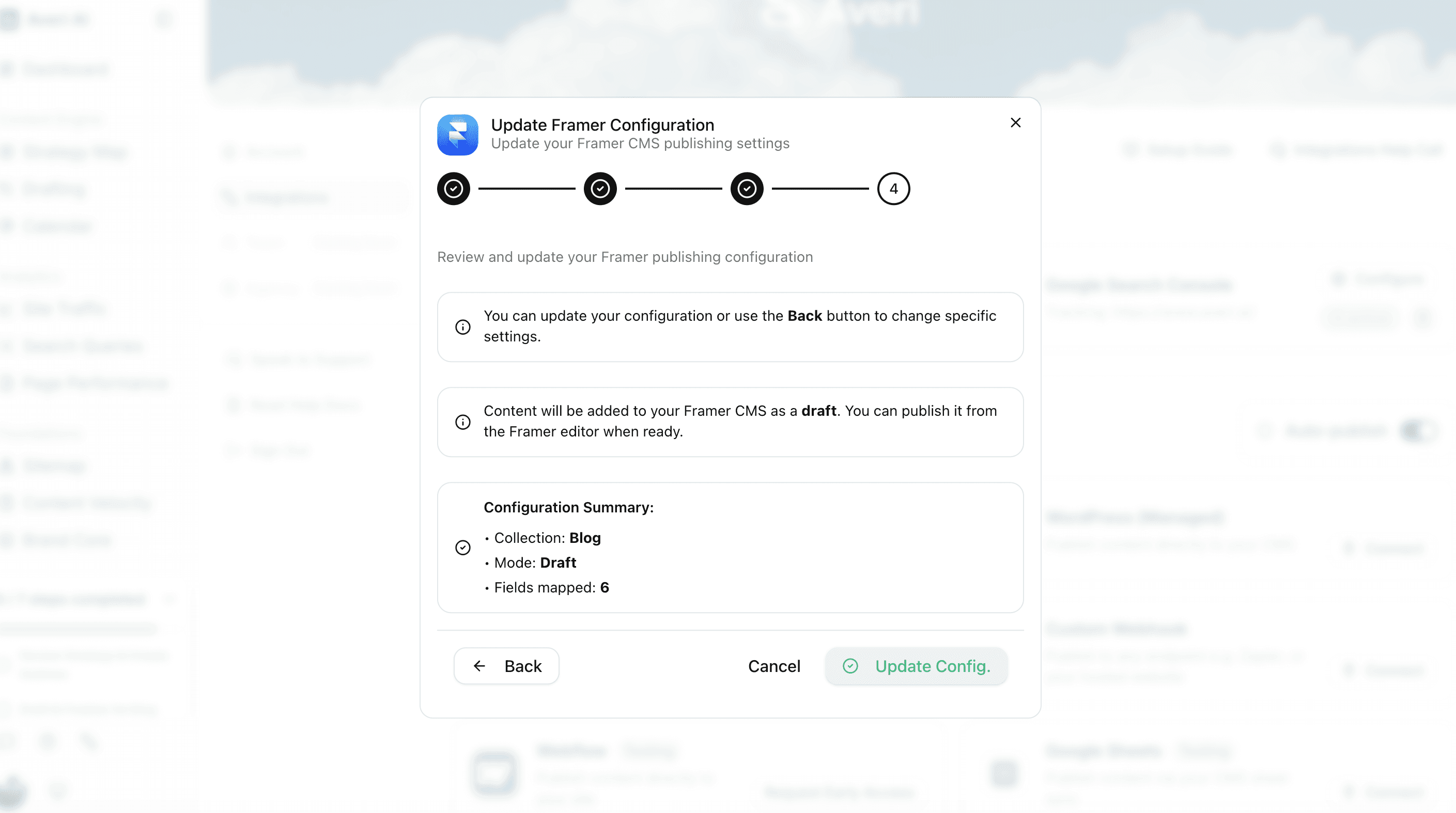
The Integration: How It Works

Step 1: Connect Your Framer Site (5 Minutes)

In Averi's dashboard, go to Settings → Integrations → Framer.

  1. Click "Connect Framer"

  2. Authorize Averi to access your Framer project

  3. Select your Framer site

  4. Select the CMS collection used for blog posts (typically "Blog" or "Posts")

  5. Map the content fields

The authorization grants Averi permission to create new CMS items in your blog collection.

It doesn't modify your site design, other collections, or existing content.

Step 2: Map Your CMS Fields (5 Minutes)

Framer CMS collections have custom fields. Map Averi's outputs to your Framer fields:

Averi Output

Framer CMS Field

Field Type

Article title

Title / Name

Text

Article body

Content / Body

Rich Text

Meta title

SEO Title

Text

Meta description

SEO Description

Text

Featured image

Thumbnail / Cover

Image

Author

Author

Reference

Publish date

Date

Date

URL slug

Slug

Text

Excerpt

Summary / Excerpt

Text

Category

Category

Option or Reference

Critical: Your blog content field must be a Rich Text field. Plain Text strips formatting. Rich Text preserves headers, links, bold, and images. Verify this in your Framer CMS collection settings before connecting.

Step 3: Configure Publishing Preferences

Option A: Auto-publish. Scored content publishes directly to your Framer blog as a live CMS item.

Option B: Draft mode. Content saves as a CMS draft. You review in Framer's editor, make visual adjustments, then publish manually. Framer's on-page editing makes this quick: click, check, publish.

Option C: Scheduled publishing. Set publish dates through Averi's Calendar View. Content publishes at the scheduled time.

Start with Option B for the first 2–4 weeks while you build confidence in the workflow.

The Full Workflow: Research to Published Post

1. Topic Generation (Averi → You Review)

Averi's Strategy Map generates topic recommendations based on your Brand Core and keyword opportunity data. You review and approve 2–4 topics per week. Takes 10–15 minutes.

2. Content Creation (Averi → You Edit)

For each approved topic, Averi generates a keyword-targeted draft:

  • Question-format H2 headings

  • 40–60 word answer capsules opening each section

  • 15–20 hyperlinked statistics from authoritative sources

  • 120–180 word section structure for AI extractability

  • 5–7 question FAQ section with self-contained answers

  • Meta title and meta description pre-generated

  • Target word count: 2,500+ words

Your action: Edit the draft. Add your expertise, voice, and product-specific insights. Takes 30–45 minutes per post. The AI handles labor (research, structure, statistics). You add value (perspective, expertise, editorial polish).

3. Content Scoring (Automated)

Every piece runs through the Content Scoring System: 55% SEO (keyword placement, headers, meta, internal links) + 45% GEO (answer capsules, factual density, FAQ quality, citation readiness). Below threshold = flagged. Above = cleared for publishing.

4. Publishing to Framer (Automated)

When you publish:

  1. Content formats for Framer's Rich Text field (headers, links, images, bold, lists)

  2. All mapped CMS fields populate (title, meta, slug, author, date, image, excerpt)

  3. CMS item creates in your Framer blog collection

  4. Publishes or saves as draft based on your preference

What you skip: No copy-paste from docs. No manual formatting. No re-entering meta tags. No forgetting the featured image.

5. Schema Markup

Averi generates FAQPage JSON-LD for every piece. Add it to your Framer page's custom code:

  • Site-wide schema (Organization): Framer Site Settings → Custom Code → Head

  • Page-specific schema (Article, FAQPage): Page-level custom code injection

The copy-paste JSON-LD templates are available in the Technical GEO Setup Guide. Implementation takes 15–20 minutes as a one-time setup.

6. Performance Tracking (Averi + Framer)

Averi's analytics integration tracks Google Search Console and GA4 data: impressions, clicks, positions, engagement, conversions. Pages approaching the 90-day citation freshness window get flagged for refresh. Top performers get identified for topic expansion.

See what your Content ROI could be this year with a content engine

Framer-Specific SEO Setup for Maximum Results

Framer SEO Settings (One-Time Setup)

Verify automatic sitemap. Framer generates XML sitemaps automatically. Find yours at yourdomain.com/sitemap.xml. Submit to both Google Search Console and Bing Webmaster Tools. ChatGPT sources from Bing — skip Bing and you skip ChatGPT.

Configure robots.txt. Add AI crawler allow rules in Framer's site settings for GPTBot, PerplexityBot, ClaudeBot, and Google-Extended. Without this, AI platforms can't crawl your Framer blog to cite it.

Set up redirects. When changing URL slugs or replacing old posts, add 301 redirects in Framer's publishing settings. Each redirect preserves backlink equity from the old URL. Note: Framer handles redirects one-to-one (no wildcard or bulk redirect support), so plan URL structures carefully from the start.

Open Graph meta. Framer's page settings include OG title, description, and image. Verify they're configured for social sharing. They typically inherit from your SEO fields if left blank.

Framer CMS Best Practices for Blog Performance

Use descriptive URL slugs. Framer auto-generates slugs from the post title. Clean them up. /blog/content-marketing-automation-guide beats /blog/the-complete-and-comprehensive-guide-to-content-marketing-automation-for-saas-companies.

Design your collection page template once. Your blog collection page template controls every post's visual design. Include: author byline, visible publish date, featured image, rich text body, related posts section, CTA block, and FAQ section styling. Build it right once; every post inherits it automatically.

Set up an Authors collection. Create a separate CMS collection for authors with bio, headshot, role, and LinkedIn link. Reference it from your blog collection. This enables Person schema implementation and strengthens E-E-A-T signals that both Google and AI systems evaluate.

Keep custom code within Framer's limits. Framer embeds have a 5,000-character limit per embed block. JSON-LD schema for Article + FAQPage typically fits within this. If your FAQ section has 7+ questions with full answers, the schema may approach the limit. In that case, split Organization schema into the site-wide head code and keep Article + FAQ schema at the page level.

Optimize images before uploading. Framer compresses and optimizes images automatically, but starting with optimized assets (1,500px wide for hero images, 800px for cards) keeps CMS storage lean and publish times fast. FCP under 0.4 seconds is 3x more likely to earn AI citations. Framer's default performance is strong — don't undermine it with uncompressed 5MB hero images.

The Time Comparison: Before and After

Before (Manual Workflow)

Step

Time

Tool

Keyword research

30 min

Google Keyword Planner

Topic planning

15 min

Spreadsheet

Writing first draft

2–3 hours

Docs + ChatGPT

SEO optimization

30 min

SurferSEO / Clearscope

Copy-paste to Framer

15–20 min

Framer CMS editor

Format in Framer

10–15 min

Framer editor

Meta tags + images

10 min

Framer page settings

Review + publish

5 min

Framer

Total per post

4–5 hours

5+ tools

After (Averi + Framer)

Step

Time

Tool

Approve topic

3 min

Averi

Edit AI draft

30–45 min

Averi

Review content score

3 min

Averi

Visual check in Framer (draft mode)

2 min

Framer

Total per post

38–53 min

2 tools

Time savings: 75–85% per post. At 2 posts per week, that's 6–8 hours saved weekly.

Over a year, 300+ hours.

Common Framer-Specific Questions

"Does Framer support API-based publishing?"

Framer launched a Server API in February 2026 (open beta) that supports programmatic CMS operations. This enables automated content publishing from external tools like Averi directly into Framer's CMS collections.

"What Framer plan do I need?"

Any paid Framer plan with CMS access. The Basic plan ($10/month) includes 1 CMS collection and 500 CMS items. The Pro plan ($30/month) includes multiple collections and more items. For a dedicated blog alongside other CMS content (team, case studies), Pro is the practical minimum. Total stack cost: Framer Pro ($30/month) + Averi Solo ($99/month) = $129/month for automated blog SEO on Framer.

"Framer CMS feels limited compared to WordPress or Webflow. Is it enough?"

For a startup blog producing 2–4 posts per week? Yes. Framer CMS supports the fields a blog needs: rich text body, meta title/description, author reference, featured image, date, slug, categories. The limitations (no nested collections, limited bulk operations, simpler field types) don't affect standard blog publishing. Where Framer CMS actually falls short is complex content architectures: multilingual blogs, large product databases, or sites with 500+ interconnected CMS items. For a startup content engine producing 8–16 posts per month, it handles the job.

"Can I still edit posts in Framer after publishing from Averi?"

Yes. Edits made in Framer's editor persist. Framer's on-page editing feature (launched late 2025) makes quick text updates and image swaps even faster — edit directly on the live page in your browser.

"What if I switch from Framer to Webflow or WordPress?"

Averi integrates with all three. Reconnect to the new CMS and your content production workflow continues unchanged. Content lives in Averi; Framer is the publishing destination.

Getting Started

Step 1: Start Averi's free 14-day trial. No credit card.

Step 2: Connect your Framer site and map CMS fields during onboarding. Takes 10 minutes.

Step 3: Complete your Brand Core (ICP, positioning, differentiators). Takes 10 minutes.

Step 4: Approve your first topic and edit the AI draft. Takes 30–45 minutes.

Step 5: Publish directly to Framer. Check the live post. Takes 5 minutes.

Total setup + first published post: under 90 minutes.

By end of week 1: 2 published, scored, SEO + GEO optimized blog posts live on your Framer site. By end of month 1: 8 posts. By month 3, your Google Search Console data tells the story.

The Framer design stays yours. The content production becomes automated.

Start free. First Framer post publishes today.

Related Resources

FAQs

Does Averi work with Framer's CMS?

Yes. Averi connects to Framer's CMS and creates blog collection items directly with all fields mapped: title, rich text body, meta title, meta description, featured image, author reference, publish date, URL slug, and excerpt. Content publishes with formatting intact, no copy-paste required. The integration supports auto-publish, draft mode, and scheduled publishing. Framer's Server API (launched February 2026, open beta) enables the programmatic CMS operations that power the integration.

Do I need coding experience to set up the integration?

No. The connection is authorization-based (click "Connect Framer," authorize, select site and collection). Field mapping is a visual interface. The only semi-technical step is pasting JSON-LD schema snippets into Framer's custom code sections. Organization schema goes in Site Settings → Custom Code → Head. Article and FAQ schema go in page-level custom code. Total setup: 10 minutes for the connection plus 15 minutes for schema.

Will the integration change my Framer site design?

No. The integration creates CMS items using your existing blog collection page template. It doesn't modify your site design, components, interactions, or any non-blog content. Every published post inherits the visual design you built in Framer's editor. The CMS powers the content. The template powers the presentation.

What Framer plan do I need?

Any paid Framer plan with CMS functionality. Basic ($10/month) includes 1 CMS collection and 500 items. Pro ($30/month) adds multiple collections and more items. For most startup blogs, Pro is the practical minimum if you also use CMS for other content types (team, case studies, testimonials). Combined with Averi's Solo plan at $99/month, total cost is $129/month for automated Framer blog SEO.

How does Framer compare to Webflow for blog SEO?

Both work well. Framer is simpler, faster to set up, and better for design-forward teams that want clean aesthetics without complex CMS architecture. Webflow offers deeper CMS capabilities (nested collections, bulk redirects, more field types) for larger content operations. For a startup publishing 2–4 posts/week, both platforms handle the job. Averi integrates with both, so your content production workflow stays the same regardless of which CMS you choose.

How do I add schema markup to Framer?

Two locations. Site-wide schema (Organization JSON-LD): Site Settings → Custom Code → Head Code. Page-specific schema (Article, FAQPage): page-level custom code injection. Framer embeds have a 5,000-character limit per block. Article + FAQPage schema for a 7-question FAQ typically fits within this limit. The copy-paste JSON-LD templates are ready to paste with your site-specific details filled in. Validate with Google's Rich Results Test after adding.

Can I publish to Framer and other CMS platforms from Averi?

Yes. Averi integrates with every CMS platform either through direct integration or via webhook. If you run multiple sites across different CMS platforms, you can publish from the same content engine to each. The production workflow (strategy, creation, scoring) is identical. Only the publishing destination changes. This is useful for startups evaluating CMS platforms or maintaining separate sites for different audiences.


Continue Reading

The latest handpicked blog articles

Experience The AI Content Engine

Already have an account?

Join 30,000+ Founders, Marketers & Builders

Don't Feed the Algorithm

“Top 3 tech + AI newsletters in the country. Always sharp, always actionable.”

"Genuinely my favorite newsletter in tech. No fluff, no cheesy ads, just great content."

“Clear, practical, and on-point. Helps me keep up without drowning in noise.”

User-Generated Content & Authenticity in the Age of AI

Zach Chmael

Head of Marketing

5 minutes

In This Article

Step-by-step: connect Averi to your Framer CMS, publish SEO + GEO scored blog posts directly, skip the copy-paste. Setup to first published post in under 90 minutes.

Don’t Feed the Algorithm

The algorithm never sleeps, but you don’t have to feed it — Join our weekly newsletter for real insights on AI, human creativity & marketing execution.

TL;DR

🔗 Connect in 10 minutes: Averi connects to your Framer CMS. Authorize, map fields, choose publish mode (auto, draft, or scheduled).

✍️ Full workflow automated: Strategy → AI draft → your edit → content scoring (55% SEO + 45% GEO) → direct publish to Framer CMS with formatting, meta, images, and slug intact.

⏱️ Time per post: 38–53 minutes (vs. 4–5 hours manual). 75–85% savings. 2 tools instead of 5+.

🎨 Design stays intact. Creates CMS items using your existing blog template. No design changes.

💰 Total stack cost: Framer Pro ($30/mo) + Averi Solo ($99/mo) = $129/month for automated Framer blog SEO.

📋 Framer SEO checklist included: sitemap verification, robots.txt for AI crawlers, redirects, Open Graph, authors collection, image optimization, schema within 5,000-char embed limits.

Start free with Averi. 14-day trial. First Framer post publishes in under 90 minutes from signup.

"We built Averi around the exact workflow we've used to scale our web traffic over 6000% in the last 6 months."

founder-image
founder-image
Your content should be working harder.

Averi's content engine builds Google entity authority, drives AI citations, and scales your visibility so you can get more customers.

Framer + Averi: How to Automate Blog SEO on Framer

Framer is fast, beautiful, and increasingly the platform of choice for design-forward startups.

Over 500,000 monthly active users and a $2 billion valuation tell you the platform has earned its place.

The design is unmatched. The CMS is clean. The hosting is global and fast.

But when a founder decides to start blogging for organic growth, the same friction appears that hits every CMS: Framer is a publishing platform, not a content production system. You still need to research keywords, plan topics, write drafts, optimize for SEO and GEO, format for the CMS, and track performance across separate tools.

Most Framer users solve this with a patchwork: Google Keyword Planner, ChatGPT, a separate SEO tool, and manual copy-paste into Framer's CMS editor.

The patchwork works for 5 posts. It breaks at 15. By post 20, the blog goes quiet because the process takes too long.

This guide covers how to connect Averi's content engine to your Framer CMS, replacing the patchwork with a single workflow that goes from keyword research to published, scored, optimized blog post.

Why Framer Users Need a Content Engine

Framer's CMS handles the storage and display of structured content: blog posts, case studies, team profiles. It does this well. What it doesn't handle:

  • Researching which topics to write about

  • Generating keyword-targeted drafts

  • Optimizing for SEO and GEO before publishing

  • Scoring content quality against benchmarks

  • Tracking post-publish performance and flagging refreshes

Publishing weekly drives 3.5x more conversions than monthly.

Weekly publishing on Framer requires a production system upstream of the CMS.

That's the gap Averi fills.

See how much you could save by using Averi for your Framer blog

Framer's CMS Strengths for Blogging

Framer's CMS is simpler than Webflow's or WordPress's, and for most startup blogs, that simplicity is an advantage:

  • Rich text fields for article bodies (headers, bold, links, images preserved)

  • Collection references connecting blog posts to author profiles, categories, and related content

  • On-page editing (launched late 2025): update CMS content directly in the browser on your published site

  • Fast static hosting with global CDN, SSL, and image optimization baked in

  • Automatic sitemap generation for search engine discovery

The CMS handles 80% of what a startup blog needs. The remaining 20% (production, optimization, scoring) is what the integration adds.

The Integration: How It Works

Step 1: Connect Your Framer Site (5 Minutes)

In Averi's dashboard, go to Settings → Integrations → Framer.

  1. Click "Connect Framer"

  2. Authorize Averi to access your Framer project

  3. Select your Framer site

  4. Select the CMS collection used for blog posts (typically "Blog" or "Posts")

  5. Map the content fields

The authorization grants Averi permission to create new CMS items in your blog collection.

It doesn't modify your site design, other collections, or existing content.

Step 2: Map Your CMS Fields (5 Minutes)

Framer CMS collections have custom fields. Map Averi's outputs to your Framer fields:

Averi Output

Framer CMS Field

Field Type

Article title

Title / Name

Text

Article body

Content / Body

Rich Text

Meta title

SEO Title

Text

Meta description

SEO Description

Text

Featured image

Thumbnail / Cover

Image

Author

Author

Reference

Publish date

Date

Date

URL slug

Slug

Text

Excerpt

Summary / Excerpt

Text

Category

Category

Option or Reference

Critical: Your blog content field must be a Rich Text field. Plain Text strips formatting. Rich Text preserves headers, links, bold, and images. Verify this in your Framer CMS collection settings before connecting.

Step 3: Configure Publishing Preferences

Option A: Auto-publish. Scored content publishes directly to your Framer blog as a live CMS item.

Option B: Draft mode. Content saves as a CMS draft. You review in Framer's editor, make visual adjustments, then publish manually. Framer's on-page editing makes this quick: click, check, publish.

Option C: Scheduled publishing. Set publish dates through Averi's Calendar View. Content publishes at the scheduled time.

Start with Option B for the first 2–4 weeks while you build confidence in the workflow.

The Full Workflow: Research to Published Post

1. Topic Generation (Averi → You Review)

Averi's Strategy Map generates topic recommendations based on your Brand Core and keyword opportunity data. You review and approve 2–4 topics per week. Takes 10–15 minutes.

2. Content Creation (Averi → You Edit)

For each approved topic, Averi generates a keyword-targeted draft:

  • Question-format H2 headings

  • 40–60 word answer capsules opening each section

  • 15–20 hyperlinked statistics from authoritative sources

  • 120–180 word section structure for AI extractability

  • 5–7 question FAQ section with self-contained answers

  • Meta title and meta description pre-generated

  • Target word count: 2,500+ words

Your action: Edit the draft. Add your expertise, voice, and product-specific insights. Takes 30–45 minutes per post. The AI handles labor (research, structure, statistics). You add value (perspective, expertise, editorial polish).

3. Content Scoring (Automated)

Every piece runs through the Content Scoring System: 55% SEO (keyword placement, headers, meta, internal links) + 45% GEO (answer capsules, factual density, FAQ quality, citation readiness). Below threshold = flagged. Above = cleared for publishing.

4. Publishing to Framer (Automated)

When you publish:

  1. Content formats for Framer's Rich Text field (headers, links, images, bold, lists)

  2. All mapped CMS fields populate (title, meta, slug, author, date, image, excerpt)

  3. CMS item creates in your Framer blog collection

  4. Publishes or saves as draft based on your preference

What you skip: No copy-paste from docs. No manual formatting. No re-entering meta tags. No forgetting the featured image.

5. Schema Markup

Averi generates FAQPage JSON-LD for every piece. Add it to your Framer page's custom code:

  • Site-wide schema (Organization): Framer Site Settings → Custom Code → Head

  • Page-specific schema (Article, FAQPage): Page-level custom code injection

The copy-paste JSON-LD templates are available in the Technical GEO Setup Guide. Implementation takes 15–20 minutes as a one-time setup.

6. Performance Tracking (Averi + Framer)

Averi's analytics integration tracks Google Search Console and GA4 data: impressions, clicks, positions, engagement, conversions. Pages approaching the 90-day citation freshness window get flagged for refresh. Top performers get identified for topic expansion.

See what your Content ROI could be this year with a content engine

Framer-Specific SEO Setup for Maximum Results

Framer SEO Settings (One-Time Setup)

Verify automatic sitemap. Framer generates XML sitemaps automatically. Find yours at yourdomain.com/sitemap.xml. Submit to both Google Search Console and Bing Webmaster Tools. ChatGPT sources from Bing — skip Bing and you skip ChatGPT.

Configure robots.txt. Add AI crawler allow rules in Framer's site settings for GPTBot, PerplexityBot, ClaudeBot, and Google-Extended. Without this, AI platforms can't crawl your Framer blog to cite it.

Set up redirects. When changing URL slugs or replacing old posts, add 301 redirects in Framer's publishing settings. Each redirect preserves backlink equity from the old URL. Note: Framer handles redirects one-to-one (no wildcard or bulk redirect support), so plan URL structures carefully from the start.

Open Graph meta. Framer's page settings include OG title, description, and image. Verify they're configured for social sharing. They typically inherit from your SEO fields if left blank.

Framer CMS Best Practices for Blog Performance

Use descriptive URL slugs. Framer auto-generates slugs from the post title. Clean them up. /blog/content-marketing-automation-guide beats /blog/the-complete-and-comprehensive-guide-to-content-marketing-automation-for-saas-companies.

Design your collection page template once. Your blog collection page template controls every post's visual design. Include: author byline, visible publish date, featured image, rich text body, related posts section, CTA block, and FAQ section styling. Build it right once; every post inherits it automatically.

Set up an Authors collection. Create a separate CMS collection for authors with bio, headshot, role, and LinkedIn link. Reference it from your blog collection. This enables Person schema implementation and strengthens E-E-A-T signals that both Google and AI systems evaluate.

Keep custom code within Framer's limits. Framer embeds have a 5,000-character limit per embed block. JSON-LD schema for Article + FAQPage typically fits within this. If your FAQ section has 7+ questions with full answers, the schema may approach the limit. In that case, split Organization schema into the site-wide head code and keep Article + FAQ schema at the page level.

Optimize images before uploading. Framer compresses and optimizes images automatically, but starting with optimized assets (1,500px wide for hero images, 800px for cards) keeps CMS storage lean and publish times fast. FCP under 0.4 seconds is 3x more likely to earn AI citations. Framer's default performance is strong — don't undermine it with uncompressed 5MB hero images.

The Time Comparison: Before and After

Before (Manual Workflow)

Step

Time

Tool

Keyword research

30 min

Google Keyword Planner

Topic planning

15 min

Spreadsheet

Writing first draft

2–3 hours

Docs + ChatGPT

SEO optimization

30 min

SurferSEO / Clearscope

Copy-paste to Framer

15–20 min

Framer CMS editor

Format in Framer

10–15 min

Framer editor

Meta tags + images

10 min

Framer page settings

Review + publish

5 min

Framer

Total per post

4–5 hours

5+ tools

After (Averi + Framer)

Step

Time

Tool

Approve topic

3 min

Averi

Edit AI draft

30–45 min

Averi

Review content score

3 min

Averi

Visual check in Framer (draft mode)

2 min

Framer

Total per post

38–53 min

2 tools

Time savings: 75–85% per post. At 2 posts per week, that's 6–8 hours saved weekly.

Over a year, 300+ hours.

Common Framer-Specific Questions

"Does Framer support API-based publishing?"

Framer launched a Server API in February 2026 (open beta) that supports programmatic CMS operations. This enables automated content publishing from external tools like Averi directly into Framer's CMS collections.

"What Framer plan do I need?"

Any paid Framer plan with CMS access. The Basic plan ($10/month) includes 1 CMS collection and 500 CMS items. The Pro plan ($30/month) includes multiple collections and more items. For a dedicated blog alongside other CMS content (team, case studies), Pro is the practical minimum. Total stack cost: Framer Pro ($30/month) + Averi Solo ($99/month) = $129/month for automated blog SEO on Framer.

"Framer CMS feels limited compared to WordPress or Webflow. Is it enough?"

For a startup blog producing 2–4 posts per week? Yes. Framer CMS supports the fields a blog needs: rich text body, meta title/description, author reference, featured image, date, slug, categories. The limitations (no nested collections, limited bulk operations, simpler field types) don't affect standard blog publishing. Where Framer CMS actually falls short is complex content architectures: multilingual blogs, large product databases, or sites with 500+ interconnected CMS items. For a startup content engine producing 8–16 posts per month, it handles the job.

"Can I still edit posts in Framer after publishing from Averi?"

Yes. Edits made in Framer's editor persist. Framer's on-page editing feature (launched late 2025) makes quick text updates and image swaps even faster — edit directly on the live page in your browser.

"What if I switch from Framer to Webflow or WordPress?"

Averi integrates with all three. Reconnect to the new CMS and your content production workflow continues unchanged. Content lives in Averi; Framer is the publishing destination.

Getting Started

Step 1: Start Averi's free 14-day trial. No credit card.

Step 2: Connect your Framer site and map CMS fields during onboarding. Takes 10 minutes.

Step 3: Complete your Brand Core (ICP, positioning, differentiators). Takes 10 minutes.

Step 4: Approve your first topic and edit the AI draft. Takes 30–45 minutes.

Step 5: Publish directly to Framer. Check the live post. Takes 5 minutes.

Total setup + first published post: under 90 minutes.

By end of week 1: 2 published, scored, SEO + GEO optimized blog posts live on your Framer site. By end of month 1: 8 posts. By month 3, your Google Search Console data tells the story.

The Framer design stays yours. The content production becomes automated.

Start free. First Framer post publishes today.

Related Resources

Continue Reading

The latest handpicked blog articles

Join 30,000+ Founders, Marketers & Builders

Don't Feed the Algorithm

“Top 3 tech + AI newsletters in the country. Always sharp, always actionable.”

"Genuinely my favorite newsletter in tech. No fluff, no cheesy ads, just great content."

“Clear, practical, and on-point. Helps me keep up without drowning in noise.”

User-Generated Content & Authenticity in the Age of AI

Zach Chmael

Head of Marketing

5 minutes

In This Article

Step-by-step: connect Averi to your Framer CMS, publish SEO + GEO scored blog posts directly, skip the copy-paste. Setup to first published post in under 90 minutes.

Don’t Feed the Algorithm

The algorithm never sleeps, but you don’t have to feed it — Join our weekly newsletter for real insights on AI, human creativity & marketing execution.

Trusted by 1,000+ teams

★★★★★ 4.9/5

Startups use Averi to build
content engines that rank.

Framer + Averi: How to Automate Blog SEO on Framer

Framer is fast, beautiful, and increasingly the platform of choice for design-forward startups.

Over 500,000 monthly active users and a $2 billion valuation tell you the platform has earned its place.

The design is unmatched. The CMS is clean. The hosting is global and fast.

But when a founder decides to start blogging for organic growth, the same friction appears that hits every CMS: Framer is a publishing platform, not a content production system. You still need to research keywords, plan topics, write drafts, optimize for SEO and GEO, format for the CMS, and track performance across separate tools.

Most Framer users solve this with a patchwork: Google Keyword Planner, ChatGPT, a separate SEO tool, and manual copy-paste into Framer's CMS editor.

The patchwork works for 5 posts. It breaks at 15. By post 20, the blog goes quiet because the process takes too long.

This guide covers how to connect Averi's content engine to your Framer CMS, replacing the patchwork with a single workflow that goes from keyword research to published, scored, optimized blog post.

Why Framer Users Need a Content Engine

Framer's CMS handles the storage and display of structured content: blog posts, case studies, team profiles. It does this well. What it doesn't handle:

  • Researching which topics to write about

  • Generating keyword-targeted drafts

  • Optimizing for SEO and GEO before publishing

  • Scoring content quality against benchmarks

  • Tracking post-publish performance and flagging refreshes

Publishing weekly drives 3.5x more conversions than monthly.

Weekly publishing on Framer requires a production system upstream of the CMS.

That's the gap Averi fills.

See how much you could save by using Averi for your Framer blog

Framer's CMS Strengths for Blogging

Framer's CMS is simpler than Webflow's or WordPress's, and for most startup blogs, that simplicity is an advantage:

  • Rich text fields for article bodies (headers, bold, links, images preserved)

  • Collection references connecting blog posts to author profiles, categories, and related content

  • On-page editing (launched late 2025): update CMS content directly in the browser on your published site

  • Fast static hosting with global CDN, SSL, and image optimization baked in

  • Automatic sitemap generation for search engine discovery

The CMS handles 80% of what a startup blog needs. The remaining 20% (production, optimization, scoring) is what the integration adds.

The Integration: How It Works

Step 1: Connect Your Framer Site (5 Minutes)

In Averi's dashboard, go to Settings → Integrations → Framer.

  1. Click "Connect Framer"

  2. Authorize Averi to access your Framer project

  3. Select your Framer site

  4. Select the CMS collection used for blog posts (typically "Blog" or "Posts")

  5. Map the content fields

The authorization grants Averi permission to create new CMS items in your blog collection.

It doesn't modify your site design, other collections, or existing content.

Step 2: Map Your CMS Fields (5 Minutes)

Framer CMS collections have custom fields. Map Averi's outputs to your Framer fields:

Averi Output

Framer CMS Field

Field Type

Article title

Title / Name

Text

Article body

Content / Body

Rich Text

Meta title

SEO Title

Text

Meta description

SEO Description

Text

Featured image

Thumbnail / Cover

Image

Author

Author

Reference

Publish date

Date

Date

URL slug

Slug

Text

Excerpt

Summary / Excerpt

Text

Category

Category

Option or Reference

Critical: Your blog content field must be a Rich Text field. Plain Text strips formatting. Rich Text preserves headers, links, bold, and images. Verify this in your Framer CMS collection settings before connecting.

Step 3: Configure Publishing Preferences

Option A: Auto-publish. Scored content publishes directly to your Framer blog as a live CMS item.

Option B: Draft mode. Content saves as a CMS draft. You review in Framer's editor, make visual adjustments, then publish manually. Framer's on-page editing makes this quick: click, check, publish.

Option C: Scheduled publishing. Set publish dates through Averi's Calendar View. Content publishes at the scheduled time.

Start with Option B for the first 2–4 weeks while you build confidence in the workflow.

The Full Workflow: Research to Published Post

1. Topic Generation (Averi → You Review)

Averi's Strategy Map generates topic recommendations based on your Brand Core and keyword opportunity data. You review and approve 2–4 topics per week. Takes 10–15 minutes.

2. Content Creation (Averi → You Edit)

For each approved topic, Averi generates a keyword-targeted draft:

  • Question-format H2 headings

  • 40–60 word answer capsules opening each section

  • 15–20 hyperlinked statistics from authoritative sources

  • 120–180 word section structure for AI extractability

  • 5–7 question FAQ section with self-contained answers

  • Meta title and meta description pre-generated

  • Target word count: 2,500+ words

Your action: Edit the draft. Add your expertise, voice, and product-specific insights. Takes 30–45 minutes per post. The AI handles labor (research, structure, statistics). You add value (perspective, expertise, editorial polish).

3. Content Scoring (Automated)

Every piece runs through the Content Scoring System: 55% SEO (keyword placement, headers, meta, internal links) + 45% GEO (answer capsules, factual density, FAQ quality, citation readiness). Below threshold = flagged. Above = cleared for publishing.

4. Publishing to Framer (Automated)

When you publish:

  1. Content formats for Framer's Rich Text field (headers, links, images, bold, lists)

  2. All mapped CMS fields populate (title, meta, slug, author, date, image, excerpt)

  3. CMS item creates in your Framer blog collection

  4. Publishes or saves as draft based on your preference

What you skip: No copy-paste from docs. No manual formatting. No re-entering meta tags. No forgetting the featured image.

5. Schema Markup

Averi generates FAQPage JSON-LD for every piece. Add it to your Framer page's custom code:

  • Site-wide schema (Organization): Framer Site Settings → Custom Code → Head

  • Page-specific schema (Article, FAQPage): Page-level custom code injection

The copy-paste JSON-LD templates are available in the Technical GEO Setup Guide. Implementation takes 15–20 minutes as a one-time setup.

6. Performance Tracking (Averi + Framer)

Averi's analytics integration tracks Google Search Console and GA4 data: impressions, clicks, positions, engagement, conversions. Pages approaching the 90-day citation freshness window get flagged for refresh. Top performers get identified for topic expansion.

See what your Content ROI could be this year with a content engine

Framer-Specific SEO Setup for Maximum Results

Framer SEO Settings (One-Time Setup)

Verify automatic sitemap. Framer generates XML sitemaps automatically. Find yours at yourdomain.com/sitemap.xml. Submit to both Google Search Console and Bing Webmaster Tools. ChatGPT sources from Bing — skip Bing and you skip ChatGPT.

Configure robots.txt. Add AI crawler allow rules in Framer's site settings for GPTBot, PerplexityBot, ClaudeBot, and Google-Extended. Without this, AI platforms can't crawl your Framer blog to cite it.

Set up redirects. When changing URL slugs or replacing old posts, add 301 redirects in Framer's publishing settings. Each redirect preserves backlink equity from the old URL. Note: Framer handles redirects one-to-one (no wildcard or bulk redirect support), so plan URL structures carefully from the start.

Open Graph meta. Framer's page settings include OG title, description, and image. Verify they're configured for social sharing. They typically inherit from your SEO fields if left blank.

Framer CMS Best Practices for Blog Performance

Use descriptive URL slugs. Framer auto-generates slugs from the post title. Clean them up. /blog/content-marketing-automation-guide beats /blog/the-complete-and-comprehensive-guide-to-content-marketing-automation-for-saas-companies.

Design your collection page template once. Your blog collection page template controls every post's visual design. Include: author byline, visible publish date, featured image, rich text body, related posts section, CTA block, and FAQ section styling. Build it right once; every post inherits it automatically.

Set up an Authors collection. Create a separate CMS collection for authors with bio, headshot, role, and LinkedIn link. Reference it from your blog collection. This enables Person schema implementation and strengthens E-E-A-T signals that both Google and AI systems evaluate.

Keep custom code within Framer's limits. Framer embeds have a 5,000-character limit per embed block. JSON-LD schema for Article + FAQPage typically fits within this. If your FAQ section has 7+ questions with full answers, the schema may approach the limit. In that case, split Organization schema into the site-wide head code and keep Article + FAQ schema at the page level.

Optimize images before uploading. Framer compresses and optimizes images automatically, but starting with optimized assets (1,500px wide for hero images, 800px for cards) keeps CMS storage lean and publish times fast. FCP under 0.4 seconds is 3x more likely to earn AI citations. Framer's default performance is strong — don't undermine it with uncompressed 5MB hero images.

The Time Comparison: Before and After

Before (Manual Workflow)

Step

Time

Tool

Keyword research

30 min

Google Keyword Planner

Topic planning

15 min

Spreadsheet

Writing first draft

2–3 hours

Docs + ChatGPT

SEO optimization

30 min

SurferSEO / Clearscope

Copy-paste to Framer

15–20 min

Framer CMS editor

Format in Framer

10–15 min

Framer editor

Meta tags + images

10 min

Framer page settings

Review + publish

5 min

Framer

Total per post

4–5 hours

5+ tools

After (Averi + Framer)

Step

Time

Tool

Approve topic

3 min

Averi

Edit AI draft

30–45 min

Averi

Review content score

3 min

Averi

Visual check in Framer (draft mode)

2 min

Framer

Total per post

38–53 min

2 tools

Time savings: 75–85% per post. At 2 posts per week, that's 6–8 hours saved weekly.

Over a year, 300+ hours.

Common Framer-Specific Questions

"Does Framer support API-based publishing?"

Framer launched a Server API in February 2026 (open beta) that supports programmatic CMS operations. This enables automated content publishing from external tools like Averi directly into Framer's CMS collections.

"What Framer plan do I need?"

Any paid Framer plan with CMS access. The Basic plan ($10/month) includes 1 CMS collection and 500 CMS items. The Pro plan ($30/month) includes multiple collections and more items. For a dedicated blog alongside other CMS content (team, case studies), Pro is the practical minimum. Total stack cost: Framer Pro ($30/month) + Averi Solo ($99/month) = $129/month for automated blog SEO on Framer.

"Framer CMS feels limited compared to WordPress or Webflow. Is it enough?"

For a startup blog producing 2–4 posts per week? Yes. Framer CMS supports the fields a blog needs: rich text body, meta title/description, author reference, featured image, date, slug, categories. The limitations (no nested collections, limited bulk operations, simpler field types) don't affect standard blog publishing. Where Framer CMS actually falls short is complex content architectures: multilingual blogs, large product databases, or sites with 500+ interconnected CMS items. For a startup content engine producing 8–16 posts per month, it handles the job.

"Can I still edit posts in Framer after publishing from Averi?"

Yes. Edits made in Framer's editor persist. Framer's on-page editing feature (launched late 2025) makes quick text updates and image swaps even faster — edit directly on the live page in your browser.

"What if I switch from Framer to Webflow or WordPress?"

Averi integrates with all three. Reconnect to the new CMS and your content production workflow continues unchanged. Content lives in Averi; Framer is the publishing destination.

Getting Started

Step 1: Start Averi's free 14-day trial. No credit card.

Step 2: Connect your Framer site and map CMS fields during onboarding. Takes 10 minutes.

Step 3: Complete your Brand Core (ICP, positioning, differentiators). Takes 10 minutes.

Step 4: Approve your first topic and edit the AI draft. Takes 30–45 minutes.

Step 5: Publish directly to Framer. Check the live post. Takes 5 minutes.

Total setup + first published post: under 90 minutes.

By end of week 1: 2 published, scored, SEO + GEO optimized blog posts live on your Framer site. By end of month 1: 8 posts. By month 3, your Google Search Console data tells the story.

The Framer design stays yours. The content production becomes automated.

Start free. First Framer post publishes today.

Related Resources

"We built Averi around the exact workflow we've used to scale our web traffic over 6000% in the last 6 months."

founder-image
founder-image
Your content should be working harder.

Averi's content engine builds Google entity authority, drives AI citations, and scales your visibility so you can get more customers.

FAQs

Yes. Averi integrates with every CMS platform either through direct integration or via webhook. If you run multiple sites across different CMS platforms, you can publish from the same content engine to each. The production workflow (strategy, creation, scoring) is identical. Only the publishing destination changes. This is useful for startups evaluating CMS platforms or maintaining separate sites for different audiences.
Can I publish to Framer and other CMS platforms from Averi?

Two locations. Site-wide schema (Organization JSON-LD): Site Settings → Custom Code → Head Code. Page-specific schema (Article, FAQPage): page-level custom code injection. Framer embeds have a 5,000-character limit per block. Article + FAQPage schema for a 7-question FAQ typically fits within this limit. The copy-paste JSON-LD templates are ready to paste with your site-specific details filled in. Validate with Google's Rich Results Test after adding.

How do I add schema markup to Framer?

Both work well. Framer is simpler, faster to set up, and better for design-forward teams that want clean aesthetics without complex CMS architecture. Webflow offers deeper CMS capabilities (nested collections, bulk redirects, more field types) for larger content operations. For a startup publishing 2–4 posts/week, both platforms handle the job. Averi integrates with both, so your content production workflow stays the same regardless of which CMS you choose.

How does Framer compare to Webflow for blog SEO?

Any paid Framer plan with CMS functionality. Basic ($10/month) includes 1 CMS collection and 500 items. Pro ($30/month) adds multiple collections and more items. For most startup blogs, Pro is the practical minimum if you also use CMS for other content types (team, case studies, testimonials). Combined with Averi's Solo plan at $99/month, total cost is $129/month for automated Framer blog SEO.

What Framer plan do I need?

No. The integration creates CMS items using your existing blog collection page template. It doesn't modify your site design, components, interactions, or any non-blog content. Every published post inherits the visual design you built in Framer's editor. The CMS powers the content. The template powers the presentation.

Will the integration change my Framer site design?

No. The connection is authorization-based (click "Connect Framer," authorize, select site and collection). Field mapping is a visual interface. The only semi-technical step is pasting JSON-LD schema snippets into Framer's custom code sections. Organization schema goes in Site Settings → Custom Code → Head. Article and FAQ schema go in page-level custom code. Total setup: 10 minutes for the connection plus 15 minutes for schema.

Do I need coding experience to set up the integration?

Yes. Averi connects to Framer's CMS and creates blog collection items directly with all fields mapped: title, rich text body, meta title, meta description, featured image, author reference, publish date, URL slug, and excerpt. Content publishes with formatting intact, no copy-paste required. The integration supports auto-publish, draft mode, and scheduled publishing. Framer's Server API (launched February 2026, open beta) enables the programmatic CMS operations that power the integration.

Does Averi work with Framer's CMS?

FAQs

How long does it take to see SEO results for B2B SaaS?

Expect 7 months to break-even on average, with meaningful traffic improvements typically appearing within 3-6 months. Link building results appear within 1-6 months. The key is consistency—companies that stop and start lose ground to those who execute continuously.

Is AI-generated content actually good for SEO?

62% of marketers report higher SERP rankings for AI-generated content—but only when properly edited and enhanced with human expertise. Pure AI content without human refinement often lacks the originality and depth that both readers and algorithms prefer.

Is AI-generated content actually good for SEO?

62% of marketers report higher SERP rankings for AI-generated content—but only when properly edited and enhanced with human expertise. Pure AI content without human refinement often lacks the originality and depth that both readers and algorithms prefer.

Is AI-generated content actually good for SEO?

62% of marketers report higher SERP rankings for AI-generated content—but only when properly edited and enhanced with human expertise. Pure AI content without human refinement often lacks the originality and depth that both readers and algorithms prefer.

Is AI-generated content actually good for SEO?

62% of marketers report higher SERP rankings for AI-generated content—but only when properly edited and enhanced with human expertise. Pure AI content without human refinement often lacks the originality and depth that both readers and algorithms prefer.

Is AI-generated content actually good for SEO?

62% of marketers report higher SERP rankings for AI-generated content—but only when properly edited and enhanced with human expertise. Pure AI content without human refinement often lacks the originality and depth that both readers and algorithms prefer.

Is AI-generated content actually good for SEO?

62% of marketers report higher SERP rankings for AI-generated content—but only when properly edited and enhanced with human expertise. Pure AI content without human refinement often lacks the originality and depth that both readers and algorithms prefer.

Is AI-generated content actually good for SEO?

62% of marketers report higher SERP rankings for AI-generated content—but only when properly edited and enhanced with human expertise. Pure AI content without human refinement often lacks the originality and depth that both readers and algorithms prefer.

TL;DR

🔗 Connect in 10 minutes: Averi connects to your Framer CMS. Authorize, map fields, choose publish mode (auto, draft, or scheduled).

✍️ Full workflow automated: Strategy → AI draft → your edit → content scoring (55% SEO + 45% GEO) → direct publish to Framer CMS with formatting, meta, images, and slug intact.

⏱️ Time per post: 38–53 minutes (vs. 4–5 hours manual). 75–85% savings. 2 tools instead of 5+.

🎨 Design stays intact. Creates CMS items using your existing blog template. No design changes.

💰 Total stack cost: Framer Pro ($30/mo) + Averi Solo ($99/mo) = $129/month for automated Framer blog SEO.

📋 Framer SEO checklist included: sitemap verification, robots.txt for AI crawlers, redirects, Open Graph, authors collection, image optimization, schema within 5,000-char embed limits.

Start free with Averi. 14-day trial. First Framer post publishes in under 90 minutes from signup.

Continue Reading

The latest handpicked blog articles

Join 30,000+ Founders, Marketers & Builders

Don't Feed the Algorithm

“Top 3 tech + AI newsletters in the country. Always sharp, always actionable.”

"Genuinely my favorite newsletter in tech. No fluff, no cheesy ads, just great content."

“Clear, practical, and on-point. Helps me keep up without drowning in noise.”

How strong is your content engine? Find out in 30 seconds.

Maybe later