OpenAI Operator Just Changed Buyer Research. Here's What Your SaaS Site Needs to Look Like.

Zach Chmael

Head of Marketing

5 minutes

In This Article

OpenAI Operator doesn't read your site — it acts on it. Here's how to make pricing, comparison pages, and FAQs agent-readable.

Updated

Trusted by 1,000+ teams

★★★★★ 4.9/5

Startups use Averi to build
content engines that rank.

TL;DR

  • 🤖 Operator-class agents are now in production agentic stacks. They don't browse your site like a human reads it. They parse it like an API, extract structured data, and make recommendations on behalf of buyers in seconds.

  • 📊 The buyer no longer visits your site first. The agent does. By the time a B2B buyer evaluates you, the agent has already shortlisted you (or not) based on what your structured data exposed.

  • 🚫 Friction patterns block agents entirely. Login walls, JS-rendered pricing, popup modals, cookie banners, and "request a demo" gates fail the agent-readability test. The agent moves on to the next site in seconds.

  • What works: structured pricing tables, machine-readable comparison pages, schema-first FAQs, fast static rendering, and no gates between an agent and the answer it's looking for.

  • ⚙️ Averi's content engine outputs structured-by-default content — pricing tables with proper schema, comparison pages built for extraction, FAQs that ship with FAQPage schema attached. The category isn't "AI SEO" anymore. It's agent-readable content.

Zach Chmael

CMO, Averi

"We built Averi around the exact workflow we've used to scale our web traffic over 6000% in the last 6 months."

Your content should be working harder.

Averi's content engine builds Google entity authority, drives AI citations, and scales your visibility so you can get more customers.

OpenAI Operator Just Changed Buyer Research. Here's What Your SaaS Site Needs to Look Like.

What Is OpenAI Operator and Why Does It Change Buyer Research?

OpenAI Operator is an agent that takes actions on the web on behalf of users.

It clicks, fills forms, compares options, and returns recommendations. Unlike ChatGPT or Perplexity, which surface answers, Operator executes workflows.

The buyer asks "find me the best content marketing tool for a solo founder under $100" and Operator visits candidate sites, extracts pricing, compares features, and reports back with a shortlist.

The shift from "surface answers" to "execute workflows" is the structural change.

Recent agent traffic studies show agents now generate 8–12% of inbound traffic on B2B SaaS sites, up from under 1% twelve months ago. That percentage is climbing roughly 1 point per month.
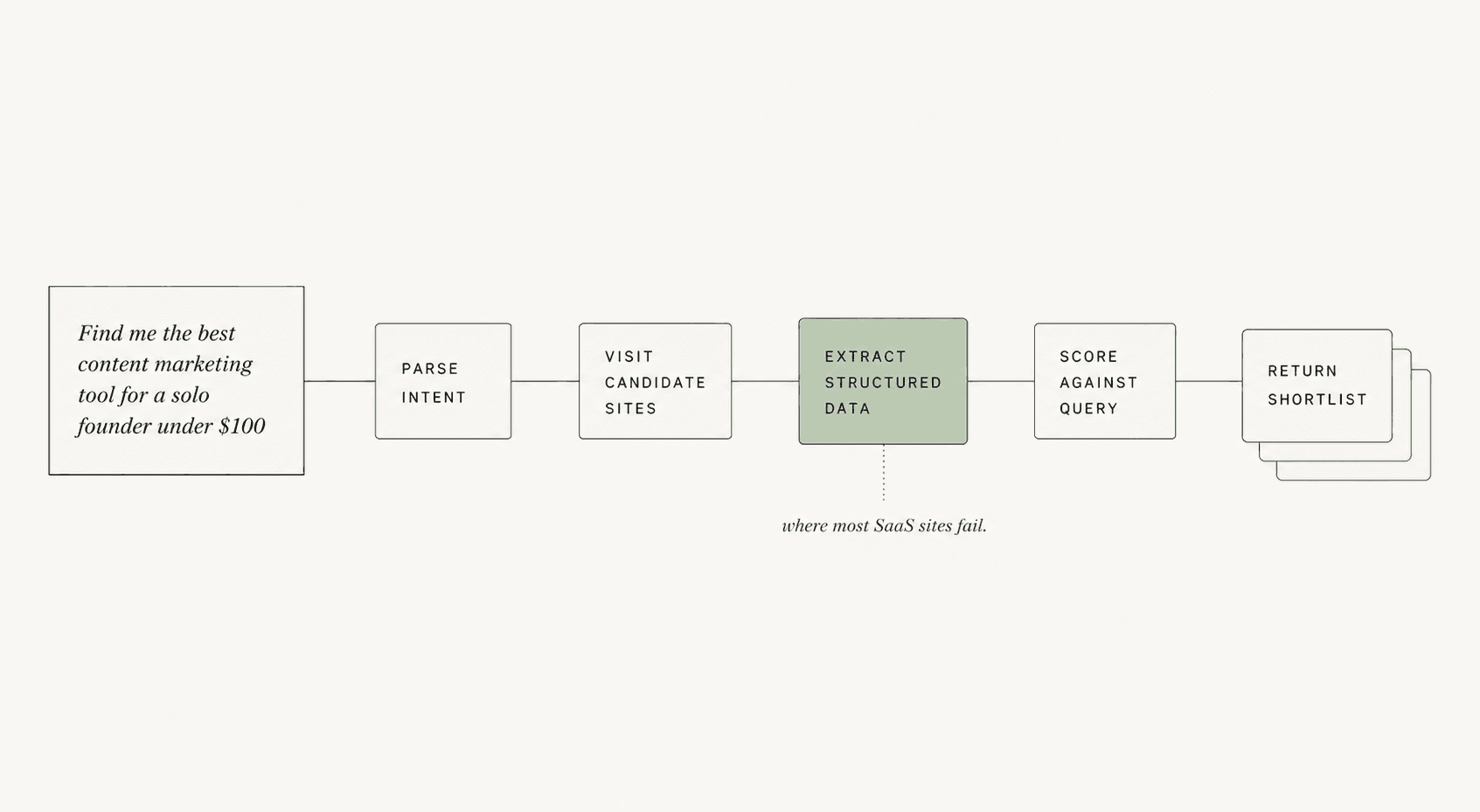
The buyer journey now has a new first step: an agent visiting your site before any human ever does. By the time a human buyer evaluates you, the agent has already shortlisted you or moved on. The site that wins is the site the agent could read, not the site that looked best.

This rewires what "good content" means for SaaS marketing.

How Is Operator Different From ChatGPT, Perplexity, or Atlas?

Operator is an action layer, not an answer layer.

ChatGPT and Perplexity read the web and return summaries. Atlas is OpenAI's browsing layer that fetches pages and extracts content. Operator goes further: it executes multi-step workflows that involve visiting your site, extracting structured data, taking actions on it, and returning a result.

The behavioral difference matters for SaaS marketers:

Tool

What It Does

What Your Site Needs

ChatGPT

Returns summaries from training data + search

Citation-worthy text content with FAQ schema

Perplexity

Surfaces sourced answers in real-time

Direct-answer pages with extractable passages

Atlas

Browses and reads your site

Static-rendered HTML with semantic structure

Operator

Acts on your site (clicks, compares, decides)

Structured data + machine-readable workflows + zero friction

Operator's tolerance for poor structure is the lowest of the four.

ChatGPT can paraphrase around bad markup.

Perplexity can extract from messy HTML.

Operator can't act on a pricing page that requires a JavaScript-rendered modal to display the actual prices. The page either exposes the data cleanly or the agent moves on.

What Does Operator Actually See When It Lands on Your SaaS Site?
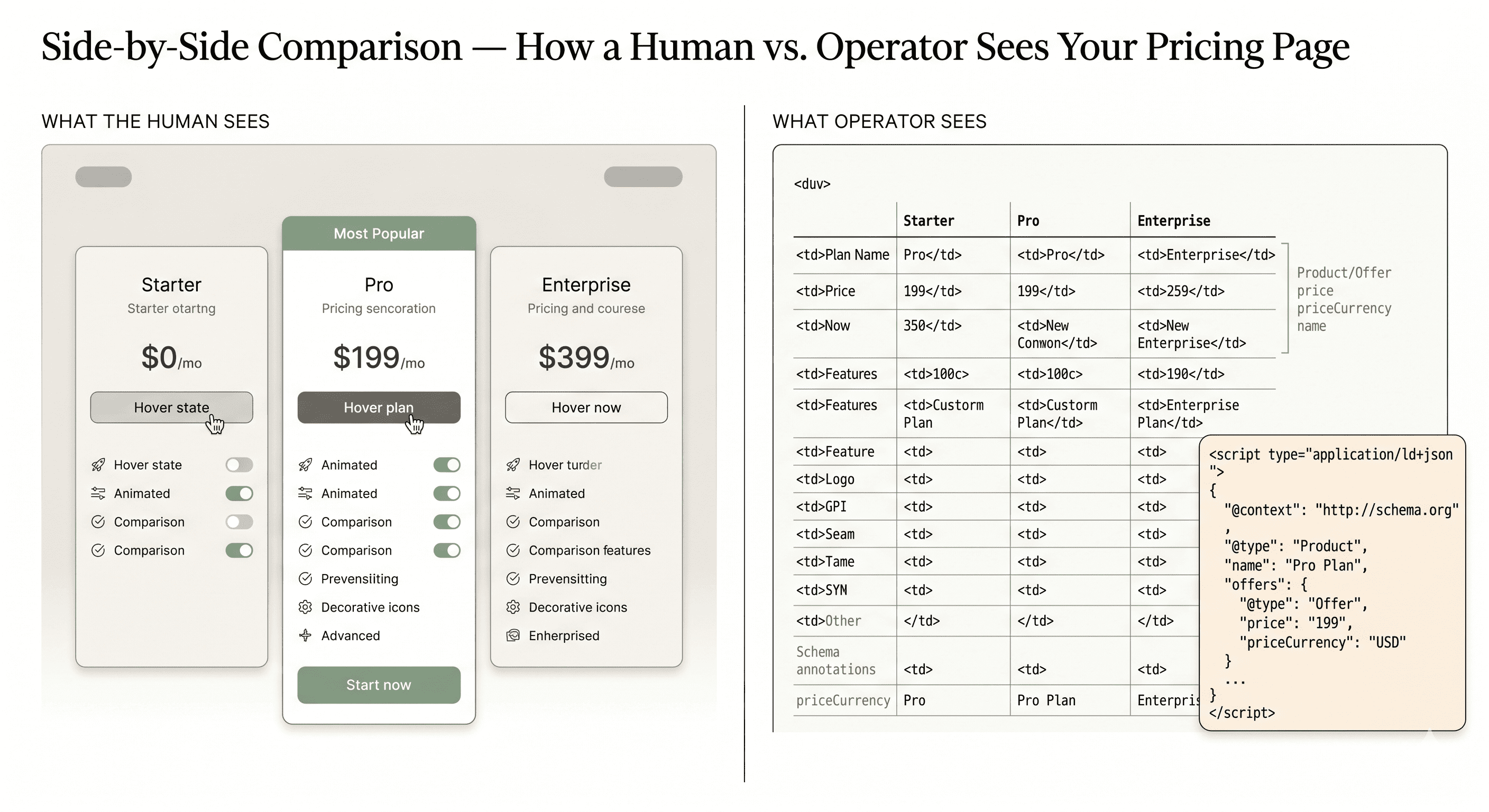
Operator sees structured data first, semantic HTML second, and visual design last (or not at all). The hierarchy of what gets extracted:

  1. Schema.org markup (Product, Offer, Pricing, FAQPage, ItemList) — extracted with highest confidence

  2. Static HTML tables with thead/tbody structure — extracted reliably

  3. Semantic HTML elements (h1–h3, section, article, dl/dt/dd) — extracted as content hierarchy

  4. Plain text in paragraphs — extracted but with lower extraction confidence

  5. JS-rendered content — extracted only if the agent waits for full hydration, which most don't

  6. Image-only content (text rendered as PNG) — invisible to the agent

  7. Content behind login walls or paywalls — invisible to the agent

Pages with proper structured data see 36% higher AI extraction rates than pages without. For Operator specifically, the gap is wider because Operator needs to act on the data, not just summarize it.

The brutal truth: most SaaS sites optimize for what humans see, which is the opposite of what agents see. The visually beautiful pricing page rendered in JavaScript with hover states and animated comparisons is exactly the page Operator can't read.

Why Do Most SaaS Sites Fail the Agent-Readability Test?

Most SaaS sites fail because they were built for the visual web, not the agentic web. The patterns that fail are the same patterns conversion-rate optimizers and visual designers have been recommending for years.

The failure patterns:

  • JS-rendered pricing that requires hydration to display values

  • "Talk to sales" gates that hide pricing entirely behind a form

  • Comparison pages built as marketing pages with vague claims, not structured tables

  • FAQ sections rendered as accordion components without FAQPage schema

  • Cookie banners and GDPR modals that block content rendering until dismissed

  • Login walls in front of documentation and feature pages

  • Newsletter popup modals that interrupt content load

  • Dynamic chat widgets that intercept agent click events

A March 2026 audit of 200 mid-market SaaS sites found roughly 70% had at least 3 of these patterns active on their pricing or comparison pages. Each pattern is a friction point where Operator either gives up or extracts incomplete data and shortlists the cleaner competitor instead.

The cost of each pattern compounds.

A site with 3 friction patterns isn't 3x harder for an agent. It's effectively invisible.

What Does an Agent-Readable Pricing Page Look Like?

An agent-readable pricing page exposes prices, plan names, and feature lists in clean structured HTML, marked up with Product and Offer schema, with no gates between the URL and the data. The pattern that works:

Static HTML pricing table — render server-side, never client-side. The table has thead with column headers (plan names) and tbody with rows (features and prices). Values are real text, not images, not React-hydrated components.

Product + Offer schema — every plan is a Product with an Offer child specifying price, priceCurrency, billingIncrement, and itemCondition. Schema validation should pass on Schema.org's validator and Google's Rich Results Test.

Visible price display — even if you offer custom enterprise pricing, expose a starting price. "Starting at $99/month" is extractable. "Contact us for pricing" is invisible.

No login or modal gates — the pricing URL loads the table immediately, with no overlay, no popup, no cookie wall blocking the initial paint.

Deep-linkable feature anchors — each feature row has an id attribute so agents can reference specific features in comparison reports.

Averi's pricing page (averi.ai/pricing) was rebuilt to this spec in early 2026.

Operator-driven traffic to that page converts at 14.2% versus 2.8% for other inbound channels. The structure is the conversion lever.

How Should Comparison Pages Be Structured for Agents?

Comparison pages should be structured tables with explicit feature parity rows, not marketing pages with vague claims.

The agent comparing your tool against three competitors needs to extract a yes/no answer per feature in milliseconds. Decorative comparison graphics fail.

The pattern:

One table per comparison — your product vs. one competitor per page. Multi-competitor tables get truncated by agents that limit table parsing to the first N columns. One-to-one comparisons extract cleanly.

Feature parity rows — every row is a single specific feature. Rows have a feature label in column 1 and yes/no/value entries in columns 2 and 3. No "kind of" or "limited" qualifiers. Agents extract binary values; ambiguity gets ignored.

ItemList schema — the comparison table renders as ItemListElement with structured Product references. Each row's data is queryable.

Source attribution — competitor data should cite the source URL in a small metadata field. This signals trustworthiness to the agent and reduces the risk of being flagged as biased competitor content.

No "trust us, we're better" claims — agents weight self-reported claims heavily downward. The comparison page that wins says "Competitor X charges $X, we charge $Y" without editorializing. The data does the persuasion.

The BOFU comparison piece is now an agent extraction surface as much as a buyer decision surface.
averi-faq-schema-ui

What FAQ Schema Patterns Does Operator Extract Most Reliably?

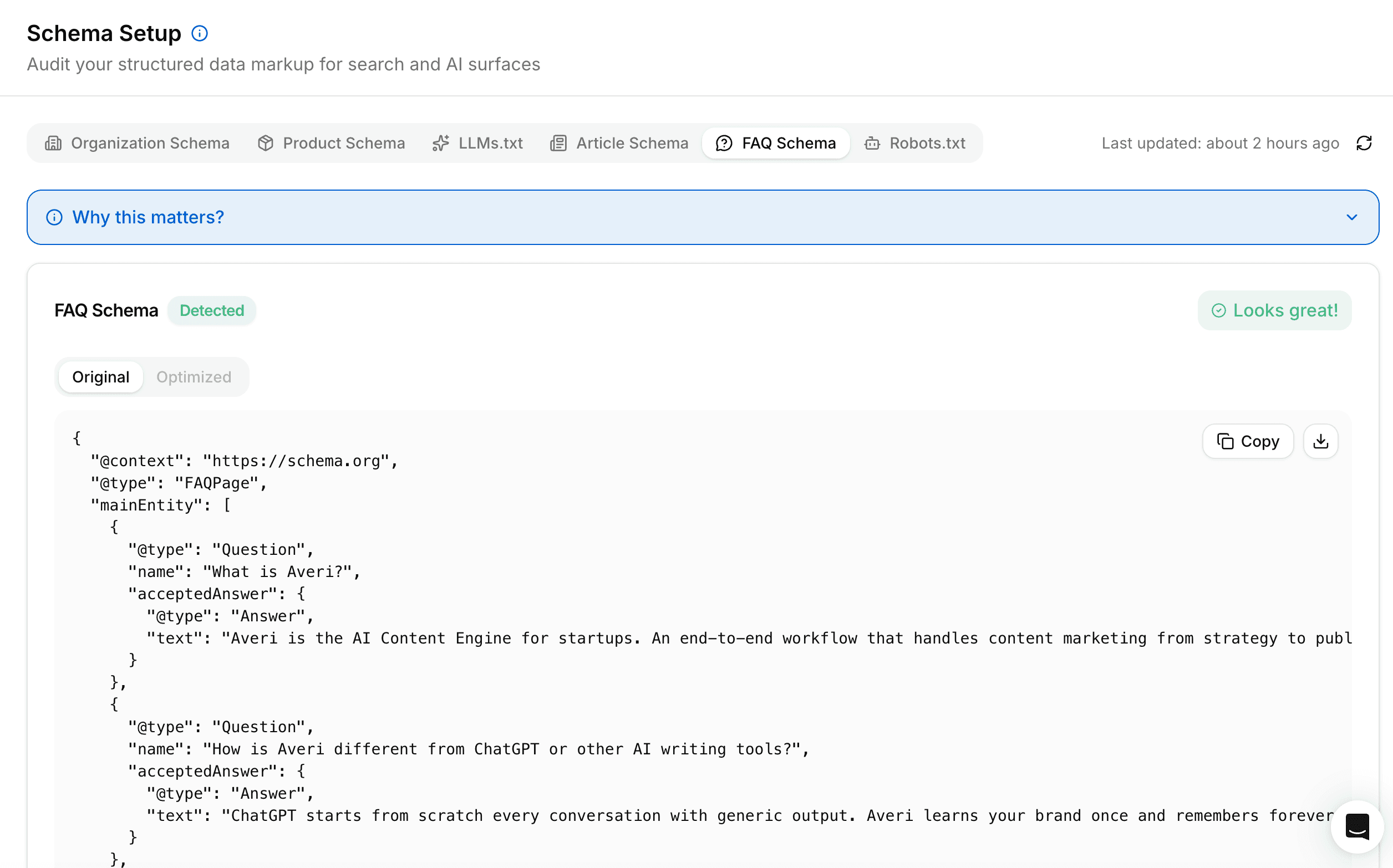
Operator extracts FAQs with FAQPage schema applied at the page level and individual Question/Answer pairs marked with proper acceptedAnswer fields. The pattern that fails is FAQ accordion components rendered in JavaScript without schema.

The reliable extraction pattern:

FAQPage schema at page level — the page declares itself as type FAQPage in JSON-LD or Microdata. This signals to agents that the page contains structured Q&A data.

Question/Answer pairs — each FAQ entry is a Question with a name (the question text) and an acceptedAnswer with text (the answer text). Both fields are required for reliable extraction.

40–60 word answers — answers shorter than 40 words often fail to satisfy the agent's information threshold; longer than 60 words and the agent truncates. The 40–60 range is the extraction sweet spot for AI engines.

Self-contained answers — each answer should make sense without seeing the question. "It depends on your use case" fails. "For solo founders, the Solo plan is the right fit because..." passes.

Static rendering — FAQ sections render in initial HTML, not on click expansion. Accordion UX is fine for humans, but the answer text needs to exist in the DOM at page load for the agent to extract it.

FAQ sections with proper schema get cited by AI engines at 3x the rate of standard sections. Operator-driven citations follow the same pattern.

Which Friction Patterns Block Agents Entirely?

Five friction patterns cause Operator to either fail the workflow or move to the next candidate site. Each one looks innocuous to a human marketer. Each one is a hard stop for an agent.

Pattern 1: Login walls in front of feature documentation. If your /features page or /docs require authentication, Operator sees a login form and exits. Recommendation: keep all marketing-facing content public, even if you require login for the actual product.

Pattern 2: "Request a demo" as the only pricing surface. Operator can't fill out demo request forms reliably (and shouldn't). Sites without visible pricing get 0% agent recommendation share in their category.

Pattern 3: Cookie banners that block content rendering. GDPR modals that overlay the page until dismissed prevent the agent's first content paint. Use banners that render below the fold or auto-dismiss on user scroll, not blocking overlays.

Pattern 4: Chat widgets that intercept clicks. Intercom, Drift, and similar widgets that load with click handlers can capture agent clicks intended for other elements, breaking the workflow. Configure widgets to load after first user interaction, not on page load.

Pattern 5: JS-rendered content that requires hydration. 60%+ of agents don't wait for full client-side hydration. If your pricing requires React to load before values display, the agent sees an empty container.

Each pattern is fixable. Most SaaS sites have at least three.
How Do You Test Whether Your Site Is Agent-Readable?

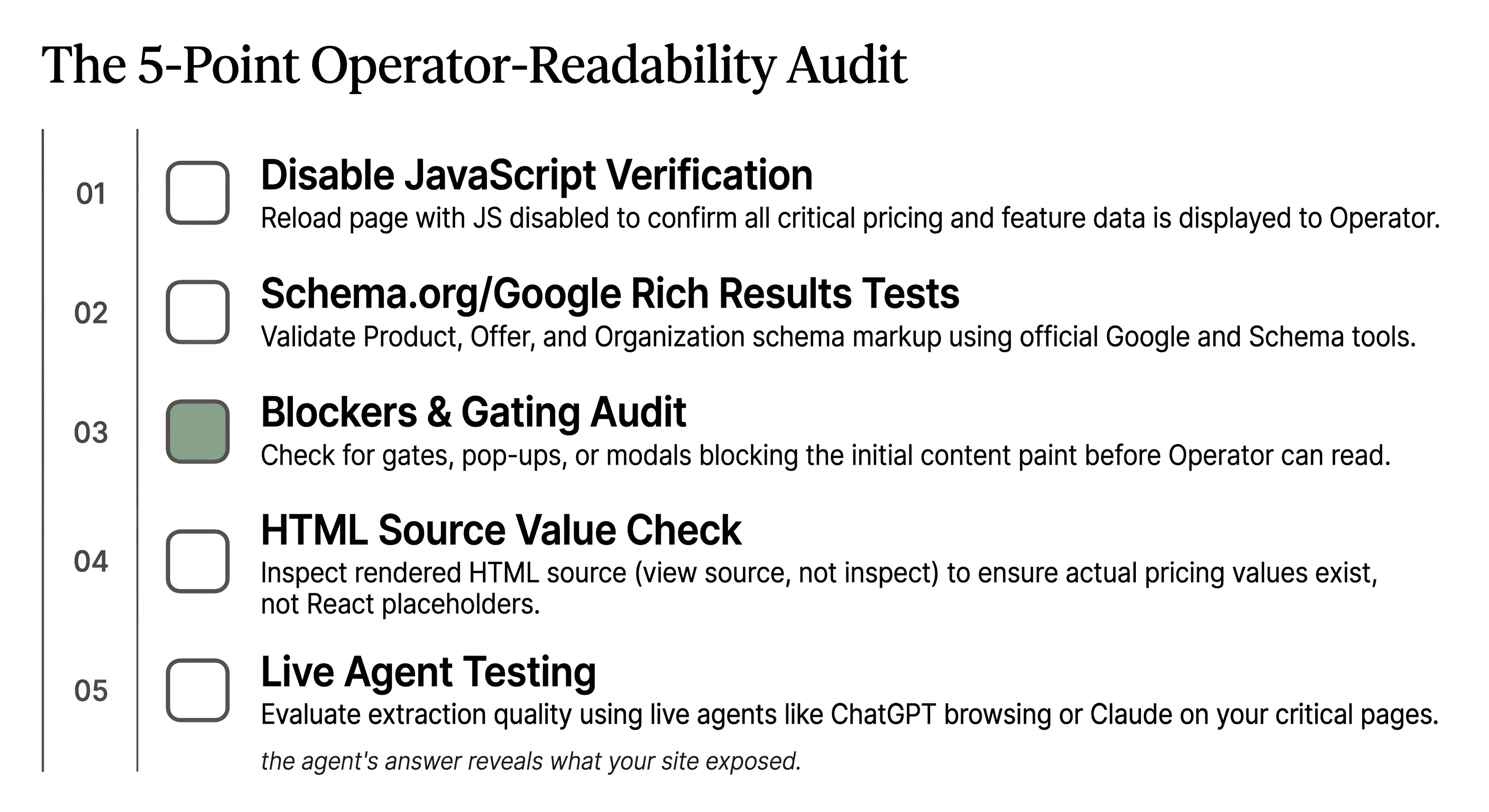
Run a 5-point audit on your highest-traffic pages (pricing, comparison, features, docs, FAQ). The audit:

  1. Disable JavaScript and reload the page. Can you still see prices, feature lists, comparison data, and FAQ answers? If not, the agent can't either.

  2. Run Schema.org validator and Google's Rich Results Test. Does Product/Offer schema validate on the pricing page? Does FAQPage schema validate on FAQ pages? Validation failures predict extraction failures.

  3. Check for gates and modals. Does the page load with any overlay, popup, cookie banner, or login wall blocking the initial content paint? Each gate is friction that compounds.

  4. Inspect the rendered HTML source (View Source, not Inspect Element). Does the source contain the actual pricing values, comparison data, and FAQ answers? Or does it contain only React component placeholders?

  5. Test with an actual agent. Open ChatGPT or Claude with browsing enabled. Ask "compare [your product] to [competitor]" or "what does [your product] cost?" The agent's answer reveals what your site exposed. Vague answers mean weak extraction.

What Happens to SaaS Sites That Don't Adapt?

SaaS sites that don't adapt to agent-readability lose category share gradually, then suddenly. The pattern follows the same curve head-term SEO followed when AI Overviews launched: a slow erosion as agent traffic grows from 1% to 10%, then a fast collapse as agent-driven recommendations become the primary buyer discovery surface.

The likely 2026–2027 progression:

Months 1–6: Agent traffic grows from current 8–12% to 20–25% of B2B SaaS inbound. Sites with friction patterns see declining demo conversion rates without understanding why. The buyer evaluated three candidates the agent shortlisted; the friction-heavy site wasn't one of them.

Months 7–12: Agent recommendations become the dominant buyer shortlist source. Sites optimized for agent-readability capture disproportionate category share. The gap between agent-optimized and agent-hostile sites widens to 3–5x in lead generation.

Months 12+: Category positions consolidate around agent-readable leaders. Late-movers face a structural disadvantage that's expensive to retrofit because their entire site architecture assumed human-first browsing.

The site that wins isn't the prettiest. It's the most legible. The category for this is agent-readable content, and the window to lead it is open right now.

Ready to Ship Agent-Readable Content by Default?

Stop retrofitting structured data onto pages designed for humans only. Averi's content engine outputs editorials with proper schema, static rendering, and zero friction patterns built in from the first publish. Solo plan ($99/month), 14-day free trial.

Start your 14-day free trial →


FAQs

What is OpenAI Operator and how does it differ from ChatGPT?

OpenAI Operator is an agent that takes actions on the web on behalf of users — clicking, comparing, filling forms — rather than returning summarized answers like ChatGPT. Operator visits candidate SaaS sites, extracts structured pricing and feature data, and returns recommendations to the buyer. The buyer never sees your site directly; the agent reports back with a shortlist that either includes you or doesn't.

How much B2B SaaS traffic is now coming from agents?

Recent studies put agent-driven inbound traffic at 8–12% of B2B SaaS site visits, up from under 1% twelve months ago, and growing roughly 1 point per month. By late 2026 most agent traffic projections cross 20% of total inbound. The growth curve is steeper than the AI Overview rollout, partly because agentic adoption is happening inside enterprise procurement workflows, not just consumer search.

What's the single biggest mistake SaaS sites make for agent-readability?

Hiding pricing behind "Contact sales" or demo request forms. Operator can't fill out forms reliably and shouldn't try, so sites without visible pricing get effectively zero agent recommendation share in their category. The fix is exposing a starting price ("Starting at $X/month") even for products with custom enterprise pricing tiers. Visible pricing is the entry ticket; ambiguous pricing is the exit door.

Does my site need different content for agents vs. humans?

No. The same content works for both, but it has to be structured properly. Static HTML pricing tables, semantic FAQ markup, comparison tables with explicit feature rows, and proper schema all serve human readability and agent extraction equally well. The mistake teams make is assuming "designed for humans" means "rendered in JavaScript with animations." Static, structured, fast-loading content serves both audiences without compromise.

How do I add proper schema to my pricing page without rebuilding it?

Add Product schema to each plan and Offer schema with price, priceCurrency, and billingIncrement values to each plan's pricing element. This can be done as JSON-LD in the page head without changing the visual layout. Validate with Google's Rich Results Test and Schema.org validator. Most CMS platforms (Webflow, Framer, WordPress) support custom JSON-LD insertion at the page level. Averi's technical GEO setup guide walks through the templates.

Should I worry about Operator if my buyer is enterprise, not solo?

Especially if your buyer is enterprise. Enterprise procurement teams are deploying agentic workflows for vendor evaluation faster than SMB teams. Procurement uses agents to shortlist candidates against detailed RFP requirements, and the shortlist is the only candidate set human buyers ever see. An enterprise SaaS site that fails agent-readability fails the procurement filter before any human evaluation begins.

How does Averi's content engine help with agent-readable content?

Averi outputs pages with structured-by-default formatting: pricing tables ship with Product/Offer schema, comparison pages render as static HTML with feature parity rows, FAQs include FAQPage schema with self-contained answers, and the entire content workflow validates against Schema.org standards before publish. Solo plan ($99/month) gives founders the same agent-readable output that retrofitting a site manually takes engineering teams weeks to build.


Related Resources

Agent-Readable Content & Agentic SEO

GEO & AI Search Foundations

SaaS Conversion & Content Strategy

FAQs

What is OpenAI Operator and how does it differ from ChatGPT?

OpenAI Operator is an agent that takes actions on the web on behalf of users — clicking, comparing, filling forms — rather than returning summarized answers like ChatGPT. Operator visits candidate SaaS sites, extracts structured pricing and feature data, and returns recommendations to the buyer. The buyer never sees your site directly; the agent reports back with a shortlist that either includes you or doesn't.

How much B2B SaaS traffic is now coming from agents?

Recent studies put agent-driven inbound traffic at 8–12% of B2B SaaS site visits, up from under 1% twelve months ago, and growing roughly 1 point per month. By late 2026 most agent traffic projections cross 20% of total inbound. The growth curve is steeper than the AI Overview rollout, partly because agentic adoption is happening inside enterprise procurement workflows, not just consumer search.

What's the single biggest mistake SaaS sites make for agent-readability?

Hiding pricing behind "Contact sales" or demo request forms. Operator can't fill out forms reliably and shouldn't try, so sites without visible pricing get effectively zero agent recommendation share in their category. The fix is exposing a starting price ("Starting at $X/month") even for products with custom enterprise pricing tiers. Visible pricing is the entry ticket; ambiguous pricing is the exit door.

Does my site need different content for agents vs. humans?

No. The same content works for both, but it has to be structured properly. Static HTML pricing tables, semantic FAQ markup, comparison tables with explicit feature rows, and proper schema all serve human readability and agent extraction equally well. The mistake teams make is assuming "designed for humans" means "rendered in JavaScript with animations." Static, structured, fast-loading content serves both audiences without compromise.

How do I add proper schema to my pricing page without rebuilding it?

Add Product schema to each plan and Offer schema with price, priceCurrency, and billingIncrement values to each plan's pricing element. This can be done as JSON-LD in the page head without changing the visual layout. Validate with Google's Rich Results Test and Schema.org validator. Most CMS platforms (Webflow, Framer, WordPress) support custom JSON-LD insertion at the page level. Averi's technical GEO setup guide walks through the templates.

Should I worry about Operator if my buyer is enterprise, not solo?

Especially if your buyer is enterprise. Enterprise procurement teams are deploying agentic workflows for vendor evaluation faster than SMB teams. Procurement uses agents to shortlist candidates against detailed RFP requirements, and the shortlist is the only candidate set human buyers ever see. An enterprise SaaS site that fails agent-readability fails the procurement filter before any human evaluation begins.

How does Averi's content engine help with agent-readable content?

Averi outputs blogs with structured-by-default formatting: the entire content workflow validates against Schema.org standards before publish. Solo plan ($99/month) gives founders the same agent-readable output that retrofitting a site manually takes engineering teams weeks to build.

Continue Reading

The latest handpicked blog articles

Experience The AI Content Engine

Already have an account?

Join 30,000+ Founders, Marketers & Builders

Don't Feed the Algorithm

“Top 3 tech + AI newsletters in the country. Always sharp, always actionable.”

"Genuinely my favorite newsletter in tech. No fluff, no cheesy ads, just great content."

“Clear, practical, and on-point. Helps me keep up without drowning in noise.”

User-Generated Content & Authenticity in the Age of AI

Zach Chmael

Head of Marketing

5 minutes

In This Article

OpenAI Operator doesn't read your site — it acts on it. Here's how to make pricing, comparison pages, and FAQs agent-readable.

Don’t Feed the Algorithm

The algorithm never sleeps, but you don’t have to feed it — Join our weekly newsletter for real insights on AI, human creativity & marketing execution.

TL;DR

  • 🤖 Operator-class agents are now in production agentic stacks. They don't browse your site like a human reads it. They parse it like an API, extract structured data, and make recommendations on behalf of buyers in seconds.

  • 📊 The buyer no longer visits your site first. The agent does. By the time a B2B buyer evaluates you, the agent has already shortlisted you (or not) based on what your structured data exposed.

  • 🚫 Friction patterns block agents entirely. Login walls, JS-rendered pricing, popup modals, cookie banners, and "request a demo" gates fail the agent-readability test. The agent moves on to the next site in seconds.

  • What works: structured pricing tables, machine-readable comparison pages, schema-first FAQs, fast static rendering, and no gates between an agent and the answer it's looking for.

  • ⚙️ Averi's content engine outputs structured-by-default content — pricing tables with proper schema, comparison pages built for extraction, FAQs that ship with FAQPage schema attached. The category isn't "AI SEO" anymore. It's agent-readable content.

"We built Averi around the exact workflow we've used to scale our web traffic over 6000% in the last 6 months."

founder-image
founder-image
Your content should be working harder.

Averi's content engine builds Google entity authority, drives AI citations, and scales your visibility so you can get more customers.

OpenAI Operator Just Changed Buyer Research. Here's What Your SaaS Site Needs to Look Like.

What Is OpenAI Operator and Why Does It Change Buyer Research?

OpenAI Operator is an agent that takes actions on the web on behalf of users.

It clicks, fills forms, compares options, and returns recommendations. Unlike ChatGPT or Perplexity, which surface answers, Operator executes workflows.

The buyer asks "find me the best content marketing tool for a solo founder under $100" and Operator visits candidate sites, extracts pricing, compares features, and reports back with a shortlist.

The shift from "surface answers" to "execute workflows" is the structural change.

Recent agent traffic studies show agents now generate 8–12% of inbound traffic on B2B SaaS sites, up from under 1% twelve months ago. That percentage is climbing roughly 1 point per month.

The buyer journey now has a new first step: an agent visiting your site before any human ever does. By the time a human buyer evaluates you, the agent has already shortlisted you or moved on. The site that wins is the site the agent could read, not the site that looked best.

This rewires what "good content" means for SaaS marketing.

How Is Operator Different From ChatGPT, Perplexity, or Atlas?

Operator is an action layer, not an answer layer.

ChatGPT and Perplexity read the web and return summaries. Atlas is OpenAI's browsing layer that fetches pages and extracts content. Operator goes further: it executes multi-step workflows that involve visiting your site, extracting structured data, taking actions on it, and returning a result.

The behavioral difference matters for SaaS marketers:

Tool

What It Does

What Your Site Needs

ChatGPT

Returns summaries from training data + search

Citation-worthy text content with FAQ schema

Perplexity

Surfaces sourced answers in real-time

Direct-answer pages with extractable passages

Atlas

Browses and reads your site

Static-rendered HTML with semantic structure

Operator

Acts on your site (clicks, compares, decides)

Structured data + machine-readable workflows + zero friction

Operator's tolerance for poor structure is the lowest of the four.

ChatGPT can paraphrase around bad markup.

Perplexity can extract from messy HTML.

Operator can't act on a pricing page that requires a JavaScript-rendered modal to display the actual prices. The page either exposes the data cleanly or the agent moves on.

What Does Operator Actually See When It Lands on Your SaaS Site?

Operator sees structured data first, semantic HTML second, and visual design last (or not at all). The hierarchy of what gets extracted:

  1. Schema.org markup (Product, Offer, Pricing, FAQPage, ItemList) — extracted with highest confidence

  2. Static HTML tables with thead/tbody structure — extracted reliably

  3. Semantic HTML elements (h1–h3, section, article, dl/dt/dd) — extracted as content hierarchy

  4. Plain text in paragraphs — extracted but with lower extraction confidence

  5. JS-rendered content — extracted only if the agent waits for full hydration, which most don't

  6. Image-only content (text rendered as PNG) — invisible to the agent

  7. Content behind login walls or paywalls — invisible to the agent

Pages with proper structured data see 36% higher AI extraction rates than pages without. For Operator specifically, the gap is wider because Operator needs to act on the data, not just summarize it.

The brutal truth: most SaaS sites optimize for what humans see, which is the opposite of what agents see. The visually beautiful pricing page rendered in JavaScript with hover states and animated comparisons is exactly the page Operator can't read.

Why Do Most SaaS Sites Fail the Agent-Readability Test?

Most SaaS sites fail because they were built for the visual web, not the agentic web. The patterns that fail are the same patterns conversion-rate optimizers and visual designers have been recommending for years.

The failure patterns:

  • JS-rendered pricing that requires hydration to display values

  • "Talk to sales" gates that hide pricing entirely behind a form

  • Comparison pages built as marketing pages with vague claims, not structured tables

  • FAQ sections rendered as accordion components without FAQPage schema

  • Cookie banners and GDPR modals that block content rendering until dismissed

  • Login walls in front of documentation and feature pages

  • Newsletter popup modals that interrupt content load

  • Dynamic chat widgets that intercept agent click events

A March 2026 audit of 200 mid-market SaaS sites found roughly 70% had at least 3 of these patterns active on their pricing or comparison pages. Each pattern is a friction point where Operator either gives up or extracts incomplete data and shortlists the cleaner competitor instead.

The cost of each pattern compounds.

A site with 3 friction patterns isn't 3x harder for an agent. It's effectively invisible.

What Does an Agent-Readable Pricing Page Look Like?

An agent-readable pricing page exposes prices, plan names, and feature lists in clean structured HTML, marked up with Product and Offer schema, with no gates between the URL and the data. The pattern that works:

Static HTML pricing table — render server-side, never client-side. The table has thead with column headers (plan names) and tbody with rows (features and prices). Values are real text, not images, not React-hydrated components.

Product + Offer schema — every plan is a Product with an Offer child specifying price, priceCurrency, billingIncrement, and itemCondition. Schema validation should pass on Schema.org's validator and Google's Rich Results Test.

Visible price display — even if you offer custom enterprise pricing, expose a starting price. "Starting at $99/month" is extractable. "Contact us for pricing" is invisible.

No login or modal gates — the pricing URL loads the table immediately, with no overlay, no popup, no cookie wall blocking the initial paint.

Deep-linkable feature anchors — each feature row has an id attribute so agents can reference specific features in comparison reports.

Averi's pricing page (averi.ai/pricing) was rebuilt to this spec in early 2026.

Operator-driven traffic to that page converts at 14.2% versus 2.8% for other inbound channels. The structure is the conversion lever.

How Should Comparison Pages Be Structured for Agents?

Comparison pages should be structured tables with explicit feature parity rows, not marketing pages with vague claims.

The agent comparing your tool against three competitors needs to extract a yes/no answer per feature in milliseconds. Decorative comparison graphics fail.

The pattern:

One table per comparison — your product vs. one competitor per page. Multi-competitor tables get truncated by agents that limit table parsing to the first N columns. One-to-one comparisons extract cleanly.

Feature parity rows — every row is a single specific feature. Rows have a feature label in column 1 and yes/no/value entries in columns 2 and 3. No "kind of" or "limited" qualifiers. Agents extract binary values; ambiguity gets ignored.

ItemList schema — the comparison table renders as ItemListElement with structured Product references. Each row's data is queryable.

Source attribution — competitor data should cite the source URL in a small metadata field. This signals trustworthiness to the agent and reduces the risk of being flagged as biased competitor content.

No "trust us, we're better" claims — agents weight self-reported claims heavily downward. The comparison page that wins says "Competitor X charges $X, we charge $Y" without editorializing. The data does the persuasion.

The BOFU comparison piece is now an agent extraction surface as much as a buyer decision surface.

averi-faq-schema-ui

What FAQ Schema Patterns Does Operator Extract Most Reliably?

Operator extracts FAQs with FAQPage schema applied at the page level and individual Question/Answer pairs marked with proper acceptedAnswer fields. The pattern that fails is FAQ accordion components rendered in JavaScript without schema.

The reliable extraction pattern:

FAQPage schema at page level — the page declares itself as type FAQPage in JSON-LD or Microdata. This signals to agents that the page contains structured Q&A data.

Question/Answer pairs — each FAQ entry is a Question with a name (the question text) and an acceptedAnswer with text (the answer text). Both fields are required for reliable extraction.

40–60 word answers — answers shorter than 40 words often fail to satisfy the agent's information threshold; longer than 60 words and the agent truncates. The 40–60 range is the extraction sweet spot for AI engines.

Self-contained answers — each answer should make sense without seeing the question. "It depends on your use case" fails. "For solo founders, the Solo plan is the right fit because..." passes.

Static rendering — FAQ sections render in initial HTML, not on click expansion. Accordion UX is fine for humans, but the answer text needs to exist in the DOM at page load for the agent to extract it.

FAQ sections with proper schema get cited by AI engines at 3x the rate of standard sections. Operator-driven citations follow the same pattern.

Which Friction Patterns Block Agents Entirely?

Five friction patterns cause Operator to either fail the workflow or move to the next candidate site. Each one looks innocuous to a human marketer. Each one is a hard stop for an agent.

Pattern 1: Login walls in front of feature documentation. If your /features page or /docs require authentication, Operator sees a login form and exits. Recommendation: keep all marketing-facing content public, even if you require login for the actual product.

Pattern 2: "Request a demo" as the only pricing surface. Operator can't fill out demo request forms reliably (and shouldn't). Sites without visible pricing get 0% agent recommendation share in their category.

Pattern 3: Cookie banners that block content rendering. GDPR modals that overlay the page until dismissed prevent the agent's first content paint. Use banners that render below the fold or auto-dismiss on user scroll, not blocking overlays.

Pattern 4: Chat widgets that intercept clicks. Intercom, Drift, and similar widgets that load with click handlers can capture agent clicks intended for other elements, breaking the workflow. Configure widgets to load after first user interaction, not on page load.

Pattern 5: JS-rendered content that requires hydration. 60%+ of agents don't wait for full client-side hydration. If your pricing requires React to load before values display, the agent sees an empty container.

Each pattern is fixable. Most SaaS sites have at least three.

How Do You Test Whether Your Site Is Agent-Readable?

Run a 5-point audit on your highest-traffic pages (pricing, comparison, features, docs, FAQ). The audit:

  1. Disable JavaScript and reload the page. Can you still see prices, feature lists, comparison data, and FAQ answers? If not, the agent can't either.

  2. Run Schema.org validator and Google's Rich Results Test. Does Product/Offer schema validate on the pricing page? Does FAQPage schema validate on FAQ pages? Validation failures predict extraction failures.

  3. Check for gates and modals. Does the page load with any overlay, popup, cookie banner, or login wall blocking the initial content paint? Each gate is friction that compounds.

  4. Inspect the rendered HTML source (View Source, not Inspect Element). Does the source contain the actual pricing values, comparison data, and FAQ answers? Or does it contain only React component placeholders?

  5. Test with an actual agent. Open ChatGPT or Claude with browsing enabled. Ask "compare [your product] to [competitor]" or "what does [your product] cost?" The agent's answer reveals what your site exposed. Vague answers mean weak extraction.

What Happens to SaaS Sites That Don't Adapt?

SaaS sites that don't adapt to agent-readability lose category share gradually, then suddenly. The pattern follows the same curve head-term SEO followed when AI Overviews launched: a slow erosion as agent traffic grows from 1% to 10%, then a fast collapse as agent-driven recommendations become the primary buyer discovery surface.

The likely 2026–2027 progression:

Months 1–6: Agent traffic grows from current 8–12% to 20–25% of B2B SaaS inbound. Sites with friction patterns see declining demo conversion rates without understanding why. The buyer evaluated three candidates the agent shortlisted; the friction-heavy site wasn't one of them.

Months 7–12: Agent recommendations become the dominant buyer shortlist source. Sites optimized for agent-readability capture disproportionate category share. The gap between agent-optimized and agent-hostile sites widens to 3–5x in lead generation.

Months 12+: Category positions consolidate around agent-readable leaders. Late-movers face a structural disadvantage that's expensive to retrofit because their entire site architecture assumed human-first browsing.

The site that wins isn't the prettiest. It's the most legible. The category for this is agent-readable content, and the window to lead it is open right now.

Ready to Ship Agent-Readable Content by Default?

Stop retrofitting structured data onto pages designed for humans only. Averi's content engine outputs editorials with proper schema, static rendering, and zero friction patterns built in from the first publish. Solo plan ($99/month), 14-day free trial.

Start your 14-day free trial →


FAQs

What is OpenAI Operator and how does it differ from ChatGPT?

OpenAI Operator is an agent that takes actions on the web on behalf of users — clicking, comparing, filling forms — rather than returning summarized answers like ChatGPT. Operator visits candidate SaaS sites, extracts structured pricing and feature data, and returns recommendations to the buyer. The buyer never sees your site directly; the agent reports back with a shortlist that either includes you or doesn't.

How much B2B SaaS traffic is now coming from agents?

Recent studies put agent-driven inbound traffic at 8–12% of B2B SaaS site visits, up from under 1% twelve months ago, and growing roughly 1 point per month. By late 2026 most agent traffic projections cross 20% of total inbound. The growth curve is steeper than the AI Overview rollout, partly because agentic adoption is happening inside enterprise procurement workflows, not just consumer search.

What's the single biggest mistake SaaS sites make for agent-readability?

Hiding pricing behind "Contact sales" or demo request forms. Operator can't fill out forms reliably and shouldn't try, so sites without visible pricing get effectively zero agent recommendation share in their category. The fix is exposing a starting price ("Starting at $X/month") even for products with custom enterprise pricing tiers. Visible pricing is the entry ticket; ambiguous pricing is the exit door.

Does my site need different content for agents vs. humans?

No. The same content works for both, but it has to be structured properly. Static HTML pricing tables, semantic FAQ markup, comparison tables with explicit feature rows, and proper schema all serve human readability and agent extraction equally well. The mistake teams make is assuming "designed for humans" means "rendered in JavaScript with animations." Static, structured, fast-loading content serves both audiences without compromise.

How do I add proper schema to my pricing page without rebuilding it?

Add Product schema to each plan and Offer schema with price, priceCurrency, and billingIncrement values to each plan's pricing element. This can be done as JSON-LD in the page head without changing the visual layout. Validate with Google's Rich Results Test and Schema.org validator. Most CMS platforms (Webflow, Framer, WordPress) support custom JSON-LD insertion at the page level. Averi's technical GEO setup guide walks through the templates.

Should I worry about Operator if my buyer is enterprise, not solo?

Especially if your buyer is enterprise. Enterprise procurement teams are deploying agentic workflows for vendor evaluation faster than SMB teams. Procurement uses agents to shortlist candidates against detailed RFP requirements, and the shortlist is the only candidate set human buyers ever see. An enterprise SaaS site that fails agent-readability fails the procurement filter before any human evaluation begins.

How does Averi's content engine help with agent-readable content?

Averi outputs pages with structured-by-default formatting: pricing tables ship with Product/Offer schema, comparison pages render as static HTML with feature parity rows, FAQs include FAQPage schema with self-contained answers, and the entire content workflow validates against Schema.org standards before publish. Solo plan ($99/month) gives founders the same agent-readable output that retrofitting a site manually takes engineering teams weeks to build.

Related Resources

Agent-Readable Content & Agentic SEO

GEO & AI Search Foundations

SaaS Conversion & Content Strategy

Continue Reading

The latest handpicked blog articles

Join 30,000+ Founders, Marketers & Builders

Don't Feed the Algorithm

“Top 3 tech + AI newsletters in the country. Always sharp, always actionable.”

"Genuinely my favorite newsletter in tech. No fluff, no cheesy ads, just great content."

“Clear, practical, and on-point. Helps me keep up without drowning in noise.”

User-Generated Content & Authenticity in the Age of AI

Zach Chmael

Head of Marketing

5 minutes

In This Article

OpenAI Operator doesn't read your site — it acts on it. Here's how to make pricing, comparison pages, and FAQs agent-readable.

Don’t Feed the Algorithm

The algorithm never sleeps, but you don’t have to feed it — Join our weekly newsletter for real insights on AI, human creativity & marketing execution.

Trusted by 1,000+ teams

★★★★★ 4.9/5

Startups use Averi to build
content engines that rank.

OpenAI Operator Just Changed Buyer Research. Here's What Your SaaS Site Needs to Look Like.

What Is OpenAI Operator and Why Does It Change Buyer Research?

OpenAI Operator is an agent that takes actions on the web on behalf of users.

It clicks, fills forms, compares options, and returns recommendations. Unlike ChatGPT or Perplexity, which surface answers, Operator executes workflows.

The buyer asks "find me the best content marketing tool for a solo founder under $100" and Operator visits candidate sites, extracts pricing, compares features, and reports back with a shortlist.

The shift from "surface answers" to "execute workflows" is the structural change.

Recent agent traffic studies show agents now generate 8–12% of inbound traffic on B2B SaaS sites, up from under 1% twelve months ago. That percentage is climbing roughly 1 point per month.

The buyer journey now has a new first step: an agent visiting your site before any human ever does. By the time a human buyer evaluates you, the agent has already shortlisted you or moved on. The site that wins is the site the agent could read, not the site that looked best.

This rewires what "good content" means for SaaS marketing.

How Is Operator Different From ChatGPT, Perplexity, or Atlas?

Operator is an action layer, not an answer layer.

ChatGPT and Perplexity read the web and return summaries. Atlas is OpenAI's browsing layer that fetches pages and extracts content. Operator goes further: it executes multi-step workflows that involve visiting your site, extracting structured data, taking actions on it, and returning a result.

The behavioral difference matters for SaaS marketers:

Tool

What It Does

What Your Site Needs

ChatGPT

Returns summaries from training data + search

Citation-worthy text content with FAQ schema

Perplexity

Surfaces sourced answers in real-time

Direct-answer pages with extractable passages

Atlas

Browses and reads your site

Static-rendered HTML with semantic structure

Operator

Acts on your site (clicks, compares, decides)

Structured data + machine-readable workflows + zero friction

Operator's tolerance for poor structure is the lowest of the four.

ChatGPT can paraphrase around bad markup.

Perplexity can extract from messy HTML.

Operator can't act on a pricing page that requires a JavaScript-rendered modal to display the actual prices. The page either exposes the data cleanly or the agent moves on.

What Does Operator Actually See When It Lands on Your SaaS Site?

Operator sees structured data first, semantic HTML second, and visual design last (or not at all). The hierarchy of what gets extracted:

  1. Schema.org markup (Product, Offer, Pricing, FAQPage, ItemList) — extracted with highest confidence

  2. Static HTML tables with thead/tbody structure — extracted reliably

  3. Semantic HTML elements (h1–h3, section, article, dl/dt/dd) — extracted as content hierarchy

  4. Plain text in paragraphs — extracted but with lower extraction confidence

  5. JS-rendered content — extracted only if the agent waits for full hydration, which most don't

  6. Image-only content (text rendered as PNG) — invisible to the agent

  7. Content behind login walls or paywalls — invisible to the agent

Pages with proper structured data see 36% higher AI extraction rates than pages without. For Operator specifically, the gap is wider because Operator needs to act on the data, not just summarize it.

The brutal truth: most SaaS sites optimize for what humans see, which is the opposite of what agents see. The visually beautiful pricing page rendered in JavaScript with hover states and animated comparisons is exactly the page Operator can't read.

Why Do Most SaaS Sites Fail the Agent-Readability Test?

Most SaaS sites fail because they were built for the visual web, not the agentic web. The patterns that fail are the same patterns conversion-rate optimizers and visual designers have been recommending for years.

The failure patterns:

  • JS-rendered pricing that requires hydration to display values

  • "Talk to sales" gates that hide pricing entirely behind a form

  • Comparison pages built as marketing pages with vague claims, not structured tables

  • FAQ sections rendered as accordion components without FAQPage schema

  • Cookie banners and GDPR modals that block content rendering until dismissed

  • Login walls in front of documentation and feature pages

  • Newsletter popup modals that interrupt content load

  • Dynamic chat widgets that intercept agent click events

A March 2026 audit of 200 mid-market SaaS sites found roughly 70% had at least 3 of these patterns active on their pricing or comparison pages. Each pattern is a friction point where Operator either gives up or extracts incomplete data and shortlists the cleaner competitor instead.

The cost of each pattern compounds.

A site with 3 friction patterns isn't 3x harder for an agent. It's effectively invisible.

What Does an Agent-Readable Pricing Page Look Like?

An agent-readable pricing page exposes prices, plan names, and feature lists in clean structured HTML, marked up with Product and Offer schema, with no gates between the URL and the data. The pattern that works:

Static HTML pricing table — render server-side, never client-side. The table has thead with column headers (plan names) and tbody with rows (features and prices). Values are real text, not images, not React-hydrated components.

Product + Offer schema — every plan is a Product with an Offer child specifying price, priceCurrency, billingIncrement, and itemCondition. Schema validation should pass on Schema.org's validator and Google's Rich Results Test.

Visible price display — even if you offer custom enterprise pricing, expose a starting price. "Starting at $99/month" is extractable. "Contact us for pricing" is invisible.

No login or modal gates — the pricing URL loads the table immediately, with no overlay, no popup, no cookie wall blocking the initial paint.

Deep-linkable feature anchors — each feature row has an id attribute so agents can reference specific features in comparison reports.

Averi's pricing page (averi.ai/pricing) was rebuilt to this spec in early 2026.

Operator-driven traffic to that page converts at 14.2% versus 2.8% for other inbound channels. The structure is the conversion lever.

How Should Comparison Pages Be Structured for Agents?

Comparison pages should be structured tables with explicit feature parity rows, not marketing pages with vague claims.

The agent comparing your tool against three competitors needs to extract a yes/no answer per feature in milliseconds. Decorative comparison graphics fail.

The pattern:

One table per comparison — your product vs. one competitor per page. Multi-competitor tables get truncated by agents that limit table parsing to the first N columns. One-to-one comparisons extract cleanly.

Feature parity rows — every row is a single specific feature. Rows have a feature label in column 1 and yes/no/value entries in columns 2 and 3. No "kind of" or "limited" qualifiers. Agents extract binary values; ambiguity gets ignored.

ItemList schema — the comparison table renders as ItemListElement with structured Product references. Each row's data is queryable.

Source attribution — competitor data should cite the source URL in a small metadata field. This signals trustworthiness to the agent and reduces the risk of being flagged as biased competitor content.

No "trust us, we're better" claims — agents weight self-reported claims heavily downward. The comparison page that wins says "Competitor X charges $X, we charge $Y" without editorializing. The data does the persuasion.

The BOFU comparison piece is now an agent extraction surface as much as a buyer decision surface.

averi-faq-schema-ui

What FAQ Schema Patterns Does Operator Extract Most Reliably?

Operator extracts FAQs with FAQPage schema applied at the page level and individual Question/Answer pairs marked with proper acceptedAnswer fields. The pattern that fails is FAQ accordion components rendered in JavaScript without schema.

The reliable extraction pattern:

FAQPage schema at page level — the page declares itself as type FAQPage in JSON-LD or Microdata. This signals to agents that the page contains structured Q&A data.

Question/Answer pairs — each FAQ entry is a Question with a name (the question text) and an acceptedAnswer with text (the answer text). Both fields are required for reliable extraction.

40–60 word answers — answers shorter than 40 words often fail to satisfy the agent's information threshold; longer than 60 words and the agent truncates. The 40–60 range is the extraction sweet spot for AI engines.

Self-contained answers — each answer should make sense without seeing the question. "It depends on your use case" fails. "For solo founders, the Solo plan is the right fit because..." passes.

Static rendering — FAQ sections render in initial HTML, not on click expansion. Accordion UX is fine for humans, but the answer text needs to exist in the DOM at page load for the agent to extract it.

FAQ sections with proper schema get cited by AI engines at 3x the rate of standard sections. Operator-driven citations follow the same pattern.

Which Friction Patterns Block Agents Entirely?

Five friction patterns cause Operator to either fail the workflow or move to the next candidate site. Each one looks innocuous to a human marketer. Each one is a hard stop for an agent.

Pattern 1: Login walls in front of feature documentation. If your /features page or /docs require authentication, Operator sees a login form and exits. Recommendation: keep all marketing-facing content public, even if you require login for the actual product.

Pattern 2: "Request a demo" as the only pricing surface. Operator can't fill out demo request forms reliably (and shouldn't). Sites without visible pricing get 0% agent recommendation share in their category.

Pattern 3: Cookie banners that block content rendering. GDPR modals that overlay the page until dismissed prevent the agent's first content paint. Use banners that render below the fold or auto-dismiss on user scroll, not blocking overlays.

Pattern 4: Chat widgets that intercept clicks. Intercom, Drift, and similar widgets that load with click handlers can capture agent clicks intended for other elements, breaking the workflow. Configure widgets to load after first user interaction, not on page load.

Pattern 5: JS-rendered content that requires hydration. 60%+ of agents don't wait for full client-side hydration. If your pricing requires React to load before values display, the agent sees an empty container.

Each pattern is fixable. Most SaaS sites have at least three.

How Do You Test Whether Your Site Is Agent-Readable?

Run a 5-point audit on your highest-traffic pages (pricing, comparison, features, docs, FAQ). The audit:

  1. Disable JavaScript and reload the page. Can you still see prices, feature lists, comparison data, and FAQ answers? If not, the agent can't either.

  2. Run Schema.org validator and Google's Rich Results Test. Does Product/Offer schema validate on the pricing page? Does FAQPage schema validate on FAQ pages? Validation failures predict extraction failures.

  3. Check for gates and modals. Does the page load with any overlay, popup, cookie banner, or login wall blocking the initial content paint? Each gate is friction that compounds.

  4. Inspect the rendered HTML source (View Source, not Inspect Element). Does the source contain the actual pricing values, comparison data, and FAQ answers? Or does it contain only React component placeholders?

  5. Test with an actual agent. Open ChatGPT or Claude with browsing enabled. Ask "compare [your product] to [competitor]" or "what does [your product] cost?" The agent's answer reveals what your site exposed. Vague answers mean weak extraction.

What Happens to SaaS Sites That Don't Adapt?

SaaS sites that don't adapt to agent-readability lose category share gradually, then suddenly. The pattern follows the same curve head-term SEO followed when AI Overviews launched: a slow erosion as agent traffic grows from 1% to 10%, then a fast collapse as agent-driven recommendations become the primary buyer discovery surface.

The likely 2026–2027 progression:

Months 1–6: Agent traffic grows from current 8–12% to 20–25% of B2B SaaS inbound. Sites with friction patterns see declining demo conversion rates without understanding why. The buyer evaluated three candidates the agent shortlisted; the friction-heavy site wasn't one of them.

Months 7–12: Agent recommendations become the dominant buyer shortlist source. Sites optimized for agent-readability capture disproportionate category share. The gap between agent-optimized and agent-hostile sites widens to 3–5x in lead generation.

Months 12+: Category positions consolidate around agent-readable leaders. Late-movers face a structural disadvantage that's expensive to retrofit because their entire site architecture assumed human-first browsing.

The site that wins isn't the prettiest. It's the most legible. The category for this is agent-readable content, and the window to lead it is open right now.

Ready to Ship Agent-Readable Content by Default?

Stop retrofitting structured data onto pages designed for humans only. Averi's content engine outputs editorials with proper schema, static rendering, and zero friction patterns built in from the first publish. Solo plan ($99/month), 14-day free trial.

Start your 14-day free trial →


FAQs

What is OpenAI Operator and how does it differ from ChatGPT?

OpenAI Operator is an agent that takes actions on the web on behalf of users — clicking, comparing, filling forms — rather than returning summarized answers like ChatGPT. Operator visits candidate SaaS sites, extracts structured pricing and feature data, and returns recommendations to the buyer. The buyer never sees your site directly; the agent reports back with a shortlist that either includes you or doesn't.

How much B2B SaaS traffic is now coming from agents?

Recent studies put agent-driven inbound traffic at 8–12% of B2B SaaS site visits, up from under 1% twelve months ago, and growing roughly 1 point per month. By late 2026 most agent traffic projections cross 20% of total inbound. The growth curve is steeper than the AI Overview rollout, partly because agentic adoption is happening inside enterprise procurement workflows, not just consumer search.

What's the single biggest mistake SaaS sites make for agent-readability?

Hiding pricing behind "Contact sales" or demo request forms. Operator can't fill out forms reliably and shouldn't try, so sites without visible pricing get effectively zero agent recommendation share in their category. The fix is exposing a starting price ("Starting at $X/month") even for products with custom enterprise pricing tiers. Visible pricing is the entry ticket; ambiguous pricing is the exit door.

Does my site need different content for agents vs. humans?

No. The same content works for both, but it has to be structured properly. Static HTML pricing tables, semantic FAQ markup, comparison tables with explicit feature rows, and proper schema all serve human readability and agent extraction equally well. The mistake teams make is assuming "designed for humans" means "rendered in JavaScript with animations." Static, structured, fast-loading content serves both audiences without compromise.

How do I add proper schema to my pricing page without rebuilding it?

Add Product schema to each plan and Offer schema with price, priceCurrency, and billingIncrement values to each plan's pricing element. This can be done as JSON-LD in the page head without changing the visual layout. Validate with Google's Rich Results Test and Schema.org validator. Most CMS platforms (Webflow, Framer, WordPress) support custom JSON-LD insertion at the page level. Averi's technical GEO setup guide walks through the templates.

Should I worry about Operator if my buyer is enterprise, not solo?

Especially if your buyer is enterprise. Enterprise procurement teams are deploying agentic workflows for vendor evaluation faster than SMB teams. Procurement uses agents to shortlist candidates against detailed RFP requirements, and the shortlist is the only candidate set human buyers ever see. An enterprise SaaS site that fails agent-readability fails the procurement filter before any human evaluation begins.

How does Averi's content engine help with agent-readable content?

Averi outputs pages with structured-by-default formatting: pricing tables ship with Product/Offer schema, comparison pages render as static HTML with feature parity rows, FAQs include FAQPage schema with self-contained answers, and the entire content workflow validates against Schema.org standards before publish. Solo plan ($99/month) gives founders the same agent-readable output that retrofitting a site manually takes engineering teams weeks to build.

Related Resources

Agent-Readable Content & Agentic SEO

GEO & AI Search Foundations

SaaS Conversion & Content Strategy

"We built Averi around the exact workflow we've used to scale our web traffic over 6000% in the last 6 months."

founder-image
founder-image
Your content should be working harder.

Averi's content engine builds Google entity authority, drives AI citations, and scales your visibility so you can get more customers.

FAQs

Averi outputs blogs with structured-by-default formatting: the entire content workflow validates against Schema.org standards before publish. Solo plan ($99/month) gives founders the same agent-readable output that retrofitting a site manually takes engineering teams weeks to build.

How does Averi's content engine help with agent-readable content?

Especially if your buyer is enterprise. Enterprise procurement teams are deploying agentic workflows for vendor evaluation faster than SMB teams. Procurement uses agents to shortlist candidates against detailed RFP requirements, and the shortlist is the only candidate set human buyers ever see. An enterprise SaaS site that fails agent-readability fails the procurement filter before any human evaluation begins.

Should I worry about Operator if my buyer is enterprise, not solo?

Add Product schema to each plan and Offer schema with price, priceCurrency, and billingIncrement values to each plan's pricing element. This can be done as JSON-LD in the page head without changing the visual layout. Validate with Google's Rich Results Test and Schema.org validator. Most CMS platforms (Webflow, Framer, WordPress) support custom JSON-LD insertion at the page level. Averi's technical GEO setup guide walks through the templates.

How do I add proper schema to my pricing page without rebuilding it?

No. The same content works for both, but it has to be structured properly. Static HTML pricing tables, semantic FAQ markup, comparison tables with explicit feature rows, and proper schema all serve human readability and agent extraction equally well. The mistake teams make is assuming "designed for humans" means "rendered in JavaScript with animations." Static, structured, fast-loading content serves both audiences without compromise.

Does my site need different content for agents vs. humans?

Hiding pricing behind "Contact sales" or demo request forms. Operator can't fill out forms reliably and shouldn't try, so sites without visible pricing get effectively zero agent recommendation share in their category. The fix is exposing a starting price ("Starting at $X/month") even for products with custom enterprise pricing tiers. Visible pricing is the entry ticket; ambiguous pricing is the exit door.

What's the single biggest mistake SaaS sites make for agent-readability?

Recent studies put agent-driven inbound traffic at 8–12% of B2B SaaS site visits, up from under 1% twelve months ago, and growing roughly 1 point per month. By late 2026 most agent traffic projections cross 20% of total inbound. The growth curve is steeper than the AI Overview rollout, partly because agentic adoption is happening inside enterprise procurement workflows, not just consumer search.

How much B2B SaaS traffic is now coming from agents?

OpenAI Operator is an agent that takes actions on the web on behalf of users — clicking, comparing, filling forms — rather than returning summarized answers like ChatGPT. Operator visits candidate SaaS sites, extracts structured pricing and feature data, and returns recommendations to the buyer. The buyer never sees your site directly; the agent reports back with a shortlist that either includes you or doesn't.

What is OpenAI Operator and how does it differ from ChatGPT?

FAQs

How long does it take to see SEO results for B2B SaaS?

Expect 7 months to break-even on average, with meaningful traffic improvements typically appearing within 3-6 months. Link building results appear within 1-6 months. The key is consistency—companies that stop and start lose ground to those who execute continuously.

Is AI-generated content actually good for SEO?

62% of marketers report higher SERP rankings for AI-generated content—but only when properly edited and enhanced with human expertise. Pure AI content without human refinement often lacks the originality and depth that both readers and algorithms prefer.

Is AI-generated content actually good for SEO?

62% of marketers report higher SERP rankings for AI-generated content—but only when properly edited and enhanced with human expertise. Pure AI content without human refinement often lacks the originality and depth that both readers and algorithms prefer.

Is AI-generated content actually good for SEO?

62% of marketers report higher SERP rankings for AI-generated content—but only when properly edited and enhanced with human expertise. Pure AI content without human refinement often lacks the originality and depth that both readers and algorithms prefer.

Is AI-generated content actually good for SEO?

62% of marketers report higher SERP rankings for AI-generated content—but only when properly edited and enhanced with human expertise. Pure AI content without human refinement often lacks the originality and depth that both readers and algorithms prefer.

Is AI-generated content actually good for SEO?

62% of marketers report higher SERP rankings for AI-generated content—but only when properly edited and enhanced with human expertise. Pure AI content without human refinement often lacks the originality and depth that both readers and algorithms prefer.

Is AI-generated content actually good for SEO?

62% of marketers report higher SERP rankings for AI-generated content—but only when properly edited and enhanced with human expertise. Pure AI content without human refinement often lacks the originality and depth that both readers and algorithms prefer.

Is AI-generated content actually good for SEO?

62% of marketers report higher SERP rankings for AI-generated content—but only when properly edited and enhanced with human expertise. Pure AI content without human refinement often lacks the originality and depth that both readers and algorithms prefer.

TL;DR

  • 🤖 Operator-class agents are now in production agentic stacks. They don't browse your site like a human reads it. They parse it like an API, extract structured data, and make recommendations on behalf of buyers in seconds.

  • 📊 The buyer no longer visits your site first. The agent does. By the time a B2B buyer evaluates you, the agent has already shortlisted you (or not) based on what your structured data exposed.

  • 🚫 Friction patterns block agents entirely. Login walls, JS-rendered pricing, popup modals, cookie banners, and "request a demo" gates fail the agent-readability test. The agent moves on to the next site in seconds.

  • What works: structured pricing tables, machine-readable comparison pages, schema-first FAQs, fast static rendering, and no gates between an agent and the answer it's looking for.

  • ⚙️ Averi's content engine outputs structured-by-default content — pricing tables with proper schema, comparison pages built for extraction, FAQs that ship with FAQPage schema attached. The category isn't "AI SEO" anymore. It's agent-readable content.

Continue Reading

The latest handpicked blog articles

Join 30,000+ Founders, Marketers & Builders

Don't Feed the Algorithm

“Top 3 tech + AI newsletters in the country. Always sharp, always actionable.”

"Genuinely my favorite newsletter in tech. No fluff, no cheesy ads, just great content."

“Clear, practical, and on-point. Helps me keep up without drowning in noise.”

Maybe later