How to Create Blog Posts with AI (Without Sounding Like a Robot)

Averi Academy
Averi Team
8 minutes

In This Article
Use AI to draft blog posts faster while preserving your brand voice: choose topics, craft precise prompts, edit for personality, and track results.
Updated:
Trusted by 1,000+ teams
Startups use Averi to build
content engines that rank.
AI can help you write blog posts faster, but the secret to making them engaging lies in combining AI’s speed with your personal touch. Here's how you can make AI-generated content feel natural and connect with readers:
Define Your Brand Voice: Train AI tools by providing examples of your best-performing content and clear tone guidelines. This ensures the output matches your style.
Pick the Right Topics: Use AI to analyze search trends and suggest blog ideas that balance audience interest with SEO potential.
Draft Quickly with AI: Provide detailed prompts to create structured drafts. Focus on speed, then refine for personality and flow.
Edit for Readers and SEO: Read drafts aloud, simplify awkward phrasing, and naturally integrate keywords for better readability and search rankings.
Track Results and Improve: Monitor performance metrics like traffic and engagement, then adjust your AI process to improve future content.
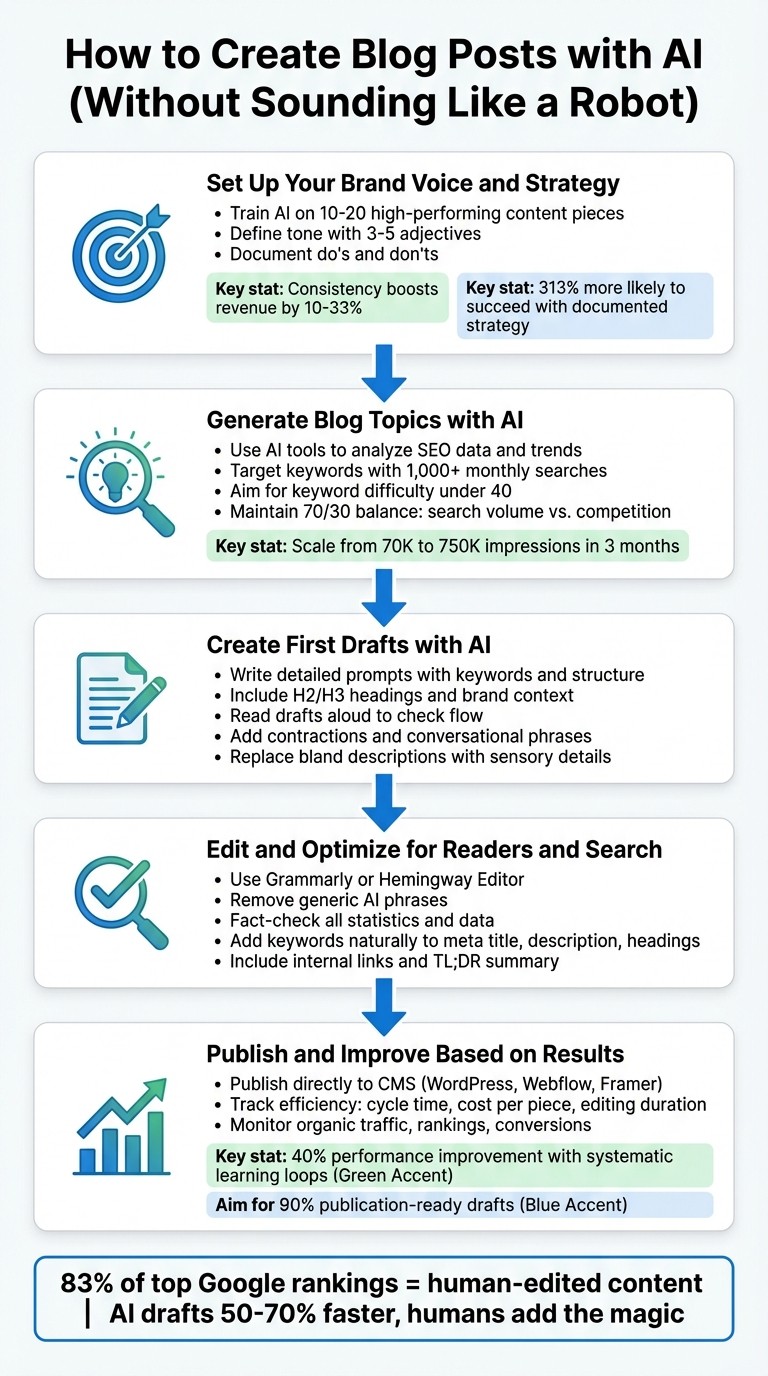
5-Step Process for Creating AI Blog Posts That Sound Human
How To Write A Killer Blog Post (Using AI)
Step 1: Set Up Your Brand Voice and Strategy
Before diving into AI-generated content, it's essential to define your brand voice. Without clear guidelines, AI tends to churn out generic material that lacks personality. The fix? Provide examples and detailed instructions that reflect your brand's unique tone and target audience.
Train AI on Your Existing Content
The most effective way to guide AI is by showing it what works for your brand. Gather 10–20 pieces of high-performing content - think blogs, emails, or social media posts - that capture your tone and style. These examples act as a blueprint for AI tools like Jasper AI, helping them understand your sentence structure, vocabulary, and messaging.
To take it a step further, document your tone explicitly. Decide if your voice is conversational or formal, humorous or serious, and whether you prefer first-person or third-person perspectives. Use 3–5 descriptive adjectives to define your style and create a simple do's and don'ts list. Consistency across platforms isn't just about aesthetics - it can boost revenue by 10–33% [1].
Once you've nailed down your tone, the next step is to define who you're speaking to and what you want to achieve.
Identify Your Target Audience and Content Goals
Knowing your audience is non-negotiable. Pinpoint their industry, experience level, and pain points, then adjust your tone to match. For example, startup founders might respond well to an informal, energetic tone, while enterprise IT managers may prefer something more professional and data-driven.
Equally important is clarifying your content goals. Are you aiming to drive organic traffic, generate leads, or position your brand as a thought leader? These objectives will shape the AI's output. Organizations with documented content strategies are 313% more likely to achieve success [1].
Providing detailed audience insights and goals allows AI tools to deliver sharper, more relevant content. Some advanced tools can even pull in real-time data, such as pricing comparisons or technical specs, ensuring the content resonates with your readers' needs.
Step 2: Generate Blog Topics with AI
Once you've nailed down your brand voice and strategy, the next step is to refine your content topics using an AI content engine. With your voice clearly defined, AI can help uncover topics that strike the perfect balance between search demand and your strategic focus.
Let AI Suggest Topics Using Data
AI tools like Jasper AI, eesel AI, and HyperWrite are designed to analyze SEO data, trends, and even your existing content to produce topic ideas tailored to your needs. By entering a keyword or a prompt - such as "10 blog topics on AI writing tools for U.S. marketers" - you can receive suggestions that are both relevant and data-driven. For instance, eesel AI can take a single keyword and deliver structured topic suggestions, complete with search volume metrics [5].
HyperWrite offers conversational inputs, allowing you to tweak suggestions based on real-time trends sourced from the web [6]. Jasper AI takes it a step further by analyzing your uploaded content to ensure its topic suggestions align with your brand's tone and style [7]. For example, entering "AI writing tools" into eesel AI might yield a suggestion like "The 6 Best AI Blog Writing Tools Tested in 2026", complete with search data to back it up [5]. These AI-generated ideas provide a starting point that you can refine to match your brand's identity.
Focus on Search Volume and Relevance
When choosing topics, prioritize those with strong search demand - over 1,000 monthly U.S. searches is a good benchmark - and low competition, ideally with a keyword difficulty score under 40. Tools like NightOwl AI can instantly provide metrics like search volume and difficulty, while also clustering keywords by intent to highlight untapped opportunities [8].
For example, users of eesel AI have reported scaling their blog impressions from 70,000 to over 750,000 in just three months by targeting these kinds of keyword gaps [5]. To double-check AI suggestions, pair them with robust SEO tools like Semrush, which integrates with platforms like Rytr, to validate metrics before committing. Focus on topics where monthly search volume exceeds 500 but competition remains manageable. These should also address specific audience needs, such as "AI tools for non-technical users" [5][8].
A good rule of thumb is to maintain a 70/30 balance: let search volume weigh 70% of the decision while competition accounts for 30%. Experts suggest this approach can speed up rankings by two to three times [5][8]. Additionally, AI can help you spot content gaps by analyzing areas your competitors have overlooked, giving you a chance to stand out in underserved niches. This deliberate method ensures your topics align with search trends while staying true to your broader goals.
Step 3: Create First Drafts with AI
With your topics and brand voice nailed down, it’s time to tap into AI for that all-important first draft. The goal here isn’t perfection - it’s speed and structure. With clear inputs, AI can churn out a well-organized draft in just minutes, giving you a solid foundation to build on.
Use AI to Write Structured First Drafts
Start by crafting a detailed outline before diving into a full draft. This method ensures the AI stays on track and creates a logical flow. Tools like Averi, ChatGPT, or Jasper thrive when given precise prompts that include your target keyword, brand context, and a clear structure - think H2/H3 headings, FAQ sections, or even schema markup.
For example, a specific prompt such as: "Write a 1,200-word blog post titled 'The 6 Best AI Blog Writing Tools Tested in 2026.' Use H2s for each tool, include pros and cons, and write in a conversational tone with contractions. Target keyword: AI blog writing tools" can produce a natural and cohesive draft. To reinforce your brand’s voice, always guide the AI using your best-performing examples as a reference [1].
Once you have a draft in hand, it’s time to focus on making it shine by adding personality and flow.
Edit to Add Personality and Flow
AI-generated drafts often feel polished but lack that human touch. To fix this, read the draft out loud. If a sentence feels stiff or unnatural when spoken, it’ll likely come across as robotic to your audience. Use this as a cue to refine the tone. Adjust the AI’s output by asking it to incorporate contractions, shorter sentences, or conversational phrases like “honestly” or “you know what I mean” to make the text more relatable.
Go a step further by adding sensory details to replace bland descriptions. For instance, instead of saying “the office was busy,” paint a vivid picture: “the air smelled like burnt coffee as phones rang off the hook.” If you notice sections that feel overly formal or repetitive, ask the AI to highlight them, then rework those areas yourself for a more authentic feel.
Step 4: Edit and Optimize for Readers and Search
With your AI-generated draft in hand, it’s time to fine-tune it for clarity and search performance. The goal here is to make your content flow naturally, resonate with readers, and meet SEO requirements without sacrificing authenticity. This step involves catching AI quirks, removing mechanical patterns, and weaving in SEO elements seamlessly.
Clean Up Grammar and Improve Readability
Start by running your draft through tools like Grammarly or Hemingway Editor to identify and fix passive voice, overly complicated sentences, and awkward phrasing. These tools are great for spotting readability issues, such as sentences that are too long or vocabulary that feels unnecessarily dense. If you're using Averi's editor, highlight clunky sections and rewrite them immediately for a smoother flow.
Another effective trick is to read your content out loud. If a sentence trips you up or sounds unnatural when spoken, it will likely feel the same to your audience. This is also the time to weed out generic AI-generated phrases like "in today's world", "furthermore", or "it is important to note." These expressions can make your content feel lifeless - ditch them for a more conversational tone.
Finally, fact-check every detail, from statistics to company names and dates. AI systems occasionally fabricate data, so verify everything before publishing. A single inaccurate stat can damage your credibility with readers.
Add SEO Elements Naturally
SEO isn’t about cramming keywords into every sentence. Instead, use your target keyword thoughtfully in key areas like the meta title (under 60 characters), meta description (aim for under 160 characters with a clear call-to-action), and a few subheadings. If a keyword feels forced, rephrase it to maintain a natural tone - search engines prioritize context over repetition.
To enhance both SEO and user experience, include internal links to related content and consider adding a TL;DR summary at the top of your post. This not only improves navigation but also keeps readers engaged. Tools like Averi can simplify this process by suggesting internal links and auto-generating meta descriptions, saving you time while optimizing your content.
Step 5: Publish and Improve Based on Results
Once your content is ready to go, the next step is to publish it and track how it performs. This stage separates those who treat publishing as a one-and-done task from teams that use results to fuel a continuous improvement cycle. The objective is clear: publish quickly, measure key metrics, and refine your AI workflow based on real-world data.
Publish Directly to Your CMS
Skip the hassle of manual copy-pasting and formatting errors by publishing directly to your content management system (CMS). Tools like Averi integrate seamlessly with platforms such as WordPress, Webflow, and Framer, enabling one-click publishing. This approach not only saves time but also ensures consistent formatting for headers, images, and links.
By publishing directly through your CMS, you keep everything organized in one place. Each new post strengthens your AI’s understanding of your brand, making future drafts more aligned with your style and reducing the need for heavy editing. Once your content is live, use performance insights to fine-tune your future content strategy.
Track Performance and Fine-Tune Your Process
The real advantage lies in leveraging performance data to continuously improve. Start by tracking efficiency metrics like cycle time, cost per piece, and editing duration. For instance, you could cut editing time from 30 minutes to just 10 over a six-month period by integrating recurring edits into your AI prompts [1]. Keep an eye on quality metrics as well, such as error rates, adherence to your style guide, and how often content needs reworking. If you notice recurring issues with tone or phrasing, update your AI’s brand voice guidelines to address these patterns early. Organizations that adopt systematic learning loops report a 40% improvement in performance over time as these adjustments add up [1].
Performance metrics like organic traffic, keyword rankings, and conversion rates can also reveal opportunities for content clusters around high-performing topics. Keep an eye on whether AI search engines like ChatGPT or Perplexity are referencing your content - this can be a strong indicator of authority. If a post ranks #8 on Google, analyze what’s missing and make updates to push it closer to the top. Aiming for drafts that are “90% publication-ready” ensures your AI produces content requiring minimal human intervention, allowing you to focus more on strategy and less on nitpicky edits [1].
Conclusion
AI provides speed and structure, but it’s your human touch that transforms drafts into content people genuinely want to read. Consider this: 83% of top Google rankings come from human-edited content [4]. While AI predicts words based on patterns, it’s humans who bring rhythm, surprise, and emotional depth to writing - qualities that make it truly engaging [2].
Think of AI as your drafting partner, not a replacement. It can help you create first drafts 50–70% faster [4], but the magic happens when you step in to add personality, address nuanced reader concerns, and polish the flow [3]. The most effective strategies combine AI’s efficiency with human judgment at every stage - training the system to match your brand voice, fine-tuning for emotional resonance, and refining based on real-world performance data.
A simple but powerful tip: read your content out loud before hitting publish [2][3]. If something doesn’t sound natural in conversation, it probably doesn’t belong on the page. Replace overly polished AI phrasing with conversational markers like contractions or words such as “honestly” to keep the tone relatable [2]. Adding specific details - like a vivid image, sound, or anecdote - can make even summaries feel compelling [2]. Your consistent effort to refine your brand voice, from the first draft to the final edit, is what sets your content apart.
Teams achieving the best results treat AI as part of a continuous improvement cycle. They document what works, feed corrections back into their prompts, and steadily improve AI outputs over time. In fact, organizations that adopt systematic learning loops report a 40% performance boost as these refinements build on each other [1]. Aim to finish with drafts that are nearly publication-ready, allowing you to focus more on strategy than starting from scratch. This ongoing process of strategy, creation, and refinement ensures your content stays efficient and genuinely resonates with readers.
FAQs
How do I keep AI writing from sounding generic?
To ensure AI-generated content feels natural and relatable, prioritize editing and refining it with care. Adjust the tone and style to match a conversational, human voice, making it feel more personal and engaging. Applying direct response copywriting techniques can help craft content that connects with readers while staying true to your brand's identity. By blending AI tools with thoughtful manual adjustments, you can maintain a natural flow and steer clear of content that feels robotic or overly generic.
What should I put in my prompt to get a usable draft?
Crafting an effective AI prompt requires clarity and precision to ensure the output aligns with your goals. To guide the AI effectively, include details about the topic, target audience, tone, and structure. For instance, instead of a vague request like "Write about social media marketing", try something more specific:
"Write a professional yet approachable blog post on social media marketing strategies for small business owners. Focus on practical tips for increasing engagement and growing followers, using a conversational tone. Include an engaging introduction, three actionable tips, and a brief conclusion summarizing the key takeaways."
This level of detail helps the AI understand the purpose and style you're aiming for, ensuring the draft is tailored to your needs. Avoid broad or generic prompts, as they often lead to results that lack focus or depth. Instead, think of your prompt as the blueprint for the content you want to create.
How can I spot and fix AI-made mistakes before publishing?
To ensure AI-generated content meets high standards, a detailed editing process with manual review is essential. Pay close attention to factual accuracy, maintaining a tone that aligns with your brand, and correcting any grammar or style issues. Many marketers use AI drafts as a starting point, refining them to preserve quality. Focus on creating a natural flow, adding personality, and boosting engagement to make the content feel more human. By consistently reviewing drafts and applying human judgment, you can achieve polished and genuine results.
Related Blog Posts

Zach Chmael
CMO, Averi
"We built Averi around the exact workflow we've used to scale our web traffic over 6000% in the last 6 months."
Your content should be working harder.
Averi's content engine builds Google entity authority, drives AI citations, and scales your visibility so you can get more customers.