From Notion Docs to Ranking Pages: Why Most Startup Content Fails

Averi Academy
Averi Team
8 minutes

In This Article
Most Notion docs fail to rank due to missing keyword research, poor structure, internal links, and schema—convert them into SEO-ready pages.
Updated:
Trusted by 1,000+ teams
Startups use Averi to build
content engines that rank.
Most startup content fails to rank on Google because it’s not designed for search engines. Startups often rely on internal tools like Notion for documentation, but these documents are invisible to search engines without proper optimization. Key issues include lack of keyword research, poor structure, no internal links, and outdated content.
Key Takeaways:
82% of startup websites get zero organic traffic within 12 months.
Notion docs are built for collaboration, not SEO - missing indexing, schema markup, and keyword targeting.
Only 5.7% of new pages rank in Google’s top 10 within a year.
Effective content needs to match search intent, include internal links, and stay updated.
Solution: Tools like Averi AI help transform static Notion docs into optimized, ranking pages by automating keyword research, content structuring, and SEO optimizations. Startups using these workflows often see a 40% boost in organic traffic within six months.
Don’t let your internal knowledge sit idle - turn it into traffic-driving content that ranks.
How to Create SEO Content That Ranks (2026 Update)
The Core Problem: Internal Content Is Static and Invisible
The downfall of startup content often isn’t bad writing - it’s that it’s never designed to be found. Internal documents stored in tools like Notion or shared Google Docs work well for team collaboration but are completely hidden from search engines. They lack indexing, schema markup, and keyword optimization, making them invisible in Google’s search results.
"Publishing without distribution is like opening a store in the desert." – Zach Chmael, CMO, Averi [1]
Why Startups Rely on Notion Docs
Notion is a favorite among startups for good reason. It’s easy to use, requires little training, and offers flexibility for internal documentation. But this simplicity can backfire. While these documents often contain a wealth of knowledge, they rarely reach a broader audience.
Turning an internal document into a polished, SEO-friendly webpage demands expertise that early-stage teams often don’t have. Without a dedicated content marketer or a defined process, this crucial step is frequently skipped.
The Divide: Static Docs vs. Live Pages
The gap between an internal Notion document and a webpage that ranks on Google isn’t just about aesthetics - it’s about structure and purpose. Internal docs are built for functionality, while live pages are crafted for visibility. Key differences include:
Feature | Static Internal Content (e.g., Notion) | SEO-Optimized Live Pages |
|---|---|---|
Discoverability | Hidden from search engines; no indexing | Indexed, keyword-targeted, with schema markup |
Authority | No link equity or topical signals | Builds authority through links and content clusters |
Engagement | Focused on internal utility | Tailored to user intent, boosting dwell time and E-E-A-T |
AI Readiness | Not structured for AI extraction | Optimized for AI citations and integration |
Maintenance | Often static and outdated | Regularly updated to maintain freshness |
This structural gap explains why internal content needs a complete redesign to perform well in search. Even if published, standalone internal documents lack the linking and organization needed to signal relevance to Google. Without schema markup, clear author credentials, or alignment with search intent, even the best ideas remain buried. Recognizing these differences is the first step toward turning internal content into assets that can be discovered and valued.
Common Mistakes When Converting Notion Docs to Published Pages
Many startups stumble with content not because their ideas lack merit, but because they treat the transition from an internal document to a published page as a simple copy-and-paste exercise. The result? Pages that may look polished but fail to perform where it counts. Here's why this approach often falls short.
Weak Headlines and Poor Formatting
Headlines like "Product Onboarding Notes", pulled straight from internal docs, do nothing to attract search traffic. Titles like these lack the specificity and relevance users are searching for, which leads to lower click-through rates. Add to that cluttered layouts filled with unnecessary widgets, and you’re looking at slower page loads - something that can drive visitors away before they even engage.
There’s also the issue of trust. Publishing content without clear author bylines or credentials makes it harder for Google to see your content as credible. Without strong E-E-A-T (Experience, Expertise, Authoritativeness, Trustworthiness) signals, your pages risk being overlooked entirely.
No Keyword Research or SEO Context
Presentation matters, but aligning your content with the right search intent is equally important. Internal docs are often created for team use, but when published without SEO optimization, they rarely meet the needs of external audiences.
This is where search intent mismatch becomes a major problem. For example, if someone searches for "best project management tools for startups" and lands on your page about setting up an internal workflow, it won’t meet their expectations. Even the most detailed content won’t rank if it doesn’t match what users are actually looking for.
"The difference between AI content that ranks and AI content that doesn't comes down to 10 specific, fixable mistakes... Most [startups] are making 6+." – Zach Chmael, CMO, Averi [1]
Skipping keyword research also leads to keyword cannibalization, where multiple pages target similar keywords and end up competing against each other. This dilutes your site’s authority and prevents any of the pages from ranking well. A quick solution? Analyze the search engine results page (SERP) before publishing and ensure your content format aligns with the top-ranking results for your target keyword.
Missing Internal Links and Outdated Content
When a page lacks internal links, it exists in isolation. Google struggles to understand how it connects to the rest of your site, and it doesn’t pass authority to other pages either.
"Internal linking serves two critical functions: It tells Google how your content relates... and it distributes link equity. Without internal links, your authority stays siloed." – Zach Chmael, CMO, Averi [1]
A good rule of thumb is to link every new article to 3–5 existing pages using descriptive, keyword-rich anchor text. Avoid generic phrases like "click here" and instead use terms that reinforce the page’s relevance.
Outdated content is another common issue. Google’s algorithms prioritize fresh, up-to-date material, especially for competitive or fast-changing topics. AI-driven search engines are even stricter - they rarely cite outdated pages.
"Outdated content is almost never cited [by AI search engines]." – Zach Chmael, CMO, Averi [1]
The impact of refreshing old content can be dramatic. One startup saw a 170% increase in Google traffic simply by updating 10 existing blog posts [2]. Treating your published content as a dynamic, evolving asset instead of a static product can yield significant results.
How to Turn Internal Docs into Pages That Rank
If you've got internal documents sitting idle, it's time to put them to work. Turning these static resources into high-performing, search-ranking pages requires a thoughtful and repeatable strategy.
Use AI Tools to Extract Insights and Build Structure
Start by giving your AI tool enough context to work with. Tools like Averi AI can analyze your website to understand your brand voice, product positioning, and target audience - what they call a "Brand Core" [4]. With this foundation, the tool creates outlines and drafts that align with your company's perspective. It also pulls in industry trends, key stats, and verified facts to build a structured, SEO-ready framework [4].
Optimize for Search Intent and Local SEO
Before drafting anything, research the search engine results page (SERP) for your target keyword. What format dominates - listicles, how-to guides, or comparison articles? Match the format to the search intent. Then, focus on technical SEO by adding elements like FAQ sections, metadata, and schema markup (Article, FAQPage, Person). Using schema can increase click-through rates by 20–30% by enabling rich results [1]. Building these optimizations into your workflow ensures your content is primed for visibility.
Edit, Link, and Publish with Workflow Automation
AI-generated content still needs a human touch. As Zach Chmael, CMO at Averi, explains:
"The startups winning with AI content aren't publishing more - they're publishing smarter, with human oversight at the right stages." [1]
This means injecting first-hand experience, a distinct brand voice, and expert insights - things AI can't replicate. Averi's collaborative tools allow teams to edit drafts, leave comments, and refine content in real time. The platform also suggests internal links and generates meta descriptions automatically [4]. Once finalized, you can publish directly to platforms like WordPress, Webflow, or Framer, minimizing formatting issues [4].
Track Rankings and Update Based on Data
Publishing is just the beginning. Monitor how your content performs by tracking metrics like impressions, clicks, and keyword rankings. Tools like Averi provide actionable insights, such as how to move an article from position #8 to page one or how to respond to a competitor's new content [4]. Regularly auditing and updating your articles every quarter ensures they stay fresh and relevant, meeting Google's expectations and remaining visible to AI-driven search engines like Perplexity and ChatGPT [1].
Manual Notion Workflow vs. AI-Powered Content Workflow
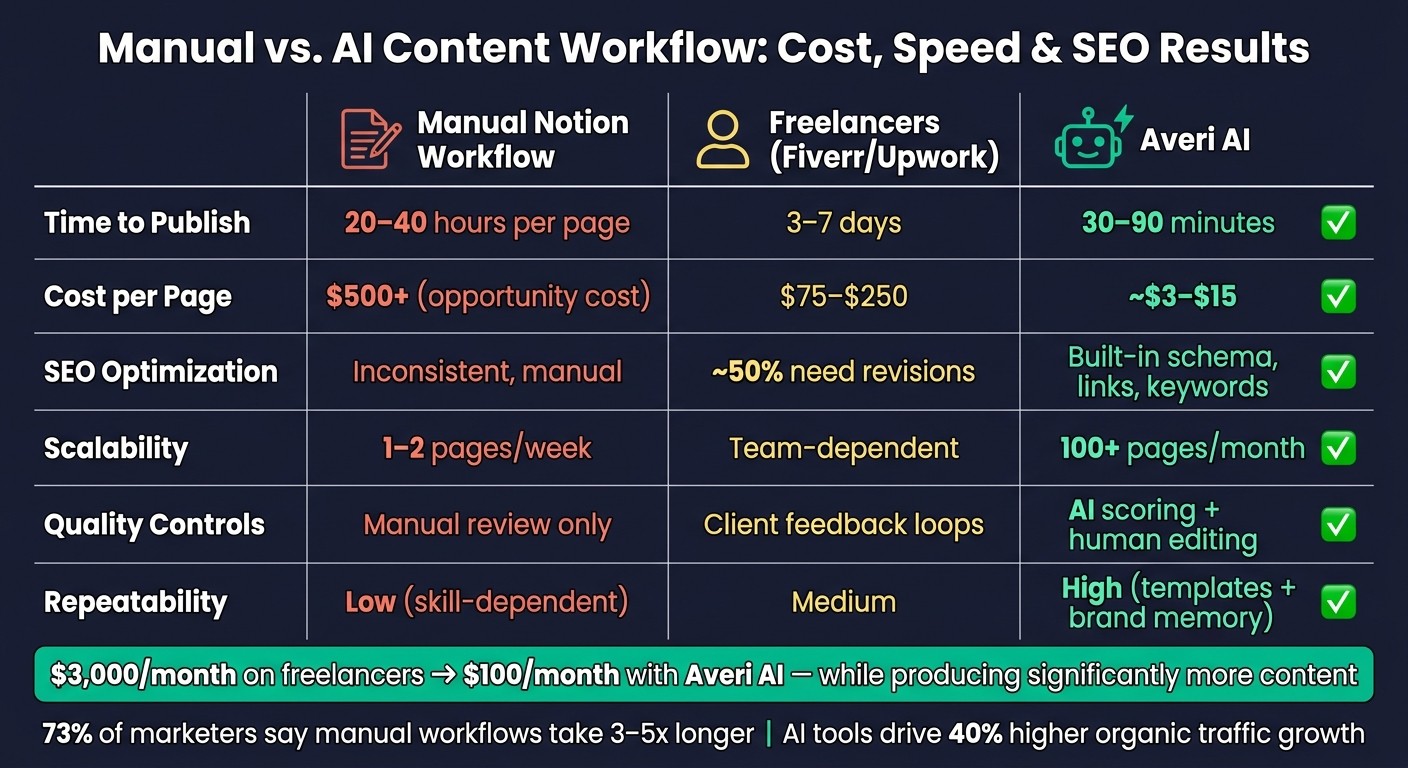
Manual vs. AI Content Workflow: Cost, Speed & SEO Results
Turning ideas written in Notion into content that ranks on Google involves more than just effort - it’s about the approach. The process you choose directly affects how internal insights transform into polished, SEO-ready assets.
A 2024 HubSpot report reveals that 73% of marketers find manual content creation takes 3–5 times longer than AI-assisted workflows, with 62% citing scalability as their biggest challenge [8]. These inefficiencies not only slow productivity but also weaken SEO results, creating an opportunity for AI-driven solutions to shine.
As Rand Fishkin, founder of SparkToro, aptly said:
"Manual Notion-to-web is like handwriting emails in 2025 - AI makes it scalable SEO gold."
Startups using AI content tools experience 2.5x faster content creation and achieve 40% higher organic traffic growth compared to manual methods [9]. On the other hand, freelancers on platforms like Fiverr or Upwork charge between $75 and $250 per article, with 25% of those requiring revisions due to SEO issues - leading to extra costs and delays [10].
Comparison Table: Manual vs. AI Workflows
Metric | Manual Notion Workflow | Fiverr/Upwork Freelancers | Averi AI |
|---|---|---|---|
Time to Publish | 20–40 hours per page | 3–7 days (back-and-forth) | |
Cost per Page | $500+ (opportunity cost) | $75–$250 | |
SEO Optimization | Manual, often inconsistent | Variable; ~50% need revisions | Built-in: schema, internal links, keywords [9] |
Quality Controls | Manual review only | Client feedback loops | AI scoring + human editing [5] |
Repeatability | Low (skill-dependent) | Medium | High (templates + brand memory) [12] |
Scalability | 1–2 pages/week | Team-dependent | 100+ pages/month [11] |
This comparison highlights the clear advantages of AI-powered workflows. The cost difference alone is striking: a startup spending $3,000/month on freelancers could cut that to $100/month with Averi AI - while producing significantly more content [2].
Beyond cost savings, AI tools like Averi AI solve a common problem: the static nature of internal documents. By converting them into dynamic, optimized content, startups can unlock their full potential. Plus, Averi's Brand Core ensures your unique voice, strategy, and positioning remain consistent, even as content volume scales [4].
How Startups Are Getting Results with Averi AI
The impact of Averi AI becomes clear when you look at the numbers. Real-world examples show how this tool is helping startups achieve results that manual workflows simply can't match. Take Flowbase, a B2B startup, as an example. In Q2 2025, they used Averi AI to transform 45 Notion documents into topic clusters targeting "no-code automation" keywords. The results? In just 90 days, their organic traffic skyrocketed from 2,100 to 28,000 monthly visitors - a staggering 1,233% increase. This surge brought in 450 qualified leads every month, translating into $150,000 in pipeline value [3].
Another success story comes from LeadGenius, which, in January 2025, automated 30 Notion playbooks into high-ranking guides. They secured top-3 rankings for 18 key terms, boosting their monthly leads by 220% - from 120 to 384 - while cutting customer acquisition costs by 15% [14]. These examples highlight how converting internal documents into optimized content can drive both traffic and lead generation.
Averi AI's efficiency is a game-changer. Its automated workflow slashes production time, reducing it from 15–25 hours per page to just 2–4 hours. This means startups that previously managed 2–4 pages per month can now produce 12–20 pages per month [3].
"We built Averi around the exact workflow we've used to scale our web traffic over 6,000% in the last 6 months." - Zach Chmael, CMO, Averi [1]
What sets Averi apart is its ability to improve over time. Each new piece of content enhances its contextual Library, making future outputs even more effective. For startups operating with lean teams and tight budgets, this self-improving system transforms static Notion documents into a dynamic, scalable engine for organic lead generation. Over time, this compounding effect turns a simple collection of internal docs into a powerful growth tool.
Conclusion: Close the Gap Between Internal Docs and Search Rankings
The issue with your Notion docs isn’t their existence - it’s letting them sit idle. The real challenge lies in neglecting keyword research, poorly structured content, missing internal links, and skipping post-publish updates.
Take the time to audit your content, align it with search demand, and refresh it every quarter to maintain a competitive edge. Did you know that content optimized for keywords before publishing is 2.5x more likely to rank in the top 10 within 90 days? [3] This small step can mean the difference between being invisible online and gaining visibility. Startups that adopt structured content workflows typically see a 40% boost in organic traffic within six months [3]. Each optimized page not only builds your authority but also makes it easier for future content to perform better. Waiting only gives your competitors more time to pull ahead.
If you’re ready to turn those idle documents into traffic-driving powerhouses, Averi AI can make it happen. From scraping your site to creating a AI content strategies, drafting, optimizing, and publishing directly to your CMS, Averi AI handles it all. The Plus Plan starts at $100/month, and you’ll receive a free, tailored marketing plan (or build your plan in 48 hours) as soon as you sign up - no waiting, no demo calls.
Don’t let your expertise stay hidden. Use a proven system to turn it into content that ranks.
FAQs
How do I choose the right keywords from my internal docs?
To connect with your audience effectively, begin by pinpointing keywords that reflect their questions, challenges, or search intent. Organize these keywords into themes to address a wide range of user needs and craft focused, purposeful content. Give special attention to long-tail keywords with lower competition, as they can help you rank faster and attract more relevant traffic. Concentrate on terms that mirror actual user queries to enhance the visibility and relevance of your content.
What’s the minimum SEO setup a published page needs to rank?
To perform well in search rankings, a page must focus on several key elements. Keyword optimization, ensuring a fast loading speed, and maintaining mobile-friendliness are critical. Additionally, having HTTPS security helps build trust and credibility. Using schema markup can further enhance visibility by making it easier for search engines to interpret the content accurately.
Beyond these technical aspects, success also relies on building quality backlinks, crafting engaging and relevant content, and keeping users actively interested. By addressing these essentials, you create a strong foundation that boosts your page's chances of achieving higher rankings in search results.
How often should I update old pages to keep rankings?
To keep your search rankings strong, it's important to revisit and update older pages on a consistent schedule. Industry professionals often suggest refreshing content every 6 to 12 months, though the exact timing can vary depending on your topic and the dynamics of your industry. Pay close attention to how relevant the content remains and monitor performance trends within your niche to determine the ideal update frequency.
Related Blog Posts

Zach Chmael
CMO, Averi
"We built Averi around the exact workflow we've used to scale our web traffic over 6000% in the last 6 months."
Your content should be working harder.
Averi's content engine builds Google entity authority, drives AI citations, and scales your visibility so you can get more customers.