Flodesk for Bloggers: What You Need to Know Before You Start

Alyssa Lurie
Head of Customer Success
5 minutes

In This Article
Flodesk is not a blogging platform. It doesn't have a blog. It doesn't publish content to the open web in a format search engines can index and rank. If you're hoping Flodesk will replace WordPress, Webflow, or any CMS you've used before, it won't. Here's what Flodesk actually gives bloggers, where it stops, what to use for the blog itself, and how to connect everything so both tools work together.
Updated
Trusted by 1,000+ teams
Startups use Averi to build
content engines that rank.
TL;DR
🚫 Flodesk is not a blogging platform. No blog feature, no CMS, no web publishing, no SEO tools.
📧 Flodesk is excellent for the email side of blogging: beautiful newsletters, opt-in forms, welcome sequences, and digital product sales
🌐 Bloggers need two systems: a blog for discovery (Google/AI) + email for relationship (Flodesk). One without the other has a ceiling.
🔧 Three blog tiers: standalone CMS (free–$39/mo + your time), CMS + SEO tools ($274–$437/mo), or Averi content engine ($104–$138/mo, ~2 hrs/week)
🔗 Connect them: embed Flodesk forms on every blog page, set up welcome automation, and link blog posts in your Flodesk emails to create a flywheel
📈 Compound blog posts generate 38% of traffic from 10% of posts. A few well-optimized articles drive Flodesk subscribers for months or years.
⚡ Start free with Averi. 14-day trial. No credit card. Blog content engine running by midweek.

Zach Chmael
CMO, Averi
"We built Averi around the exact workflow we've used to scale our web traffic over 6000% in the last 6 months."
Your content should be working harder.
Averi's content engine builds Google entity authority, drives AI citations, and scales your visibility so you can get more customers.
Flodesk for Bloggers: What You Need to Know Before You Start
If you're a blogger evaluating Flodesk, you probably found it through one of two paths.
Either someone in your niche has stunning emails and you asked what they use, or you're looking for a platform that handles email and blogging in one place.
The first path makes sense. Flodesk emails do look great. Reviewers consistently call Flodesk's editor one of the best in email marketing for design-forward creators.
The second path is where things get complicated.
Flodesk is not a blogging platform. It doesn't have a blog. It doesn't publish content to the open web in a format search engines can index and rank. If you're hoping Flodesk will replace WordPress, Webflow, or any CMS you've used before, it won't.
That's not a knock on Flodesk.
It's a scope clarification. Flodesk sends emails. Blogs publish content that Google finds. These are different jobs.
Using Flodesk for both is like using a camera as a phone because it has a screen. Technically possible in some narrow interpretation. Practically, no.
Here's what Flodesk actually gives bloggers, where it stops, what to use for the blog itself, and how to connect everything so both tools work together.

What Flodesk Offers Bloggers
Flodesk is useful for bloggers. It's just useful for the email half of blogging, not the publishing half.
Email Newsletters to Your Blog's Audience
This is the core use case. You write blog posts on your website. Readers subscribe to your email list. You send them updates, new posts, and exclusive content through Flodesk. The block-based editor with pre-designed layouts makes it easy to create on-brand emails without design skills. Custom fonts, brand palette matching, and polished templates come standard.
For bloggers who care about how their emails look (and most should), Flodesk delivers.
Opt-In Forms and Landing Pages
Flodesk includes tools for building signup forms, pop-ups, and landing pages that can be embedded on your blog. You can create lead magnet delivery pages, content upgrade opt-ins, and subscriber capture forms styled to match your brand. These integrate with your blog through embed codes or links.
This is actually useful. Your blog drives traffic. Flodesk forms convert that traffic into email subscribers. That connection matters.
Welcome Sequences and Automation
When someone subscribes through your blog, Flodesk can trigger automated email sequences: welcome series, lead magnet delivery, and follow-up nurture emails. The automation is straightforward to set up, though it lacks advanced branching logic and multi-trigger capabilities. For simple welcome-sequence-to-regular-newsletter workflows, it works.
Digital Product Sales
If you monetize your blog through digital products (ebooks, templates, courses), Flodesk's checkout feature lets you sell with no platform commission beyond Stripe's processing fee. This is a real advantage for bloggers who sell alongside their content.
What Flodesk Doesn't Offer Bloggers
Here's the part that matters if you're evaluating Flodesk as a blogging solution rather than an email solution.
No Blog
Flodesk has no blogging feature. No CMS. No content editor for web-published articles. No blog post templates. No archive of published content that visitors can browse. No category or tag organization for posts.
If someone visits your Flodesk page, they see your landing page, your signup form, and your checkout pages. They don't see a blog. Because there isn't one.
No Web Content Publishing
Emails you send through Flodesk live in inboxes. They aren't published to the open web. Google can't crawl them. Visitors can't discover them through search. AI platforms can't cite them.
Some email platforms (like beehiiv and Substack) offer web publishing that indexes newsletter content for search. Flodesk doesn't do this. Your Flodesk content exists only for the people who already subscribed.
No SEO Infrastructure
No meta titles or descriptions for blog content. No sitemap generation. No Google Search Console integration. No URL optimization. No keyword research tools. No internal linking features. No schema markup support.
Organic search drives 53% of all website traffic. For bloggers, organic search is usually the primary traffic source. Flodesk gives you zero tools to capture it.
No Content Discovery
Flodesk helps you reach people who already know about your blog. It doesn't help people discover your blog in the first place. That's the critical distinction for bloggers evaluating the platform. Every blogger needs two systems: one for discovery (SEO, content, search visibility) and one for relationship (email, nurture, monetization). Flodesk covers the second. The first needs separate infrastructure.
What to Actually Use for Your Blog
If Flodesk handles email, what handles the blog itself? Three tiers based on your needs and budget.
Tier 1: Standalone CMS (You Build It Yourself)
WordPress is the default. 61% of B2B blogs run on WordPress. Massive theme and plugin ecosystem. Full SEO control through plugins like Yoast or RankMath. Free core software, $5–$30/month for hosting. You own everything.
Webflow ($14–$39/month) gives you more design control with built-in hosting, SSL, and SEO features. Steeper learning curve. Popular with design-conscious creators who want polished pages without plugin management.
Framer ($5–$20/month) is fast and modern. Built-in SEO fields. Clean publishing workflow. Less plugin flexibility than WordPress but simpler to maintain. Increasingly popular with startup creators.
All three support embedded Flodesk forms. Publish your blog content on any of these platforms, embed your Flodesk signup forms, and the two systems connect.
Trade-off: You handle content strategy, keyword research, writing, SEO optimization, publishing, and analytics yourself. The average blog post takes 4 hours and 10 minutes to write. On top of your Flodesk email production, that's significant.
Tier 2: CMS + SEO Tools (Better Optimization)
Add keyword research and SEO optimization tools to your CMS:
Ahrefs or SEMrush ($99–$199/month) for keyword research, competitive analysis, and ranking tracking
Clearscope or Surfer SEO ($170–$199/month) for content optimization scoring
Google Search Console (free) for search performance monitoring
This stack gives you the data to write content that actually ranks. Businesses that prioritize blogging are 13x more likely to see positive ROI. That ROI comes from targeting the right keywords and optimizing for search intent, not from publishing random topics.
Trade-off: $274–$437/month in tools on top of Flodesk. Plus the same 15–20 hours/week of content production. You get better data but the workload stays heavy.
Tier 3: Content Engine (Averi Handles the Blog)
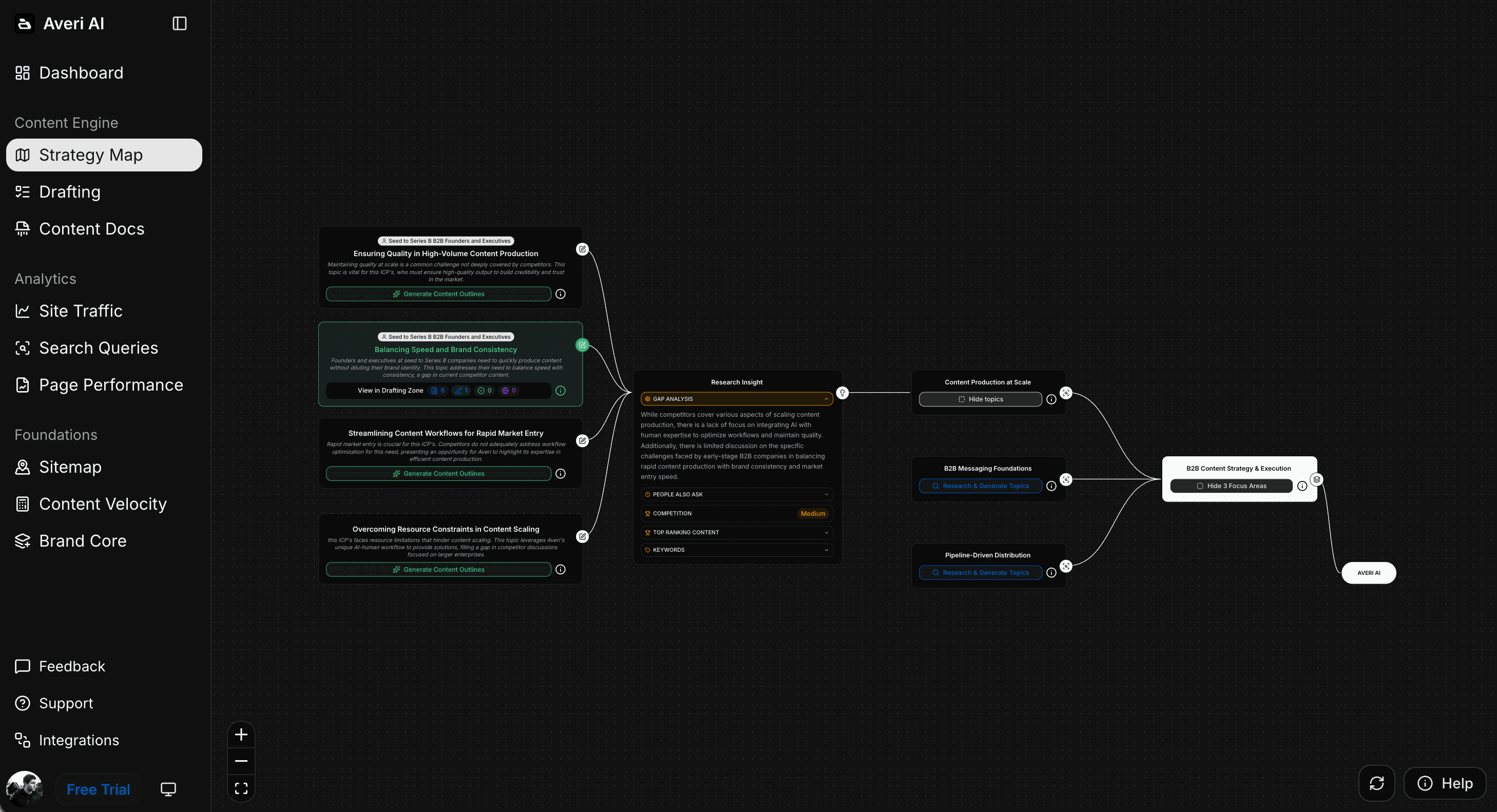
Averi is the AI content engine for startups that replaces the entire blog production workflow: content strategy, keyword research, AI-assisted drafting, SEO and GEO optimization, CMS publishing, and analytics.
Here's what that means for a Flodesk blogger:
Content strategy builds automatically. Averi analyzes your website, audience, and competitors during a 10-minute onboarding. It generates keyword-backed topic clusters. No separate Ahrefs subscription. No manual keyword-to-topic translation.
Content queue runs on data. Averi generates weekly topic recommendations with target keywords, search volume, competitive difficulty, and strategic rationale. You approve what to write.
Drafts arrive with research done. AI-assisted drafts include 15–20 sourced and hyperlinked statistics, internal links, FAQ sections with standalone answer blocks, and meta optimization. You edit in a collaborative canvas, adding voice and perspective. The 4+ hour writing time drops to 30–45 minutes of review.
Every piece is scored for both Google and AI. Averi's content scoring system weights SEO (55%) and GEO/AI citation readiness (45%). You know before publishing whether the post will compete. Pages with FAQ sections earn 4.3x more Featured Snippets. Averi generates those FAQ sections automatically.
Publishing is one click. Averi publishes directly to WordPress, Webflow, and Framer. No copy-pasting between tools.
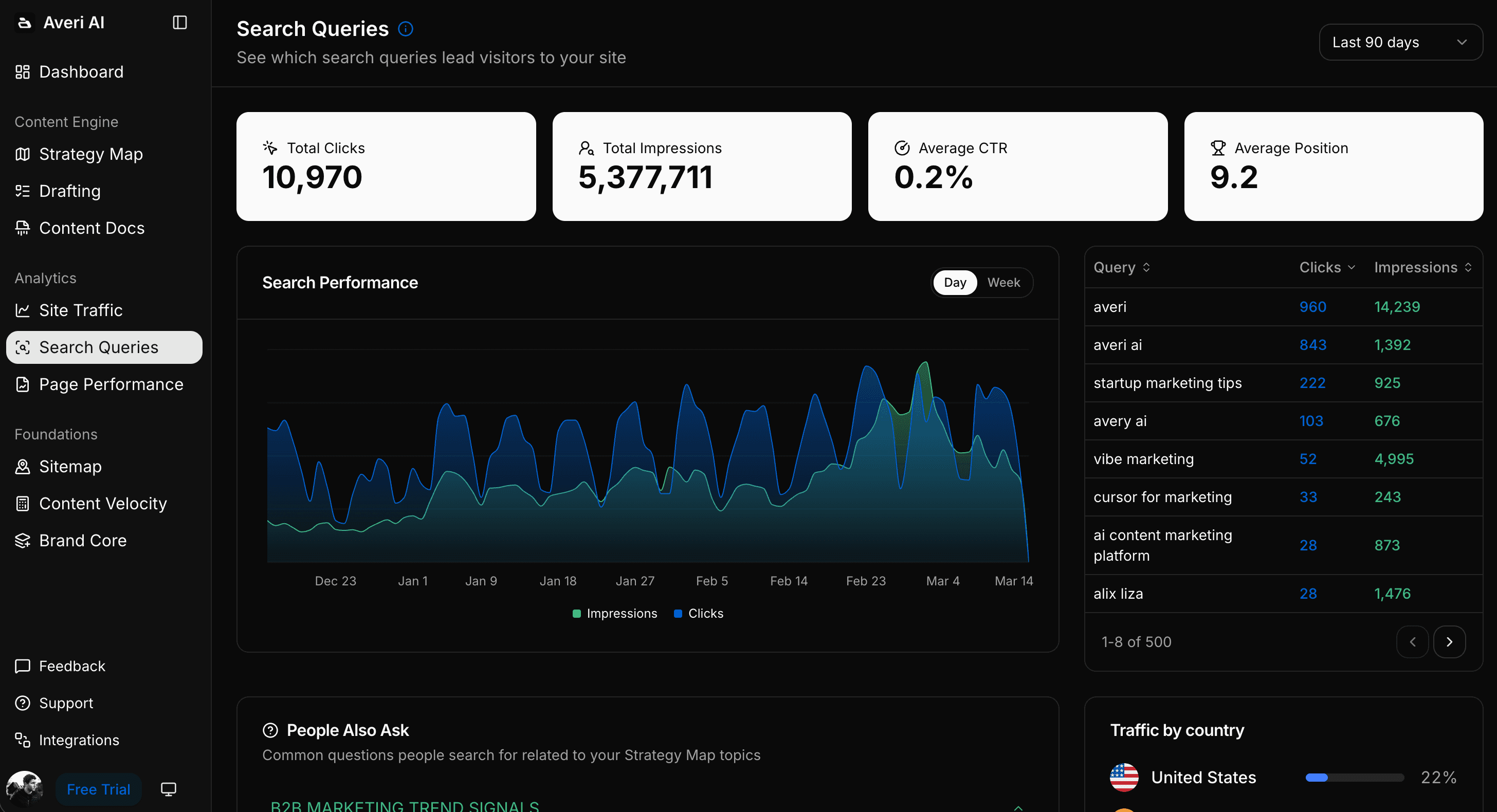
Analytics feed back into strategy. Built-in tracking with Google Analytics and Search Console integration. Monitor which content drives traffic. The data feeds into future topic recommendations.
Cost: $99/month (Solo plan) + blog hosting ($5–$39/month) = $104–$138/month for the entire blog operation. Less than a single Ahrefs subscription. Less than one freelance blog post per month.
Time: ~2 hours/week. Thirty minutes on topics. Thirty to forty-five minutes editing. Five minutes publishing. Fifteen minutes reviewing performance.
How to Connect Flodesk and Your Blog
Regardless of which tier you choose for the blog itself, the connection to Flodesk follows the same pattern.
Embed Flodesk Forms on Every Blog Page
Flodesk generates embed codes for signup forms that work on any website. Place them in three positions on each blog post:
After the introduction. The reader has confirmed the post matches their interest. Capture the "I'm interested but won't read everything" segment.
Mid-article. Between two major sections. Use a contextual CTA that references the specific topic: "I send breakdowns like this every Thursday. Subscribe and get them first."
End of article. For readers who consumed the full piece. Most engaged, highest conversion rate.
Specific CTAs convert better than generic ones. "Subscribe to our newsletter" is worse than "Get the weekly AI tool roundup that 5,000 bloggers read every Tuesday." 70% of consumers prefer learning about companies through blog articles than ads. Your CTA should make the newsletter feel like a natural continuation of what they just read.
Set Up Flodesk Welcome Automation
When someone subscribes through your blog, they've read one post. They don't know your email voice yet. A 3–4 email welcome sequence bridges the gap:
Email 1 (immediate): Deliver whatever lead magnet prompted the signup, plus your single best newsletter edition. First impression counts.
Email 2 (Day 2–3): Your second-best edition or a curated "start here" roundup of your top blog posts. Prove the newsletter is consistently valuable.
Email 3 (Day 5–7): Something that shows your unique perspective. An opinion. A framework. The thing that makes your newsletter different from the ten others in their niche.
This sequence runs automatically for every blog-sourced subscriber. By the time they receive their first regular edition, they've had 3 positive touchpoints with your content.
Create the Blog-to-Email Flywheel
Blog drives new subscribers. Organic search brings visitors who've never heard of you. Flodesk forms convert them.
Email drives blog traffic. Reference and link to blog posts in your Flodesk emails. This sends engaged subscribers back to your blog, improving engagement signals that Google uses to rank content higher.
Both channels compound. Newsletter-driven returning traffic converts with lead rates 15–35% higher than first-time visits. The blog creates the first touchpoint. The newsletter deepens it. Returning visitors engage more, which boosts rankings, which brings more first-time visitors.
Compound blog posts generate 38% of all blog traffic from just 10% of total posts. A few well-optimized articles on your blog can drive Flodesk subscribers for months or years. The email side and the blog side accelerate each other.
The Realistic Timeline for Flodesk Bloggers
Month 1: Set up your blog. Embed Flodesk forms. Publish 3–4 keyword-targeted posts. Connect Google Search Console. Configure your Flodesk welcome automation.
Month 3: Google has indexed your content. Early impressions showing in Search Console. Positions 15–30 on target keywords. A trickle of organic subscribers entering your Flodesk list.
Month 6: Older posts climbing toward page 1. Updating existing content can boost traffic by 106%. Refresh your earliest posts. Organic subscribers: 50–150/month flowing into Flodesk.
Month 12: 48+ posts if publishing weekly. Compounding visible in the data. Traffic grows even during weeks you don't publish. Organic subscribers: 200–500+/month. Your Flodesk list is growing on autopilot from search traffic.
Averi grew organic traffic 6,000% in 10 months running this exact system. The timeline depends on your niche and competition. The shape of the curve is the same for everyone: slow start, accelerating middle, compounding finish.
The Bottom Line for Bloggers Evaluating Flodesk
Use Flodesk for email. It's excellent at that job. Beautiful templates. Easy automation. Clean checkout for digital products. No platform fees on sales.
Don't use Flodesk as your blogging platform. It doesn't have one. Use WordPress, Webflow, or Framer for your blog. Use Flodesk for the email layer that nurtures the audience your blog attracts.
If you want the blog production handled for you, start a free trial of Averi. Fourteen days free, no credit card. It builds the content engine that drives organic traffic to your blog and subscribers into your Flodesk list. You keep writing emails. Averi builds the blog that feeds them.
Two tools for email and content. One system for growth.
Related Resources
SEO for Startups: How to Rank Higher Without a Big Budget in 2026
Content Marketing on a Startup Budget: High-ROI Tactics for Lean Teams
Beyond Google: How to Get Your Startup Cited by ChatGPT, Perplexity, and AI Search
Google AI Overviews Optimization: How to Get Featured in 2026
Evaluating AI Marketing Tools: Choosing the Right Platform for Your Needs
Resources for Flodesk Users
Flodesk + SEO: How to Drive Email Signups With Organic Content
The Best AI Writing Tools for Flodesk Users Who Need Blog Content
Flodesk Content Calendar: How to Plan Email and Blog Content Together
How to Create Blog Content for Your Flodesk Audience (Without Writing Everything Twice)
Can You Use Flodesk for Content Writing? Capabilities, Limits, and Better Options
Why Your Flodesk Open Rates Are Dropping (And How Content Marketing Fixes It)
How Small Businesses Use Flodesk + Averi to Run Marketing Without a Team
The Content Marketing Stack for Flodesk Users: What You Actually Need
How to Repurpose Your Flodesk Newsletters Into Blog Content That Ranks
How to Build a Content Marketing Strategy Around Your Flodesk Newsletter
FAQs
Can I use Flodesk as a blogging platform?
No. Flodesk does not include a blog, CMS, or web content publishing feature. Content created in Flodesk exists as emails in subscriber inboxes and is not indexed by search engines. For blogging, you need a separate platform like WordPress, Webflow, or Framer. Flodesk works alongside your blog as the email layer: you publish blog posts on your website, embed Flodesk signup forms to capture subscribers, and use Flodesk to send newsletters that nurture that audience. The blog handles discovery through organic search. Flodesk handles distribution through email.
Does Flodesk have a blog feature?
No. Flodesk offers landing pages, email creation, opt-in forms, and checkout pages. It does not have a blog editor, content management system, post archive, category/tag organization, or any web publishing functionality that search engines can crawl and index. Companies with blogs have 434% more indexed pages than those without. Flodesk doesn't contribute to that number. For bloggers, Flodesk is the email companion to a blog hosted elsewhere, not a replacement for the blog itself.
What blogging platform works best with Flodesk?
WordPress, Webflow, and Framer all work well with Flodesk through embedded signup forms. WordPress powers 61% of B2B blogs and offers the most plugin flexibility, including SEO tools like Yoast and RankMath. Webflow provides more design control with built-in hosting. Framer is fast and modern with clean built-in SEO fields. All three accept Flodesk embed codes for subscriber capture. For bloggers who want the blog production workflow handled automatically, Averi publishes directly to all three platforms while handling keyword research, drafting, and SEO optimization.
How do I connect my blog to Flodesk for email signups?
Generate embed codes from Flodesk's form builder and place them on your blog in three positions: after the introduction, mid-article between sections, and at the end. Use contextual CTAs that reference the specific blog content rather than generic "subscribe" language. Set up a Flodesk welcome automation that delivers your best content to new subscribers immediately. Link to blog posts in your regular Flodesk emails to create a flywheel where each channel drives traffic to the other. Tag blog-sourced subscribers separately to track conversion rates by acquisition channel.
How does Averi help bloggers who use Flodesk?
Averi handles the entire blog production workflow Flodesk doesn't cover: content strategy and keyword research, AI-assisted blog post drafting with sourced statistics, dual SEO + GEO optimization, direct CMS publishing to WordPress, Webflow, or Framer, and performance analytics. Bloggers review and edit drafts in about 30–45 minutes instead of writing from scratch in 4+ hours. Averi builds the blog content that ranks on Google. Flodesk converts the organic traffic into subscribers and nurtures them. The combined cost is $129–$192/month for both tools.
Do I need SEO tools if I use Flodesk for my blog's email?
Yes. Flodesk has no SEO capabilities. If you want your blog to drive organic traffic (and you should, since organic search accounts for 53% of all website traffic), you need SEO tools for keyword research, content optimization, and performance tracking. Options include standalone tools like Ahrefs or SEMrush ($99–$199/month), free tools like Google Keyword Planner and Search Console, or an integrated content engine like Averi ($99/month) that includes keyword research and SEO optimization in the drafting workflow.
Is Flodesk worth it for bloggers?
Yes, for the email side of blogging. Flodesk's design-forward editor, beautiful templates, and simple automation make it a strong choice for bloggers who want their emails to look polished without spending hours on design. Its checkout feature lets you sell digital products with no platform commission. Where Flodesk falls short is everything outside email: it has no blog, no SEO tools, and no content publishing features. Bloggers who use Flodesk need a separate blog and ideally a content engine to handle the organic discovery side. Flodesk is worth it as half of the stack. It's not the whole stack.